Afterpay: Pay over time
- 71.00K
- 4.0
- Installs
- 10.00M
- Price
- Free

Screenshots


Analysis by Reviewed
When I’m weighing a shopping app, I start with what it costs to get access. Afterpay: Pay over time is free to download, so there is no upfront app price to consider. That makes trying it less of a commitment than paying for a shopping tool, but free access is not the same as free purchases: using a payment option still means taking on scheduled payments, and I would only do that when the total fits my budget.
Free to install, not a discount on the purchase
It helps to separate two questions: does the app cost anything to install, and is using its payment option right for this particular order? The first answer is straightforward: the app is free. The second depends on the product’s full price, your available money, and the payment dates you would be accepting. I would never treat a small first payment as evidence that an item is affordable overall.
Before checking out, I’d write down the complete purchase amount and compare it with my normal payment options. If I could pay in full without affecting essentials, that may be the cleaner choice. If the timing is the only issue, scheduled payments may offer a useful way to organize the cost—but only if I can already see how each one fits into my budget. The app’s no-cost download is a low-risk way to explore it; it is not a reason to place an order.
What free access does—and does not—tell you
Afterpay is a shopping app from Afterpay, released in 2018 and currently at version 1.128.0. It is rated for Everyone and requires Android 7.0 or later. Those details describe app access, not whether a particular purchase is a good deal. I’d compare the item’s full price with what I’d pay through my usual payment method before deciding; splitting payments can change timing, but it does not make an item cheaper by itself.
The app has an average rating of 4.0 from around 167,000 ratings, and it has been installed over 10 million times. That level of use suggests it is familiar to many shoppers, though it is not a guarantee that its approach will suit every budget or shopping habit. For me, its value depends less on the download and more on whether payment scheduling helps me plan without encouraging me to spend beyond what I can comfortably repay.
Where the convenience earns its place
Ever found yourself eyeing that trendy jacket or the latest gadget but your wallet just isn’t ready for it? Enter Afterpay - Buy Now, Pay Later, a game-changing app that’s shaking up how we handle shopping sprees. If you’re like me and love to shop without the immediate burn in your pocket, this app might just be your new best friend.
What’s the Deal with Afterpay?
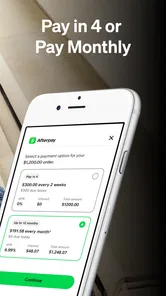
So, here’s the lowdown. With Afterpay, you get to snag your favorite items now and pay for them later in four interest-free installments. Yeah, you heard that right—interest-free! It’s like having your cake and eating it too. Obviously, you’ll want to make sure you’re keeping track of those payments, but for the organized shopper, it’s a dream come true.
More From Our News Desk

Weather by Xiaomi Review: Clear at a Glance, Less Clear Up Close

X Under Pressure: Can It Recover When Posting Goes Wrong?

Clash of Clans Is Won Between the Battles

Android Auto Makes the Case for Quieter Car Software

MobiOffice: Transforming Mobile Productivity with Seamless Integration

EA SPORTS FC™ Mobile Soccer: Redefining Mobile Sports Gaming
How I’d decide whether the payment schedule helps
I’d begin with the calendar, not the catalogue. If the dates line up with money I already expect to have and leave enough room for essentials, the instalment approach may smooth out the timing of a planned purchase. If the plan depends on a hoped-for shift, a sale, or moving another bill around, I’d take that as a signal to pause. A payment schedule is useful only when it makes an existing plan easier to manage.
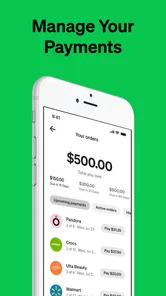
One practical habit is to keep a running note of every active order and its remaining payments, even if the app already shows upcoming amounts. That gives me one place to see the combined commitment before starting another checkout. It matters because two small orders can overlap and create a larger total obligation than either one seemed to represent on its own. I’d also make a quick check after each purchase rather than relying on memory later.
Getting Started: Easy Peasy
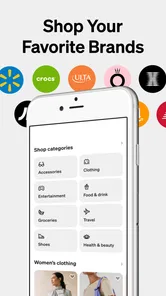
Getting rolling with Afterpay is as easy as pie. Just download the app, sign up, and you’re ready to start shopping. The interface is super user-friendly, which means no fussing around trying to figure things out. Plus, there’s a handy shop directory right in the app, so you can see which of your favorite stores offer Afterpay. Spoiler alert: there are a ton!
The directory is most useful to me as a starting point, not a promise that every item or checkout will work exactly the same way. I’d use it to find places to browse, then confirm the payment option and final total when I’m actually ready to buy. That order of operations helps avoid getting attached to a product before checking whether the planned way to pay is available for that purchase.
Shopping with a specific purpose
A realistic use case is replacing something worn out—a pair of everyday shoes, for example—when waiting until the next payday is inconvenient but the full price is still manageable across the coming weeks. I’d first check the budget for rent, food, transport, and other fixed costs, then decide whether the scheduled payments fit without squeezing those priorities. If they do, the app can serve as a timing tool rather than an excuse to upgrade to a more expensive option.
For a non-urgent want, I’d use a different test: wait a day, then see if I still want the item and can explain why I need it now. That pause is especially useful when browsing feels entertaining and the first payment makes a purchase seem smaller than its actual cost. If the desire fades, I’ve avoided a commitment; if it remains, I can compare the full price and payment dates with a straightforward upfront purchase.
Shop Till You Drop... Responsibly!
One of the things I love about Afterpay is that it encourages responsible spending. Sure, it’s tempting to go wild and buy everything in sight, but the app gives you a spending limit to keep your shopping in check. It’s like having a little voice in your head saying, “Hey, maybe put that extra pair of sneakers back.” Plus, you’ll get reminders when payments are due, so you’re never caught off guard.
My practical tip is to check upcoming installments before browsing, then judge a new order against the dates and amounts already due. That helps prevent several individually manageable purchases from stacking into a difficult month. I’d also separate “I need this now” from “I want this now”: for a replacement household essential, spreading the cost may help cash flow, while a non-urgent impulse buy is easier to postpone until the money is available.
Small habits that prevent checkout surprises
I’d treat the available spending limit as a boundary, not a target. Being able to place an order does not tell me whether it fits my own budget, and I would not shop up to a limit just because it appears available. Before confirming, I’d check the order total, note the payment dates, and make sure the first payment does not distract me from the amount still to come.
Reminders are helpful prompts, but they are not a budgeting system by themselves. I’d keep the money for upcoming payments visible in my own monthly plan and avoid scheduling several purchases close together. If my income changes or an unexpected bill appears, I want to notice the pressure early rather than discover it when multiple obligations are due. That small bit of planning is more valuable than browsing for another item.
Flexibility at Its Best
Life happens, and sometimes you need a little wiggle room. Afterpay understands that, which is why they offer the option to reschedule payments if needed. It’s a bit of a lifesaver if you ask me. Just make sure you’re not abusing this feature because, like with any financial tool, you don’t want to find yourself in a pickle later on.
When another way to pay makes more sense
I wouldn’t treat rescheduling as a backup budget. If a purchase only works on the assumption that I can move a payment later, I’d wait instead. A debit card or paying in full is simpler when I already have the money and want no future instalments to track; a credit card may suit someone who prefers its own repayment system. Afterpay’s appeal is the timing option, not a reason to skip comparing alternatives or checking the total before confirming.
Compared with paying upfront, Afterpay creates future dates to remember, while a debit card settles the purchase without leaving that particular payment schedule hanging over the next few weeks. A credit card is another familiar alternative, but it comes with its own terms and repayment habits, so I would compare those rather than assume one approach is automatically better. The right choice is the one whose total cost and repayment routine I understand and can handle.
It is also worth thinking about returns before using any pay-over-time option. I’d keep the order confirmation and follow the retailer’s return process, then check how the purchase and its remaining payments are reflected in the app. That small bit of housekeeping can save confusion if an item does not fit or arrives unsuitable. The key question is not only whether the first payment feels manageable, but whether the full commitment still makes sense if plans change.
Returns and changing plans
If I think I might return an item, I’d keep the retailer’s order details somewhere easy to find and make a note of the purchase in my budget. I would follow the retailer’s stated return steps rather than assume that sending something back automatically settles every payment detail at once. After a return or cancellation, I’d check the app and my order records so I understand what remains scheduled before treating the matter as finished.
The same careful approach applies if a payment date becomes awkward. I’d look at the app’s available options early, not wait until the due date is close, and I would not start another order on the assumption that rescheduling will always solve a cash-flow problem. Flexibility can help with a temporary timing issue, but repeated reliance on it is a sign that the purchase pattern needs a pause.
Who gets the most from it?
For a realistic example, imagine replacing a worn pair of shoes just before payday. If the purchase is planned, the total is affordable, and the scheduled payments fit around rent and bills, the app can make the timing easier to manage. I’d set a reminder outside the app as well if missing a due date would cause stress, and I’d avoid placing another order until I had checked what the first one leaves outstanding.
This is most useful for someone who already budgets carefully and wants an alternative checkout rhythm at participating shops. It is a weaker fit for anyone trying to control impulse spending, juggling several short-term obligations, or relying on uncertain income. In those situations, paying later can make the present feel cheaper than it is. The app’s popularity—Afterpay has around 70,000 reviews—doesn’t change that personal calculation.
Who should choose another approach?
I’d skip pay-over-time shopping if keeping track of several dates already feels stressful, if my income is unpredictable, or if I’m using a new order to cover a purchase I cannot afford at its full price. Someone who wants the simplest checkout and has the money ready may be better served by paying in full. And if my main goal is to curb impulse buying, adding a convenient way to defer payment could work against that goal rather than help.
On the other hand, a careful shopper with a defined need may appreciate having the option in the same shopping app as the store directory. I would still compare the item’s full price across the usual ways I shop and check that the payment schedule fits alongside existing commitments. That makes the decision about a particular purchase, not a blanket assumption that using the app is always beneficial or always a mistake.
The Bottom Line
In a nutshell, if you’re someone who loves shopping but wants to keep a handle on your finances, Afterpay - Buy Now, Pay Later is worth checking out. It’s convenient, easy to use, and it gives you flexibility without the dreaded interest fees. Just remember, with great power comes great responsibility—use it wisely, and your wallet will thank you!
My verdict is to try it only when the purchase is already within reach and the payment dates are clear. The app itself is free, but the useful value is the option to organize a purchase differently—not extra spending power. If you prefer a clean slate at checkout, or if tracking future obligations feels like work, paying upfront is the better choice. For a disciplined shopper with a specific need, Afterpay can be handy; for everyone else, convenience alone is not a reason to buy.
Afterpay: Pay over time Frequently Asked Questions
Can I browse participating stores and products in the Afterpay app?
Afterpay is a shopping app centered on finding purchases and paying for them over time. Its store summary describes flexible payments designed to fit your budget, and the app can help you explore shopping options. Before placing an order, check the retailer’s terms and make sure the installment schedule works for you, since payment obligations continue after the purchase.
Can I use Afterpay for both online and in-store shopping?
Afterpay supports online checkout and, at participating retailers, in-store purchases. For an in-store transaction, the published instructions say to set up the Afterpay Card in the app and add it to your digital wallet, then tap your phone at checkout. Availability depends on the retailer, so check that the store accepts Afterpay before you shop.
Is the Afterpay app free to download, and which devices can run it?
Afterpay is a free shopping app for finding and paying for purchases with its buy now, pay later service. The listed minimum operating system is version 7.0, so check your device’s software before downloading. The app is intended for everyone, though using Afterpay for purchases requires meeting its eligibility requirements and setting up an account.
What is Afterpay and how does it work?
Afterpay is a 'buy now, pay later' service that allows you to purchase items immediately and pay for them over four installments, due every two weeks. There are no interest or fees when you pay on time. To use it, simply select Afterpay as your payment method at checkout, and you'll be prompted to create an account or log in to complete the purchase.
Are there any fees associated with using Afterpay?
Using Afterpay doesn't incur any interest or fees if you make all your installment payments on time. However, if you miss a payment, a late fee may be applied. The fee structure is transparent, and you'll be notified about any potential charges before they occur. Always ensure funds are available in your account to avoid extra costs.
Pros
- Interest-free payment plans.
- Easy to use interface.
- No credit checks required.
- Widely accepted at many stores.
- Improves budgeting flexibility.
Cons
- Late fees can apply.
- Payment schedule is fixed.
- Limited to certain retailers.
- Requires linking to bank account.
- May encourage overspending.











