18Birdies Golf GPS Rangefinder
- 5.34K
- 4.9
- Installs
- 1.00M
- Price
- Free

Screenshots








Analysis by Reviewed
I reach for a golf app when I want fewer loose notes and a clearer picture of how a round is going, not when I expect my phone to fix my swing. 18Birdies Golf GPS Rangefinder aims to cover several parts of that routine: course distances, scorekeeping, handicap tracking and swing analysis. In my view, its appeal is the way those jobs sit together, although golfers who only need one simple tool may find the broader setup more than they want.
A useful snapshot of the app today
Made by 18Birdies LLC, this free sports app has been around since February 2015. Its average rating is 4.8 from around 50,000 ratings, and it has more than a million installs. It is rated for Everyone, while optional in-app purchases range from $2.99 to $99.99 per item. I’d treat the free starting point as a chance to see whether its course-day workflow suits you, then check the purchase details in the app before paying for anything.
The mix is aimed at golfers who want a GPS rangefinder and scorecard in one place, with extra tools for following a handicap and reviewing swing-related information. That can be handy if you already use separate apps or paper notes for those tasks. It also means the experience is not just about checking a distance and closing the app: the benefit depends on whether you’ll actually use the record-keeping and analysis features after the round.
Level Up Your Golf Game
First off, let me just say that if you're serious about golf, having a reliable GPS rangefinder is like having a secret weapon. The 18Birdies Golf GPS Rangefinder app is packed with features that make it more than just a digital caddy. I mean, who wouldn’t want something that not only helps you find the distance to the pin but also provides insights on how to improve your swing?
Unpacking the Features
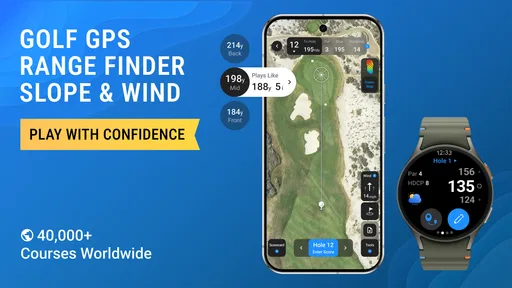
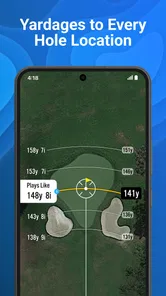
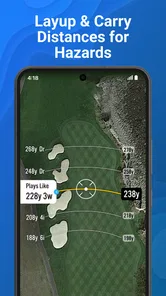
Alright, so what does this app bring to the table? One of the standout features is its accurate GPS tracking. Whether you’re a weekend warrior or a seasoned pro, knowing the exact distance to hazards, greens, and fairways can make a huge difference in your game. I took it out for a spin, and the accuracy was pretty spot-on, which is crucial when you’re trying to shave strokes off your score.
But wait, there’s more! The app also boasts a digital scorecard. No more fumbling around with paper and pencil in the middle of a game. You can easily log your scores and stats right in the app, making it super convenient to track your progress over time.
Make a round easier to review
One practical habit I’d build is to enter each hole’s score as soon as you finish it, rather than trying to reconstruct the round afterward. That keeps the scorecard useful as a record, not just a final total, and makes it easier to notice patterns across later rounds. If you’re playing with friends, decide beforehand who will handle the phone; passing it around after every shot can interrupt the pace and distract from the group.
More From Our News Desk

Weather by Xiaomi Review: Clear at a Glance, Less Clear Up Close

X Under Pressure: Can It Recover When Posting Goes Wrong?

Clash of Clans Is Won Between the Battles

Android Auto Makes the Case for Quieter Car Software

MobiOffice: Transforming Mobile Productivity with Seamless Integration

EA SPORTS FC™ Mobile Soccer: Redefining Mobile Sports Gaming
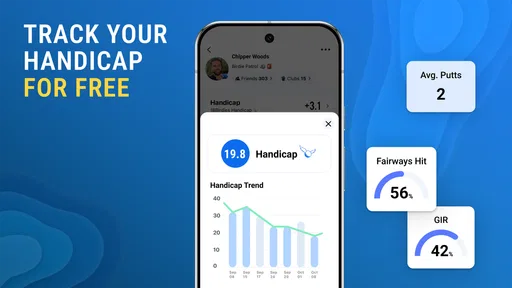
The app’s combination of scorekeeping and handicap tracking is most valuable when you use it consistently. A single round can be fun to log, but a longer record gives you more context for whether a change in your approach is helping. I wouldn’t treat a score trend as a complete diagnosis of your game: course difficulty, weather and an unusually good or bad day all affect the result. The useful takeaway is a recurring pattern, not one isolated number.
Distances in context, not in isolation
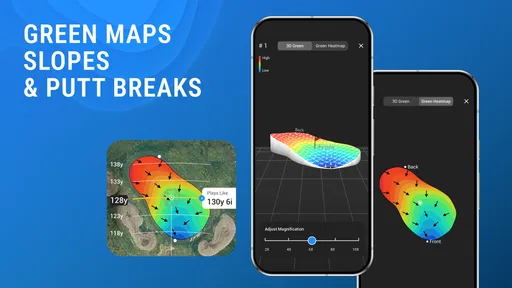
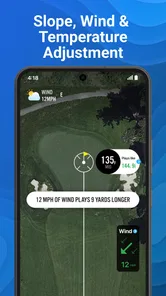
A yardage reading is only useful when it helps you choose a shot you can actually play. I’d use the app’s course-distance view to compare the target with my comfortable range, rather than letting one precise-looking number pressure me into attempting a shot I rarely make. For example, if a hazard makes a direct line risky, the better decision may be to aim short or take a safer route. The app can inform that choice, but the golfer still has to judge lie, wind and confidence.
This is also where an all-in-one phone setup differs from a basic handheld rangefinder. A dedicated device keeps the interaction focused on distance, which is a real advantage for someone who wants minimal screen time. The app’s broader value is having distance and round records close together; its trade-off is that a phone needs to be handled and kept accessible. I’d choose based on how much information I want during play, not on the assumption that one approach is automatically better.
Socialize Your Golf Experience
One thing I didn’t expect was how much the app enhances the social aspect of golf. With 18Birdies, you can connect with your golf buddies, share your rounds, and even compete in virtual tournaments. It’s like having a mini social network just for golfers. I found this feature particularly fun, as it adds a whole new dimension to the game.
Good company, with a small trade-off
For a regular group that already likes comparing rounds, sharing can give a casual game a little extra structure. For golfers who prefer to keep their scores private, or who don’t want another social feed to manage, it is easy to see this side of the app as optional rather than essential. I’d use it when everyone in the group is interested, not assume that every playing partner wants to join in.
On a typical weekend morning, I’d check distances as I move around the course, enter each hole’s result before heading to the next tee, then look back at the round afterward. That routine makes the app more useful than opening it only when I’m unsure about a shot. It also highlights a basic trade-off: a phone can put several golf tools in reach, but tapping through a screen is less natural than a dedicated rangefinder or a small paper card for someone who values the simplest possible round.
A practical routine for a busy round
For a round squeezed between other weekend plans, I’d keep the phone routine deliberately small: use the distance view when it affects club selection, record the score at the end of the hole, and leave deeper review for afterward. That keeps the app from becoming a distraction while still preserving useful details. If the group is moving quickly, it may be better to enter information between holes than to stop play for extra taps. The key is choosing a repeatable rhythm instead of trying to use every tool on every shot.
Afterward, I’d look for questions the record can help answer: am I repeatedly losing strokes on a certain part of my game, or was that round simply an outlier? The scorecard and handicap tracking are more useful as a consistent log than as a verdict on one afternoon. I wouldn’t expect them to explain every cause behind a result, but they can help me decide what to pay attention to at practice or discuss with a coach.
Improvement at Your Fingertips
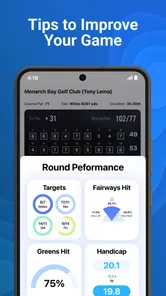
Another cool feature is the personalized coaching tips. Based on your stats, the app provides feedback and tips tailored to your game. It’s like having a coach in your pocket, ready to dish out advice whenever you need it. I tried out a few tips, and I swear, I could feel my swing getting just a bit better.
What to expect from swing feedback
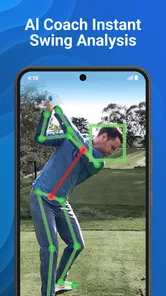
The AI swing analyzer is an appealing extra, but I’d use it as a prompt for reflection rather than a replacement for a coach watching you in person. A phone-based review can help you pay attention to a specific movement or compare what you notice over time; it cannot make every practice session equivalent to hands-on instruction. If you’re working through a persistent technique issue, a qualified coach may be a better next step than relying on any app alone.
That distinction matters for beginners especially. The combination of GPS, scorekeeping and feedback can help make a round feel less confusing, but it can also put a lot of information in front of someone who is still learning basic course routines. I’d start with distances and scores, then explore the analysis tools once those simpler habits feel comfortable. More experienced players may appreciate the all-in-one approach, while a golfer who only wants a quick yardage check may prefer a dedicated rangefinder.
Who gets the most from the combination
I think the best fit is a golfer who plays regularly enough to care about a growing record, enjoys reviewing scores, and is curious about swing feedback without expecting instant technical answers. A casual player can still benefit, especially if remembering scores is a chore, but may not need to explore every feature. Someone who already has a reliable rangefinder and a scorekeeping routine may see less reason to move everything into one app unless the shared record or analysis tools fill a genuine gap.
I’d also be selective about what I adopt first. Start with the scorecard and distance checks for a few rounds; if those feel natural, then try the handicap and swing-related tools. This gives you a fair sense of whether the extra layers fit your habits instead of turning the first outing into a setup exercise. If you mainly want an uncomplicated walk and dislike using a phone outdoors, paper scoring or a dedicated device may be more enjoyable.
What the free start does and doesn’t settle
There is no upfront app price, but optional purchases make it sensible to decide what you actually need before spending. I’d first use the basic routine on a real round and only consider a paid item if a specific feature would change how I play or review golf. Since purchases can vary considerably in cost, checking the in-app terms matters more than assuming every golfer will need the same upgrade. A broad toolset is only good value when it earns a regular place in your routine.
That approach also answers a common practical concern: you don’t need to commit to the whole package just because the app brings several golf tasks together. Try the parts that match your current habits, and judge whether they save effort or provide useful reflection. If you rarely review rounds, for example, a detailed record may sit unused; if you enjoy tracking your game, it may become the part you value most. The choice should follow your play, not the feature list.
The Final Tee-Off
So, what’s the final verdict? Honestly, the 18Birdies Golf GPS Rangefinder app is a must-have for anyone looking to take their golf game to the next level. It’s loaded with features that are both useful and fun, making every round of golf a new adventure. Whether you’re looking to improve your skills, keep track of your scores, or just enjoy the game more with friends, this app has got you covered.
So, if you’re ready to hit the greens with confidence and maybe even show off a little, give 18Birdies a shot. You might just find it’s the best caddy you’ve ever had!
What I’d keep in mind before choosing it
The app is most convincing if you play often enough to benefit from a running record and want more than yardage alone. If your priority is a device that works without needing to handle a phone during a round, a conventional rangefinder may fit better. If your main goal is formal swing instruction, time with a coach is a more direct option. For the golfer who wants distances, scores and social play together, though, this is a practical place to begin without an upfront app price.
Product details can change as an app evolves, so I’d check the current feature and purchase screens before building a routine around a particular tool. I can’t infer a specific version history from the release date alone, and I wouldn’t assume a future update will address a personal gap. What I would watch for is whether the features you care about remain easy to access and whether optional purchases feel worthwhile for your own playing habits. My recommendation is to start with the basics on a real round, keep the phone use brief, and let your own scores tell you whether the extra analysis earns a place in your golf routine.
18Birdies Golf GPS Rangefinder Frequently Asked Questions
Who develops 18Birdies, and what kind of app is it?
18Birdies is a sports app developed by 18Birdies LLC, built around golf tools for use before, during, and after a round. Its focus includes GPS distances, scoring, and tracking performance, so it may suit golfers who want several game-related features in one mobile app. The app is rated for Everyone.
What does 18Birdies cost, and are there optional purchases?
18Birdies is free to download, so you can try its golf features without paying for the initial installation. Optional in-app purchases are available, with prices ranging from $2.99 to $99.99 per item. Before buying anything, review the purchase details shown in the app so you understand what a particular option includes and whether it is useful for the way you play.
Is 18Birdies suitable for beginners as well as experienced golfers?
18Birdies is a golf app designed to support players who want to keep track of their game and use course tools while playing. Beginners may find the scorecard and GPS rangefinder useful for following a round, while more experienced golfers can use the tracking and analysis features to review their performance. Its Everyone age rating makes it suitable for a broad audience.
What is 18Birdies Golf GPS Rangefinder?
18Birdies Golf GPS Rangefinder is a powerful mobile application designed for golf enthusiasts who wish to enhance their game. This app provides GPS-based rangefinder capabilities, allowing players to accurately gauge distances on the course. Additionally, it offers features like score tracking, game analysis, and social interactions to connect with other golfers. Its developer is 18Birdies LLC, and it is a sports app focused on golf.
How accurate is the GPS rangefinder feature in 18Birdies?
The GPS rangefinder feature in 18Birdies is highly accurate, utilizing advanced GPS technology to provide precise distance measurements. Users can rely on this feature to make informed decisions about club selection and shot strategy. The app is regularly updated to include new courses and ensure accuracy across various golf locations worldwide. As with any GPS-based tool, its usefulness depends on having location access enabled and a suitable signal while you play.
Pros
- Accurate GPS rangefinder provides precise measurements.
- User-friendly interface
- easy to navigate.
- Comprehensive course database with frequent updates.
- Score tracking and statistics for game improvement.
- Social features to connect with other golfers.
Cons
- Requires subscription for premium features.
- Battery consumption can be high during use.
- Limited offline functionality without internet.
- Occasional GPS signal issues in remote areas.
- Ads in free version can be distracting.





