

미스터블루 - 웹툰, 만화, 소설앱
- 10.00
- 3.9
- Installs
- 1.00M
- Price
- Free

Screenshots





Analysis by Reviewed
I judge a story-reading app by what happens between the exciting chapters: whether browsing feels manageable, whether I can fit a few pages into an ordinary day, and how frustrating it is when a connection gets in the way. That is the lens I’d use with 미스터블루 - 웹툰, 만화, 소설앱, a free comics app from Mr. Blue Corporation. It brings webtoons, comics, and novels together, so it is aimed at readers who like switching formats without changing apps.
When the network becomes part of reading
Reading on a phone often means moving between Wi-Fi and mobile data, and that can shape how convenient a digital library feels. I’d treat 미스터블루 as a connected reading service: browse and open the material when the connection is steady, rather than assuming every title will be available whenever the phone is offline. If you know you’ll be somewhere with unreliable reception, it is sensible to start reading beforehand and avoid counting on a chapter loading at the last moment.
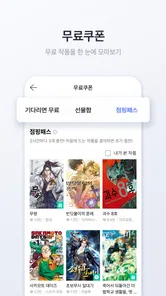
The app’s store summary highlights free viewing, daily free coupons, and a signup bonus. Those offers may make it easier to sample stories, but they do not remove the need to pay attention to how access works for the particular title you choose. Before settling into a long series, I’d check the chapter options and any purchase prompt in the app. That small habit helps avoid interrupting a story when a free allowance or offer does not cover the next instalment.
A better fit for some mobile routines than others
For a commute, a lunch break, or a quiet wait, short reading sessions are a natural use for webtoons and serialized fiction. I’d pick a title before the break starts, then use the time to read rather than spend it comparing dozens of options. At home on Wi-Fi, browsing a wider range of comics and novels makes more sense; away from Wi-Fi, I’d be more deliberate about how much I browse and when I open a chapter.
This is especially useful if you enjoy following more than one kind of story. A webtoon can suit a quick pause, while a novel may be the better choice when you have time to concentrate. The trade-off is that an app with several reading formats can feel less focused than a service built around just one. If your main priority is a particular publisher, language, or reading format, compare the available selection in 미스터블루 with the specialist apps you already use before moving your reading routine over.
What I would do when a chapter will not load
A stalled page can be especially annoying when a story ends on a cliffhanger. I would first check whether the phone has a usable connection, then return to the title and try opening the chapter again. If the problem continues, waiting until the connection is more stable is usually a better choice than repeatedly tapping through the same screen. For reading on the go, choosing a chapter while you still have a reliable connection is a simple way to reduce avoidable interruptions.
I would also keep account and purchase steps separate from quick browsing. Daily coupons and a signup offer sound appealing, but it is worth reading the terms shown in the app and checking the price before confirming any paid chapter. In-app purchases range from $0.99 to $189.99 per item, so readers should be mindful of what they select, particularly when following a long-running series one instalment at a time.
More From Our News Desk

 Gmail
GmailGmail in a Busy Inbox: Who Benefits Most?
From first account to crowded workday, Gmail earns its place through dependable search and flexible sorting—but its best fit depends on how much inbox maintenance you can tolerate.

 Prime Video
Switching to Prime Video: What Changes in Your Viewing Routine
Prime Video can make a compelling second home for streaming, but switching means learning a different catalog, rental layer, and route from browsing to playback.

 Universal TV Remote Control
Universal TV Remote Control Works Best as a Reliable Backup
A phone remote earns its place through quick setup and reliable habits. Here is how to get more from Universal TV Remote Control—and where its limits show.

 Weather - By Xiaomi
Weather by Xiaomi Review: Clear at a Glance, Less Clear Up Close
Xiaomi’s weather app makes everyday forecasts quick to scan, but its calm surface can leave useful details and recovery paths harder to find than they should be.

 X
XX Under Pressure: Can It Recover When Posting Goes Wrong?
A resilience-focused review of X, examining setup, mistaken posts, interruptions, weak connections, and the gaps that matter when recovery needs to be dependable.

 Clash of Clans
Clash of Clans Is Won Between the Battles
Its raids are quick; its community is a long-term project of coordination, teaching, rivalry, and shared responsibility—with all the friction that entails.
Latest News



Keeping mobile-data use intentional
If you have a limited mobile plan, browsing lots of covers and opening several chapters while away from Wi-Fi may be less convenient than choosing a story in advance. I’d use Wi-Fi for exploring and reserve mobile data for the title I actually want to read. This is a practical habit rather than a guarantee of a particular data saving: the amount used can depend on what you read and how the app loads it.
There is another useful trade-off here. Free access and coupons can help you try a series without committing immediately, while paid chapters may make it easy to continue once you are invested. I’d set a personal spending limit before starting a lengthy story and pause at a natural stopping point if the next chapter requires a purchase. That keeps the decision deliberate instead of letting a cliffhanger make it for me.
The Magic of Multilingual Content
Right off the bat, the first thing that struck me about 미스터블루 is its impressive library of content. Whether you're into the classic style of manga or prefer the episodic thrill of webtoons, this app has got you covered. The variety here is mind-blowing. You can find everything from action-packed adventures to heartwarming romances. And the best part? It’s not just limited to Korean speakers. Many stories are available in multiple languages, making it accessible to a global audience. If you're a language learner, this could be a fun way to practice!
Intuitive Interface and User Experience
Navigating through the app is a breeze. The developers have done an excellent job designing a user-friendly interface that even the most tech-averse person would find easy to use. Everything is neatly categorized, so whether you’re looking for the latest update on your favorite webtoon or searching for a new novel to binge-read, you’re just a few taps away. The reading mode is particularly delightful, offering a seamless experience that allows readers to focus solely on the story.
Personalized Recommendations
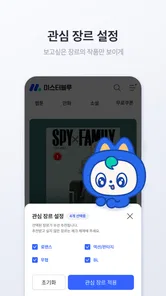
Who doesn’t love a good recommendation? One of the standout features of 미스터블루 is its recommendation engine. It’s like having a personal librarian who knows your taste inside out. After spending some time on the app, I noticed that the suggestions became more tailored to my preferences. This feature is perfect for those moments when you’re not sure what to read next. Plus, it keeps you from endlessly scrolling through titles, saving time and effort.
Another interesting aspect is the community feel that 미스터블루 offers. You can interact with other readers, leave comments, and even engage in discussions about plot twists, favorite characters, and more. It adds a whole new layer to the reading experience, making it feel more interactive and engaging.
Choosing titles without losing reading time
When I have only a few minutes, I would use a specific title or genre as my starting point rather than treating the app like a general browsing feed. A practical approach is to sample a short stretch of a story, note whether its format and tone work for that moment, and save deeper exploration for a stable connection and a longer break. This matters because browsing itself can eat into the time meant for reading, especially when several formats compete for attention.
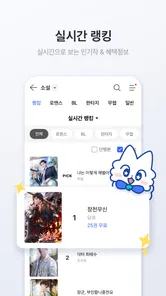
Recommendations can help narrow the field, but I would treat them as discovery aids, not a substitute for checking a story’s premise and chapter access. If a suggestion looks interesting, I’d inspect the title and its available reading options before getting invested. That is a small but useful safeguard: a recommendation may fit my taste while the payment pattern or language availability still makes it a poor choice for regular reading.
How it fits beside other reading apps
Compared with a single-format comics reader or a novel-only app, the appeal here is the mix: I can move between illustrated episodes and prose without switching services. That breadth is most valuable when I am undecided about what mood I am in. The counterpoint is that a specialist alternative may be a better match if I care more about its particular catalogue or a narrowly focused reading experience. I would try a few titles in each format before making this my main library.
For a realistic weekday routine, I might browse over Wi-Fi in the morning, choose a webtoon for a short ride, and save a novel for a longer evening break. If reception drops during the ride, I would not assume the next page will appear; I would switch to something already available on my phone instead. That makes the app useful as part of a reading routine, while keeping the connection itself from becoming a surprise.
When reading plans meet a weak connection
There is a difference between a brief pause in reception and a reading plan built around having no signal. For an unpredictable commute, I’d keep expectations modest and avoid starting a chapter at the moment I need to leave a reliable network. If a page fails, I’d retry once after checking the connection, then move on and return later rather than spending a short break troubleshooting. That is not a special recovery feature; it is simply the least frustrating way to handle a connection-dependent reading session.
Before changing devices or restarting an account, I would make sure I know which title and chapter I was trying to open, and whether the interruption happened while browsing or at a purchase step. Separating those cases helps me avoid repeating a payment action when the real issue is only a slow connection. For any purchase prompt, I’d pause long enough to check the displayed cost and confirm that I am choosing the intended instalment.
Who should give it a try
I’d recommend it to readers who enjoy Korean comics and serialized stories, want several formats in one place, and are comfortable reading through a connected app. It is also worth a look if you like sampling titles with free access or coupons before deciding whether to spend on a series. The app is free to install, has a Teen content rating, and has an average rating of 3.9 from around 8,600 ratings, with over one million installs. It was released on April 5, 2016, and its current version is 5.29.1, with Android 7.0 as the minimum operating system.
I would steer away if you need dependable offline reading, want a catalogue in a language that is not well represented, or prefer never to encounter paid chapter choices. The language mix and title availability matter more than the broad promise of having several formats together, so I would check whether the stories you actually want are present. The app’s range is a strength only when it matches your reading taste.
It is also a less natural fit if you mainly want a quiet, uninterrupted reading tool with no social layer or discovery process. Readers who already know the exact publisher or series they follow may find a specialist service more direct, while someone who likes moving between comics and prose may value the broader mix. I’d make that decision based on the titles I can actually read, not simply on the number of formats gathered in one app.
For a first try, I’d choose one webtoon and one novel rather than starting several series at once. That gives me a fair sense of how the formats suit my routine and whether the reading options fit my budget. I’d use Wi-Fi for the initial exploration, check the next-chapter prompt before getting hooked, and keep a clear stopping point in mind. Those steps make the free entry point useful without turning a casual test into an unplanned commitment.
Final Thoughts
In a world overflowing with digital content, finding an app that caters to all your storytelling needs can be a challenge. However, 미스터블루 - 웹툰, 만화, 소설앱 stands out by offering a diverse range of stories, an intuitive interface, and personalized recommendations. Whether you’re a seasoned webtoon enthusiast or a novel newbie, this app promises a reading adventure that’s both fun and immersive. So, why wait? Dive into the world of 미스터블루 and let the stories sweep you off your feet!
My practical verdict is more measured: it is a promising option for people who want webtoons, comics, and novels together, and who can plan around connectivity and chapter costs. I would start with a title that catches my eye, try the free reading options, and see whether the selection and reading flow suit me before making it a daily habit. If those pieces line up, it can earn a place in my phone’s reading rotation; if not, a more specialized app may serve me better.
미스터블루 - 웹툰, 만화, 소설앱 Frequently Asked Questions
Is 미스터블루 - 웹툰, 만화, 소설앱 suitable for younger readers?
The app has a Teen content rating, so parents and readers should consider that guidance when deciding whether it is appropriate. 미스터블루 focuses on webtoons, comics, and novels, and the specific themes can vary from one title to another. It is sensible to review a title’s details before a younger reader starts reading.
What is 미스터블루 - 웹툰, 만화, 소설앱?
미스터블루 - 웹툰, 만화, 소설앱 is a versatile application offering a wide range of webtoons, comics, and novels for enthusiasts. Users can explore various genres, enjoy high-quality content, and indulge in an immersive reading experience. It's an ideal app for those who love to delve into diverse storytelling formats in Korean literature and comics. The app is developed by Mr. Blue Corporation and is listed in the Comics category.
Is 미스터블루 available for both Android and iOS devices?
Yes, 미스터블루 - 웹툰, 만화, 소설앱 is available for download on both Android and iOS platforms. This ensures that users across different devices can enjoy the vast library of webtoons, comics, and novels without any platform restrictions, making it accessible to a wider audience. On Android, the app requires version 7.0 or later, so it is worth checking your device’s software before installing.
Does 미스터블루 offer free content or is it a paid app?
미스터블루 offers a mix of both free and paid content. Users can access a selection of free webtoons, comics, and novels, while premium content may require in-app purchases or a subscription. This allows users to explore content without immediate financial commitment, while also providing options for deeper access to exclusive materials. The app is free to download, and its store summary highlights free viewing of webtoon novels, daily free coupons, and a 1,000-won sign-up benefit. In-app purchase options are available, so check the purchase details before buying.
How does the subscription model work in 미스터블루?
The subscription model in 미스터블루 allows users to access premium content that may not be available for free. Subscribers can enjoy an ad-free experience, early access to new releases, and exclusive content. Subscription options vary, and users can choose a plan that best fits their reading preferences and budget. Since in-app purchases are also offered, review the current options in the app and make sure the choice suits how you plan to read.
Pros
- Extensive library of webtoons
- comics
- and novels.
- User-friendly interface for easy navigation.
- High-quality images and text for an immersive reading.
- Regular updates with new content.
- Supports offline reading for convenience.
Cons
- Some content requires in-app purchases.
- Limited language options.
- Occasional app crashes reported.
- Ads can be intrusive for free users.
- Requires a stable internet connection for some features.











