

ZigWord: Calm Word Puzzle
- 39.00
- 4.9
- Installs
- 50.00K
- Price
- Free
Screenshots
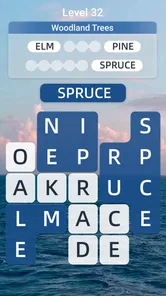

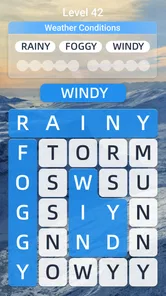
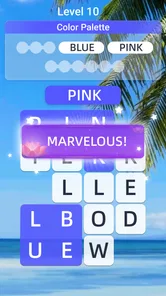
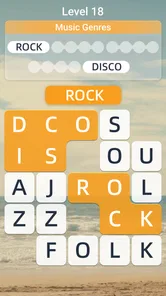
Analysis by Reviewed
I spent time with ZigWord: Calm Word Puzzle as a quiet word game rather than a fast, competitive challenge. Its main appeal is easy to understand: you look for hidden words, settle into a relaxed rhythm, and use it as a small break during the day. That sounds simple, but the difference between a pleasant word puzzle and a tiring one often comes down to readability, movement, and how well it fits real situations. In my experience, those details matter more than a long feature list.
This is a free game from Oakever Games, aimed at Everyone, and it sits in the word-puzzle category. The current version is 1.5.0 and it runs on Android 8.0 or later. It has reached over fifty thousand installs and holds a 4.9 average from around one and a half thousand ratings, which suggests that its calm approach is connecting with the people who try it. I would still treat those figures as a useful signal rather than a guarantee: a relaxed puzzle can be a great fit for one player and feel too gentle for another.
How ZigWord feels to read and navigate
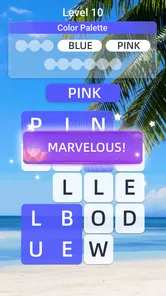
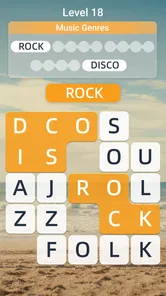
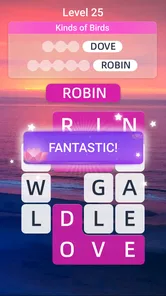
The first thing I noticed was that the game’s central task is visually direct. You are not learning a complicated control scheme before you can play. The whole experience is built around spotting letters and identifying words, so the interface has a natural priority: the puzzle itself needs to remain the focus. That makes it easier to pick up when I only have a few minutes and do not want to study menus or instructions.
For players who prefer a low-pressure layout, this simplicity is a genuine strength. A word search does not require the constant visual tracking of a racing game or the rapid switching between several panels found in strategy games. I can concentrate on one area, scan at my own pace, and pause mentally without feeling that I have missed a time-sensitive event. That makes the game approachable for casual players and for anyone who finds crowded game interfaces exhausting.
Readability is not only about whether letters are technically visible. It is also about how long I can keep scanning before my eyes become tired. Hidden-word puzzles ask me to compare shapes, follow lines, and distinguish similar characters. I found it more comfortable to play in short sessions, especially when I changed my viewing position or took a break rather than forcing myself through a long stretch. That is practical advice for anyone with visual fatigue: the calm tone does not remove the basic strain of reading a dense letter field.
Navigation also affects whether a game feels welcoming to people who are less familiar with mobile games. ZigWord works best when treated as a focused activity, not as a system that demands constant management. I could approach it with the mindset of opening a magazine puzzle: look, search, make a selection, and continue. That familiar pattern lowers the learning barrier for older players, occasional gamers, and people who do not enjoy action controls.
There is a useful trade-off here. A restrained word game can be easier to understand than a feature-heavy alternative, but it may also provide less variety for someone who wants elaborate progression, dramatic presentation, or a strong competitive layer. I would recommend it to a friend who wants the puzzle to stay in the foreground. I would point that friend elsewhere if they specifically want a game that teaches vocabulary in depth, tracks detailed performance, or constantly changes its format.
More From Our News Desk

 Gmail
GmailGmail in a Busy Inbox: Who Benefits Most?
From first account to crowded workday, Gmail earns its place through dependable search and flexible sorting—but its best fit depends on how much inbox maintenance you can tolerate.

 Prime Video
Switching to Prime Video: What Changes in Your Viewing Routine
Prime Video can make a compelling second home for streaming, but switching means learning a different catalog, rental layer, and route from browsing to playback.

 Universal TV Remote Control
Universal TV Remote Control Works Best as a Reliable Backup
A phone remote earns its place through quick setup and reliable habits. Here is how to get more from Universal TV Remote Control—and where its limits show.

 Weather - By Xiaomi
Weather by Xiaomi Review: Clear at a Glance, Less Clear Up Close
Xiaomi’s weather app makes everyday forecasts quick to scan, but its calm surface can leave useful details and recovery paths harder to find than they should be.

 X
XX Under Pressure: Can It Recover When Posting Goes Wrong?
A resilience-focused review of X, examining setup, mistaken posts, interruptions, weak connections, and the gaps that matter when recovery needs to be dependable.

 Clash of Clans
Clash of Clans Is Won Between the Battles
Its raids are quick; its community is a long-term project of coordination, teaching, rivalry, and shared responsibility—with all the friction that entails.
Latest News



Making the search easier on your own attention
My most useful approach was to avoid scanning the entire board randomly. I started by choosing a direction, checking likely letter combinations, then moving to another section instead of repeatedly jumping around. This is not a special mode or a hidden setting; it is simply a better workflow for the kind of visual search the game asks for. It reduces the feeling of being overwhelmed and makes a short session feel more deliberate.
I also found that playing with a clear stopping point helped. Rather than opening the game whenever I was already mentally drained and expecting it to restore my focus instantly, I used it during a transition: after finishing a task, while waiting, or before putting my phone down for the evening. That distinction matters. The game can create a calmer break, but it is still a screen-based activity requiring attention, and it is not a substitute for rest when my eyes or concentration are already worn out.
For someone with reading difficulties, the word-search format may be more manageable than a clue-heavy crossword because the target is found within the visible letter field. On the other hand, a player who struggles with dense visual scanning may find a text-entry puzzle or an audio-supported word activity more suitable. ZigWord’s core design gives it a clear advantage for recognition, but that same design can become a barrier when the screen is hard to inspect.
Using it with different abilities and in different situations
I also think it helps to treat comfort as something personal rather than assuming one layout suits everyone. A steady phone position, good lighting, and brief sessions can make the letter search easier to manage, while a larger display or a different style of word game may be preferable when precise tracing or dense text becomes tiring. From there, it is worth considering which players and everyday routines benefit most from that flexibility.
Motor comfort and touch precision
The game’s basic interaction is less physically demanding than games that require repeated rapid taps, virtual joysticks, or precise timing. That makes it a reasonable option for players who prefer slower gestures and who do not want their hands constantly occupied. A person with limited dexterity may appreciate being able to think before acting rather than being punished for a delayed response.
Still, “slow” does not automatically mean “accessible.” Finding a word can involve tracing across letters or selecting a sequence on a compact touchscreen. If a player has tremors, reduced reach, or difficulty maintaining a straight gesture, the central action may remain uncomfortable. I would test it gently rather than assuming that a calm theme guarantees easy control. A stylus or a larger device could make the letter field more manageable for some people, while others may prefer a game based on individual taps instead of dragging.
One practical habit helped me: I held the phone in a stable position and used a relaxed finger movement instead of gripping it tightly. That sounds minor, but it reduces accidental contact and makes longer searches less tiring. I would also avoid playing while walking or carrying something, because the puzzle benefits from a steady view and deliberate touch. The game is a better companion for a seated pause than for a situation where one hand and attention are already divided.
Sensory load and personal comfort
ZigWord is a better match for people seeking a visually contained activity than for players who need strong audio guidance or highly expressive feedback. The word field is the important information, so anyone who has difficulty distinguishing letters, contrast, or crowded patterns should pay close attention to their own comfort. I would increase the phone’s general display readability if needed and use a brighter, evenly lit environment rather than trying to solve a puzzle in poor light.
Players sensitive to visual motion may prefer this kind of stationary puzzle to animated action games, but calm presentation should not be confused with universal sensory comfort. The repeated letter pattern can still feel busy, particularly when I have been reading for a long time. Taking a short pause after a few puzzles is more effective than lowering my standards and continuing while the board starts to blur together.
For people who are hard of hearing, a word game centered on visible letters can be more practical than an experience that depends heavily on spoken instructions. That is one of its quiet strengths. At the same time, blind or low-vision players may need a different type of word game if the essential task cannot be comfortably completed through visual inspection. I would not recommend choosing it solely because the store age label is Everyone; age suitability and accessibility for a particular disability are different questions.
Short breaks, offline moments, and shared spaces
The offline focus is especially useful in everyday situations where connectivity is unreliable or undesirable. I can imagine using it on a commute with poor reception, in a waiting room, or during a flight when I want a quiet activity that does not depend on a live conversation. It also works well as a small evening reset because the word-search format does not require the emotional investment of a long story or the alertness of an online match.
A realistic example is a ten-minute gap between appointments. I would open the game, complete a small amount of searching, and stop when my name is called rather than beginning something that needs to be saved at a precise dramatic moment. That makes it more convenient than many console-style games. The same quality can be useful for caregivers or busy parents who need an activity that can be put down quickly, although any phone game can still become distracting if notifications or personal habits pull attention away from the surrounding situation.
It is also suitable for a quiet shared environment because the main activity is visual and self-contained. I would still keep the screen brightness comfortable and avoid using it when I should be listening to someone. The game supports a pause in the day; it does not make divided attention harmless.
Offline play changes the value proposition in an important way. A puzzle that remains useful without a connection can be more dependable than an alternative built around daily online events or live competition. However, players who enjoy comparing scores with friends, joining timed challenges, or receiving a constant stream of social activity may find this less motivating. Its independence is an advantage for privacy-minded and connectivity-limited situations, but a weakness for people who need social pressure to stay engaged.
Where the experience may still create friction
The biggest limitation is inherent to hidden-word play: the board can become visually repetitive. When I am in the mood for discovery, that repetition feels soothing. When I want a strong sense of advancement, it can feel like I am performing the same mental action again. This is why I see ZigWord as a companion for short, restorative sessions rather than a complete replacement for every kind of word game.
There is also a financial point worth considering. The game is free to start, while optional purchases range from under a dollar to amounts approaching one hundred dollars per item. That wide range means I would approach any purchase screen carefully and avoid assuming that every useful part of the experience is included at no cost. I recommend deciding in advance whether you want a purely free casual game and treating optional spending as something to review slowly, not something to make during a tired or distracted moment.
Players who are sensitive to visual clutter, who need large text, or who depend on nonvisual controls should test the basic puzzle interaction before committing to it. The same applies to anyone with hand pain: a low-speed game may still involve a gesture that becomes uncomfortable after repetition. If the central letter search is difficult, a clue-based game with more spacious text or an audio-oriented word activity may be a better choice, even if it feels less relaxing at first.
The age rating of Everyone makes the game broadly suitable as a family-friendly word activity, but suitability still depends on the individual player. A child may enjoy the search, while an adult learner may use it for casual vocabulary exposure. I would not present it as a structured educational course, though. Its value is in practicing attention and recognition informally, not in replacing guided language learning or a carefully graded literacy tool.
Who should choose it over familiar alternatives?
I would choose ZigWord over a crossword when I want less dependence on clues and more direct visual searching. I would choose it over a competitive word battle when I want to remove the pressure of speed and opponents. Compared with a large word-game collection, it is more appealing when I want one clear activity instead of a menu full of modes that can make a short break feel like another decision to manage.
I would choose a crossword, an anagram game, or a vocabulary app instead when I want to produce answers from memory, learn definitions, or feel a stronger sense of intellectual progression. I would choose a multiplayer word game when social interaction is the main reason I am opening an app. Those alternatives are not automatically better; they simply serve different kinds of attention. ZigWord’s identity is strongest when the goal is to settle into a visual search and step away from urgency.
The developer, Oakever Games, has positioned this as a focused word experience rather than a demanding action title, and the store summary’s emphasis on unwinding matches how I used it. The current release is small enough to understand quickly, yet its usefulness depends on personal tolerance for scanning. I would not install it expecting a deep narrative or a constantly changing challenge. I would install it for a dependable, low-pressure puzzle to keep on my phone.
My inclusive verdict
ZigWord is at its best when accessibility means reducing pressure, simplifying the task, and allowing the player to control the pace. Its visible word-search format can suit casual players, older users, people who prefer quiet activities, and anyone who wants an offline-friendly break. The lack of fast action makes it less demanding than many mobile games, and the Everyone rating supports its broad, family-friendly positioning.
My recommendation comes with a clear condition: check whether the letter field and touch gesture feel comfortable for you. A calm presentation cannot solve every issue involving vision, dexterity, or sensory fatigue. I would try it in good lighting, play for a short period, and notice whether the search relaxes me or makes my eyes work harder. That small test tells me more than a general accessibility label ever could.
For me, the game succeeds because it knows what kind of break it wants to provide. It does not need to be loud, competitive, or complicated to be worthwhile. If you enjoy hidden-word puzzles and want something you can pick up during a spare moment, I think it is an easy recommendation. If you need extensive accessibility controls, rich vocabulary instruction, or social competition, I would look for a more specialized alternative. Used within its strengths, ZigWord: Calm Word Puzzle is a gentle, practical word game with a clear audience and a pleasantly unhurried pace.
ZigWord: Calm Word Puzzle Frequently Asked Questions
What does ZigWord: Calm Word Puzzle offer players looking for a relaxing game?
ZigWord: Calm Word Puzzle is a relaxing word game focused on finding and connecting letters to form words. Its calm presentation makes it suitable for short breaks, casual play, or anyone who enjoys vocabulary challenges without a fast-paced or competitive atmosphere. The puzzles are designed to be approachable, while still encouraging you to think carefully and discover less obvious word combinations. Its store summary also describes it as a way to unwind with hidden-word puzzles.
Who developed ZigWord: Calm Word Puzzle, and what kind of game is it?
ZigWord: Calm Word Puzzle is a word game developed by Oakever Games. It centers on solving puzzles by finding words, rather than on action, competition, or complex controls. That focus makes it a straightforward option for players who want a quiet mental activity. The game is free to download, and its age rating is Everyone, though families may still want to review purchase settings before children play.
What is ZigWord: Calm Word Puzzle?
ZigWord: Calm Word Puzzle is a relaxing word game focused on finding and connecting letters to form words. Its calm presentation makes it suitable for short breaks, casual play, or anyone who enjoys vocabulary challenges without a fast-paced or competitive atmosphere. The puzzles are designed to be approachable, while still encouraging you to think carefully and discover less obvious word combinations.
How does the gameplay in ZigWord work?
The main gameplay revolves around examining the available letters and creating valid words according to each puzzle’s rules. As you progress, the challenges may require more observation, vocabulary knowledge, and experimentation. The game is easy to understand after the first few rounds, but later puzzles can become more demanding, making it a good choice for players who enjoy gradual difficulty rather than complicated controls or action-based mechanics.
Is ZigWord: Calm Word Puzzle free to download and play?
ZigWord: Calm Word Puzzle is free to download, with optional in-app purchases priced from $0.39 to $99.99 per item. The presence of purchases means it is worth checking the purchase settings before handing the game to a child or anyone who might tap through prompts unintentionally. You can try the game without paying upfront, then decide whether any optional purchase is useful for your play.
Pros
- Relaxing gameplay suitable for short
- stress-free sessions.
- Clean
- minimalist design keeps attention on the word puzzles.
- Gradual difficulty makes it approachable for casual players.
- Offline play is convenient when no internet connection is available.
- Word challenges can help support vocabulary and concentration.
Cons
- Some puzzles may feel repetitive after extended play.
- Limited competitive features may disappoint leaderboard-focused players.
- Hints or extra content may be restricted by ads or in-app purchases.
- The calm pace may feel too slow for players seeking fast action.
- Puzzle difficulty can vary noticeably between individual levels.













