

Word Tiles: Relax n Refresh
- 8.65K
- 4.6
- Installs
- 1.00M
- Price
- Free
Screenshots
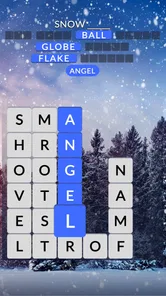
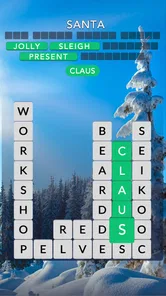

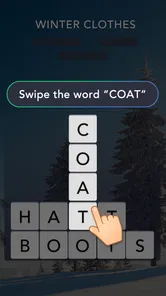
Analysis by Reviewed
I found Word Tiles: Relax n Refresh easiest to understand when I treated it as a quiet word puzzle rather than a score-chasing challenge. Developed by Puzzle1Studio, this free game places word tiles at the center of the experience and aims for short, low-pressure sessions. It is available for Everyone and runs on Android devices using version 6.0 or later, which makes it practical for many older phones as well as newer ones.
That simple description is also the key to deciding whether it belongs on your device. I enjoyed it most when I wanted something calmer than a fast arcade game and more interactive than reading. It works well for a coffee break, a commute with a stable connection, or a few minutes before bed. However, players looking for a deep story, competitive multiplayer, or a highly demanding vocabulary workout may find the experience too restrained.
How the game feels in everyday use
The basic appeal is immediate: you work with word tiles, arrange your attention around letters, and try to solve the puzzle in front of you. I did not need a long tutorial to understand the general idea. That matters for a casual word game because the best sessions begin quickly rather than making me study a complicated rule set.
The store summary describes it as a way to relax with word games, and that mood is a fair reflection of its purpose. The game is not trying to replace a full crossword book or a serious language-learning course. Instead, it gives you a compact activity that can occupy your hands and mind without demanding the same commitment as a longer game.
Its audience is broad. A person who already enjoys arranging letters may appreciate the familiar word-game rhythm, while someone who normally avoids games with complicated controls can approach it without learning a large control scheme. The Everyone content rating also fits the friendly, general-purpose positioning. I would still choose another app for children who need structured educational progression, because relaxation and vocabulary teaching are not the same goal.
Readability and navigation
For me, the most important accessibility question in a tile-based word game is whether I can quickly distinguish the playable elements from the surrounding interface. Word Tiles: Relax n Refresh benefits from keeping the main activity visually obvious: the tiles are the reason to look at the screen, so they naturally become the focus of each round. When the layout is uncluttered, I can spend my attention on recognizing letters instead of searching for the next control.
This kind of design is particularly useful for casual players who do not want to memorize menus. I could pick it up after a break and understand what deserved attention without having to reconstruct a complicated game state. That makes it suitable for someone who plays irregularly, including people who may forget controls between sessions.
More From Our News Desk

 Gmail
GmailGmail in a Busy Inbox: Who Benefits Most?
From first account to crowded workday, Gmail earns its place through dependable search and flexible sorting—but its best fit depends on how much inbox maintenance you can tolerate.

 Prime Video
Switching to Prime Video: What Changes in Your Viewing Routine
Prime Video can make a compelling second home for streaming, but switching means learning a different catalog, rental layer, and route from browsing to playback.

 Universal TV Remote Control
Universal TV Remote Control Works Best as a Reliable Backup
A phone remote earns its place through quick setup and reliable habits. Here is how to get more from Universal TV Remote Control—and where its limits show.

 Weather - By Xiaomi
Weather by Xiaomi Review: Clear at a Glance, Less Clear Up Close
Xiaomi’s weather app makes everyday forecasts quick to scan, but its calm surface can leave useful details and recovery paths harder to find than they should be.

 X
XX Under Pressure: Can It Recover When Posting Goes Wrong?
A resilience-focused review of X, examining setup, mistaken posts, interruptions, weak connections, and the gaps that matter when recovery needs to be dependable.

 Clash of Clans
Clash of Clans Is Won Between the Battles
Its raids are quick; its community is a long-term project of coordination, teaching, rivalry, and shared responsibility—with all the friction that entails.
Latest News



There is a practical trade-off, though. Letter tiles need to be read at a glance, and readability depends on the size of the device, the display, and the player’s vision. On a larger phone, the board has more room to breathe. On a smaller screen, the same letters and controls can feel more crowded, especially if I hold the device farther away or increase the system text size. I would test a few puzzles before deciding whether it is comfortable for someone with reduced vision.
I also recommend playing with the screen brightness adjusted to the room rather than assuming the brightest setting is best. Strong glare can make letter recognition harder, while a dim display may reduce contrast. This is a small habit, but it makes a noticeable difference in any game where similar letter shapes must be identified quickly.
Navigation is easiest when I keep my sessions focused on the puzzle rather than exploring every available option. A player who prefers a minimal interface may appreciate that approach. Someone who needs large labels, very strong contrast, or a highly customizable display should inspect the actual presentation on their own device before committing to long sessions. I would not describe the game as a specialist accessibility tool; I would describe it as a straightforward casual puzzle whose comfort varies with the screen and the player.
Touch, movement, and sensory comfort
Word tiles are a natural fit for touch interaction because the action is based on selecting or arranging visible pieces rather than steering a character through a fast environment. That lowers the pressure on reaction time. I could pause to think about a word instead of responding to an opponent or a timer-driven threat, which is helpful for players who find rapid input tiring.
There is still a motor consideration: touching a small tile accurately can be harder for people with limited fine-motor control, hand tremors, or difficulty maintaining a steady grip. A stylus or a larger device may help, but I would not assume either will solve every problem. The best approach is to try a short session and notice whether mistakes come from word knowledge or from tapping the wrong area.
One useful habit is to support the phone on a table or cushion instead of holding it in midair. That reduces the need to stabilize the device with one hand while tapping with the other. It also makes the game more comfortable for players who experience hand fatigue. For a quick round, this may seem unnecessary; over a longer session, it can prevent the physical strain from becoming the reason to stop.
The slower word-puzzle format can also suit people who are sensitive to frantic movement or constant visual change. I found it less mentally noisy than action games because my attention stays on letters and choices. That does not mean every player will find it sensory-neutral. Screen brightness, animation, sound, and the density of the interface can still affect comfort, so I would use the phone’s normal sound and display controls to create a calmer setup.
A quiet environment can improve the experience for players who rely heavily on visual concentration. On the other hand, the game can fit a noisy setting if all the important information is visible and I do not need to follow spoken instructions. That flexibility is valuable in everyday use, although I would avoid playing while walking or crossing roads because a word puzzle still absorbs attention.
Where it fits into real routines
I can easily imagine opening this game during a lunch break when I have enough time for a small mental reset but do not want to begin a larger game. I might solve a puzzle, put the phone away, and return to work without feeling pulled into a long campaign. The same pattern works in a waiting room or while sitting at home with a cup of tea.
For commuters, the main question is whether the game behaves comfortably in the particular travel situation. A train ride with a seat and steady lighting is very different from a crowded bus where one hand is occupied and the screen is moving. The tile format is less demanding than a game requiring precise character movement, but it still needs enough visual stability to read letters accurately.
It can also work as a shared activity. I could hand the phone to a friend and discuss possible words, or use a round as a gentle way to involve a family member who does not enjoy conventional games. That said, it is not a substitute for a dedicated group word game if the goal is conversation, competition, or several people playing simultaneously.
People who use games to manage short breaks may like the low barrier to entry. People who need a reliable offline activity should test their intended situation rather than assume that every part of the experience will be available without a connection. I would install it before a trip and try it in the conditions I expect to face, especially if the game is meant to be a backup for travel.
What makes the word format worthwhile
The strongest part of the design is the way it turns a familiar vocabulary activity into something tactile. Instead of only entering an answer into a blank field, I am encouraged to look at the relationship between individual tiles. That gives the puzzle a physical quality and makes the process feel different from typing into a search box or completing a traditional text-only crossword.
It is also useful for players who enjoy pattern recognition more than definition-based clues. A conventional crossword often asks me to know a specific fact or interpret a clue in a particular way. A tile puzzle can make me think about possible letter combinations, word shapes, and the way a partial answer might develop. If I get stuck, I can shift from recalling information to examining structure.
This difference matters when choosing between alternatives. A crossword app is probably better for someone who wants rich clues and a newspaper-style solving routine. A spelling or vocabulary app is a better choice for deliberate study, progress tracking, and measurable language practice. A fast word game may be preferable for players who enjoy racing against time. Word Tiles: Relax n Refresh sits in the quieter middle: more hands-on than a basic word list, but less academically focused than a learning tool.
One of my practical tips is to avoid treating every difficult puzzle as a test of intelligence. When I became stuck, it helped to scan for short, familiar combinations first and then reconsider the remaining letters. That approach keeps the game relaxing and prevents one stubborn arrangement from turning a casual break into a source of frustration. The value is in the process as much as in finishing quickly.
Limits that affect inclusive play
The same simplicity that makes the game approachable can limit it for experienced puzzle fans. If you want elaborate clues, a strong narrative, or a sense of character progression, the tile-focused format may feel narrow. I would also skip it if my main goal were social competition, because the experience is better suited to individual concentration than to a lively multiplayer session.
Visual dependence is another real barrier. The central task involves seeing and distinguishing letters on a screen, so players who need screen-reader-first interaction or nonvisual alternatives may not find the game suitable. I would not recommend it as a blind-accessible word tool without personally testing it with the relevant assistive technology.
Players with motor limitations should pay attention to the physical size and spacing of the tiles. Even when the puzzle itself is calm, repeated taps can become tiring if the targets feel cramped. A phone stand, a larger screen, or shorter sessions may improve the experience, but these are workarounds rather than guarantees.
The game is free to download, while optional in-app purchases range from under a dollar to nearly one hundred dollars per item. That broad range is worth remembering before handing the device to a child or allowing purchases casually. I would review the device’s purchase controls and decide in advance whether spending is allowed. The game’s Everyone rating describes the content, not a promise that every family will want the same purchase settings.
Its current version is 2606.0.2, and the game has been available since May 22, 2019. Those details suggest an established title rather than a brand-new experiment, while the version number also reminds me to keep the app updated through the normal platform process. On Android, the minimum requirement of version 6.0 keeps the technical entry point relatively broad, but compatibility alone does not guarantee that an older phone will display every tile comfortably.
Who should download it
I would recommend it to people who want a gentle word game for short sessions, especially if they like manipulating letters and prefer thinking time over reflexes. It is a reasonable choice for casual players, adults looking for a quiet distraction, and families who want a simple puzzle that is easy to explain.
I would be more cautious for anyone who needs very large controls, strong customization for low vision, nonvisual play, or a clearly educational curriculum. In those situations, a dedicated accessibility-focused word tool or a language-learning app may be a better fit. Players who dislike ads or optional purchase prompts should also pay attention during use and configure their device accordingly rather than assuming that “free” means completely frictionless.
The game has built a substantial audience, with over one million installs, and its average rating is 4.6 from around twenty-five thousand ratings. I see those figures as signs that the basic concept works for many people, not as proof that it will suit every ability or routine. My own experience is that its success depends less on advanced features and more on whether the tile presentation feels comfortable on the phone in your hand.
After spending time with it, I see Word Tiles: Relax n Refresh as a pleasant, focused option rather than an all-purpose word-game replacement. Its best quality is the calm, tactile relationship between letters and the player. Its biggest weakness is that the same visual and touch-based simplicity can leave fewer options for people who need extensive adjustments or alternative input.
If your ideal break is a few minutes of arranging letters without a complicated story or demanding controls, I think it is worth trying. Start with short sessions, adjust the screen and sound to your surroundings, and check how comfortably you can tap the tiles before settling into longer play. The game is free, rated for Everyone, and made by Puzzle1Studio, but the real decision is personal: choose it for relaxed word play, not for deep learning, competition, or specialized accessibility support.
Word Tiles: Relax n Refresh Frequently Asked Questions
How much storage space should I have available before installing Word Tiles: Relax n Refresh?
It is sensible to leave some free space on your device before downloading Word Tiles: Relax n Refresh, as with any game installation. The game’s Android requirement is version 6.0 or later, so check that your device meets that condition as well. Once installed, keeping a little room available can also help your device handle updates and continue running smoothly.
Is Word Tiles: Relax n Refresh suitable for quick sessions, or does it require a long time commitment?
Word Tiles: Relax n Refresh is designed around short, calming play sessions, making it a natural option for a break or a few minutes of word puzzles. Its level-based format lets players work through challenges gradually, rather than requiring one long stretch of play. As puzzles become more demanding, you may want to spend longer thinking through a level, but the relaxed style remains central to the experience.
Who developed Word Tiles: Relax n Refresh, and what kind of game is it?
Word Tiles: Relax n Refresh is a word game developed by Puzzle1Studio. Its focus is on solving letter-based puzzles, making it a fit for players who enjoy finding words and working through bite-sized challenges. The game’s short description is “Word Tiles,” while its summary invites players to relax with word games. It has a 4.6 average rating from around 25,000 ratings.
What devices can run Word Tiles: Relax n Refresh?
The game is available for Android and iOS, so it can suit players using either platform. On Android, it requires version 6.0 or later. Before downloading, check that your device meets the operating system requirement and has enough available space for the installation. Keeping your device’s software current can also help with compatibility and a smoother experience.
What is Word Tiles: Relax n Refresh?
Word Tiles: Relax n Refresh is a casual word puzzle game designed for short, calming play sessions. Instead of focusing only on speed or competition, it combines letter-based challenges with a relaxing visual style and gentle progression. Players usually form words from available tiles, complete level objectives, and gradually unlock new stages while enjoying a low-pressure experience suitable for daily breaks.
Pros
- Simple tile-matching gameplay is easy to learn and pick up anytime.
- Relaxing pace makes it suitable for short stress-free play sessions.
- Word puzzles can help exercise spelling and vocabulary skills.
- Progression offers a steady sense of achievement without intense pressure.
- Clean interface keeps the focus on solving each puzzle.
Cons
- Some puzzles may feel repetitive after extended play.
- Difficulty can vary noticeably between consecutive levels.
- Hints or extra moves may be limited without watching ads or spending currency.
- The game may require an internet connection for certain features.
- Players seeking competitive multiplayer may find the experience too solitary.













