

Word Search Inspiration
- 2.31K
- 4.3
- Installs
- 1.00M
- Price
- Free
Screenshots

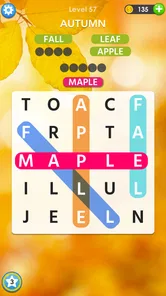

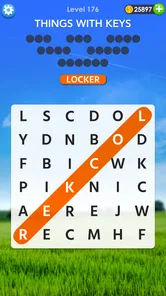

Analysis by Reviewed
When I want a quiet break that does not demand a long explanation, I usually reach for a word search rather than a competitive game. Word Search Inspiration fits that mood well: it is a free word game from Puzzle1Studio built around themed searches, with a gentle pace that works especially well on a shared phone or tablet. I found it easy to hand to another person without first explaining complicated rules, progress systems, or controls.
That simplicity is the main appeal, but it also sets the right expectations. This is not a deep vocabulary course, a timed contest, or a social game that needs everyone online together. It is better understood as a collection of topic-based puzzles for short moments of concentration. I would recommend it to someone who wants a relaxing mental reset, while I would point a serious word-game fan toward a more demanding alternative.
How it works when the device belongs to everyone
A realistic household use case is a tablet left in the living room. One person can open a puzzle while waiting for dinner, another can pick it up later, and a child or older relative can understand the basic objective almost immediately. Because the central activity is visual and self-contained, it does not require a shared conversation or a fixed playing schedule. That makes it more suitable for passing around than a game whose value depends on one person maintaining a private account or a continuous match.
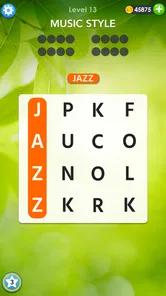
I also like that the topic-based format gives each session a natural starting point. Instead of facing an empty grid with no context, the theme gives me a small mental frame for the words I am looking for. That can make the first few discoveries feel more approachable, particularly when I am tired or only have a few minutes. The result is a game that can sit comfortably beside ordinary household routines rather than taking over the room.
Shared use does require a little common sense. I would not treat one device as if it automatically offered separate personal spaces. If several people use the same copy, they should agree on whether they are continuing one puzzle together or taking turns. That simple conversation avoids the most common household frustration: someone accidentally changing the current state and another person assuming their own progress is still waiting exactly where they left it.
This is also where the game differs from a paper puzzle book. A printed book naturally belongs to whoever is holding it, while a shared device can blur that boundary. The digital version is easier to keep nearby and more convenient when I want an instant puzzle, but it benefits from a clear “whose turn is it?” habit. For a family or couple, that is a small organizational detail worth deciding before the game becomes a communal pastime.
Setting expectations before the first puzzle
The game is free to download and carries an Everyone age rating, which makes it easy to consider for a mixed-age household. I would still introduce it according to the child’s reading ability rather than relying on the label alone. Word searches can be accessible to young players, but the challenge depends on recognizing letters, understanding the theme, and staying patient when a word is hidden in an awkward direction.
More From Our News Desk

 Gmail
GmailGmail in a Busy Inbox: Who Benefits Most?
From first account to crowded workday, Gmail earns its place through dependable search and flexible sorting—but its best fit depends on how much inbox maintenance you can tolerate.

 Prime Video
Switching to Prime Video: What Changes in Your Viewing Routine
Prime Video can make a compelling second home for streaming, but switching means learning a different catalog, rental layer, and route from browsing to playback.

 Universal TV Remote Control
Universal TV Remote Control Works Best as a Reliable Backup
A phone remote earns its place through quick setup and reliable habits. Here is how to get more from Universal TV Remote Control—and where its limits show.

 Weather - By Xiaomi
Weather by Xiaomi Review: Clear at a Glance, Less Clear Up Close
Xiaomi’s weather app makes everyday forecasts quick to scan, but its calm surface can leave useful details and recovery paths harder to find than they should be.

 X
XX Under Pressure: Can It Recover When Posting Goes Wrong?
A resilience-focused review of X, examining setup, mistaken posts, interruptions, weak connections, and the gaps that matter when recovery needs to be dependable.

 Clash of Clans
Clash of Clans Is Won Between the Battles
Its raids are quick; its community is a long-term project of coordination, teaching, rivalry, and shared responsibility—with all the friction that entails.
Latest News



For an older family member, the same design can be pleasantly low-pressure. There is no need to memorize a complicated control scheme, and the visual task is easy to describe: look through the grid, find a word, and mark it. I would sit nearby for the first session if the person is not comfortable with touchscreens. That is less about the game itself and more about making sure a missed tap or an unfamiliar gesture does not turn a relaxing activity into a technology lesson.
On Android, the listed minimum requirement is version 6.0, so the game is positioned to work on a broad range of devices that are not necessarily new. The current version is 2606.0.6. In practical terms, I would still check that the shared phone or tablet has enough battery and a comfortable screen before settling in. A word search is much more pleasant when the grid is easy to see and the device is not being used by someone else every few minutes.
One boundary I would set early concerns purchases. The game itself is free, while in-app items are listed from $0.99 to $99.99 each. That range makes it sensible to discuss purchasing before handing the device to a child or leaving it unattended in a shared space. I am not suggesting that every player will buy anything; I am saying the household should treat the purchase option as a real boundary, especially when several people use the same device.
For that reason, I would separate the question “Can this person play?” from “Can this person make purchases?” The Everyone rating answers the first question in a broad content sense, but it does not replace a household rule about spending. A parent can let a child enjoy the puzzles while keeping purchasing decisions with an adult. That arrangement preserves the game’s easygoing nature without turning a casual session into an unexpected account problem.
Taking turns without turning relaxation into administration
Coordination works best when it stays lightweight. In my experience, the easiest approach is to give each person a clear stopping point: finish the current puzzle, stop after a short session, or leave the device with the grid untouched. I would avoid inventing a complicated rotation system for a game that is supposed to be a break. A simple verbal handoff is usually enough.
Another useful habit is to say out loud whether a puzzle is being solved cooperatively or individually. Two people can look for words together and compare what they see, which makes the game a nice conversation starter. Alternatively, one person can play while the other waits. The first option feels more social, while the second protects the player’s concentration. Neither approach is built into the game as a formal team mode, so the household supplies the coordination itself.
This distinction matters because word searches can feel very different depending on who is holding the device. A quick finder may unintentionally remove the satisfying discovery for everyone else. If the goal is shared relaxation, I would suggest pointing toward an area of the grid rather than immediately marking the answer. That keeps the less experienced player involved and turns the puzzle into a small cooperative exercise instead of a demonstration by the fastest person.
For a child and an adult, I would use the themes as a way to adjust the conversation rather than as a competition. The adult can ask the child to name a word they expect to find, then let them search. For two adults, the same game can work as a quiet side activity while talking. The important trade-off is that the app provides the puzzle, not the household routine; the quality of the shared experience depends on how people choose to take turns.
I would be more cautious with a device that several people need for work, school, or communication. A word search is easy to pause, but it still occupies the screen and may interrupt another person’s plans. On a dedicated tablet, that is rarely a concern. On a single family phone, I would use it only when the owner is comfortable with someone else holding the device and with the current puzzle remaining available for the next player.
Where the game earns its relaxing reputation
The strongest part of the experience is the low entry cost in terms of attention. I do not need to learn a character build, remember a story, or prepare for an opponent. I can open a themed grid, scan for patterns, and stop when I have had enough. That makes it useful after a busy day, during a short waiting period, or whenever I want something more engaging than passive scrolling but less demanding than a strategy game.
The themes also give the activity a little more personality than a completely random letter grid. They help me form expectations about the vocabulary, which can make searching feel purposeful. At the same time, I would not mistake that thematic structure for a guaranteed learning program. It may encourage attention to words, but the primary goal remains finding them, not building a measured study plan or receiving detailed language instruction.
One practical technique I found helpful is to change the way I scan the grid instead of staring at the whole board. I look for unusual letter combinations, then trace possible directions from them. If I am playing with someone else, we can divide the grid visually without needing a formal team feature: one person checks the upper area while the other checks the lower area, then we swap if one side becomes difficult. This makes a shared session feel organized without adding pressure.
Another useful trade-off is choosing the game for mood rather than ambition. If I want to improve a personal best, compete with friends, or solve unusually difficult puzzles, this relaxed format may feel too gentle. If I want to settle my attention and enjoy a clear, finite task, its restraint becomes a strength. The same simplicity that limits depth is what makes it approachable for a mixed group.
What to watch for on a shared device
The first limitation is the lack of a natural personal boundary when one installation is used by several people. I would not assume that every player gets a separate identity, separate progress, or a private history. If those distinctions are important to your household, a shared copy may feel less suitable than separate devices or an app designed around individual profiles. The game works best when everyone accepts that the device is a common space.
The second limitation is the possibility of interruptions. Word searches are calm, but a calm game still needs enough uninterrupted attention to notice patterns. A child may want to tap every letter quickly, an adult may be called away, or another household member may need the tablet. That does not make the game frustrating by default, but it means I would choose short, clearly bounded sessions instead of expecting a long, private stretch of play.
Purchases are another point where convenience and control pull in opposite directions. Optional spending can make a free game easier to continue for some players, but the listed item range means I would not leave purchase decisions vague. In a household, the cleanest arrangement is to make one adult responsible for approving any transaction and to explain that playing for free and buying something are separate choices.
I would also avoid presenting the game as a replacement for every kind of word activity. A crossword offers clues and broader reasoning. A spelling game may give direct feedback. A competitive word app can create urgency through scores or opponents. This title sits in a quieter space. Its value is the search itself, supported by themes and a relaxed rhythm, so people looking for richer language mechanics should compare those alternatives before deciding.
Who will enjoy it, and who should choose something else
I think it is a good match for casual players who enjoy finding patterns, people who want a short screen activity, and households looking for something that can be explained in a minute. It is especially convenient for a mixed-age group because the basic interaction is easy to demonstrate. The broad Everyone rating also makes it a reasonable candidate for family consideration, provided adults still handle the household’s purchase rules and device boundaries.
It is less convincing for players who need a strong sense of personal progression or competitive achievement. If your ideal word game includes ranked matches, detailed statistics, or a demanding difficulty curve, the relaxed search format may run out of depth. I would also skip it as a primary language-learning tool. The themes can make vocabulary more noticeable, but the game’s central reward is discovery, not structured teaching.
The audience response suggests that many people find the approach worthwhile: the game has an average rating of 4.3 from around 11 thousand ratings, with about 2.3 thousand written reviews and over 1 million installs. I see those figures as evidence of broad appeal rather than a guarantee that every household will enjoy it. A large audience can confirm that the basic idea works for many players, but it cannot decide whether your family prefers quiet searching or more competitive wordplay.
The developer, Puzzle1Studio, has kept the identity of the experience focused on themed word searches rather than adding a complicated premise. That focus is helpful when I am recommending it to someone who dislikes learning new game systems. It also means the decision is fairly clear: if you like the core activity, you will probably appreciate the straightforward design; if you find word searches repetitive, there is not much else here to change your mind.
My household verdict after weighing convenience and control
I would keep Word Search Inspiration on a shared tablet for those moments when several people want an easy activity but do not want to commit to a board game or a competitive match. It is approachable, inexpensive to start, and flexible enough for solo play or informal cooperation. A child can search with an adult, two relatives can take turns, or one person can use it as a quiet reset between tasks.
My recommendation comes with three practical conditions. First, decide whether progress belongs to one shared session or to individual players, because the device itself does not create that agreement for you. Second, establish who may approve purchases before anyone starts playing. Third, match the game to the player’s goal: choose it for calm visual searching, not for intensive vocabulary study or high-pressure competition.
For me, that balance is what makes the game useful. It does not try to be a social network, a classroom, and a tournament at once. It offers a focused word activity that can fit around household life. The free entry point and Everyone rating make it easy to try, while the in-app purchase range and shared-device ambiguity deserve adult attention.
In the end, I would recommend it to families and individuals who value a gentle puzzle they can start and stop easily. I would choose a crossword, a dedicated learning app, or a competitive word game when I wanted more structure or challenge. But for a quiet few minutes with a themed grid, especially on a device that people pass around, this game delivers a clear and pleasant experience without asking the household to organize its entire evening around it.
Word Search Inspiration Frequently Asked Questions
Who makes Word Search Inspiration, and what devices can run it?
Word Search Inspiration is a word game from Puzzle1Studio. It runs on Android devices using Android 6.0 or later, making it an option for many phones and tablets that meet that requirement. Before downloading, check your device’s operating-system version and available storage, and use the appropriate app store for your device.
What is Word Search Inspiration?
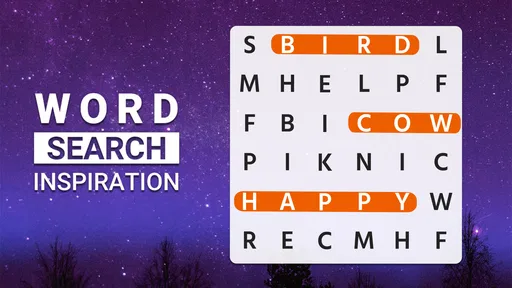
Word Search Inspiration is a word puzzle game designed for players who enjoy traditional word searches with a more relaxed and visually appealing presentation. You search for hidden words in letter grids, usually by swiping across connected letters in different directions. The game is suitable for short sessions, casual entertainment, and anyone who wants to exercise concentration and vocabulary without learning complicated rules.
How does the gameplay work?
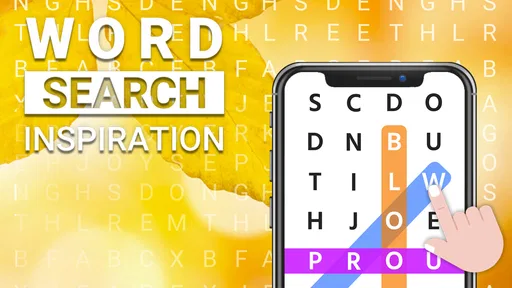
The main objective is to find the words listed below or beside each puzzle grid. Words may appear horizontally, vertically, diagonally, or in reverse, so carefully scanning the board is important. As you complete puzzles, the game can introduce new challenges and increasingly difficult layouts. The controls are generally simple: touch the first letter, drag across the word, and release when the full word is selected.
Is Word Search Inspiration suitable for beginners and children?
Yes, Word Search Inspiration is generally accessible to beginners because the basic mechanics are easy to understand and do not require previous puzzle experience. Its gradual progression can help new players become comfortable before facing more demanding grids. However, parents should review the app’s age rating, advertising, and privacy information before allowing children to use it, especially if the device is shared or connected to in-app purchases.
Does Word Search Inspiration require an internet connection?
The exact offline functionality may depend on the version installed and the features being used. Basic word-search puzzles may remain playable without a constant connection, but advertisements, synchronization, updates, leaderboards, or optional online content can require internet access. If offline play is important to you, test the game in airplane mode after installation and check the store listing for the developer’s current connectivity requirements.
Pros
- Relaxing word puzzles suitable for short or extended play sessions.
- Offers a simple interface that is easy for beginners to understand.
- Can help improve spelling
- vocabulary
- and visual word recognition.
- Provides a quiet
- low-pressure alternative to action-oriented mobile games.
- Works well for casual players who enjoy themed puzzle content.
Cons
- Some puzzles may become repetitive after extended play.
- Hints or extra features may be limited without optional purchases.
- Small letters can be difficult to read on compact phone screens.
- The app may feel too easy for experienced word-search players.
- Progression may offer limited variety beyond completing individual puzzles.













