

Word Search Hunt
- 856.00
- 4.9
- Installs
- 500.00K
- Price
- Free
Screenshots
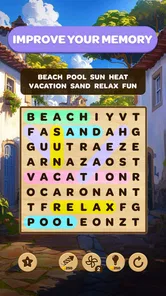
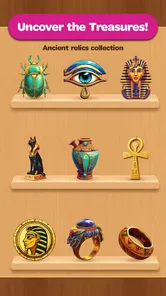
Analysis by Reviewed
I judge a word-search game less by how many extras it lists and more by whether its basic search feels easy to pick up, satisfying to finish, and flexible enough for an ordinary day. That is where Word Search Hunt makes its case: it turns the familiar task of spotting words in a letter grid into a quick mobile activity. I’d reach for it when I want a small mental diversion, not when I’m looking for a game that will occupy an entire evening.
A focused search, not a complicated puzzle system
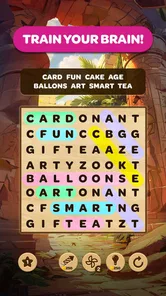
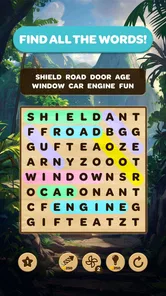
At its heart, this is a word search game: you scan a letter grid, pick out listed words, and trace each one with a swipe. That simple loop is the part I’d recommend it for. It asks for attention without demanding a long tutorial or a big time commitment, so it suits a short break when I want something more engaging than scrolling but less involved than a strategy game.
The theme-led approach also gives the search a little context. Rather than treating every grid as an identical jumble, a topic such as animals or nature can help me anticipate the kinds of words I’m looking for. My practical tip is to scan for unusual letter combinations first, then check the longer words; this can be quicker than reading the list repeatedly from top to bottom. It’s a small habit, but it makes a familiar puzzle feel more deliberate.
Unveiling the Word Search Hunt Experience
When I first downloaded Word Search Hunt, I was immediately impressed by its sleek and colorful interface. The app is user-friendly, making navigation a breeze even for those who might not be tech-savvy. It offers a variety of themes to choose from, ranging from nature and animals to more abstract concepts like emotions and space. This variety keeps the game fresh and engaging, ensuring that you never get bored of playing the same old puzzles.
Gameplay and Features
The gameplay is straightforward yet addictive. You’re presented with a grid of letters and a list of words to find. Simply swipe your finger across the screen to highlight the words as you discover them. The app offers multiple difficulty levels, which is perfect whether you're looking for a relaxing way to pass the time or a brain-busting challenge.
That range makes it easier to match a puzzle to my attention level: a gentler round works when I’m tired, while a tougher one is better when I want to concentrate. If you’re new to word searches, start with a comfortable difficulty and focus on completing the grid cleanly rather than racing. If you already solve these puzzles quickly, raise the challenge when the easier settings stop holding your attention. The appeal is the adjustable mental effort, not a complicated rule set.
One small technique that helps me avoid aimless scanning is to use the word list as a search plan. I look for a distinctive starting letter or an uncommon sequence, then sweep likely rows and columns rather than tracing every possible path. When a theme narrows the vocabulary, I use that as a hint about likely word shapes, not as proof that a guess is correct. This keeps the puzzle focused while leaving the actual spotting to me.
More From Our News Desk

 Gmail
GmailGmail in a Busy Inbox: Who Benefits Most?
From first account to crowded workday, Gmail earns its place through dependable search and flexible sorting—but its best fit depends on how much inbox maintenance you can tolerate.

 Prime Video
Switching to Prime Video: What Changes in Your Viewing Routine
Prime Video can make a compelling second home for streaming, but switching means learning a different catalog, rental layer, and route from browsing to playback.

 Universal TV Remote Control
Universal TV Remote Control Works Best as a Reliable Backup
A phone remote earns its place through quick setup and reliable habits. Here is how to get more from Universal TV Remote Control—and where its limits show.

 Weather - By Xiaomi
Weather by Xiaomi Review: Clear at a Glance, Less Clear Up Close
Xiaomi’s weather app makes everyday forecasts quick to scan, but its calm surface can leave useful details and recovery paths harder to find than they should be.

 X
XX Under Pressure: Can It Recover When Posting Goes Wrong?
A resilience-focused review of X, examining setup, mistaken posts, interruptions, weak connections, and the gaps that matter when recovery needs to be dependable.

 Clash of Clans
Clash of Clans Is Won Between the Battles
Its raids are quick; its community is a long-term project of coordination, teaching, rivalry, and shared responsibility—with all the friction that entails.
Latest News



How it fits into an ordinary day
For an everyday use, I can see this fitting into a waiting room or a quiet stretch on a commute: start a puzzle when there’s a few minutes to spare, then put the phone away when your stop arrives. It’s also a reasonable choice for a shared screen with someone who enjoys word games, since the basic swipe-and-find interaction is easy to understand. I wouldn’t choose it for a group looking for deep collaboration, though; the central activity is still an individual search through a grid.
A realistic routine might be opening a puzzle while waiting for a coffee or sitting before an appointment. I’d choose a comfortable difficulty if I expect interruptions, because a word search is easier to resume than a game that depends on remembering a chain of moves or a story plot. For a short wait, I’d aim to finish one round rather than start playing with a timer in mind. That makes the game feel like a contained break instead of another task to keep up with.
That same simplicity is useful when I want to share the phone with a child or a relative who is comfortable with basic touch controls. I’d let the other person choose a theme or take turns finding words, while keeping expectations modest: it can prompt a bit of friendly observation, but it is not built around teamwork. If one player is much faster, taking turns searching for separate words can make the moment more welcoming than comparing solve times.
Daily play and optional competition
One of the features I particularly enjoyed is the daily challenges. Each day, you get a new puzzle with a unique theme, and completing these challenges earns you rewards and badges. It’s a great way to keep players coming back daily, plus who doesn’t love a little reward for their efforts?
The daily format can be useful as a small routine rather than a reason to play for a long stretch. I’d treat the challenge as a ready-made starting point on days when choosing a puzzle feels like extra work, and skip it when I’d rather play casually. The trade-off is that anyone who dislikes recurring goals may find the reward loop less appealing than simply opening a puzzle whenever they want. The game is at its best when the daily prompt adds structure without turning a relaxing pastime into an obligation.
If you’re deciding whether a daily puzzle suits you, I’d separate the puzzle itself from the streak-like feeling that can come with a recurring activity. Play when it sounds enjoyable, and don’t let a badge or reward decide whether your break was worthwhile. That mindset is especially useful for people who want a low-pressure game: the daily challenge can provide direction, but it need not become a commitment.
Social play without losing the solo appeal
If you're competitive like me, you'll appreciate the leaderboards where you can see how your scores stack up against players worldwide. There’s also a fun feature where you can challenge your friends to beat your time in a particular puzzle, adding a layer of social interaction that’s often missing in solo play games.
These options make the game a better fit for players who enjoy comparing results, but they aren’t necessary to enjoy the core search. I’d focus on personal improvement if rankings make a casual game feel stressful; a quicker solve can be satisfying without turning every round into a contest. Compared with a paper word-search book, the app adds digital competition and themed presentation, while paper remains the better fit for anyone who wants to avoid screen time or play without a device. Compared with crosswords, this is more about visual scanning than clues and general knowledge, so it won’t replace them for someone who wants a vocabulary puzzle with a different kind of reasoning.
There’s also a practical difference between playing alone and making a challenge social. A leaderboard is most enjoyable if you like a quick comparison, but it can distract from the relaxed pace that makes this format appealing in the first place. I’d treat friend challenges as an occasional extra, not the reason to install the game. If your friends prefer cooperative play, a shared word game with explicit team goals would be a better match.
Free to start, with purchases to consider
While the app is free to download, it does offer in-app purchases. You can buy hints or remove ads for a smoother experience. However, I found that the ads were not intrusive, and the game is fully enjoyable without spending a dime.
It’s worth deciding what you want before paying: if you rarely get stuck, hints may add little; if ads interrupt your preferred rhythm, an ad-removal purchase may be more relevant. Purchases range from $0.49 to $99.99 per item, so I’d check the individual option carefully rather than assuming every purchase is a small add-on. The game is free to start, but that doesn’t mean every optional item costs the same.
For anyone who is unsure about spending, my advice is to play a few sessions first and notice what actually interrupts the fun. If it is the occasional difficult word, a hint may be useful; if it is an interruption between rounds, consider whether paying to change that experience is worth it to you. If neither is a real problem, there is no need to buy anything just because an option appears. That makes the free version a sensible way to decide whether the game’s particular style of searching suits you.
Who will get the most from it
I’d recommend it most to people who already like word searches, want a simple puzzle for short breaks, or enjoy having themes and daily challenges to return to. Its Everyone age rating makes it suitable for a broad audience, and Mad Brain Games LTD is the developer. The game is free, has a 4.5 average from around 700 ratings, and has passed 100,000 installs. It was released on April 26, 2024; version 0.23.1 lists Android 10 as the minimum operating system.
The strongest fit is someone who likes visible progress in small pieces: find a word, mark it, then move on. It can also suit a casual solver who wants familiar rules but appreciates choosing a theme or difficulty rather than opening a book to a random page. The themed grids offer a useful starting point for younger or less experienced players, while adjusting the challenge gives regular word-search fans a way to keep the task engaging.
I’d skip it if your main goal is a story-driven game, elaborate strategic choices, or a puzzle that relies on solving clues rather than spotting words in a grid. It may also be a poor match if you dislike ads, optional purchases, or competitive features, even though the basic puzzle can be enjoyed without spending money. The useful question is not whether word searches are generally relaxing, but whether repeating a focused scanning task is the kind of downtime you actually enjoy.
How it compares with other ways to unwind
Against a paper puzzle book, the phone version is convenient when I’m already carrying my device and want a themed puzzle without bringing anything extra. Paper wins if I prefer writing or circling answers by hand, want a break from screens, or need a puzzle that does not invite me to check scores. Neither format is automatically better; the right choice depends on whether convenience or a screen-free pause matters more at that moment.
Against crosswords and word-guessing games, the main difference is the kind of attention it uses. Here I’m visually searching for a word that is already given, rather than interpreting a clue or testing possible answers. That makes it easier to enter quickly, but it also means it offers less variety in the mental task. I’d choose this when I want a clear, bounded activity, and a crossword when I want to work through language and clues more deeply.
For players who want rapid action, plot, or a stronger sense of progression, this is likely too modest. Its appeal is precisely that it does not ask me to learn a large system before I can play. That trade-off is worth understanding before downloading: a small, repeatable puzzle can be relaxing, but it will not satisfy someone who needs every session to introduce a new mechanic or narrative development.
Final Thoughts
All in all, Word Search Hunt is a delightful app that brings a nostalgic game into the modern era with style and ease. It's perfect for anyone looking to sharpen their mind or simply unwind with a fun and engaging activity. With its blend of challenging puzzles, social features, and daily rewards, it’s a game that’s hard to put down once you start playing.
Whether you're a seasoned puzzle solver or a newcomer looking for a fun way to kill time, give Word Search Hunt a try. It might just become your new favorite app!
Word Search Hunt Frequently Asked Questions
Who developed Word Search Hunt, and what kind of game is it?
Word Search Hunt is a word puzzle game developed by Mad Brain Games LTD. Its central activity is finding words hidden among a grid of letters, making it a straightforward option for players who enjoy vocabulary challenges. The game’s store summary, “Unearth relics, solve puzzles, have fun!”, also hints at a puzzle-focused theme alongside the word-search gameplay.
What is Word Search Hunt and how does it work?
Word Search Hunt is an engaging puzzle game available on Android and iOS platforms. It challenges players to find hidden words within a grid of letters. The words can be arranged in various directions including horizontally, vertically, and diagonally. The game offers multiple levels of difficulty, allowing both beginners and seasoned word search enthusiasts to enjoy. Players can enhance their vocabulary and cognitive skills while having fun with this interactive game.
Is Word Search Hunt suitable for all age groups?
Yes, Word Search Hunt is designed to be suitable for all age groups. The game features different difficulty levels, ranging from easy to challenging, making it accessible for kids, teenagers, and adults. The easy levels can help young children develop their vocabulary, while the more complex puzzles provide a stimulating experience for older players. It’s a great family-friendly game that encourages learning and fun.
Can my phone or tablet run Word Search Hunt?
Word Search Hunt is available for Android devices that run Android 10 or later. Before downloading, check your device’s operating system version to make sure it meets that requirement. The game is listed as free to download, so compatibility is the main practical check for Android users before installing. It is also described as available on iOS.
Does Word Search Hunt require an internet connection to play?
No, Word Search Hunt does not require an internet connection for regular gameplay. Players can enjoy searching for words offline, making it a perfect companion for travel or situations where internet access is limited. However, some features, such as leaderboards or special event puzzles, might require an internet connection to access. This ensures players can enjoy the game anytime, anywhere.
Pros
- Engaging puzzles for all ages.
- Simple and intuitive interface.
- No intrusive ads interrupting play.
- Offline mode available.
- Regular updates with new puzzles.
Cons
- Limited free puzzles available.
- Some puzzles can be too easy.
- Occasional minor bugs.
- No multiplayer mode.
- In-app purchases can add up.













