

Word City: Connect Word Game
- 4.57K
- 4.8
- Installs
- 5.00M
- Price
- Free

Screenshots
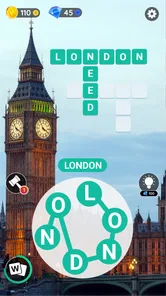
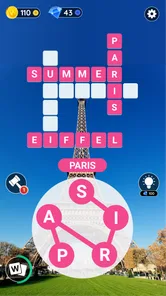
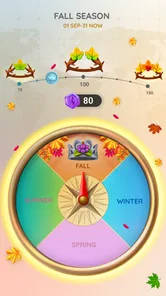

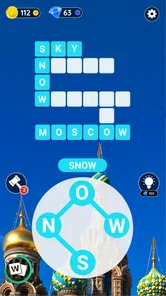
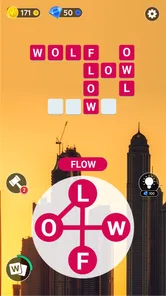
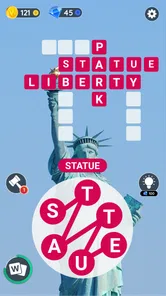
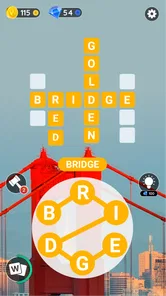
Analysis by Reviewed
I like to approach Word City: Connect Word Game as a small puzzle break rather than a game that needs a long, uninterrupted session. Its letter-linking format is easy to pick up: look at the available letters, trace a word, then use the remaining clues to work out what the puzzle expects. That simple loop suits a commute, a quiet coffee break, or a few minutes at home when I want to focus on something without having to learn complicated rules.
A useful rhythm for solving each board
My most reliable habit is to scan the letters before swiping and test familiar short words first. That gives me a feel for the combinations available, while making it less tempting to repeat the same guess in slightly different ways. If I get stuck, I pause and look for less obvious connections instead of tapping at random. The game is still about vocabulary, but a little patience often helps more than speed.
Because the puzzles are designed around connecting letters, I find it more satisfying when I treat each board as a word-finding exercise instead of a race. A quick session can be enough to complete a level, while a tougher board can become a longer challenge. That flexibility is a good fit for casual play, though anyone looking for timed competition or a head-to-head match should choose a different kind of word game.
Getting Hooked with Word Challenges
Right off the bat, Word City: Connect Word Game draws you in with its simple yet captivating interface. The premise is straightforward: connect letters to form words. But don’t be fooled by its simplicity; the game ramps up the challenge as you progress. There's something incredibly satisfying about swiping your finger across the screen as you piece together words at lightning speed. Each level feels like a new adventure as you unlock different cities, each with its unique theme and set of words to discover.
Why It’s a Must-Play
Now, let’s talk about what makes this game stand out. First off, it’s perfect for anyone who loves a good brain workout. The difficulty increases at just the right pace, keeping you on your toes without feeling overwhelmed. Plus, the game is free to play, with some optional in-app purchases if you want to enhance your experience a bit more.
Another thing I absolutely love is the design. The graphics are clean and vibrant, and the music is soothing, which is perfect for those long gaming sessions. The app also doesn’t bombard you with ads, which is a huge plus in my book. It’s like the developers knew exactly what would make a player happy!
Exploring Different Cities
One of the coolest features is the city exploration aspect. As you complete levels, you unlock new cities to visit. Each city has its own set of challenges and themes. It’s like taking a little world tour, but from the comfort of your couch. This aspect keeps the game fresh and exciting as you never know what new words you’ll encounter in the next city.
More From Our News Desk

 Gmail
GmailGmail in a Busy Inbox: Who Benefits Most?
From first account to crowded workday, Gmail earns its place through dependable search and flexible sorting—but its best fit depends on how much inbox maintenance you can tolerate.

 Prime Video
Switching to Prime Video: What Changes in Your Viewing Routine
Prime Video can make a compelling second home for streaming, but switching means learning a different catalog, rental layer, and route from browsing to playback.

 Universal TV Remote Control
Universal TV Remote Control Works Best as a Reliable Backup
A phone remote earns its place through quick setup and reliable habits. Here is how to get more from Universal TV Remote Control—and where its limits show.

 Weather - By Xiaomi
Weather by Xiaomi Review: Clear at a Glance, Less Clear Up Close
Xiaomi’s weather app makes everyday forecasts quick to scan, but its calm surface can leave useful details and recovery paths harder to find than they should be.

 X
XX Under Pressure: Can It Recover When Posting Goes Wrong?
A resilience-focused review of X, examining setup, mistaken posts, interruptions, weak connections, and the gaps that matter when recovery needs to be dependable.

 Clash of Clans
Clash of Clans Is Won Between the Battles
Its raids are quick; its community is a long-term project of coordination, teaching, rivalry, and shared responsibility—with all the friction that entails.
Latest News



Oh, and did I mention the daily challenges? They add a nice touch by offering extra rewards and keeping you coming back for more. It’s a clever way to ensure players stay engaged and continuously test their word skills.
Settings, pace, and spending
Before settling into a routine, I’d check the available settings and adjust the sound to suit where I’m playing; the gentle audio that works at home may be less welcome in a waiting room. I also keep sessions short when I’m tired, since familiar letters can start to blur together and guesses become less deliberate. The practical advantage is that the basic puzzle loop is easy to return to without needing to remember a complicated strategy.
It is free to start, but optional purchases range from $0.99 to $49.99 per item, so I’d treat spending as a choice rather than a requirement. I’d first see how far I get using the ordinary puzzle flow and only consider a purchase if I understand what it changes and genuinely want it. For parents, the game is rated Everyone; that label is useful context, but I’d still make purchase decisions deliberately on a shared device.
Where it fits among word games
Compared with a standard word search, where I scan a fixed grid for listed words, this asks me to build words from a set of letters and infer the answers the board needs. It feels more guided than a blank crossword because the letters provide a starting point, but less open-ended than free-form word play. That middle ground is the appeal: it offers a clear task without asking me to plan a whole puzzle strategy.
For a realistic everyday example, I’d open it while waiting for an appointment, finish one board if time allows, and put the phone away without feeling I have to protect a long run. Daily challenges can provide a reason to return, but I wouldn’t turn them into an obligation; skipping a day is better than making a relaxing game feel like homework. If you prefer competitive scoring, strict timers, or a large shared crossword to solve with friends, another word title will suit you better.
Who will enjoy the routine
I’d recommend it to someone who likes vocabulary puzzles, wants a gentle mental warm-up, and enjoys seeing progress through themed cities. It also works for players who appreciate a clear, repeatable action: inspect letters, try a considered word, then move on. The trade-off is that the central interaction stays familiar. If you need constant changes in mechanics or a deep narrative to keep you engaged, the letter-connection format may begin to feel repetitive.
Word City is from Unico Games Studio, and its 4.7 average rating across around 161,000 ratings suggests that many players enjoy this approachable style. It has passed 5 million installs, is free to download, and includes optional in-app purchases. The current version is 4.2.26, and it runs on Android 5.1 or later. Those details make it easy to judge whether it suits your device and preferences without confusing a simple puzzle game with a more demanding commitment.
Making a short session count
I get more out of the game when I give a board one deliberate pass before I start experimenting. I look for obvious letter pairs, then try likely short words and use each result to reassess what remains. This is more useful than repeatedly swiping the same sequence with tiny changes: the latter feels busy but rarely gives me a fresh clue. If a board stalls, taking a brief pause is a practical reset, not wasted time.
There is also a small vocabulary habit that helps: when I find a word, I mentally note why it worked, such as an unusual letter pairing or a familiar ending. That gives me a better starting point on later boards without turning play into a formal study session. I would not expect it to replace a language-learning tool, but it can make casual word practice more attentive.
Choosing the right moment to play
The game works best when I can give the letters a little attention. It is easy to open during a short wait, but noisy or distracted surroundings can make me rush and miss combinations. If I’m standing in a queue, I’ll aim for a quick attempt rather than forcing myself to finish a board; at home, I can take more time with a stubborn puzzle. That flexibility is more valuable than treating every session as a complete run.
For someone deciding whether to install it, the practical questions are simple: do you enjoy forming words from a limited set of letters, and are themed progression and recurring challenges enough motivation for you? If yes, the format offers an accessible way to fill small gaps in the day. If you mainly want a dictionary reference, a structured spelling course, or a social game with shared turns, those tools are designed for different needs.
Progress without turning it into homework
The city structure gives progress a visible sense of direction, but I find it healthier to treat that as a gentle nudge rather than a checklist. A daily challenge can be a welcome change of pace when I feel like opening the game; it need not decide whether the day’s play was worthwhile. This matters for a casual puzzle, because once a reminder or reward becomes an obligation, the relaxing part can disappear.
I also wouldn’t judge my vocabulary by how quickly I clear a board. Some puzzles invite immediate answers, while others benefit from stepping back and noticing a different order of letters. That variation makes patience a useful skill, but it does not make the game a test of general knowledge. I play it for the satisfying moment when a combination clicks, not for a serious measure of language ability.
When another word game is a better fit
Word City sits between a traditional word search and a more open crossword-style experience. A fixed-grid search gives you a list and asks you to spot each answer; here, the letter set itself is the starting clue, so I have to generate possible words and decide which ones fit the board. A crossword may offer richer clue-solving and more room for broad knowledge, while a competitive word game can add pressure through an opponent or a timer. This one is calmer than those options, but its narrower interaction is also its main constraint.
I would steer away if you want every session to introduce a new mechanic or if you lose interest once you understand the core action. The changing city themes help give the journey character, but they don’t alter the basic pleasure of tracing letters into words. On the other hand, players who want an approachable solo puzzle without a steep learning curve may prefer that consistency to a game that keeps adding rules.
What I would check before settling in
I would take a moment to check the sound controls before playing somewhere quiet, and I’d be mindful of purchase prompts if a child uses the same device. The game is free to download, while optional in-app purchases are available; that makes it reasonable to begin without paying, but it is still worth knowing how spending is handled on a shared phone or tablet. The Everyone age rating is a helpful starting point for families, not a substitute for setting household purchase expectations.
On Android, the listed minimum is version 5.1, so checking the operating system before troubleshooting is sensible if installation is an issue. The game’s current version is 4.2.26. It has been available since December 13, 2017, and its 3.9K reviews sit alongside a 4.7 average. I see those figures as useful context for an established casual game, not a promise that every player will enjoy the same pace or puzzle style.
Final Thoughts
So, if you’re on the hunt for a new word game that’s both fun and challenging, give Word City: Connect Word Game a shot. It’s a delightful mix of puzzle-solving, exploration, and word discovery that will keep you entertained for hours. Whether you’re a casual gamer or a word game aficionado, this app has something for everyone. Happy word hunting!
My own verdict is more specific: I’d keep it around for calm, low-pressure word practice, not as my only puzzle game. Its strongest quality is how quickly I can understand what a board asks of me; its main limitation is that the familiar letter-linking loop will not satisfy everyone for long. If that balance sounds right, it’s an easy one to try, and you can decide from a few short sessions whether the city progression gives you enough reason to continue.
Who I’d recommend it to
I’d point a friend toward this game if they like short solo puzzles and want a small, repeatable mental task rather than a complicated campaign. It is especially suited to people who enjoy spotting letter patterns, prefer a forgiving pace, and find themed progress motivating. Someone who often plays in brief pockets of free time can dip in without needing to coordinate with another person or remember a long sequence of rules.
I’d be less likely to recommend it to a player who wants a competitive ladder, shared solving, or a different kind of challenge every time they open an app. Those preferences are not faults in the game; they simply call for a different format. Likewise, anyone who finds repeated swiping dull may be happier with a clue-heavy crossword or a word game built around opponents and turn-taking.
A grounded verdict on the routine
My best advice is to use Word City as an optional break: choose a quiet moment, scan before guessing, and stop when the puzzle stops feeling enjoyable. That approach makes the most of its approachable word-linking without relying on speed or turning daily play into a duty. If the city progression keeps you curious, there is a clear reason to return; if it does not, the core activity is easy to assess quickly and move on from.
Word City: Connect Word Game Frequently Asked Questions
Is Word City: Connect Word Game suitable for short play sessions?
Yes. Word City: Connect Word Game is built around forming words by connecting letters and completing puzzles, so it can suit players who want to fit a puzzle into a spare moment as well as those who prefer to keep playing. The simple central mechanic is easy to pick up, while the puzzles can become more challenging as you advance.
Who developed Word City: Connect Word Game, and how popular is it?
Word City: Connect Word Game is developed by Unico Games Studio. It has a 4.7 average rating from around 161,000 ratings, with roughly 3,900 written reviews and over 5 million installs. Those figures suggest that many players have tried it, although individual preferences differ, so the letter-connecting puzzle format is the best guide to whether it will suit you.
What age group is Word City: Connect Word Game suitable for?
Word City: Connect Word Game has an Everyone content rating, so it is presented as suitable for a broad audience. Its word puzzles may appeal to people who enjoy spelling and vocabulary challenges, whether they are new to this type of game or already familiar with it. As with any game, parents can consider whether its puzzle format suits a child before downloading.
What does Word City: Connect Word Game cost, and does it have in-app purchases?
Word City: Connect Word Game is free to download and play, so you can try its letter-connecting puzzles without paying upfront. It also offers optional in-app purchases, with prices ranging from $0.99 to $49.99 per item. Purchases are not required to begin playing, but the game’s original description notes that options such as hints and additional features may help players progress or customize their experience.
What is Word City: Connect Word Game?
Word City: Connect Word Game is a mobile puzzle game that challenges players to find hidden words by connecting letters on a grid. It's a fun and addictive game that helps improve your vocabulary and spelling skills, with thousands of levels and different themes to keep you entertained for hours. The game is developed by Unico Games Studio and is listed in the word-game category.
Pros
- Engaging word puzzles
- Improves vocabulary skills
- Daily challenges available
- User-friendly interface
- No internet required
Cons
- Contains ads
- Limited free hints
- Repetitive levels
- In-app purchases needed
- Some words are obscure













