Box Away
- 996.00
- 4.6
- Installs
- 500.00K
- Price
- Free

Screenshots
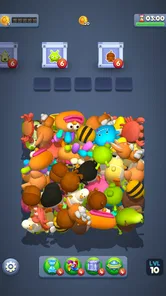

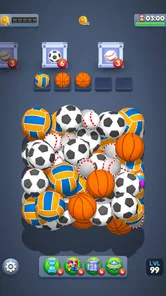
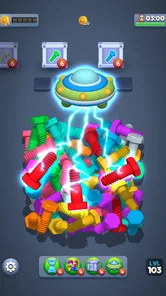



Analysis by Reviewed
I spent time with Box Away as a casual 3D puzzle game, paying particular attention to how comfortably it works in different everyday situations. Its basic idea is easy to understand: objects appear in a busy three-dimensional space, and I sort matching pieces into boxes. That simple task gives the game a calm rhythm, but it also creates a few accessibility questions that matter more than the cheerful presentation might suggest.
Created by Unico Games Studio, this free puzzle game is aimed at Everyone and runs on Android devices using version 6.0 or later. It has reached over 500 thousand installs and holds a 4.6 average from around 12 thousand ratings, which suggests that its straightforward sorting loop has found a sizeable audience. I can see why: it is the kind of game I can open for a short break without learning a complicated ruleset first.
The current version is 1.001, and the central appeal is not speed or competition. It is the small satisfaction of finding order in a crowded arrangement. That makes Box Away a potentially comfortable choice for players who enjoy visual organization, but the same visual focus can become a limitation for anyone who needs strong contrast, large targets, or very predictable touch interactions.
How clearly the game communicates what to do
The opening concept is unusually approachable for a sorting game. I do not need to memorize a long tutorial or understand a fictional world before making progress. The objects themselves provide most of the explanation, while the boxes give the goal a visible shape. In practical terms, I look for related items, select or move them, and work toward clearing the scene.
That directness helps players who prefer learning by doing. It also makes the game suitable for a quick introduction to someone who does not normally play puzzle games. A family member can watch one round and understand the general objective without needing gaming vocabulary. For people who find complex menus tiring, this low-commitment structure is one of the strongest parts of the experience.
Navigation is similarly easy to grasp at a basic level. The game keeps attention on the puzzle rather than surrounding it with a large amount of text. I found that useful when playing in short sessions, because I could return after a break and remember the purpose immediately. The visual arrangement acts as the main instruction, so the player is not constantly switching between a board and a separate explanation screen.
There is a trade-off, though. When a game communicates mostly through pictures, the quality of those pictures becomes central. A player who has difficulty distinguishing small shapes, similar colors, or objects partly hidden by other pieces may have a harder time than someone with strong visual detail perception. The simple rules do not automatically make every board simple to read.
More From Our News Desk

 Gmail
GmailGmail in a Busy Inbox: Who Benefits Most?
From first account to crowded workday, Gmail earns its place through dependable search and flexible sorting—but its best fit depends on how much inbox maintenance you can tolerate.

 Prime Video
Switching to Prime Video: What Changes in Your Viewing Routine
Prime Video can make a compelling second home for streaming, but switching means learning a different catalog, rental layer, and route from browsing to playback.

 Universal TV Remote Control
Universal TV Remote Control Works Best as a Reliable Backup
A phone remote earns its place through quick setup and reliable habits. Here is how to get more from Universal TV Remote Control—and where its limits show.

 Weather - By Xiaomi
Weather by Xiaomi Review: Clear at a Glance, Less Clear Up Close
Xiaomi’s weather app makes everyday forecasts quick to scan, but its calm surface can leave useful details and recovery paths harder to find than they should be.

 X
XX Under Pressure: Can It Recover When Posting Goes Wrong?
A resilience-focused review of X, examining setup, mistaken posts, interruptions, weak connections, and the gaps that matter when recovery needs to be dependable.

 Clash of Clans
Clash of Clans Is Won Between the Battles
Its raids are quick; its community is a long-term project of coordination, teaching, rivalry, and shared responsibility—with all the friction that entails.
Latest News



I also think the three-dimensional presentation deserves attention. Depth can make the search more interesting, because an object may be obscured or visually mixed into the pile. It can also make the board less predictable for players who need flat, clearly separated layouts. The game’s appeal depends on noticing relationships between objects in space, not merely matching two large symbols on a plain grid.
For readers deciding whether it is easy to follow, my answer is conditional: the objective is clear, but the board may demand careful visual scanning. If you enjoy locating details in a cluttered picture, that is part of the fun. If visual clutter quickly becomes exhausting, the same design may feel like work rather than relaxation.
Why the visual sorting loop can feel calming
My favorite quality is the steady movement from disorder to order. Each successful match reduces the visual noise, and that gives the player a small, understandable reward without requiring a complicated strategy. It is a good fit for a quiet pause after work, while waiting for an appointment, or during a short commute when I want something more engaging than scrolling.
The game is also presented as playable offline, which changes how I think about its use. I can treat it as a self-contained distraction rather than something that depends on a reliable connection. That is particularly useful in places where reception is inconsistent, or when I want to limit background interruptions. It makes the game more practical for travel and for brief moments away from home.
Offline play does not remove every situational concern. A crowded board still needs concentration, and a moving vehicle can make detailed touch interaction less comfortable. I would choose a stable seat for careful levels and reserve the game’s easiest moments for situations where my attention is divided. The absence of a connection requirement helps, but it does not turn a visually precise puzzle into a hands-free activity.
Touch control, hand movement, and fatigue
Sorting games often look gentle while quietly asking for repeated taps, drags, or selections. In Box Away, the main physical challenge comes from identifying an object and interacting with it accurately among neighboring pieces. That means the game may suit someone who enjoys light, repeated touch input, but it may be less comfortable for players with tremors, limited reach, joint pain, or difficulty maintaining a steady finger position.
A useful approach is to play with the device supported on a table rather than holding it in midair. That reduces the need to stabilize both the phone and the hand at the same time. I also prefer short sessions when my hands feel tired, because the game’s relaxing pace can make it easy to continue longer than intended. The absence of frantic timing is helpful, but repeated precision can still produce fatigue.
Players who use one hand should consider the physical size and placement of the puzzle area on their particular phone. A larger screen may make objects easier to inspect, yet it can also require more reach. A smaller screen can be easier to hold but may compress the visual details that distinguish one object from another. This is one of those cases where the device itself becomes part of the accessibility experience.
I would not recommend relying on the game while walking, cooking, or doing another task that needs both hands. The offline format makes it available in more places, but the sorting action still benefits from deliberate attention. Someone looking for an audio-first or completely passive experience should choose a different type of game.
Sound, sight, and the sensory balance
The core challenge is visual, so players who prefer puzzles based on text, sound, or logic grids may find the sensory balance less suitable. On the positive side, the sorting premise does not depend on a long story or dense written instructions. That can reduce the reading burden for people who find extended text difficult or who simply want a game that communicates quickly.
At the same time, visual simplicity should not be confused with visual accessibility. Objects can be recognizable in general and still difficult to separate when they overlap or share similar colors. I found it helpful to slow down and inspect the whole arrangement before making a move, rather than tapping at the first item that looked familiar. This is a practical habit for avoiding mistakes and reducing the strain of repeatedly searching the same area.
The game may work well for players who like quiet, low-pressure stimulation, especially because its advertised offline design supports a focused session without depending on live interaction. It is less obviously suited to someone who needs every important distinction expressed through more than one sensory channel. If color or shape recognition is difficult, the player may have to spend much more effort interpreting the board than the relaxed theme suggests.
Parents and carers may also appreciate the Everyone content rating when choosing a simple puzzle for a broad age range. The rating makes the intended audience clear, but it does not tell me whether every visual interaction will be comfortable for every child. Younger players may understand the goal quickly while still needing help with patience, careful tapping, or recognizing partially hidden objects.
Using it in real situations
One realistic use is a short waiting period with no dependable internet. I might sit in a clinic waiting room, put my phone on a stable surface, and play a few rounds without needing to sign into a service or follow a live event. The game’s sorting structure gives that time a clear beginning and end, while the offline nature avoids the frustration of a connection drop.
Another use is a quiet wind-down before bed, although I would keep the session brief if screen stimulation affects my sleep. The game does not demand the emotional intensity of a competitive match, and there is no need to coordinate with other players. That makes it easier to stop after a small amount of play than a multiplayer game that constantly asks me to respond.
For a shared setting, I can imagine one person solving while another suggests which objects to inspect. This may work nicely with a child, an older relative, or a friend who is curious about puzzle games but does not want to control a fast action title. However, shared play can expose the board’s visual limitations: one person may notice a small object immediately while another may need the phone closer or the scene explained aloud.
Travel is another strong context, particularly when mobile data is limited. The game’s offline positioning makes it more dependable than puzzle titles that require constant online access. Still, I would avoid playing during a bumpy ride if precise selection becomes uncomfortable. The best setting is one where I can pause, adjust the viewing angle of the device, and give the board my full attention.
What may still get in the way
The biggest barrier is the dependence on visual searching. A player with low vision, color-vision differences, or difficulty processing crowded scenes may find that the central mechanic creates friction at every stage. The game can be relaxing only when recognizing and selecting objects feels manageable. If that first step is tiring, the reward of clearing the boxes may not compensate for the effort.
Touch precision is the second concern. A misplaced tap can be more annoying in a sorting game than in a broad-button puzzle, because the player is usually working among several nearby objects. People with motor difficulties may want to test the game carefully rather than assuming that its slow pace guarantees easy control. Calm timing helps, but it does not replace generous interaction targets.
There is also a monetization consideration. The game is free to download, while optional purchases range from about one dollar and forty cents to nearly ninety dollars per item. That wide spread means I would approach the purchase screens carefully, especially on a shared family device. The free entry point is attractive, but anyone trying to keep spending strictly controlled should make sure the device’s purchase protections are configured before handing it to a child.
Players who want deep deduction, wordplay, or a large strategic system may outgrow the basic sorting loop. Box Away is closer to visual organization than to a traditional logic puzzle where every move follows a chain of deductions. That is not a flaw for its intended mood, but it is an important distinction. If I want a demanding brainteaser, I would look toward a grid-based logic game; if I want a gentle object-finding task, this is the better match.
The same distinction applies to people seeking social features or a competitive reason to return. The appeal here is personal focus and gradual completion, not interaction with a community. Someone who needs leaderboards, direct challenges, or a strong narrative may find the experience too solitary. Someone who wants a private, low-pressure activity may see that simplicity as a benefit.
Who I would recommend it to
I would recommend Box Away to players who enjoy tidy visual tasks, casual object matching, and games that can be picked up without a long tutorial. It is especially appealing if you want an offline puzzle for waiting rooms, travel, or short breaks and prefer a calm pace over timers and competition.
I would also suggest trying it for a family member who is curious about mobile games but dislikes complicated controls. The basic purpose is easy to explain, and the Everyone rating makes it a reasonable candidate for a broad household audience. I would still watch the first session to see whether the board’s detail and touch requirements are comfortable for that particular person.
I would skip it if visual clutter is a major source of stress, if you need strong non-visual cues, or if small touch targets regularly cause frustration. I would also choose another puzzle category if my goal were serious deduction, vocabulary practice, or long-term strategic planning. This game’s strength is its focused sorting routine, not its breadth.
After using it, my view is positive but specific. Box Away understands the appeal of making a messy scene orderly, and its free, offline format gives that idea practical value. Its accessibility is strongest in its clear objective, gentle pace, and low reading burden. Its weaker side is the unavoidable dependence on visual discrimination and accurate touch input.
My inclusive verdict is that Box Away is worth trying when visual sorting feels comfortable for you. It offers a friendly entry point, works well in disconnected situations, and can provide a quiet mental reset without demanding a large time commitment. Just approach it with realistic expectations: the relaxed mood does not remove the need to see details clearly, reach the relevant parts of the screen, and control repeated touches.
For me, that balance makes it a good recommendation for casual puzzle fans rather than a universal fit. If your hands, eyes, and attention are comfortable with a three-dimensional object hunt, the gradual clearing of each scene can be genuinely satisfying. If those demands are exactly what you are trying to avoid, a flatter, text-led, or more generously controlled puzzle will probably serve you better.
Box Away Frequently Asked Questions
What kind of puzzles does Box Away offer?
Box Away is a puzzle game built around dropping, sorting, and collecting 3D objects into boxes. Its simple premise makes it easy to understand before starting, while the sorting challenges invite players to think through where objects should go. The store describes the experience as relaxing, so it may appeal to people looking for a calm puzzle rather than a fast-paced action game.
What is Box Away and how does the game work?
Box Away is a casual puzzle game focused on moving, matching, or clearing boxes through increasingly challenging levels. Its gameplay is designed to be easy to understand at first, but later stages require more careful planning, timing, and attention. After testing it, the game feels best suited to short sessions, making it a convenient choice for commuting, waiting, or relaxing without needing a long time commitment.
Is Box Away free to download and play?
Box Away is free to download, though it offers in-app purchases priced from $1.41 to $89.99 per item. Free access may include advertisements, optional purchases, extra lives, hints, or other bonuses. Before downloading, users should check the store listing for current information about in-app purchases and confirm whether any paid features are necessary to progress comfortably.
Does Box Away require an internet connection?
The basic puzzle experience in Box Away may be playable without a continuous internet connection, which is useful when traveling or when mobile data is unavailable. However, certain features can depend on connectivity, including advertisements, cloud synchronization, updates, events, leaderboards, or purchases. For the most reliable experience, it is recommended to launch the game online at least once and keep it updated.
Is Box Away suitable for children and beginners?
Box Away is approachable for beginners because its core controls and objectives are usually introduced gradually. Children may also enjoy the colorful, straightforward puzzle format, and its Everyone content rating makes it suitable for a broad audience. Parents should still review advertising, privacy information, and possible in-app purchases before allowing independent play. Some later levels can become more demanding, so younger players may occasionally need help understanding the best solution.
Pros
- Simple interface makes browsing and managing files easy.
- Cloud storage keeps files accessible across multiple devices.
- Useful sharing options for sending files to others.
- Supports collaboration on shared files and folders.
- Automatic syncing helps keep updated versions available.
Cons
- Free storage is limited compared with some competing services.
- Large uploads may take time on slower internet connections.
- Advanced features often require a paid subscription.
- Offline access may need files to be selected manually first.
- Occasional sync delays can make recent changes appear later.