Solo Cat : CatPOP music game
- 44.00
- 4.7
- Installs
- 1.00M
- Price
- Free

Screenshots

Analysis by Reviewed
I’d treat Solo Cat: CatPOP music game as a cheerful, short-session rhythm game rather than something to build a serious practice routine around. Its cat-themed presentation gives familiar tap-to-the-beat play a softer, sillier mood, which makes it easy to try during a break. The important question for me is whether that first burst of charm holds up once the novelty wears off; the answer depends on how much you enjoy repeating music challenges and chasing better timing.
Why the first sessions are easy to enjoy
The basic appeal is immediate: music sets the pace, tapping gives you something active to do, and the cats keep the tone light. I can see it fitting into an ordinary wait for a bus or a few spare minutes before bed. A round gives that small, focused task that works well when I want a game but don’t have the time or attention for a longer adventure.
It is also approachable for someone who has not played many rhythm games. You do not need to learn a complicated control scheme before getting started, while improving your timing gives repeat attempts a purpose. The trade-off is that players who want a deep music game, detailed performance tools, or a demanding competitive scene may find the simple format limiting.
A practical fit for short breaks
I’d reach for it when I have a little time to fill but still want to pay attention to something. On a commute, for example, I could play a brief round while waiting, then stop when my ride arrives instead of trying to remember a long quest or story. At home, a song or two can make a quick break feel more playful than scrolling without a purpose.
That use case has a caveat: rhythm play asks for enough attention to hear and follow the music. If I’m in a loud place, holding a conversation, or trying to keep one eye on something else, the game loses much of what makes it satisfying. I’d save it for a moment when I can focus, and use a passive music app when I only want sound in the background.
What keeps it useful after the novelty
The game is free to download, and FunGo Studio is the developer. It sits in the music-game corner of mobile gaming, with an Everyone age rating. Its average rating is 4.6 from around 1.6 thousand ratings, and it has passed half a million installs. Those figures suggest that its friendly concept has found an audience, but they do not tell me whether every player will enjoy returning to the same kind of challenge.
For longer-term value, I would use it in small, deliberate bursts: pick a song, focus on cleaner timing, then stop before tapping becomes automatic. That makes improvement feel more satisfying than playing on in the background. A practical tip is to give the music your attention rather than relying on the visuals alone; rhythm games are easier to judge when you listen for the beat and keep your taps steady.
More From Our News Desk

Weather by Xiaomi Review: Clear at a Glance, Less Clear Up Close

X Under Pressure: Can It Recover When Posting Goes Wrong?

Clash of Clans Is Won Between the Battles

Android Auto Makes the Case for Quieter Car Software

MobiOffice: Transforming Mobile Productivity with Seamless Integration

EA SPORTS FC™ Mobile Soccer: Redefining Mobile Sports Gaming
Compared with a broad music-streaming app, this is an active game, not a way to explore or play songs passively. Compared with more technical rhythm titles, its appeal is the cute presentation and low barrier to entry rather than a promise of serious training. If I wanted a deep charting challenge, I would choose a more specialized rhythm game; if I wanted an easy, cat-themed distraction, this is the better fit.
The Purr-fect Concept
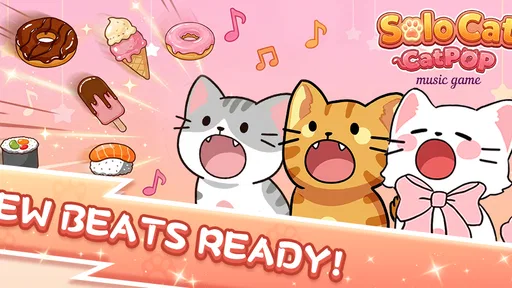
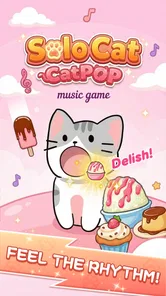
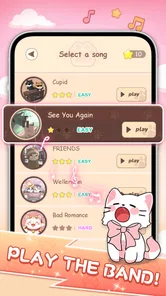
Imagine a world where cats are the ultimate pop stars. That's exactly what Solo Cat: CatPOP music game is all about. The game invites you to embark on a musical journey where you guide your adorable cat character through various catchy tunes. From classical to pop, the music library is as diverse as it is entertaining. I found myself tapping along to the beat, completely engrossed in the gameplay.
Gameplay Mechanics
The mechanics are simple yet challenging. You tap on the screen to the rhythm of the music, helping your cat character hit the right notes. As you advance, the songs get faster and more complex, demanding quick reflexes and a good sense of timing. It's a game that's easy to pick up but hard to master, which is exactly what keeps players coming back for more.
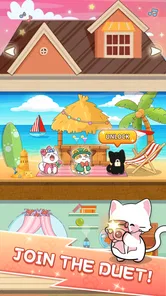
What really stands out is the vibrant and colorful graphics. Each level is beautifully designed, with charming animations that bring the cat characters to life. The visual appeal is complemented by the catchy soundtracks, making it a feast for both the eyes and ears.
Making a routine without turning it into homework
For me, a useful way to judge a rhythm game is to notice whether I’m returning because I enjoy the music and the timing challenge, or because I feel compelled to clear a checklist. Solo Cat’s best role is a small, optional habit: play when I want a focused pause, and leave it alone when I don’t. That approach matters especially for casual players, since missing a session should not make a light game feel like another task waiting on a to-do list.
If I want to get more from a short session, I’d choose one song and concentrate on one thing, such as keeping a steadier rhythm, instead of jumping around just to fill time. Then I’d stop while I still feel engaged. This makes a replay feel like a deliberate attempt rather than an automatic loop, and gives me a clearer sense of whether I’m enjoying the game itself or only its first impression.
Customization and Features
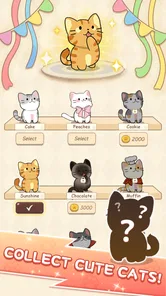
One of the features I really enjoyed is the ability to customize your cat character. You can unlock various outfits and accessories by completing levels and earning points. It adds a layer of personalization that makes the game even more engaging. Additionally, the app offers daily challenges and leaderboards, encouraging you to improve your skills and compete with friends.
What to expect from regular play
Daily challenges and leaderboards can give a returning player a reason to check in, but they also shape the game into a routine. I would treat them as optional prompts, not obligations: missing a day should not turn a relaxing music game into a chore. If competition motivates you, a leaderboard can make replaying a song feel purposeful; if it makes every run feel like a score test, skipping that pressure is part of enjoying the game on your own terms.
Customization is a nice reward, though it is most meaningful if changing a cat’s look is part of the fun for you. I would focus first on learning the rhythm and let outfits come as a side benefit, rather than grinding solely for cosmetics. That keeps the music at the center and helps avoid turning a playful game into a checklist.
The current version is 1.6.7, and the game was released on July 12, 2024. It supports Android 6.0 or later and includes optional in-app purchases, with items priced from $0.99 to $9.99. I would try the free experience before spending: purchases make sense only if you already know that the game’s repeated music-and-tapping loop is something you want more of. This is also a useful distinction for parents: the age rating is Everyone, but optional purchases are still worth discussing with younger players.
What the purchase choice means in practice
Because the game can be downloaded for free and has optional purchases, I’d begin by deciding whether the basic rhythm loop is enough for me before paying for anything. An attractive outfit may add a personal touch, but it will not necessarily make repeated tapping more rewarding if that core activity has already started to feel samey. I’d treat spending as a way to support a game I already enjoy, not as a shortcut to discovering whether I enjoy it.
For a family phone, I’d make the same distinction clear to a younger player: the Everyone rating makes the content broadly suitable, while optional purchases still involve real spending. Setting expectations before handing over the device is more useful than assuming a friendly cat theme means every choice in the app is automatically a no-cost choice.
Small habits, and when they stop helping
A sensible way to make it last is to use it as a brief reset rather than a constant background activity. For example, after finishing a task, I might play a song or two, pay attention to where my timing slips, and then put the phone away. That creates a clear stopping point and makes each session feel intentional. Playing while distracted may still pass the time, but it is less satisfying if the goal is to improve.
The main fatigue risk is repetition: the core pleasure comes from listening, tapping, and trying to do better, so it may wear thin if you expect every session to introduce a different kind of play. The simple controls are a strength for quick access, but they also set a ceiling for players who want more strategic input. And while a bright screen and lively music are part of the charm, they may not suit a quiet setting or someone looking for a subdued game.
Who is likely to stick with it
I think it suits cat fans, casual players, and anyone who likes a small timing challenge more than a long campaign. It can also work for someone new to rhythm games who wants a gentle introduction before trying titles with denser patterns or more exacting play. The approachable premise gives you a reason to try a round without first learning a lot of terminology or systems.
I would be less likely to recommend it to someone who wants music discovery, instrument practice, or a serious score-focused contest. A streaming service is better for browsing and listening; a learning app is a better choice for building musical skills; a specialist rhythm game is a better match for demanding patterns and deeper competition. Solo Cat occupies a narrower space: it pairs a playful cat presentation with a straightforward musical challenge.
How I’d decide whether to keep it
After trying it, I would ask myself two practical questions: do I still enjoy tapping along when the cat novelty is familiar, and do the challenges make me want to improve rather than simply collect rewards? If the answer to both is yes, the daily prompts and personal progress can support a modest recurring habit. If not, there is little reason to force a routine; a free game can be worth a quick visit without earning permanent space on your phone.
Final Thoughts
Overall, Solo Cat: CatPOP music game is a delightful blend of music, strategy, and feline charm. It's a game that appeals to a wide audience, from casual gamers to hardcore rhythm enthusiasts. Whether you're looking to kill some time or immerse yourself in an enchanting world of music and cats, this app is sure to deliver hours of entertainment. So, grab your headphones and get ready to tap your way to cat stardom!
Solo Cat : CatPOP music game Frequently Asked Questions
What device requirements should I check before downloading Solo Cat: CatPOP?
Solo Cat: CatPOP is a music game for Android and iOS, and the Android version requires Android 6.0 or later. Checking your device’s operating system before downloading can help you avoid compatibility issues. The game is free to download, so you can try its cat-themed rhythm gameplay without an upfront purchase.
Who developed Solo Cat: CatPOP, and how has it been received by players?
Solo Cat: CatPOP is developed by FunGo Studio. It has an average rating of 4.6 from around 1.6 thousand ratings, giving prospective players a quick sense of its reception. Ratings are only one way to judge a game, but they can be useful alongside its music-focused premise and playful cat theme when deciding whether it suits you.
What is Solo Cat: CatPOP music game about?
Solo Cat: CatPOP is a rhythm-based music game where players guide an adorable cat through various music tracks. The objective is to hit the right notes in time with the music to score points and progress through increasingly challenging levels. The game combines engaging music tracks with delightful cat-themed animations, making it both fun and visually appealing.
What platforms is Solo Cat: CatPOP available on?
Solo Cat: CatPOP is available for download on both Android and iOS platforms. It can be downloaded from the Google Play Store for Android users and the Apple App Store for iOS users. The game is designed to perform smoothly on a wide range of devices, ensuring a great experience for all players.
Is Solo Cat: CatPOP free to play?
Yes, Solo Cat: CatPOP is free to download and play. However, the game offers in-app purchases for players who wish to enhance their experience. These purchases range from $0.99 to $9.99 per item, so it is worth keeping that option in mind if you prefer to avoid optional spending.
Pros
- Engaging rhythm-based gameplay.
- Colorful and fun graphics.
- Wide selection of popular songs.
- Simple controls suitable for all ages.
- Regular updates with new content.
Cons
- Advertisements can be intrusive.
- Limited free song selection.
- Requires internet for some features.
- In-app purchases can be costly.
- Occasional performance lags.











