Rush Tiles: Rhythm Music Piano
- 7.00
- 4.0
- Installs
- 1.00M
- Price
- Free

Screenshots




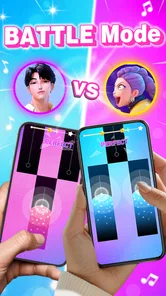
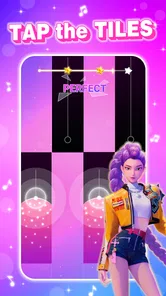

Analysis by Reviewed
I spent time with Rush Tiles: Rhythm Music Piano as a quick music game built around one simple challenge: tap the piano tiles accurately while the pace tests how quickly your fingers and eyes can react. It is easy to understand within moments, but the appeal comes from trying to stay calm when the pattern speeds up. I found it most enjoyable in short sessions, especially when I wanted something more active than a casual puzzle but less demanding than a full rhythm game with a large control system.
The game comes from iMusic Game and is free to play. It sits in the music category, carries an Everyone age rating, and has reached more than a million installs. Those details match the way it feels in use: this is an approachable title aimed at broad audiences, not a specialist music-training tool. You do not need piano knowledge, a strong gaming background, or a long tutorial before starting.
How I built a reliable playing routine
My first useful discovery was that success depends less on frantic tapping than on creating a repeatable rhythm. I began by playing with one finger, which made the controls easy to understand but also caused unnecessary movement when tiles appeared quickly. Switching to a comfortable two-thumb position gave me better reach and reduced the temptation to chase every tile with the same finger.
That small change matters because the game asks for visual timing rather than musical knowledge. I watched the incoming tiles, kept my hands close to the lower part of the screen, and tried to tap from the wrists instead of lifting my whole hand. The result was not instantly perfect, but it made mistakes easier to understand. When I failed, I could usually tell whether I had reacted late, tapped outside the intended area, or lost focus while following the speed.
I recommend beginning with a few relaxed attempts rather than treating the first run as a serious score challenge. The opening moments are useful for learning the spacing and the visual rhythm. Once I stopped trying to force speed immediately, I became more consistent. Accuracy is the foundation of speed in this game; rushing before your eyes recognize the pattern usually creates a chain of avoidable errors.
A practical everyday scenario is a short break between tasks. I can play a handful of attempts while waiting for an appointment or taking a coffee break, then put the game away without feeling that I have started a long campaign. That makes it a better fit for fragmented time than games that require a story, a team, or a lengthy match. It also means the game works well for people who want a small reflex exercise rather than a large entertainment commitment.
The basic loop does become familiar quickly. You tap, react, restart after a poor run, and try to improve your control. That simplicity is part of the charm, but it is also the first sign of the game’s limits. Players looking for character progression, exploration, or a deep music library may find the experience narrow. I enjoyed the directness, though I would not choose it when I want a substantial game session.
More From Our News Desk

Weather by Xiaomi Review: Clear at a Glance, Less Clear Up Close

X Under Pressure: Can It Recover When Posting Goes Wrong?

Clash of Clans Is Won Between the Battles

Android Auto Makes the Case for Quieter Car Software

MobiOffice: Transforming Mobile Productivity with Seamless Integration

EA SPORTS FC™ Mobile Soccer: Redefining Mobile Sports Gaming
Making the screen easier to read
Before trying to improve my results, I checked the available in-game options instead of assuming that the default setup would suit every phone. The most important settings are the ones that affect comfort and concentration. I looked for choices related to sound, vibration, and presentation, then adjusted anything that distracted me during repeated attempts. A rhythm game can feel harder than it really is when the phone is too loud, the feedback is irritating, or the display is uncomfortable to watch.
Sound is useful when it supports timing, but I did not always want it. In a quiet public place, playing silently made the game more practical. At home, audio helped me settle into a steadier pace. I would not treat sound as a replacement for watching the tiles, because visual attention remains essential, but it can provide a helpful sense of flow when it matches the action.
Vibration deserves a similar check. Some players like physical confirmation after a tap, while others find it breaks concentration. During my longer practice sessions, I preferred reducing distractions and relying on what I could see. If your fingers begin reacting to vibration instead of the tile movement, turning that feedback down is worth trying. This is a small adjustment, but it can make repeated practice less tiring.
Screen comfort is another overlooked factor. I played with the phone at a stable angle and avoided holding it too close to my face. A clean display and moderate brightness helped me distinguish the moving tiles without making my eyes work harder than necessary. I also found that wiping the screen before playing was surprisingly useful: rapid taps become less dependable when the surface is greasy or when a finger slides instead of landing cleanly.
The current version is 1.0.31, and the game runs on devices using Android 8.0 or later. For someone deciding whether an older phone can handle it, that minimum requirement is the practical checkpoint to consider. I would still keep the device charged and close other demanding apps before a serious session, not because this is an especially complex title, but because interruptions and background slowdowns can ruin a rhythm attempt.
There is also a social setting question. I would not recommend beginning a focused run while notifications are appearing across the screen. A message banner at the wrong moment can break concentration and make the result meaningless. My better habit was to silence interruptions for a few minutes, place the phone securely, and then start. That routine costs almost no time and makes the score feel more representative of my actual control.
Turning quick reactions into repeatable patterns
Once the basic controls felt familiar, I stopped thinking of every tile as an isolated emergency. Instead, I watched for short visual groups. The useful skill is not simply tapping faster; it is recognizing where the next action is likely to be and moving efficiently toward it. I kept my fingers relaxed and tried to avoid returning to a fixed starting point after every tap.
That approach helped with alternating movement. When tiles appeared on different sides, I let the nearer finger handle the next tap rather than forcing one finger to do everything. The technique is especially helpful when the game accelerates, because a single finger may spend too much time crossing the screen. It also reduces strain during repeated attempts.
I found it useful to separate practice into two goals. In one run, I focused on surviving as long as possible without worrying about a personal best. In another, I deliberately worked on cleaner movement and accepted that I might not go as far. This distinction prevented every mistake from feeling like a failure. The survival run built confidence, while the technique run exposed the habits that were slowing me down.
A less obvious tip is to pay attention to where you look. I initially stared at the tile I was about to tap, which made me late for the following one. Shifting my attention slightly upward helped me prepare earlier. I was not trying to predict an unknown pattern; I was simply giving my eyes enough time to process what was already visible. That change made a bigger difference than tapping harder or gripping the phone more tightly.
Another useful habit is to stop after a few poor attempts. When I became frustrated, I started tapping with more force and less accuracy. A short pause reset my hands and attention better than immediately pressing restart. Because the game is designed for quick retries, it is easy to fall into an unproductive loop of repeating the same mistake. A deliberate break turns practice into a learning process instead of automatic frustration.
For players who use the game as a finger-speed exercise, I would keep sessions short and consistent. A few focused minutes several times during the week are more useful than one long session in which your hands become tense. This is not a claim that the game replaces structured musical training or medical exercise; it is simply a practical way to work on visual reaction and controlled tapping while enjoying a game.
The music-game comparison is important here. Unlike a traditional piano-learning app, this title does not ask me to read notation, learn chords, or build a repertoire. Unlike a rhythm game that emphasizes song selection, timing lanes, or elaborate performance systems, it keeps the attention on tile placement and finger response. That makes it immediately accessible, but it also gives experienced rhythm players fewer layers to explore.
Where the challenge stops being enough
The game’s strongest quality is also its clearest boundary. Its focused tile-tapping loop is satisfying when I want a fast test, but the experience does not offer the wider range I would expect from a full music game. Anyone hoping to practice real piano technique should choose a dedicated piano-learning product instead. Anyone wanting a richer rhythm system may prefer a title built around songs, note types, progression, or competitive modes.
I also would not recommend it to someone who dislikes repetition. Improvement comes from replaying similar actions and refining small timing errors. There is no need to invest a large amount of time, but the game does ask for patience if you want noticeably better results. Players who need a strong narrative or a changing world may quickly feel that each attempt lacks context.
Another limitation is that finger speed alone does not solve every problem. If the screen is small, your hand position is awkward, or your attention is divided, faster tapping can make performance worse. I had better results when I treated comfort as part of the strategy. A stable grip, clean screen, suitable volume, and fewer notifications mattered as much as raw reflexes.
The Everyone rating makes it an easy recommendation for mixed-age households, although younger players may still benefit from sensible screen-time limits. The controls are simple enough for a first try, yet the faster sections can be demanding. I would introduce it as a short challenge rather than an endless activity, particularly for children who may keep restarting in pursuit of a better result.
The free price also lowers the barrier to trying it. I could install it without making a purchase decision first, which suits a game that is best judged through a few personal sessions. Still, free access should not be confused with unlimited depth. The value here comes from quick entertainment and repeatable reflex practice, not from a large collection of systems or long-form content.
Its average rating is 4.0 from around 1.2 thousand ratings, with a small number of written reviews visible alongside that score. I read that overall reception as positive but measured rather than a guarantee that every player will find lasting depth. The install count, now above a million, suggests that the straightforward concept has broad appeal, yet popularity does not change the central trade-off: easy entry in exchange for a relatively focused experience.
My verdict after learning its rhythm
I recommend Rush Tiles: Rhythm Music Piano to anyone who wants a free, uncomplicated music game for short bursts of concentration. It is particularly suitable for players who enjoy chasing personal improvement, testing hand-eye coordination, or filling a few spare minutes with something more active than scrolling. The controls are approachable, and the challenge becomes meaningful once you start refining hand position, visual focus, and restart habits.
I would skip it if your main goal is to learn piano, play complete songs, or explore a deep rhythm-game system. A dedicated educational app will be more useful for technique, while a larger rhythm title will offer more variety and progression. This game is not trying to be either of those things, and judging it by those standards would miss its purpose.
For the best experience, I would begin with two fingers, adjust sound and vibration to match the environment, keep the phone steady, and use separate attempts for survival and technique. Watch slightly ahead of the tile you are tapping, pause when frustration starts affecting accuracy, and keep sessions short enough that your hands remain relaxed. These habits do not add imaginary features; they simply make the existing loop more rewarding.
In my experience, the title succeeds because it does not bury its main idea under unnecessary complexity. I can open it, understand the challenge, and immediately test whether my reactions are improving. The version available now is 1.0.31, it supports Android 8.0 and later, and its free, Everyone-rated format makes it easy to try. If you want a compact reflex game with a musical feel, it is worth a place on your phone; if you want a complete piano or rhythm-learning journey, look elsewhere.
Rush Tiles: Rhythm Music Piano Frequently Asked Questions
What devices can run Rush Tiles: Rhythm Music Piano?
Rush Tiles: Rhythm Music Piano is a music game for Android devices running Android 8.0 or later. Before downloading, check your device’s operating-system version in its settings to make sure it meets that requirement. The game’s simple tap-based style is designed for touchscreen play, so a compatible phone or tablet is the natural way to enjoy its rhythm challenges.
Who developed Rush Tiles: Rhythm Music Piano, and when was it released?
Rush Tiles: Rhythm Music Piano was developed by iMusic Game and released on August 25, 2024. It is listed as a Music game, with Rush Tiles as its short description. If you are comparing rhythm games before installing, those details can help you identify the right title and developer in the app store.
What is Rush Tiles: Rhythm Music Piano?
Rush Tiles: Rhythm Music Piano is a fast-paced music game where you tap, hold, and follow moving tiles in time with songs. The main challenge is to maintain the rhythm while the speed increases and patterns become more demanding. It combines simple one-touch controls with arcade-style gameplay, making it easy to start but progressively harder to master.
How do you play Rush Tiles: Rhythm Music Piano?
Gameplay is based on tapping the correct tiles as they appear on the screen and keeping your actions synchronized with the music. Missing a tile or tapping incorrectly can interrupt your performance, so concentration and timing are important. New players may need a few attempts to get used to the speed, while experienced users can focus on achieving higher scores and longer combos.
Does Rush Tiles: Rhythm Music Piano require an internet connection?
The game may allow some basic gameplay features to work offline, but an internet connection can be necessary for downloading songs, loading advertisements, synchronizing progress, or accessing certain online content. Availability may vary depending on the version installed and the device. It is best to open the game online at least once after installation and check which features remain available without a connection.
Pros
- Simple tap controls make it easy for beginners to start playing.
- Wide song selection provides variety for different musical tastes.
- Fast rounds are convenient for short gaming sessions.
- Increasing speed keeps later levels challenging and engaging.
- Bright visuals and sound effects make the gameplay feel energetic.
Cons
- Some songs or features may require in-app purchases to unlock.
- Frequent retries can become frustrating when patterns speed up.
- Gameplay may feel repetitive after extended sessions.
- Requires precise timing
- which can be difficult on smaller screens.
- Ads may interrupt the experience
- especially between attempts.











