Preschool & Kindergarten Games
- 10.36K
- 4.2
- Installs
- 1.00M
- Price
- Free
Screenshots

Analysis by Reviewed
What makes a preschool learning game worth returning to is not simply a bright screen; it is whether a child can understand what to do, enjoy trying, and stop without feeling they have lost a long contest. Preschool & Kindergarten Games is best approached as a collection of short learning activities rather than a single game with one long storyline. That makes it handy for a brief practice session, though it also means parents should set expectations: progress here is about building familiarity, not racing through a campaign.
Small goals that make starting easy
The activities focus on early skills such as letters, numbers, counting, and math, so a parent can give a child a simple goal before handing over the device: find a few letters, practise counting, or try one puzzle. That framing helps keep play purposeful without turning it into a test. I’d avoid asking a young child to complete everything in one sitting; choosing one kind of activity at a time makes it easier to notice what holds their attention and when they are ready for a break.
That flexible use is a strength for families with uneven routines. A child waiting for an appointment might manage a short matching activity, while a caregiver at home could sit beside them and talk through a counting game. The adult’s presence matters: asking “How did you work that out?” can turn a tap into a useful conversation, especially when a child guesses or makes a mistake.
How play, practice, and progress fit together
RosiMosi LLC makes this educational game for preschool and kindergarten learners. It is free to start, rated for Everyone, and has an average rating of 4.3 from around 28,000 ratings, with over 1 million installs. The current version is 15.0.5, and it runs on Android 8.0 or later. In-app purchases range from $4.99 to $39.99 per item, so I’d check what is included before treating the free starting point as the whole experience.
Progress you can see without a score chase
For this age group, useful progress can look modest: a child recognises a letter sooner, counts with less prompting, or works through a puzzle more patiently. I would watch for those signs rather than assume a game’s completion or a streak is proof of learning. Since the activities span different early topics, a child may find one area comfortable and another unfamiliar; switching to a better-fitting activity is more helpful than insisting they master every task in order.
A practical tip is to let the child choose between two activities rather than asking an open-ended “What do you want to play?” A limited choice can make starting smoother while still giving them a sense of control. If they repeatedly choose the same activity, that may mean it feels reassuring, not that they are making no progress. A gentle invitation to try a related topic can broaden practice without making the session feel like homework.
Difficulty, attention, and the adult’s role
The app’s range of difficulty levels can suit children at different starting points, but a label such as “preschool” cannot tell you exactly how a particular child will respond. I’d stay nearby for the first few sessions, especially if the child is new to touchscreens, and notice whether instructions are clear to them in practice. If they become stuck, demonstrate one turn and then let them try; taking over every answer can make the activity smoother but removes the useful thinking that the puzzle is meant to invite.
More From Our News Desk

Weather by Xiaomi Review: Clear at a Glance, Less Clear Up Close

X Under Pressure: Can It Recover When Posting Goes Wrong?

Clash of Clans Is Won Between the Battles

Android Auto Makes the Case for Quieter Car Software

MobiOffice: Transforming Mobile Productivity with Seamless Integration

EA SPORTS FC™ Mobile Soccer: Redefining Mobile Sports Gaming
Short sessions are also a sensible way to manage attention. The game can fill a quiet moment, but it should not become the default answer to every lull, and it is no substitute for talking, drawing, building, or playing away from a screen. I’d use it as one small part of a varied routine, then stop while the child still has energy for another activity. That tends to make the next invitation feel optional rather than like a demand.
What to check before making it a regular choice
The free price lowers the barrier to trying it, but the listed in-app purchases are a real consideration for a family budget. I would explore the available activities with an adult present before letting a child browse independently, and check purchase settings on the device so an accidental tap does not become an unwanted charge. The app is aimed at early learners, but it will not suit every child: a child who wants open-ended drawing, a story-led adventure, or a curriculum with a very specific sequence may be happier with a different kind of educational app.
Compared with a single-skill alphabet or counting game, this one offers a broader mix of early-learning practice in one place. That variety is useful when a child’s interests change from day to day, but a focused alternative may be easier if you want to work on one clearly defined skill. And compared with a physical book or hands-on counting objects, a screen game gives immediate interaction but cannot replace the sensory and social parts of learning together. I’d choose the format based on the moment, not expect one app to do every job.
For a realistic routine, imagine a child settling in after preschool while dinner is being prepared. I’d sit with them for a few minutes, let them choose a letter or number activity, and ask them to explain one answer. If they start tapping quickly without thinking, that is my cue to pause or switch to something offline, rather than encouraging them to keep going just to finish. The best use is a calm, shared burst of practice—not a way to measure a child against other children.
What the experience feels like in practice
Hey there! So, I recently got my hands on this app called Preschool & Kindergarten Games, and let me tell you, it’s a delightful blend of fun and learning for the little ones. If you’re a parent or caregiver looking for a way to keep your kids engaged while learning, you’re going to want to hear about this.
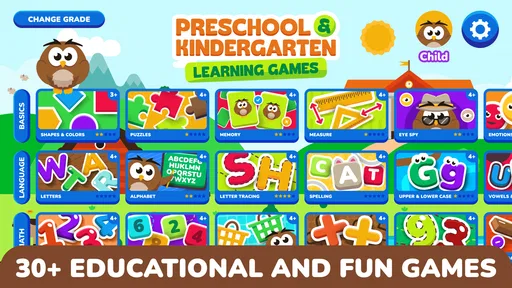
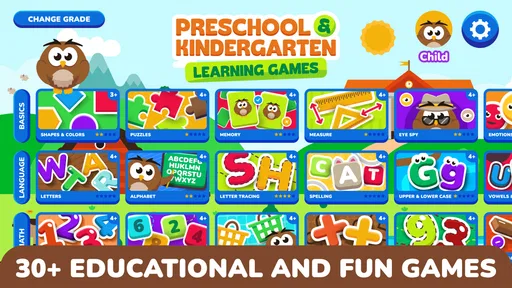
The app is packed with a variety of educational games designed specifically for preschoolers and kindergarteners. I honestly think it’s a lifesaver for those moments when you need a quick educational distraction for your child. The app is colorful, intuitive, and effortlessly navigable, which is perfect for young kids who are just starting to explore the digital world.
A World of Learning
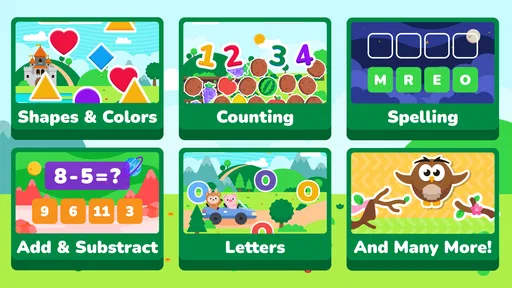
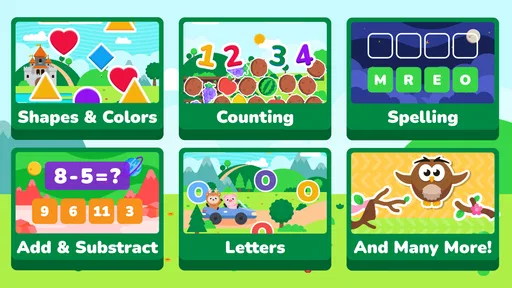
Once you dive into the app, you'll find games that cover a range of subjects. From basic math and counting to the alphabet and phonics, Preschool & Kindergarten Games is like a mini classroom on your device. I loved how it tackles learning through play, which is essential at this age. The app offers interactive puzzles, matching games, and even some catchy songs that my niece couldn’t stop singing!
One of the first things I noticed was how the app encourages critical thinking and problem-solving. For example, the puzzles and sorting games are designed to make kids think logically and figure things out on their own. It’s like sneaky learning, and I’m all for it!
User-Friendly Experience
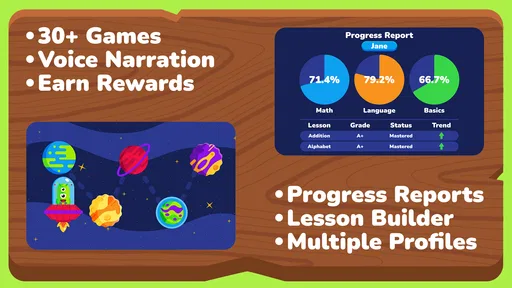
Let’s talk about how user-friendly this app is. The interface is bright and colorful, with cute animations that really capture the attention of young users. Each game has simple instructions, so kids can easily follow along without getting frustrated. Plus, the voiceovers are clear and friendly, guiding the kids through each activity with a cheerful tone.
The app also offers a variety of difficulty levels, which is great because it can grow with your child. Whether they’re just starting to recognize numbers or are ready to tackle more complex patterns, there’s something for every stage of development.
Parental Controls and Safety
If you’re like me and constantly worried about screen time and content, you’ll appreciate the built-in parental controls. The app allows parents to monitor usage and even tailor the games to suit their child’s learning needs. It’s reassuring to know that the app creators have thought about safety and control, which is so important in today’s digital age.
Moreover, the app doesn’t bombard you with ads, which is a huge relief. Kids can focus on learning without being interrupted by pop-ups or external links. It’s a clean, safe environment for them to explore.
When I’d recommend it—and when I wouldn’t
I’d recommend giving it a try if you want a varied set of early-learning activities for a preschooler or kindergartener, especially when you can join in and keep the session short. The game’s breadth makes it more adaptable than a narrowly focused practice tool, and its approachable activities can help a child feel comfortable trying letters, numbers, and puzzles. A child who is already comfortable with basic concepts may still enjoy the variety, but I would not treat it as a substitute for a more advanced learning program.
I would skip it if you need a tightly structured lesson plan, detailed progress tracking for an adult, or a screen-free activity. Likewise, if your child becomes frustrated by touch controls or tends to tap through instructions, playing together is likely to work better than leaving them alone with the device. The useful question is not whether the app can keep a child occupied for a long time, but whether a particular activity leaves them curious enough to talk about what they just did.
A sensible way to judge its staying power
Its appeal comes from having several kinds of practice to choose from, not from a high-pressure progression loop. That is a good fit for young children, who often benefit more from repeating a comfortable activity than from being pushed toward the next unlock. I’d let interest guide the pace, while occasionally offering a different subject so practice does not become monotonous. If a child loses interest, ending the session is a better choice than turning play into a negotiation.
So, if you’re ready to give your kids a head start in their learning journey, you can find this gem on both Android and iOS. Happy learning!
My progression verdict
Overall, I see this as a flexible practice companion rather than a game built around dramatic rewards or a finish line. Its early goals are easy to explain, and the variety gives caregivers room to match an activity to a child’s mood and current skills. The trade-off is that adults need to supply some structure: choose a sensible activity, keep an eye on attention, and connect the on-screen task to everyday learning. Used that way, it can make a short stretch of screen time feel purposeful without pretending that every child needs the same pace.
Making a trial session useful
When I first introduce this kind of activity to a child, I would treat the first visit as a chance to learn what draws them in, not as a test of whether the app is worth keeping. Offer a small choice, watch how they handle the instructions, and notice whether they can return to the task after a wrong answer. Those observations help decide whether to keep the session simple or move toward a more challenging activity. They also make it easier to spot when the child is enjoying the theme but not really engaging with the learning task.
One useful trade-off is that a broad selection can reduce the need to install several narrowly focused games, but it can also make it harder to maintain a particular learning sequence. If a teacher or caregiver is working on one specific letter sound or number concept, I would pair the app with a book, conversation, or hands-on activity that reinforces that exact goal. The app is more convincing as a flexible practice option than as a substitute for a planned lesson.
Choosing it for the right moment
This game is a better fit for a child who likes brief, guided challenges and benefits from variety than for one who wants to create freely or follow a continuous story. A caregiver with only a few spare minutes can use a single activity as a contained diversion, then close the device without needing to preserve a long run of progress. For a child who gets absorbed and resists stopping, I would agree on the endpoint before opening the app—for example, one chosen activity—so the boundary is clear and predictable.
Families comparing it with worksheets may appreciate the more interactive feel, while families comparing it with open-ended learning apps may find its task-based approach more focused. Neither format is automatically better: worksheets can suit quiet pencil practice, and open-ended tools can suit imaginative exploration. I would choose this one when a child needs a simple prompt and immediate response, rather than when the goal is extended creative play or a complete home curriculum.
My recommendation is to try it alongside an adult, keep the first session brief, and judge the experience by the child’s attention and conversation afterward—not by how many activities they complete. That gives you a practical sense of whether its mix of early learning and short play fits your household. If the child asks to explain a choice or notices a letter later in the day, that is a more meaningful sign of engagement than simply asking to stay on the screen.
Preschool & Kindergarten Games Frequently Asked Questions
Is Preschool & Kindergarten Games appropriate for a child’s first learning game?
Preschool & Kindergarten Games is an educational game focused on preschool, kindergarten, and pre-K learning. Its activities cover foundational subjects such as letters, numbers, and math, making it a possible starting point for children exploring early learning games. A parent can preview the activities and decide whether the content and play experience suit the child.
Who developed Preschool & Kindergarten Games?
Preschool & Kindergarten Games is developed by RosiMosi LLC. It is an educational game intended for young learners, with preschool and kindergarten topics at its center. Parents can consider the developer and the game’s learning focus when deciding whether it fits their child’s needs and the kinds of activities they want to offer.
What does Preschool & Kindergarten Games teach?
Preschool & Kindergarten Games is an educational game for early learners, with activities involving ABCs, numbers, math, and more. Its preschool and kindergarten focus makes it a playful way for children to explore foundational topics. Parents looking for a learning game can use its mix of subjects to introduce or practice basic concepts through simple activities.
What age group is Preschool & Kindergarten Games suitable for?
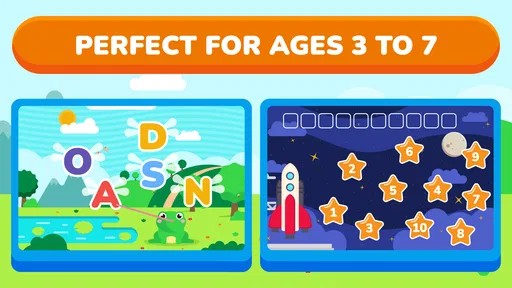
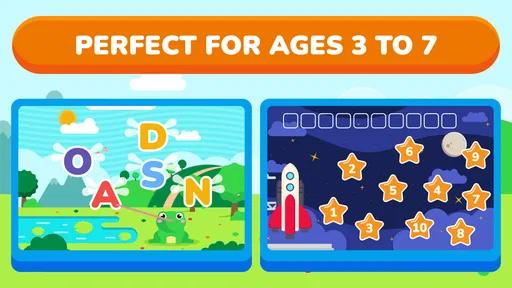
Preschool & Kindergarten Games is designed for children aged 2 to 6 years. The app offers age-appropriate activities that focus on early learning skills, including shapes, colors, numbers, and letters. It provides a safe and engaging environment for young children to explore and develop foundational skills before entering formal education.
Is Preschool & Kindergarten Games available on both Android and iOS platforms?
Yes, Preschool & Kindergarten Games is available for download on both Android and iOS devices. You can find it on the Google Play Store for Android users and the Apple App Store for iOS users. This cross-platform availability ensures that more children can access the educational content regardless of their device type.
Pros
- Engaging interface for young children.
- Wide variety of educational games.
- Colorful graphics and animations.
- Simple navigation for easy use.
- Supports multiple languages.
Cons
- Some games require in-app purchases.
- Limited offline functionality.
- Occasional ads can be disruptive.
- May not suit older kids.
- Requires frequent updates.