Play Pretend Food Menu
- 0.00
- 0.0
- Installs
- 1.00
- Price
- $1.49

Screenshots







Analysis by Reviewed
When I think of a pretend restaurant game for a young child, I look for something that can prompt a conversation rather than keep a child busy by itself. Play Pretend Food Menu is an educational game from Evil Alien, built around the familiar idea of choosing food and acting out a restaurant visit. That makes it an easy concept to try at home: a child can be the customer, the cook, or the person taking an order, while an adult joins in when the play needs a little direction.
What the purchase gets you
The game costs $1.49, so this is a paid download rather than a free game supported by ads or optional purchases. The listed price is the clearest basis for deciding whether it suits your budget; I wouldn’t assume anything about future costs or purchase policies beyond that. Its Everyone rating makes it suitable for a broad audience, though a younger child will still benefit from an adult nearby to turn tapping into conversation and shared pretend play.
Where it fits in a child’s day
A practical way to use it is during a short wait at home or while a meal is being prepared. I’d invite a child to choose an imaginary order, then ask who it is for, what should go on the plate, and how they might describe it to a customer. That gives the screen time a simple beginning and end, instead of leaving the child to browse without a purpose. It can also give a shy child a low-pressure way to practise asking for something or taking turns in a make-believe exchange.
A small activity with a clear purpose
For me, the useful question is not whether a pretend-menu game can replace toys or conversation; it cannot. The better question is whether it gives a child an easy starting point for a shared activity. A food choice can lead naturally into naming ingredients, deciding who is hungry, or explaining what a customer wants. Those are simple exchanges, but they make the activity more engaging than handing over a device with no plan and hoping it holds attention.
A realistic moment might be a child waiting for dinner while an adult finishes cooking. I would ask them to take the role of server and bring me an imaginary order, then let them decide whether I should have a snack or a full meal. When the food is ready, the pretend restaurant can end without needing a score, a prize, or a long session. That short routine suits families who want a screen activity that can be folded into ordinary home life rather than treated as a separate event.
Whipping Up Imagination
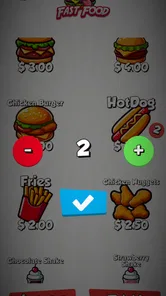
The Play Pretend Food Menu app is all about sparking creativity and enhancing the pretend-play experience for kids. It's like giving them a tiny restaurant to run, right on your phone or tablet. Once you fire up the app, you're greeted with a colorful selection of dishes ranging from classic burgers to exotic sushi. It's a visual treat, and the playful design is sure to capture any kid's attention.
Easy-Peasy Navigation
One of the first things that stood out to me was how intuitive the app is. It's designed with little fingers in mind, so kids can easily navigate through the menu options. The icons are big and bold, and the app responds quickly to taps, which is crucial when you're dealing with an excited mini-chef. Plus, the lack of complicated text means even pre-readers can join in on the fun.
More From Our News Desk

 Gmail
Gmail in a Busy Inbox: Who Benefits Most?
From first account to crowded workday, Gmail earns its place through dependable search and flexible sorting—but its best fit depends on how much inbox maintenance you can tolerate.

 Prime Video
Switching to Prime Video: What Changes in Your Viewing Routine
Prime Video can make a compelling second home for streaming, but switching means learning a different catalog, rental layer, and route from browsing to playback.

 Universal TV Remote Control
 Works Best as a Reliable Backup
A phone remote earns its place through quick setup and reliable habits. Here is how to get more from Universal TV Remote Control—and where its limits show.

 Weather - By Xiaomi
Weather by Xiaomi Review: Clear at a Glance, Less Clear Up Close
Xiaomi’s weather app makes everyday forecasts quick to scan, but its calm surface can leave useful details and recovery paths harder to find than they should be.

 X
X Under Pressure: Can It Recover When Posting Goes Wrong?
A resilience-focused review of X, examining setup, mistaken posts, interruptions, weak connections, and the gaps that matter when recovery needs to be dependable.

 Clash of Clans
 Is Won Between the Battles
Its raids are quick; its community is a long-term project of coordination, teaching, rivalry, and shared responsibility—with all the friction that entails.
Latest News



Customization Galore
What I absolutely love about this app is the level of customization it offers. Kids can mix and match ingredients to create their own dishes. Want a pizza topped with ice cream and pickles? No problem! This feature not only makes the game more engaging but also encourages kids to explore their culinary creativity without any mess in your actual kitchen.
Turning choices into conversation
One way I’d make those food choices more meaningful is to ask the child to explain a dish rather than simply select it. They might describe what makes it tasty, decide which character would order it, or invent a name for an unusual combination. This gives a child room to tell a story without making the game feel like a lesson. It also works well for mixed ages: a younger player can point to a choice, while an older sibling can help build the restaurant scene around it.
There is a trade-off here. Ready-made food visuals can help a child who has trouble thinking of a pretend scenario from scratch, but they also steer play toward the options on screen. If a child wants to invent foods that are not represented or build an elaborate restaurant with toys, paper, and blocks, drawing a menu or using play food may leave more room for that kind of open-ended play. I see the app as a prompt, not a boundary on what the child is allowed to imagine.
A Safe Space for Fun
As a parent, safety is always top of mind, and Play Pretend Food Menu delivers on this front. The app is ad-free, which is a huge relief because the last thing you want is for your child to accidentally tap on an ad. Moreover, it doesn't require any internet connection, so your little ones can play without interruptions.
Choosing between screen play and props
Compared with paper menus, toy food, or open-ended drawing, a menu game gives a child ready-made visual prompts and avoids setting up a play space. It is especially handy when you are away from home or want a quick activity before dinner. Physical props are the better choice when a child wants to handle objects, share a pretend meal with siblings, or move around; the app is best treated as one small prompt for imaginative play, not a replacement for every kind of play.
The choice between digital and physical play also depends on what you need in that moment. If you are travelling light, a phone or tablet is easier to bring than a collection of toy dishes. If two children are trying to build a shared restaurant, however, physical objects can make it easier for them to act out serving and cooking together. I would pick the game for a compact, guided starting point and reach for props when movement, cooperative play, or making things by hand is the main appeal.
Small ways to get more from it
I’d try handing the device to the child only after agreeing on a role: “You’re the server; I’m ordering.” Then switch roles, or ask the child to invent a menu special and explain why it belongs on the menu. These little choices make the activity more social without adding a complicated set of rules. If the child gets absorbed in tapping rather than talking, pause and invite them to describe one choice before continuing. That keeps the game centered on pretend play instead of turning it into a test of speed or reading.
A second useful approach is to give the activity a gentle stopping point before starting. For example, agree that the child will take one order, prepare an imaginary meal, and then serve it. This can help when you need a brief distraction but do not want the device to become an open-ended demand for more screen time. It also makes it easier to put the game away without framing the end as a punishment: the restaurant has finished serving for now.
Who will enjoy it, and who may not
This is a better fit for children who already enjoy pretend cooking, ordering food, or naming dishes. It may be less appealing to a child who wants fast action, levels to beat, or a clear sense of progression; those expectations are more suited to a conventional arcade or puzzle game. The game is listed at version 1.0 and requires Android 6.0 or later, so those are useful checks before buying. It was released on November 27, 2024, and has one or more installs, which is a very small public footprint rather than a meaningful basis for judging long-term popularity.
The small install count is worth treating carefully. It tells me this is not a widely established title with a large public audience to draw on, but it does not tell me whether a particular child will enjoy the activity. I would make the decision based on the child’s interest in restaurant role-play and the modest purchase price, rather than expecting popularity to serve as proof of quality. The Android requirements also matter in a practical way: check the device before buying, especially if you are considering installing it on an older hand-me-down phone or tablet.
For a child who likes to pretend but needs an initial idea, the menu theme offers a clear role and an easy way to begin. For a child who prefers construction, racing, puzzles, or a sequence of goals, I would choose a game built around those interests instead. The educational label is best understood here through imaginative choices and conversation, not as a promise of formal lessons or measurable progress. That distinction helps set fair expectations before a child starts playing.
What I’d want to know before handing it over
Parents deciding whether the game is appropriate may wonder about ads, connectivity, and what happens during play. My experience is that it is ad-free and works without an internet connection, which makes it convenient for offline moments and reduces one common distraction. I would still supervise a young child’s device use as usual, and I’d check the purchase screen and device settings before handing over a phone. If you want a game with a documented progression loop or a broader set of activities, a different children’s game may be a better match; this one is most convincing as a focused pretend-menu activity.
It is also reasonable to ask whether the price makes sense for a game with such a specific theme. I think it is easiest to justify if restaurant role-play is already something the child enjoys, or if you expect to join in and use it as a recurring conversation prompt. If you are looking for a large collection of unrelated activities, a broader children’s app may offer more variety. The $1.49 purchase is straightforward to weigh, but I would not buy it on the assumption that it includes extra content or a particular update plan.
For parents who want to know whether it can work away from home, the offline play is a practical advantage for a waiting room or a journey where connectivity is inconvenient. I would still prepare the child for a short session and stay nearby, particularly if the device itself is shared or has other apps available. Offline use removes the need for a connection during play, but it does not replace the usual care around handing a young child a personal device.
Trust, expectations, and a fair purchase
My purchase judgement is fairly simple: the known price is $1.49, the age rating is Everyone, and the game is an educational title from Evil Alien. Those facts make it possible to decide whether the purchase fits your budget and the child’s interests without pretending the game is a full learning system. A small, focused game can be worthwhile when its purpose is clear; it is less compelling if you expect broad replay variety or a structured path of challenges.
I would not use the limited public install footprint as a reason to assume either hidden quality or a problem. It is simply a reason to keep expectations grounded and judge the game by the kind of play it offers. For families comfortable with a one-time paid download, the price is visible before purchase, while details such as future costs or purchase policies should be checked at the point of buying rather than guessed at. That is a more useful way to think about fairness than treating a low price as proof that every family will get lasting value from it.
My practical recommendation is to consider the child first, then the device and the spending decision. A child who enjoys choosing food, taking turns, and making up a restaurant scene is the clearest match. A child who wants complex goals, physical movement, or lots of different activities may be happier with toys, a drawing prompt, or another kind of game. That makes this a selective recommendation rather than an automatic one.
Final Thoughts
In a world where screens often get a bad rap, it's refreshing to find an app that genuinely enhances imaginative play. Play Pretend Food Menu is more than just a game; it's a tool that helps nurture creativity and decision-making in young minds. Whether your child is a budding chef or just loves to play restaurant, this app is definitely worth checking out. So, go ahead and download it, and watch as your child's culinary adventures unfold!
Play Pretend Food Menu Frequently Asked Questions
Is Play Pretend Food Menu suitable for children who are just starting to use educational games?
Play Pretend Food Menu is an educational game with a child-friendly pretend-food theme. Its short description is “Play Pretend,” so it is framed around imaginative play rather than a complicated game premise. The content rating is Everyone, which makes it a broadly accessible option for families considering a simple food-menu play experience for children.
What is Play Pretend Food Menu and how does it work?
Play Pretend Food Menu is an interactive educational app designed for children, allowing them to engage with a variety of virtual food items and menus. The app provides a fun and safe environment for kids to explore culinary concepts, enhance their creativity, and learn about different food types and cuisines. It features colorful graphics, easy-to-use interfaces, and interactive activities that mimic real-life cooking and restaurant experiences.
What age group is Play Pretend Food Menu suitable for?
Play Pretend Food Menu is primarily designed for children aged 3 to 8 years old. The app's content, interactive elements, and educational activities cater to young kids, promoting creativity and learning through play. Parents can rest assured that the app is safe and suitable for early childhood education, providing age-appropriate challenges and rewards.
Are there any in-app purchases or advertisements in Play Pretend Food Menu?
Play Pretend Food Menu offers a free version with basic features, but it may include optional in-app purchases to unlock additional content or features. While the app aims to provide an ad-free experience for children, some versions might display non-intrusive advertisements. Parents are encouraged to review the app settings to manage purchases and ads accordingly.
Can Play Pretend Food Menu be used offline?
Yes, Play Pretend Food Menu can be used offline once it is downloaded and installed on your device. This feature allows children to enjoy the app's content without the need for an internet connection, making it a convenient option for use during travel or in areas with limited connectivity. However, some features may require online access for updates or additional content.
Pros
- Encourages creativity in children.
- User-friendly interface for kids.
- Wide variety of food items.
- No in-app purchases needed.
- Educational and fun.
Cons
- Limited to food-related play.
- Graphics could be improved.
- Lacks multiplayer options.
- May become repetitive over time.
- No parental controls.