Piano Pop Music 2
- 1.42K
- 4.1
- Installs
- 10.00M
- Price
- Free
Screenshots


Analysis by Reviewed
I spent time with Piano Pop Music 2 as a quick music game rather than as a piano-learning tool, and that distinction matters from the first tap. Its central idea is easy to understand: tiles arrive in time with a song, and I tap them to keep the performance moving. The game is free to download, aimed at Everyone, and comes from GMG Global. It sits in the music-game corner of mobile gaming, where timing, attention, and a willingness to restart matter more than musical knowledge.
My first impression was that the basic interaction is approachable. I did not need to read a long explanation before trying a song, which makes it suitable for a short break or for someone who does not usually play games. At the same time, the simplicity can be deceptive. The opening taps feel manageable, but the experience quickly becomes less forgiving when the pace rises. I would recommend it most to people who enjoy rhythm challenges and repeated attempts, not to anyone expecting a relaxed virtual keyboard or lessons in reading music.
Its broad audience is reflected in its Everyone age rating, while the store shows a 4.1 average from around 106 thousand ratings and more than 10 million installs. Those figures suggest that the concept has reached a large mobile audience, but they do not change the practical question: does its visual timing and tap-based control work comfortably for you? That is where my review focuses, especially for players with different abilities, different surroundings, or limited time.
How Piano Pop Music 2 works in everyday play
I focus here on the practical rhythm of a round: how watching the next tile and choosing when to tap can make a simple control scheme feel more demanding than it first appears. I also consider why a steady setup and a deliberate pace matter, before looking at the everyday situations where that focused play is most comfortable.
Readable goals and a short learning curve
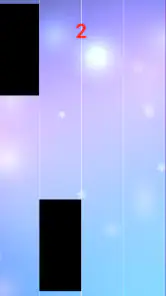
The game communicates its main task through the playfield itself. I look for the tiles, follow their movement, and tap at the appropriate moment. That direct presentation is one of its strongest qualities because it avoids burying the player under menus or complicated rules. Someone handing the phone to a friend can explain the objective in a sentence, and a new player can understand the rhythm by watching a few seconds of action.
The compact format also makes it easy to fit into ordinary routines. I can imagine playing during a short wait, between household tasks, or while taking a break from a longer game. There is no need to commit to a large story or learn a complicated character system. The trade-off is that the game’s value depends heavily on whether the songs and timing challenge hold my attention. If I am not in the mood to repeat a section until my taps improve, there is not much else here to keep me engaged.
Navigation feels most comfortable when I treat the game as a focused activity rather than something to manage in the background. Rhythm games demand that my eyes stay on the active area, so moving through menus is only part of the accessibility picture. The more important question is whether I can distinguish the next target quickly enough. Players with strong visual tracking may find the presentation immediately readable, while others may need more time to adjust to the speed and movement.
More From Our News Desk

Weather by Xiaomi Review: Clear at a Glance, Less Clear Up Close

X Under Pressure: Can It Recover When Posting Goes Wrong?

Clash of Clans Is Won Between the Battles

Android Auto Makes the Case for Quieter Car Software

MobiOffice: Transforming Mobile Productivity with Seamless Integration

EA SPORTS FC™ Mobile Soccer: Redefining Mobile Sports Gaming
Why the tap design can be welcoming
Touch controls remove a barrier that appears in many conventional games. I do not need a controller, several physical buttons, or knowledge of gamepad layouts. A phone or tablet is enough, and the action is based on a familiar gesture. For a player who finds multi-button controls difficult, that limited input can feel much more approachable than an action game requiring simultaneous movement, aiming, and camera control.
There is also a useful mental advantage in the narrow control scheme. I can concentrate on one repeating relationship: see the tile, judge the timing, tap. That consistency makes the game easy to demonstrate to another person and simple to return to after a break. It can work well for someone who prefers predictable interaction over a crowded interface.
However, simple controls do not automatically mean low physical demand. Accurate rhythm play may require quick, repeated taps, and those taps can become tiring if I play for a long session. A player with limited finger movement, tremor, pain, or slower reaction speed may find the later portions frustrating even if the first attempts feel comfortable. The game is therefore more accessible as a short, self-paced challenge than as an activity that I would recommend playing continuously for a long time.
Visual and sensory demands during a song
The game’s core information is visual and musical at the same time. I need to see where a tile is and connect that movement with the beat. That combination can be satisfying because the screen and sound reinforce each other, but it also creates two separate demands. A player may be comfortable with one and struggle with the other.
For example, someone who has difficulty processing fast visual motion may find the playfield overwhelming once several targets arrive close together. Someone who cannot rely on audio needs to judge the timing visually, which may be possible in principle but can feel less natural when the song is doing much of the pacing work. Conversely, a player who does not want sound in a shared space may have to rely on the screen and accept that the experience changes when played silently.
I found it helpful to think of each attempt as a visual timing exercise rather than trying to react to the whole song at once. Watching the next few tiles, keeping the phone steady, and avoiding distractions made a noticeable difference to my concentration. That is a practical tip for anyone who becomes overloaded: focus on the immediate target instead of trying to predict the entire sequence.
Playing in real-world situations
This is naturally suited to short, stationary sessions. Sitting down with the phone held securely gives me the best chance of seeing the targets and tapping accurately. It is less suitable while walking, standing on a moving bus, or doing another task at the same time. The game may be quick to start, but its timing demands still require attention.
In a realistic everyday scenario, I could use it during a ten-minute break after work. I would lower the volume if other people were nearby, play a few attempts, and stop before rushed taps became uncomfortable. That kind of session matches the game better than opening it while waiting in a crowded line with one hand occupied. A small change in posture can affect accuracy, especially when the screen is viewed at an angle or the phone is balanced awkwardly.
It can also be a reasonable shared activity for a family member who wants to try a music game without learning a complex interface. I would first let the person watch a round, then offer the device in a stable position and avoid treating the score as the only measure of success. The immediate feedback makes it easy to understand what went wrong, but repeated failure can discourage a player who is sensitive to fast-paced challenges.
Where the experience becomes less inclusive
The main barrier is the relationship between speed and precision. A player may understand exactly what to do and still be unable to respond quickly enough. That is an important difference from a menu-based app, where reading time or a larger button might solve the problem. In a rhythm game, the timing window is part of the challenge, so the same feature that creates excitement can exclude people who need slower pacing.
I would also be cautious about recommending it to anyone looking for a calm music experience. The word “piano” might suggest practice, melody creation, or a simulated instrument, but this is better understood as a reflex-driven tile game. It does not replace a piano-learning app, a metronome, or a virtual keyboard. Those alternatives are better when the goal is to learn notes, build technique, or play without pressure.
Players who need strong customization for visual presentation, timing, or input should approach it with modest expectations. The most important part of the game is the moving target sequence, so any limitation in how that information is displayed has a direct effect on play. I would test a few rounds immediately after installing it rather than assuming that an Everyone rating means every player will find the interaction comfortable.
Practical ways to make a session easier
My first suggestion is to use a stable grip and a clear viewing angle. Holding the phone with both hands can reduce unnecessary movement, while placing it on a firm surface may help someone who finds continuous handheld play tiring. The goal is not to change the game but to remove avoidable physical effort from the task.
Second, I would keep sessions short and stop when accuracy starts falling because of fatigue. In a game built around repeated taps, tiredness can look like poor timing even when the real problem is hand strain or reduced concentration. Short attempts also make failure less discouraging and give the player a natural chance to reset.
Third, I would treat sound as a personal aid rather than an obligation. In a quiet room, audio can help connect the taps to the rhythm. In a public place, visual tracking may be the more practical choice. Players who rely strongly on sound should choose a setting where the music is clear and interruptions are limited, while players who cannot use audio should judge the game by whether the visual flow remains understandable for them.
A fourth useful habit is to avoid chasing a difficult sequence immediately after a failed attempt. I found that a brief pause helps me separate a genuine timing problem from a rushed reaction. This is especially relevant for players with attention differences or anyone who becomes tense when a streak breaks. The game rewards concentration, but concentration usually improves when the session feels controlled rather than urgent.
Free entry, optional spending, and expectations
The game is free, which makes it easy to try without making a financial commitment. It includes in-app purchases ranging from less than a dollar to a few dollars per item. I would consider that a reason to decide in advance whether optional purchases fit my budget, especially if I am reviewing it for a child or sharing a device with family members. The Everyone rating describes the intended age range, but it does not replace sensible supervision of spending.
The free entry is valuable because the game’s suitability depends so much on personal timing, vision, hearing, and comfort with repetition. I would install it, play several short attempts, and make the decision based on the actual feel of the taps rather than on its popularity. If the interaction feels tiring or visually rushed, paying for extras would not solve the underlying mismatch.
The current version is 1.0.42, and the game runs on Android 7.0 or later. That gives it a fairly broad starting point for Android users with older compatible devices, although the experience can still vary with screen size, responsiveness, and how comfortably the device can be held. A larger display may make targets easier to follow, while a compact phone may be more convenient but leave less room for visual separation.
Who should choose it, and who should skip it
I would suggest this game to someone who wants a quick music-themed challenge, enjoys improving through repetition, and prefers tapping over complex controls. It is particularly appealing if you like the satisfaction of matching actions to a beat but do not want a full rhythm-game system with many buttons or a long campaign. It is also a sensible first experiment for a casual player who wants to see whether this genre is enjoyable.
I would steer a player toward another type of app if the goal is musical education, composing, or relaxed listening. A piano tutor can explain technique and notation; a digital instrument can let the user control notes freely; a rhythm game with adjustable speed may be better for someone who needs more control over pacing. This title’s strength is its immediate tap challenge, so choosing it for a different purpose would likely lead to disappointment.
I would also skip it for a player who strongly dislikes restarting after mistakes or who needs slow, deliberate interaction. The game’s appeal comes from timing pressure, and that pressure is not a minor detail that can be ignored. For someone with motor or sensory needs that make rapid visual tapping uncomfortable, a slower music activity may provide a more inclusive experience.
My inclusive verdict
After using it, I see Piano Pop Music 2 as an approachable but demanding music game. Its clear central action, free entry, and limited control scheme make the first step easy. The Everyone rating and large audience fit that broad approach, but they should not be read as a guarantee that every player will find the speed, visual movement, or repeated tapping comfortable.
What I appreciate most is how quickly it communicates its purpose. I can open it, understand the task, and decide within a short session whether the rhythm challenge suits me. What holds it back is the lack of room for players who need a slower pace or a less visually intense way to interact. The same focus that makes the game satisfying for quick reactions can become its biggest barrier.
My recommendation is therefore specific: try it for short, seated sessions, keep the phone stable, and test both visual and audio timing in the environments where you expect to play. If matching taps to moving tiles sounds enjoyable, this free game is worth exploring. If you want to learn piano, create music, or play without rapid reactions, choose a different tool. For me, it succeeds as a compact reflex challenge, provided the player’s abilities and surroundings match what its design asks for.
Piano Pop Music 2 Frequently Asked Questions
Can I play Piano Pop Music 2 with sound turned off?
Piano Pop Music 2 is built around tapping tiles in time with music, so sound is an important part of the experience. Playing with the audio off may still let you interact with the tiles, but it can make timing more difficult because you lose the musical cues. If you often play in quiet places, consider using headphones when appropriate or checking whether the game’s audio controls suit your needs.
Is Piano Pop Music 2 appropriate for quick play sessions?
Yes. Its central activity is tapping tiles as they move across the screen, so it is easy to understand and can suit a short break or a longer stretch of repeated attempts. Songs test timing and concentration, and faster sections can encourage you to replay a track to improve. It is an arcade-style music game rather than a game that requires a long setup before playing.
What device requirements should I check before downloading Piano Pop Music 2?
Piano Pop Music 2 is a music game for Android devices, and it requires Android 7.0 or later. Before downloading, check your device’s operating system version and make sure you have enough available storage for the game. If your device meets the minimum requirement, you can try its quick, tap-based rhythm gameplay; keeping the game updated can also help you access its current version.
Who developed Piano Pop Music 2, and how popular is it?
Piano Pop Music 2 is developed by GMG Global and has attracted a substantial audience of players. It has over 10 million installs, with an average rating of 4.1 from around 106,000 ratings and about 1,400 written reviews. These figures offer a snapshot of its reach and player feedback, though your own enjoyment will depend on whether you like fast, tile-tapping music games.
What is Piano Pop Music 2, and how is the gameplay structured?
Piano Pop Music 2 is a rhythm game in which you tap piano-style tiles in time with popular music. Notes generally move down the screen, and your goal is to touch the correct tiles without missing them. As songs become faster, the game tests your timing, concentration, and reaction speed. It is designed for short sessions, making it suitable for casual play as well as repeated attempts to improve your score.
Pros
- Simple tap controls make it easy for beginners to start playing.
- Fast songs provide an engaging challenge for rhythm-game fans.
- Bright visuals and lively effects make sessions feel energetic.
- Short levels are convenient for quick breaks or casual play.
- A broad selection of pop-style tracks adds variety to gameplay.
Cons
- Later stages can become difficult and require very precise timing.
- Frequent ads may interrupt play
- especially between songs.
- Some tracks or features may require in-app purchases to unlock.
- Gameplay can feel repetitive after extended sessions.
- Performance may vary on older devices during busy visual effects.
- Category
- Music
- Version
- 1.0.42












