Piano Music Heart: Pop Tiles
- 34.00
- 4.8
- Installs
- 10.00M
- Price
- Free
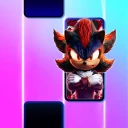
Screenshots
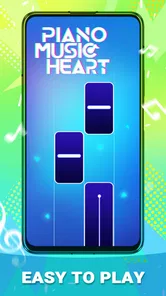
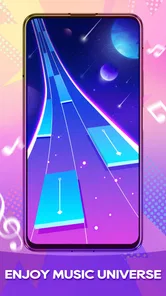
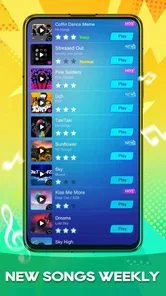
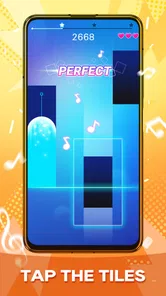
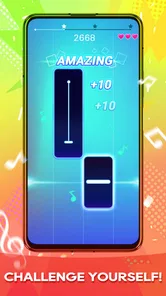

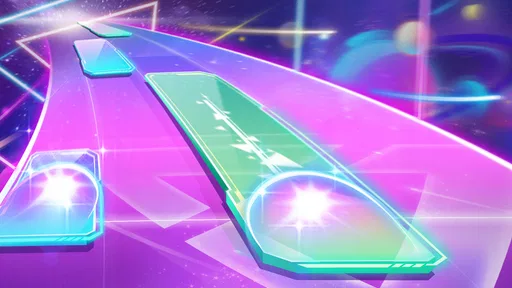

Analysis by Reviewed
Before deciding whether this belongs on your phone, it helps to separate a quick rhythm challenge from the many other things a music app can do. I see Piano Music Heart: Pop Tiles as a game for following a beat with taps, not as a piano tutor, song library, or hands-off way to listen. That focused purpose is its main appeal: I can pick it up for a short burst of play without first learning a complicated system. It also draws a clear boundary around who is likely to enjoy it. If I want to improve my keyboard technique or choose music to play in the background, I would reach for a different kind of app.
A useful way to choose your first session
I would try it at a moment when I have a few uninterrupted minutes, rather than during a commute on foot or while waiting for an important call. That first session gives me a fair chance to judge whether the tile rhythm feels natural and whether the pace is fun rather than stressful. If I enjoy that basic loop, the game has a clear place in a routine of short breaks; if I find myself wanting more control over the music, I would take that as a sign to try a broader rhythm game instead.
The central question is not whether the game can replace piano practice or a music player—it cannot serve those purposes in the same way—but whether tapping along is satisfying enough to return to. I find that distinction more useful than comparing it with every music app at once. It sets expectations around attention, repetition, and the kind of reward the game offers: an active little challenge, not a lesson or a listening session.
How the quick rhythm-game format feels
The appeal is immediate. A stream of tiles gives me a clear thing to watch and a simple action to perform, so I can understand the central challenge without studying a manual. The enjoyment comes from matching timing and focus, not from building a complicated strategy. That makes the game approachable for casual players, including someone trying a rhythm game for the first time.
That simplicity also sets expectations for speed. The game is designed around short, responsive actions, so delays between a tap and its effect would matter more here than they might in a slower puzzle game. I would judge a session less by how many options appear on screen and more by whether the rhythm remains readable and my input feels consistent. On a device that handles ordinary games comfortably, this is the kind of format I would expect to feel brisk; I would not assume every older or busy device will behave identically.
Its music focus gives the tapping a stronger sense of purpose than a generic reaction test. Still, the piano presentation should not be mistaken for realistic keyboard practice. I would use it to enjoy a music-themed challenge and test my timing, not to learn notes, fingering, or how to play a song on a real instrument. That is a useful distinction before installing it, especially for parents or learners choosing an app with music in mind.
Where it fits into an ordinary day
A realistic use is a short wait: I might open it while waiting for a ride or between other tasks, play a round or two, then put the phone away. The format is naturally suited to that stop-and-start routine because the central interaction is easy to pick up. It is less suitable when I need to keep my attention on a conversation, walk through a crowded area, or monitor something else. Rhythm play rewards concentration, even when a session is brief.
More From Our News Desk

Weather by Xiaomi Review: Clear at a Glance, Less Clear Up Close

X Under Pressure: Can It Recover When Posting Goes Wrong?

Clash of Clans Is Won Between the Battles

Android Auto Makes the Case for Quieter Car Software

MobiOffice: Transforming Mobile Productivity with Seamless Integration

EA SPORTS FC™ Mobile Soccer: Redefining Mobile Sports Gaming
For the same reason, I would avoid treating it as background entertainment. Unlike a music player, it asks me to watch and respond; unlike a passive video, it gives me a task. If I want something to accompany chores, a streaming app is the better fit. If I want a game that makes a few minutes feel active, the tapping format is more engaging than simply leaving a playlist on.
One practical tip is to try a first session when you can give the screen your full attention, rather than judging it while multitasking. That makes it easier to tell whether the timing feels comfortable and whether the visual rhythm suits you. I would also keep sessions short at first: rhythm games can turn a casual attempt into repeated retries, and a quick break stops being relaxing if I start playing when I am already tired or impatient.
What happens when play gets intense
The heaviest moments are not necessarily long sessions; they are the parts where the pace or pattern demands more precise attention. In those moments, even a small interruption can break concentration. A notification, a finger slipping on the screen, or a device struggling with other tasks can make the experience feel less fair, because success depends on timing. I would close demanding apps beforehand if I noticed stutters, but I would not assume that doing so guarantees a particular performance improvement.
There is a trade-off in the compact design. A straightforward tile game is easier to approach than a music title built around multiple controls, instruments, or elaborate progression, but it also leaves less room for players who want variety in how they interact with music. If tapping tiles is the part you enjoy, that focus is a strength. If you quickly tire of repeating a similar kind of physical action, the same focus may become a limitation.
For a more comfortable run, I would make sure my hands are free and the phone is held steadily. This is not a hidden setting or a promise of better results; it is simply a practical way to reduce accidental taps in a game where finger placement matters. Playing while carrying bags or using the phone one-handed on the move makes the interaction less dependable, and it is a poor choice if you need to remain alert to your surroundings.
Reliability and interruptions
For a rhythm game, reliability is about more than whether it opens. I care about whether the response stays predictable, whether the display remains clear, and whether I can resume without feeling that an interruption has spoiled the challenge. I cannot treat those qualities as identical across every phone, so I would test a few rounds on the device I plan to use rather than relying on another person’s experience.
If a call or message interrupts a session, I would expect to lose focus at minimum. Whether a particular round can be resumed depends on how the game handles that moment, so I would avoid starting a challenging run when I know I may need to answer something urgently. This is a sensible rhythm-game habit, not a claim that the game has a specific save or recovery feature. The same caution applies when switching between apps: pause your attention first rather than assuming the game will preserve every moment exactly as you left it.
Keeping the game current is also a reasonable basic step if it behaves oddly. The current version is 1.0.30, and the game is from CodiPlayer. I would treat an update as a normal maintenance measure, not as evidence that a particular bug has been fixed or that every device issue will disappear. If the game feels inconsistent, first check whether other apps are making the phone sluggish and try again under simpler conditions.
Device fit and what to expect
The stated minimum operating system is Android 6.0, which gives older Android users a concrete compatibility point to check before installing. Meeting that requirement does not by itself tell me how smoothly the game will run on a particular handset: storage pressure, background activity, and the device’s general condition still affect everyday performance. I would leave some breathing room on a phone that is nearly full and avoid having several demanding apps running at once if responsiveness matters.
I would not choose this game on the assumption that it is an elaborate, resource-heavy production, but I also would not make unsupported promises about battery use, download size, heat, or memory consumption. A sensible first test is to play a few minutes and notice whether the phone stays comfortable to hold and whether taps remain dependable. If the device becomes warm or input starts to feel delayed, taking a break and closing other active apps is more useful than pushing through and blaming every missed note on the game.
It is free and rated for Everyone, which makes it easy to consider for a casual household game. The age rating is not a substitute for an adult’s own judgment about screen time or a child’s habits, though. I would still decide whether the quick-repeat style is appropriate for the person using it, particularly if they tend to keep retrying after a frustrating round.
How it compares with other music games
Compared with a rhythm game that uses several kinds of input or asks players to manage a band, the tile-based approach is easier to grasp but narrower. Compared with a piano-learning app, it is a game first: the point is to react to the rhythm, not to build transferable keyboard technique. And compared with a regular music app, it is interactive rather than something I can leave playing while I do other things. Choosing among those alternatives comes down to whether you want timing practice for fun, music instruction, or listening.
The game’s pop focus should also shape expectations. Someone looking for a broad music library across many genres may prefer a service or game designed around discovery and selection. Someone who wants a direct, familiar pop-oriented rhythm challenge may find the narrower premise more inviting. I would not install it expecting a customizable instrument or a full catalogue of musical tools; the attraction is the simple act of following the screen’s rhythm.
Its audience numbers suggest that the format has found plenty of players: it has over 10 million installs and an average rating of 4.8 from around 20,000 ratings. I take that as useful context rather than a guarantee that it will suit me. Ratings can tell me a game is widely tried, but they cannot predict how its pace feels on my phone or whether I personally enjoy repeating a timing challenge.
Who should try it—and who should pass
I would recommend giving Piano Music Heart: Pop Tiles a try if you enjoy quick reactions, like music-themed games, and want a free option that is easy to understand. It is especially plausible for short breaks when you can look at the screen and concentrate. The 4.8 average and substantial install base make it a well-established choice in this narrow style, but my strongest reason to try it would still be the fit between its simple interaction and your own taste.
I would pass if you are searching for structured piano lessons, a more varied rhythm system, or music you can listen to without playing. I would also choose something else if you dislike repeated attempts or if even small timing inconsistencies frustrate you. A slower puzzle game is a better option for a relaxed, interruption-friendly break; a music-learning app is better for practice; and a player or streaming service is better when listening is the whole point.
My verdict is that this is a focused casual game whose performance should be judged in a few real sessions, not inferred from its musical theme alone. Start when you can concentrate, check that your device runs it comfortably, and notice whether the tapping stays enjoyable after the novelty wears off. If that rhythm suits you, it can make a spare moment feel lively. If you want deeper musical control or a more forgiving pace, the alternatives will serve you better.
Piano Music Heart: Pop Tiles Frequently Asked Questions
What is Piano Music Heart: Pop Tiles?
Piano Music Heart: Pop Tiles is a rhythm game built around tapping musical tiles as they move across the screen. Players aim to keep pace with the song, hit the correct tiles, and avoid missing notes. Its simple tap-based controls make it easy to understand, while increasing speed and more demanding patterns can provide a challenge as you progress.
How do you play Piano Music Heart: Pop Tiles?
Start a song and tap the tiles in time with the music as they appear. Accuracy and timing are important: missing a tile or tapping incorrectly may interrupt your run, depending on the selected mode. Before playing, check the in-game instructions and control prompts, since song choices, difficulty options, and scoring rules can vary between versions of the app.
Is Piano Music Heart: Pop Tiles free to download and play?
The game may be available to download without an upfront charge, but that does not necessarily mean every feature is free. Mobile rhythm games commonly offer optional purchases, advertisements, or other in-app content, and availability can differ by platform or region. Review the app-store listing and its in-app purchase information before downloading, and check the payment settings on your device if children may use it.
Does Piano Music Heart: Pop Tiles need an internet connection?
Whether you can play offline may depend on the version and the feature you want to use. A basic song or mode might work without a connection, while downloading tracks, viewing ads for rewards, syncing progress, or accessing online features may require internet access. To avoid surprises, check the game’s current store description and test offline access after installation; do not assume every song is available without a connection.
Is Piano Music Heart: Pop Tiles suitable for children, and what should I check before installing it?
The tap-to-the-beat format is straightforward, but suitability depends on the app’s age rating, song content, advertisements, and any purchase or social features included in the version available to you. Check the official store listing for permissions, privacy details, and content guidance before installing. If a child will play, consider enabling parental controls and requiring approval for purchases to help prevent accidental spending.
Pros
- Quick rounds make it easy to play during short breaks.
- Familiar pop-style tracks can make the rhythm gameplay engaging.
- Simple tap controls are easy for new players to learn.
- Increasing difficulty offers a challenge as your timing improves.
- A music-game format can help sharpen rhythm and reaction skills.
Cons
- Fast notes can become difficult to follow on smaller screens.
- Repeated tracks may reduce variety during longer play sessions.
- Ads or in-app purchases may interrupt the playing experience.
- Mistimed taps can end a run quickly
- which may frustrate beginners.
- Gameplay depends on keeping a steady rhythm and focused attention.











