Piano Magic Star 4: Music Game
- 581.00
- 3.9
- Installs
- 10.00M
- Price
- Free

Screenshots

Analysis by Reviewed
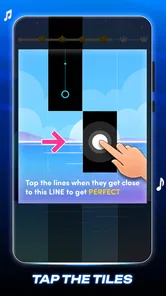
I’d approach Piano Magic Star 4: Music Game as a quick rhythm challenge rather than a shortcut to playing piano. Its central idea is easy to understand: listen to the music, follow the moving tiles, and tap in time. That simplicity is reassuring when you’re opening it for the first time, and it means you can find out quickly whether this style of play suits you.
What to expect from the tapping
Before you treat it as a piano course, it helps to set the right expectation: I see this as a casual music game built around timing, not a replacement for learning how to play a real keyboard. The basic appeal is immediate—follow the notes on screen and try to keep your taps in time with the song. That makes it easy to try for a few minutes while waiting for something, without needing musical experience or equipment.
It is a better fit for someone who enjoys rhythm challenges and recognizable songs than for a player looking for detailed music theory, notation practice, or a realistic piano simulator. The tile format puts quick reactions first. If that sounds fun, the game has a clear reason to try it; if you want structured lessons, a dedicated piano-learning app will serve you better.
That distinction is useful when comparing it with other music games, too. Some rhythm titles focus on elaborate charts, instruments, or competitive play; this one’s straightforward tile tapping is easier to pick up without learning a complicated control scheme. The trade-off is that its appeal depends on enjoying the repeated cycle of watching, anticipating, and tapping. If you want to build a playlist and listen passively, a music player is a better choice; if you want to practice a song on actual keys, a piano-learning app is more relevant.
Getting Started with Your Musical Journey
First things first, downloading Piano Magic Star 4 is a breeze. Available on both Android and iOS, you can find it easily on your respective app store. Once installed, the app welcomes you with a visually appealing interface. It’s straightforward, which I appreciate—no need to fumble around looking for what to tap. The vibrant colors and intuitive design make it inviting for users of all ages.
The game is free, and its age rating is Everyone, so it can suit a shared family device as well as a solo player’s phone. Pem studio is the developer, and the game has reached over 10 million installs. Its average rating is 3.9 from around 19,000 ratings, which suggests a sizeable audience but also leaves room for mixed experiences. It first appeared on August 17, 2023, and version 2.15.1 is the current release. On Android, it requires version 7.0 or later.
For a first session, I’d keep the goal small: open the game, pick a song that feels familiar, and focus on following the tiles rather than chasing a high score. That first clean stretch of taps is a more useful test than browsing for the perfect track. If the pace feels awkward, give yourself a few tries before deciding whether the timing suits you; rhythm games can feel unfamiliar until your eyes and fingers settle into the pattern.
More From Our News Desk

Weather by Xiaomi Review: Clear at a Glance, Less Clear Up Close

X Under Pressure: Can It Recover When Posting Goes Wrong?

Clash of Clans Is Won Between the Battles

Android Auto Makes the Case for Quieter Car Software

MobiOffice: Transforming Mobile Productivity with Seamless Integration

EA SPORTS FC™ Mobile Soccer: Redefining Mobile Sports Gaming
It’s also worth choosing a moment when you can give the screen your attention. A noisy waiting room or a stop-start commute can make it harder to hear the beat and concentrate on the tiles, so I’d save a first attempt for a calmer few minutes. Once you know how the controls feel, short interruptions are less of a problem. I wouldn’t try to play while walking or doing anything that needs your attention; the game asks you to watch the screen closely.
Gameplay That Hits the Right Notes
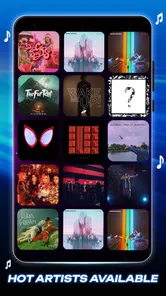
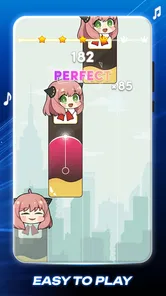
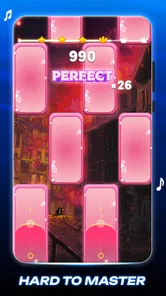
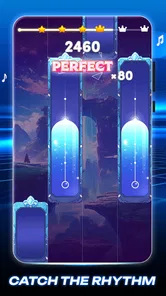
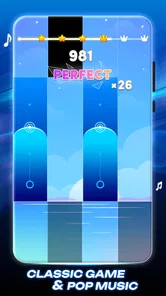
Diving into the gameplay, the app offers a wide range of songs that cater to different musical tastes. From classical pieces to pop hits, there’s something for everyone. I was particularly impressed with how the app integrates popular music tracks that are familiar and fun to play. The gameplay is simple yet addictive: you tap on the falling tiles in rhythm with the music, and the better your timing, the higher your score.
One feature that I found particularly engaging is the challenge mode. If you’re like me and love a good challenge, this mode pushes you to improve your skills by increasing the speed and complexity of the songs. It’s a great way to keep the game exciting and test your musical chops.
A useful way to approach a faster song is to watch the next tiles rather than stare only at the one under your finger. It gives you a moment to anticipate the pattern and can make a difficult run feel less like frantic guessing. I also find it helpful to use short sessions: stop after a few attempts if your timing starts slipping, then return later. Repeated play can build rhythm-game familiarity, but fatigue can make a score feel worse than your actual ability.
For a more deliberate first win, I’d choose a song whose pace feels comfortable and treat the opening as a warm-up. Keep your hands relaxed, look slightly ahead on the screen, and aim for steady taps rather than trying to react at the last instant. If you miss a run, change one thing on the next attempt—such as looking farther ahead—instead of tapping harder or rushing. That gives you a clearer sense of whether the challenge is the song’s speed, your timing, or simply getting used to the format.
That distinction matters if you are deciding between this and a conventional piano app. Piano Magic Star 4 rewards accurate taps against music; a keyboard lesson app is the stronger option when you want to learn hand position, read sheet music, or practice pieces on physical keys. I’d pick this game for a quick musical challenge, not as the main tool for developing piano technique.
Learning and Fun Rolled into One
What sets Piano Magic Star 4 apart is its educational aspect. While you’re having fun, you’re also subtly learning about music and rhythm. The app provides a perfect blend of entertainment and education, making it ideal for kids and adults alike. It’s like having a music teacher in your pocket, guiding you through each note and chord.
I also loved the fact that you can adjust the difficulty level. Whether you’re a beginner or an advanced player, you can tailor the game to suit your skill level. This flexibility ensures that the app remains challenging and engaging no matter how much you improve.
For a first-time player, I’d treat the difficulty choice as a comfort setting rather than a test of musical skill. Start where you can follow the screen without feeling rushed, then raise the challenge once the basic timing feels natural. That makes the game more welcoming for younger players or anyone new to rhythm games, while still giving experienced players a reason to push themselves.
I’d be cautious about reading the game’s music-themed presentation as formal instruction. Tapping along can help you pay attention to pulse and timing, but it won’t teach the habits a keyboard player needs, such as coordinating both hands or reading notation. That makes it a useful light activity for someone curious about rhythm, not a substitute for a teacher or a structured practice plan.
One trade-off to keep in mind is that the free download includes in-app purchases, with items priced from $1.99 to $8.99. I’d play first and decide later whether anything extra is worth it for your routine; there’s no need to spend just to find out whether the tapping style appeals to you. If you are choosing a game for a child, it is sensible to check purchase settings on the device before handing it over.
That spending choice is easiest to assess after you’ve tried the basic loop for yourself. I wouldn’t buy anything just because a song or challenge catches your eye in the moment; first decide whether you expect to return to the game regularly. For a child using a shared phone, setting purchase controls beforehand is a practical precaution, while an adult can simply treat optional spending as a limit to consider rather than a requirement for the first session.
Making it fit into an ordinary day
This is the kind of game I’d open during a short break, on a commute when it is safe and practical to use a phone, or while waiting for an appointment. A familiar song can make a quick round feel more inviting than a generic reaction test, and a challenge gives me a reason to try again when I have another spare minute. For a longer evening session, I’d choose another game if I wanted a deeper progression system or a more involved music-learning routine.
A realistic use for me would be a few rounds while waiting for a friend at a café: I can pick a song, give it my attention, and put the phone away when they arrive without needing to set aside a whole evening. It also works as a small shared activity if family members take turns and compare how a song feels. I’d avoid turning that into a serious score contest, though; the better reason to pass the phone around is to see who enjoys the timing challenge, not to treat a missed tile as a measure of musical ability.
It may also work as a low-pressure way for family members to take turns: each person can try a song and compare how far they get, without needing to know piano beforehand. The appeal depends on enjoying quick visual timing, though. Someone who dislikes tapping games, wants calm listening without interaction, or needs formal instruction will probably be happier with a music player, a different rhythm title, or a dedicated learning tool.
On the other hand, I’d skip it if I were looking for a long-term practice curriculum, a realistic keyboard experience, or a game whose main draw is complex rhythm-chart mastery. Its uncomplicated controls are a strength for newcomers, but they also mean the experience is centered on the same basic kind of interaction. Whether that feels relaxing or repetitive will depend on how much you enjoy replaying songs and improving your timing.
Final Thoughts
Piano Magic Star 4: Music Game is more than just a game; it’s a gateway to discovering your musical talent. With its extensive song library, engaging gameplay, and educational features, it provides hours of entertainment. Whether you’re looking to pass the time or seriously improve your musical skills, this app has got you covered. So, if you haven’t already, give it a try and let the music take you away!
My practical recommendation is to start with one song, learn how its tile patterns feel, and only then decide whether you want a longer session or a tougher challenge. I’d recommend it to casual players who want music-driven tapping on Android or iOS and are comfortable with the possibility of optional purchases. I wouldn’t choose it as a substitute for piano lessons, but as a free way to test whether this style of rhythm game clicks, it is an easy one to sample.
My bottom line is simple: begin with the free experience, keep the first session short, and judge it by whether the tapping itself feels satisfying—not by whether you can already play piano. If the combination of familiar music and quick reactions keeps you engaged, it can earn a place among your casual games. If what you really want is to make progress on an instrument, choose a tool built around lessons and real keys instead.
Piano Magic Star 4: Music Game Frequently Asked Questions
What kind of gameplay does Piano Magic Star 4: Music Game offer?
Piano Magic Star 4: Music Game is a music game built around tapping tiles in time with songs. That makes it a straightforward pick if you want a rhythm-focused activity rather than a traditional piano lesson. Its store summary invites players to tap tiles and feel the music, so the central appeal is following the songs and keeping up with the on-screen action.
Who made Piano Magic Star 4: Music Game, and when was it released?
Piano Magic Star 4: Music Game was developed by Pem studio and released on August 17, 2023. If you are comparing music games before downloading, those details can help you identify the title and its developer. The game’s current version is 2.15.1, giving you a clear version reference when checking whether it matches the release available on your device.
Is Piano Magic Star 4: Music Game free to download?
Yes. Piano Magic Star 4: Music Game is free to download, so you can try its music-tapping gameplay without paying upfront. The game also offers optional in-app purchases, priced from $1.99 to $8.99 per item. Those purchases are separate from downloading the game, so consider your preferences before choosing to buy anything.
What age group is Piano Magic Star 4: Music Game intended for?
The game has an Everyone content rating, making it broadly suitable for players of different ages. Its straightforward music-game concept centers on tapping tiles along with songs, which can appeal to casual players as well as people who enjoy rhythm challenges. As with any game that offers optional purchases, parents may want to review purchase settings with younger players.
What is Piano Magic Star 4: Music Game?
Piano Magic Star 4: Music Game is a highly engaging mobile application that allows players to experience the thrill of playing a virtual piano. This app combines the elements of music and gaming to provide an entertaining platform for users to test their musical skills. It features a variety of songs across different genres, offering a comprehensive musical experience. Its store description highlights tapping tiles to enjoy the music, giving the game a simple, rhythm-focused appeal.
Pros
- Engaging and intuitive gameplay.
- Wide range of popular songs.
- Responsive touch controls.
- Stunning visual effects.
- Regular updates with new content.
Cons
- Contains in-app purchases.
- Ads can be intrusive.
- Requires internet connection.
- Limited offline play options.
- Occasional lag on older devices.











