Piano Magic Notes 7 Music Game
- 37.00
- 4.6
- Installs
- 1.00M
- Price
- Free

Screenshots




Analysis by Reviewed
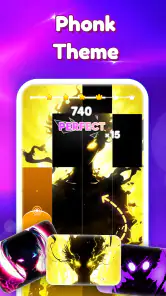
When one phone or tablet has to entertain several people, I like games that are easy to hand over without a long explanation. Piano Magic Notes 7 is a music game built around tapping in time with piano-flavoured phonk. Its quick, focused format makes it a possible choice for a short shared turn, though it is not a lesson tool or a general music app. I’d consider it when someone wants an active rhythm challenge in a spare moment, rather than a game that asks the household to settle in for a long session.
One device, several kinds of player
In a household, the straightforward tap-and-listen format makes this game easy to pass between people. A parent can try a round, then hand the device to a child or another family member without needing to explain a complicated control scheme. That ease of entry is a genuine strength: the basic idea is apparent as soon as play begins, and the music gives each turn its own pace.
The game is a music title from Publishing Easelive. Its main appeal is the combination of quick reactions and a particular sound palette, not a broad collection of musical activities. If your household enjoys phonk or wants energetic background music paired with a light reflex challenge, it has a clearer purpose than a general-purpose piano simulator. If everyone wants a different genre, the focused musical identity may feel limiting.
A realistic use is a short turn while waiting for food, during a quiet break, or when a family member is using the same device nearby. The game suits those gaps better than a situation where you need to keep attention on a conversation or another task: rhythm play asks you to watch the tiles and respond to the beat. I’d treat it as a small activity to take turns with, rather than something to leave running as shared background entertainment.
For a shared device, decide in advance who is playing and who is paying attention to any purchase prompts. That is ordinary household coordination, not a special feature of the game. The title is free to install, while optional in-app purchases range from $1.99 to $18.99 per item. A child who can use the device independently may also be able to encounter those offers, so it is sensible for the device owner to handle purchase decisions and explain that a free download does not mean every optional item is free.
Make turns easier to manage
One useful way to share a tap-based game is to agree on a simple handoff: one person plays a round, then passes the device, rather than crowding around and reaching for the screen mid-song. That keeps the display visible and avoids turning a timing challenge into a competition over who controls the phone. It also makes it easier for a younger player to focus without someone else tapping accidentally.
There is a small but important trade-off with shared play: each person may have a different tolerance for fast music and quick reactions. Let a new player watch a moment before taking a turn, and don’t assume that a child who understands tapping will enjoy the pace. If the tempo feels stressful instead of fun, a calmer music game or a turn-based title is likely to suit the group better.
More From Our News Desk

Weather by Xiaomi Review: Clear at a Glance, Less Clear Up Close

X Under Pressure: Can It Recover When Posting Goes Wrong?

Clash of Clans Is Won Between the Battles

Android Auto Makes the Case for Quieter Car Software

MobiOffice: Transforming Mobile Productivity with Seamless Integration

EA SPORTS FC™ Mobile Soccer: Redefining Mobile Sports Gaming
I would also keep expectations modest about what a household session can accomplish. This is a casual rhythm game, not a music lesson. Tapping along may encourage attention to a beat and hand-eye coordination, but it should not be treated as practice in reading notation, learning piano technique, or developing music skills in a structured way. That distinction matters when a child asks for a “piano” game: the name and musical theme do not make it a substitute for lessons or a keyboard-learning tool.
Keeping setup and spending clear
The practical setup question is less about technical complexity than about boundaries. The game’s current version is 2.2.0, and it requires Android 7.0 or later. Before installing it on an older shared device, check that the operating system meets that minimum. If it does not, choosing another game is more sensible than planning around a version that the device cannot run.
Because there are optional purchases, I would make the account holder’s role clear before handing over a shared phone. An adult can decide whether in-app spending is allowed and manage purchases through the device’s usual account settings. I would not assume the game itself supplies family controls or separate child profiles; household account protections should be handled at the device or platform level rather than presumed to be part of this title.
This is also a good example of why “free” needs a little context. You can start without paying for the download, but purchase options exist. If your priority is a game that cannot present any spending choices, look for a title with no in-app purchases or use platform-level restrictions. If you are comfortable with optional purchases being present, a quick conversation about asking before buying is a reasonable way to share it.
For the smoothest first session, I’d install it and let the device owner explore the opening experience before passing it to a child. That gives you a chance to understand how the game presents its choices and whether its pace suits the person who will play. This is a practical check, not a claim that the game has a special setup mode; it simply avoids making a younger player the first person to navigate an unfamiliar app.
Age, trust, and the right expectations
The age rating is Everyone, which makes the game broadly suitable in its stated content classification. That is useful when deciding whether it belongs on a family device, but an age label is not a promise that every player will like the soundtrack, pace, or purchase options. For a younger child, I’d still make the first session a shared one so an adult can judge whether the music and interaction feel comfortable.
Its audience has grown beyond a niche experiment: Piano Magic Notes 7 has over a million installs and a 4.6 average from around 6,400 ratings. Those figures suggest many people have tried it, but they don’t tell me whether a particular child will enjoy phonk or whether the game will hold an adult’s attention for long. I’d use them as a sign of uptake, not as a substitute for checking whether the style fits your household.
There are around 37 written reviews, so I wouldn’t treat the written-review count as a detailed guide to every household concern. The more useful decision is personal: does the intended player want a fast music-tapping challenge, and is the device owner comfortable with the in-app purchase setup? If the answer to either is no, a different game may be the more considerate choice.
For adults sharing a device with children, trust comes from setting a boundary that is easy to understand: play is fine, purchases need permission. For siblings, the boundary can be about turns and volume rather than access. These are simple habits, but they matter more than any assumption that the game will automatically sort out who is playing or who is allowed to buy something.
How it compares with other music games
Compared with a piano-learning app, this one puts reaction and entertainment first. You are responding to tiles in time with music rather than working through lessons, scales, or a course. Compared with a broad rhythm game that spans many genres, its phonk-and-piano identity is more specific. That focus can make it appealing when the sound is exactly what you want, but less flexible when a group wants musical variety.
It also differs from passive music listening: a player has to keep watching and tapping, so the music becomes part of an active challenge. That’s a plus for someone who wants a quick hands-on game, but a minus if they simply want to relax with a playlist. Likewise, a player who prefers strategic turns, exploration, or a story may get more from another type of game; the central pleasure here is staying with the rhythm.
One non-obvious tip is to judge the game in short sessions before deciding whether it belongs on a shared device. A track that feels exciting for one turn can become tiring if the player keeps repeating the same kind of focused interaction. Another is to choose turns based on attention, not just age: a tired player may find a fast tapping challenge frustrating even when the content rating is appropriate. And if the household is using one device for several people, treat purchase decisions as belonging to the account holder, not to whoever happens to be playing.
Who will enjoy it—and who should pass
I’d recommend it to someone who wants a quick reflex game with energetic musical character, especially if phonk is already part of their listening taste. It also works as a low-commitment option for families who are comfortable taking turns and keeping purchases under adult supervision. The free entry point makes it easy to try, while the age rating and simple central interaction make the basic idea approachable to a wide range of players.
I’d steer away from it if you want a reliable piano-learning path, a quiet game for winding down, or a music title with a wide range of styles. It may also be a poor match for a shared device where no one wants to think about optional spending or where players are likely to argue over turns. In those situations, a lesson-focused app, a slower rhythm game, or a no-purchase alternative will better meet the need.
A practical household verdict
For a family trying it between errands or while waiting for a meal, I’d keep the first visit brief: let one person play, then ask the next player whether the pace and sound are enjoyable before making it a shared routine. That small check is more useful than assuming that an Everyone rating means every age and temperament will respond the same way. It also gives the device owner a chance to notice how purchase choices appear without turning a casual handoff into an unexpected spending decision.
If several people want very different things from the same device, this game is best treated as one person’s short-turn option rather than the household’s default entertainment. It asks for direct attention, so it will not solve the problem of keeping one person occupied while everyone else talks. A passive playlist fits that social moment better; a broader rhythm game is a better match if musical variety matters more than this title’s specific style.
My household verdict is that Piano Magic Notes 7 is easiest to recommend as a short, supervised-by-common-sense shared activity, not as an all-purpose family music app. Publishing Easelive has made a focused game whose quick premise suits spare moments and handoffs, while its genre focus, reaction-based play, and optional purchases deserve a little thought before it becomes a regular fixture. If the sound and pace appeal to your group and the device owner is comfortable setting spending boundaries, it is worth trying; if not, there are better-fitting options for learning, relaxing, or keeping a shared device completely purchase-free.
Piano Magic Notes 7 Music Game Frequently Asked Questions
What is Piano Magic Notes 7 Music Game?
Piano Magic Notes 7 Music Game is a rhythm game built around tapping tiles in time with music. The basic idea is simple: follow the notes as they move across the screen and tap the correct tiles without missing or losing the rhythm. It is designed for quick play sessions and can appeal to players who enjoy music games, though the exact song selection and available modes may depend on the version you download.
How do you play Piano Magic Notes 7 Music Game?
Choose a song or available game mode, then tap the piano-style tiles as they reach the target area. Timing matters: tapping too early or too late can break a streak, while missed notes may end a run or reduce your score. Some rhythm games also introduce longer notes or faster patterns as a track progresses, so starting with easier songs can help you learn the controls before attempting more demanding challenges.
Does Piano Magic Notes 7 Music Game require an internet connection?
Whether you can play offline may depend on the app version and how its songs are delivered. Some music games let you replay downloaded or built-in tracks without a connection, while others need internet access to load songs, display advertisements, or update content. Check the store listing and test the app before relying on offline play, particularly if you plan to use it while travelling or have limited mobile data.
Is Piano Magic Notes 7 Music Game free, and does it include ads or in-app purchases?
The game may be available to download without an upfront payment, but free apps can include advertisements, optional purchases, or other monetized features. These details can vary by platform, region, and release, so review the current Google Play or App Store listing before installing. Also check whether purchases unlock songs or remove ads, and use device-level purchase controls if children will be playing.
Is Piano Magic Notes 7 Music Game suitable for children, and what should I check before downloading?
The tile-tapping gameplay is generally straightforward, but suitability depends on the app’s current content, advertising, privacy practices, and store age rating. Before downloading, review the permissions requested, the developer information, and any data-safety or privacy disclosures on the relevant store. If a child will use the game, consider supervising play and checking whether ads, external links, or purchases are available.
Pros
- Simple tap controls make it easy to start playing.
- A broad song selection offers variety between sessions.
- Short rounds suit quick play during breaks.
- Increasing difficulty can keep experienced players engaged.
- Rhythm gameplay helps develop timing and coordination.
Cons
- Fast notes can be difficult to follow on smaller screens.
- Some songs or features may require in-app purchases.
- Ads may interrupt play
- depending on the version.
- Accidental taps can end a run quickly.
- Gameplay may feel repetitive after extended sessions.
- Category
- Music
- Version
- 2.2.0











