

Phonics Museum - Learn to Read
- 19.00
- 3.5
- Installs
- 10.00K
- Price
- Free

Screenshots

Analysis by Reviewed
Learning to read can feel like a big project for a child, especially when practice starts to resemble another worksheet. I found Phonics Museum - Learn to Read most interesting as a way to turn early reading practice into a more inviting activity. It is an educational game from Veritas Press, aimed at children who are beginning to connect letters and sounds. The central promise is simple: help kids build reading skills through a game-like experience rather than relying only on traditional lessons.
My overall impression is that this is best viewed as a supplement for a young learner, not as a complete replacement for a parent, teacher, or structured reading program. That distinction matters. A child who needs extra repetition may enjoy returning to an interactive activity, while a family looking for a full curriculum will probably need more than this single app. The free entry point makes it easy to try, although optional purchases range from $1.99 to $99.99 per item, so I would pay attention during setup and decide in advance how the app will fit into your learning routine.
What I would consider before choosing it
The first question is whether the child is ready for phonics practice. This is not a general entertainment game that happens to contain letters. Its value depends on a child being willing to listen, recognize sounds, repeat patterns, and stay with a task long enough for the connection to become familiar. For a preschool or early elementary learner who likes screen-based activities, that can be a useful starting point.
I would also consider how much adult guidance is available. Young children can often navigate a game more confidently than a workbook, but independent tapping does not automatically mean independent learning. I would sit nearby at least during the first sessions, listen to how the child responds, and use mistakes as a chance to say the sound aloud together. This makes the app part of a reading habit instead of a way to keep a child occupied.
The audience is broad in age terms because the content rating is Everyone, but that does not mean every child will find the same level appropriate. A child who already reads simple words may find introductory practice too easy, while a beginner may need frequent encouragement. The best match is a learner at the beginning of the reading journey or one who benefits from revisiting basic phonics in a less formal setting.
Device compatibility is another practical consideration. The listed minimum operating system is Android 7.0, which covers many older Android devices, but families should still check that the particular tablet or phone runs comfortably. Reading practice is more effective when the screen responds reliably and the child is not distracted by technical problems. I would test the app before making it part of a daily schedule.
How I would use it at home
I would avoid handing over the device with no plan. A short, predictable session works better for early learners than an open-ended instruction to “play until you are done.” For example, after breakfast, a parent could let a child complete a small amount of practice, then ask the child to say a few of the sounds away from the screen. That final step shows whether the activity is carrying over into real reading rather than remaining a button-pressing exercise.
More From Our News Desk

 Gmail
GmailGmail in a Busy Inbox: Who Benefits Most?
From first account to crowded workday, Gmail earns its place through dependable search and flexible sorting—but its best fit depends on how much inbox maintenance you can tolerate.

 Prime Video
Switching to Prime Video: What Changes in Your Viewing Routine
Prime Video can make a compelling second home for streaming, but switching means learning a different catalog, rental layer, and route from browsing to playback.

 Universal TV Remote Control
Universal TV Remote Control Works Best as a Reliable Backup
A phone remote earns its place through quick setup and reliable habits. Here is how to get more from Universal TV Remote Control—and where its limits show.

 Weather - By Xiaomi
Weather by Xiaomi Review: Clear at a Glance, Less Clear Up Close
Xiaomi’s weather app makes everyday forecasts quick to scan, but its calm surface can leave useful details and recovery paths harder to find than they should be.

 X
XX Under Pressure: Can It Recover When Posting Goes Wrong?
A resilience-focused review of X, examining setup, mistaken posts, interruptions, weak connections, and the gaps that matter when recovery needs to be dependable.

 Clash of Clans
Clash of Clans Is Won Between the Battles
Its raids are quick; its community is a long-term project of coordination, teaching, rivalry, and shared responsibility—with all the friction that entails.
Latest News



Another useful routine is to pair the game with physical materials. If the child encounters a sound, I would write the corresponding letter on paper, find an object that begins with it, and ask the child to repeat the sound. This turns the app into a prompt for conversation and observation. It also helps children who remember concepts better when they hear, see, and handle something instead of only watching a display.
For a child who becomes frustrated easily, I would stop before the session turns into a struggle. The goal is steady familiarity, not endurance. A parent can return later and begin with something the child handled comfortably. In my view, that kind of pacing is one of the most important parts of using a phonics game well, and it cannot be automated by the app itself.
Where the game is especially appealing
The strongest reason to try it is that it places reading practice inside a game context. That can lower the emotional barrier for children who resist printed exercises. A child may be more willing to repeat an activity when it feels like progress in a game, especially during the stage when the same sound relationships need to be practiced many times.
The educational focus also gives the app a clearer purpose than a general children’s game. Parents are not simply looking for colorful screen time; they are looking for an activity connected to an important skill. Phonics Museum is built around that early literacy goal, so it makes sense as a short practice option after a lesson, during a quiet afternoon, or while traveling.
I also appreciate that the app can give a child a feeling of personal participation. Early reading is full of small achievements that adults may overlook because the steps seem basic. An interactive activity can make those steps feel visible to the learner. That emotional lift is not a substitute for instruction, but it can help a reluctant child approach the subject with less resistance.
The title’s museum theme is another reason it may appeal to families who want learning to feel more imaginative than a standard drill. I would not choose it solely for the theme, but a child’s willingness to return is important. If the setting feels more inviting than a plain practice screen, that can make repetition easier to accept.
There is also a useful distinction between using the game as a first exposure and using it as reinforcement. For first exposure, I would stay involved and explain unfamiliar sounds. For reinforcement, I would give the child more room to work independently, then check understanding afterward. This two-stage approach prevents the app from carrying more teaching responsibility than it should.
Small habits that make the experience more effective
One practical tip is to ask the child to answer aloud even when the game appears to accept a tap. A correct selection can show recognition, but saying the sound gives the parent a better sense of whether the child understands it. If the child repeatedly chooses correctly but cannot say the sound, I would slow down and treat that as a signal to practice away from the screen.
A second tip is to keep a simple paper note of sounds or patterns that cause hesitation. I would not turn this into a formal test. A few observations are enough to guide the next session. If the same difficulty appears repeatedly, I would use household words and picture books to reinforce it rather than simply repeating the same digital activity.
A third tip is to make the device part of a shared routine rather than a reward that can be played without limits. When the app is used only as a prize, the child may focus more on winning access than on learning. When it has a regular place in the day, the activity feels more like practice and less like a negotiation.
I would also check purchases before allowing a child to use the app alone. The game is free to start, but in-app items are available, with individual prices extending from $1.99 to $99.99. That is a meaningful range for a family budget. I would handle any purchase decisions myself, explain that not every on-screen option is automatically part of the lesson, and avoid letting a child make a choice simply because it appears during play.
Where a different type of tool may fit better
Phonics Museum may not be the right choice for a family seeking a complete reading curriculum. A full program usually combines phonics instruction with guided reading, writing, spelling, progress checks, and a clear teaching sequence. I would choose a structured curriculum when the child needs a coordinated plan or when an adult wants lessons that explain exactly what to teach next.
A physical phonics workbook may be better for children who learn through handwriting or who become distracted by interactive screens. Paper also makes it easy for a parent to see the child’s work and notice letter formation, spacing, and effort. The trade-off is that a workbook may feel less exciting, particularly for a child who already associates reading practice with correction or repetition.
Flashcards and ordinary picture books remain useful alternatives for quick practice. They are convenient when a family wants to review sounds away from a device, and they encourage conversation. However, they require an adult to supply the structure and energy. The game is more appealing when the child needs an inviting activity that can carry some of the presentation burden.
General children’s games may offer broader entertainment, but they do not necessarily keep early reading at the center. I would choose those only when the main goal is relaxation or variety. If the goal is specifically to support phonics, this app has a more focused reason to be on the device.
For children who need specialized support with speech, hearing, attention, or language processing, I would treat the app as something to discuss with a qualified educator or specialist rather than assuming it will meet the child’s needs. A game can provide repetition, but it cannot observe a learner in the nuanced way a professional can. In those situations, the best option may be a personalized plan with the app used only where it fits.
What the ratings and history suggest
The app has an average rating of 3.5 from around 58 ratings, alongside around 19 written reviews. I would read that as a reason to try it personally rather than assuming it will suit every family. The response is mixed enough that the child’s age, reading level, device, and tolerance for game-based practice are likely to matter more than the headline score.
It has passed 10K installs, which suggests that it has found an audience without making it one of the most widely used children’s learning products. The release date was December 7, 2020, and the current version is 0.0.104. Those details are useful when setting expectations: I would approach it as a focused educational game with an established presence, but I would still judge it by how well it works for the particular learner in front of me.
The developer is Veritas Press, a name associated here with the app’s educational purpose. That context may matter to families who already know the developer’s approach or who prefer learning products connected to a particular teaching philosophy. For everyone else, I would let the child’s response and the quality of the learning routine decide whether it earns a regular place on the device.
The real cost of changing your routine
Trying a new reading app has a cost that is not always financial. The child must learn how the activity works, the adult must understand where guidance is needed, and the family must decide when practice happens. If your child already has a successful routine with books and a teacher-led program, adding another tool may create distraction rather than progress.
On the other hand, switching can be worthwhile when the current method produces daily resistance. A game-based approach may give a child a gentler entry into practice, even if it does not replace the existing materials. I would introduce it as a short experiment, keep the same reading goal, and watch for signs of actual understanding instead of measuring success by how long the child stays on the screen.
The free price makes that experiment easier, but the purchase range means I would not treat the app as automatically cost-free in the long term. Before spending, I would ask whether the child returns voluntarily, whether the practice is helping outside the app, and whether the available content complements what the child is already learning. If the answer is no, paying for more access is unlikely to solve the underlying mismatch.
Families should also consider whether they want a single-purpose literacy tool or a broader educational platform. This game’s narrow focus can be an advantage because it keeps attention on reading foundations. It can also feel limited if a child wants mathematics, writing, stories, and creative activities in the same place. In that case, a broader learning service may be a better primary choice, with this app used only for phonics practice.
My recommendation for different kinds of learners
I would recommend giving Phonics Museum a fair trial if your child is beginning to learn letter sounds, enjoys interactive activities, and needs extra encouragement to practice. It is particularly suitable for a parent who is willing to stay involved, connect the game to spoken sounds and printed words, and keep sessions short enough to remain positive.
I would be more cautious if your child already reads comfortably, needs a complete lesson sequence, or dislikes learning on a screen. I would also skip it as a main solution when the child needs individualized intervention. In those cases, books, a structured curriculum, or guidance from an educator may deliver more useful support, while the app could become unnecessary or frustrating.
My preferred way to use it is as one piece of a small reading routine: interactive practice first, a few spoken examples next, and a real book or handwritten activity afterward. That workflow exposes the difference between recognizing an answer in a game and using the skill in everyday reading. It also gives the child a clear ending, so practice does not turn into endless screen time.
In the end, I see Phonics Museum - Learn to Read as a promising option for families who want to make early phonics practice feel less like formal homework. Its value is highest when an adult guides the experience and reinforces it with offline reading. I would not choose it as the only reading resource, but I would recommend trying the free version for a child who needs motivation, repetition, and a more playful path toward those first reading skills.
Phonics Museum - Learn to Read Frequently Asked Questions
What age is Phonics Museum - Learn to Read designed for?
Phonics Museum - Learn to Read is an educational game rated Everyone, with a focus on helping children develop early literacy skills. Its phonics and reading theme makes it most relevant to young learners who are beginning to explore letters, sounds, and words. Parents can consider their child’s reading stage and comfort with using a mobile device when deciding whether it is a good fit.
What is Phonics Museum - Learn to Read?
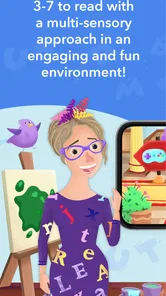
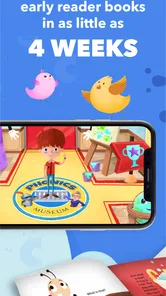
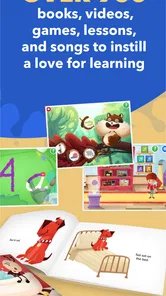
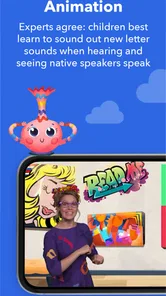
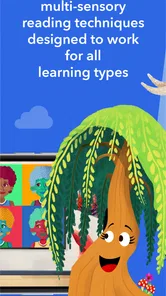
Phonics Museum - Learn to Read is an educational literacy app designed to help young children learn letter sounds, phonics rules, early reading, and spelling through interactive lessons. It combines animated demonstrations, games, songs, and museum-style activities to make practice more engaging. The app is generally aimed at preschool and early elementary learners who are beginning to connect sounds with written letters and words.
Is Phonics Museum suitable for complete beginners?
Yes. The app is intended to support children who are just starting to learn phonics, including learners who may not yet recognize all letters or understand how sounds combine to form words. Lessons usually introduce concepts gradually, allowing children to repeat activities and build confidence. Parents should still expect progress to vary, since some children will need additional reading practice, guidance, or support outside the app.
Does Phonics Museum - Learn to Read require an internet connection?
Some features may require an internet connection, particularly when downloading the app, accessing account services, receiving updates, or loading certain media. Depending on the version and device, selected lessons may be available offline after installation. Before traveling or giving the device to a child without connectivity, it is sensible to open the app and confirm which activities work offline, as availability can change with updates.
Is Phonics Museum free to use, or does it include subscriptions and in-app purchases?
The app is free to download, but it includes in-app purchases ranging from $1.99 to $99.99 per item. Additional lessons or parts of the learning program may require a purchase, so parents should review the purchase screen before a child begins using the app. Device-level parental controls can also help prevent unintended purchases.
Pros
- Engaging phonics lessons combine animations
- songs
- and interactive activities.
- Designed to support early reading skills at a beginner-friendly pace.
- Includes handwriting practice alongside letter-sound instruction.
- Child-focused interface is colorful and simple to navigate.
- Works well as a supplement to preschool or homeschool reading practice.
Cons
- Some content and features may require a paid subscription.
- The religious themes may not suit every family or classroom.
- Activities can become repetitive after extended use.
- Advanced readers may outgrow the lessons fairly quickly.
- Parental guidance is useful when children practice pronunciation and writing.











