Music Piano: Magic EDM
- 75.00
- 4.6
- Installs
- 5.00M
- Price
- Free

Screenshots
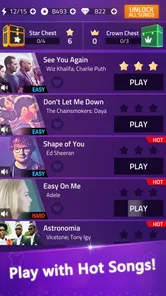
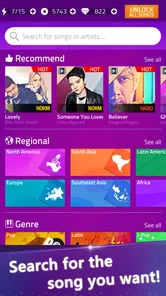

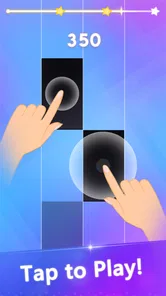
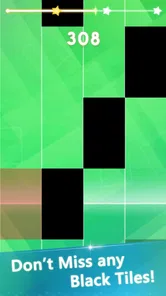


Analysis by Reviewed
When I first tried Music Piano: Magic EDM, I expected a simple tap-along game and quickly understood its appeal: it turns electronic music into a short, reactive challenge that is easy to pick up when you have a spare moment. It is a free music game from Ding-Dong Games, and its strong 4.6 average from around 27 thousand ratings helps explain why it has attracted over 5 million installs. My experience was most enjoyable in brief sessions, especially when I wanted something more active than listening to music but less demanding than a full rhythm-game campaign.
The important thing for a household is that this is not really a shared account experience. It is better understood as a game that several people can try on the same phone or tablet, one person at a time. That distinction matters. A child, teenager, or adult may enjoy the quick musical challenges, but each player should treat the device, purchases, and age suitability as shared responsibilities rather than assuming the game will organize those boundaries for them.
How the game fits into a shared household
The easiest way to use it at home is as a pass-and-play activity. One person takes a short turn, then hands over the device. That works well during a commute, a waiting room, or a quiet evening when everyone wants a little entertainment without committing to a long multiplayer session. I found that the immediate nature of the tapping makes it simple for another person to watch and understand what is happening, even if they have never played before.
This format has a useful social side. Someone waiting for a turn can listen to the track, notice where the rhythm changes, and offer encouragement. It is not the same as playing together in real time, and I would not choose it when the main goal is cooperative competition. Still, it creates a natural challenge between people using the same device: who can keep the rhythm going, who can handle a faster section, and who can stay focused when the music becomes more intense.
There is also a practical advantage to the short-session design. If I am using a family tablet, I do not need to reserve a large block of time or ask another person to understand a complicated progression system before joining in. A younger player can try a round, while an older player can take over later without turning the evening into a formal gaming event. That makes it more approachable than many music games that assume one dedicated player will build skill over repeated sessions.
What a first session feels like
The core appeal is the connection between what I hear and what I tap. The screen presents a piano-like play area, while the electronic soundtrack gives the action its momentum. Success depends on attention and timing rather than on exploring a large world or learning a long list of controls. I could begin without a tutorial-heavy commitment, which is exactly what I want from a casual rhythm game.
That simplicity is also the first trade-off. If you are looking for a realistic piano simulator, this is not the right choice. It uses the image and language of piano play to create a rhythm challenge, not to teach finger placement, reading music, or proper keyboard technique. I would recommend a dedicated learning app instead for someone who wants lessons or practical musicianship.
More From Our News Desk

Weather by Xiaomi Review: Clear at a Glance, Less Clear Up Close

X Under Pressure: Can It Recover When Posting Goes Wrong?

Clash of Clans Is Won Between the Battles

Android Auto Makes the Case for Quieter Car Software

MobiOffice: Transforming Mobile Productivity with Seamless Integration

EA SPORTS FC™ Mobile Soccer: Redefining Mobile Sports Gaming
For casual use, though, the focused control scheme is effective. It leaves most of my attention on the beat. I did not have to remember complex combinations, manage a character, or search through a detailed map before playing. The result feels closer to a musical reflex test than to a traditional piano program, and that is why it works particularly well in small gaps during the day.
Setting boundaries before handing over the device
Because the game is free to download but includes in-app purchases ranging from $0.99 to $5.99 per item, I would decide in advance who is allowed to make purchases on a shared device. That conversation is more important than the game itself. A child may see an attractive option during play and assume that tapping it is part of the game, while the person responsible for the device may expect every purchase to be discussed first.
I would also keep the device’s normal purchase protections active and avoid handing over a phone while the account is already positioned for an easy transaction. That is not a special feature of this game; it is simply sensible household practice. The free entry point makes it easy for several people to try, but the presence of optional spending means “free” should not be treated as “without financial boundaries.”
Another useful boundary concerns sound. The electronic tracks are central to the experience, so silent play can make the game less satisfying and may affect timing. In a shared room, headphones can solve the problem, but they introduce a different issue: a younger player may become less aware of what is happening around them. I prefer setting a clear volume rule and keeping the player within sight when the device belongs to everyone.
The game is rated Mature 17+, which should be taken seriously in a household with younger users. I would not rely on the colorful piano presentation alone when deciding whether it is suitable. The responsible adult should check the store page and the device context before allowing a child to play, especially when the same phone is used by people of different ages. The rating does not automatically tell me how every family should decide, but it does mean this is not a game I would casually pass to a young child without checking first.
Keeping turns fair on one phone or tablet
Shared-device play works best when the household agrees on a simple routine. I would give each person a defined turn rather than letting the most enthusiastic player continue until everyone else loses interest. Since the game is built around quick musical attempts, a round-based approach feels natural: play once, compare the experience, and then rotate.
It also helps to keep the device in a neutral place instead of letting one person carry it away. That small choice changes the mood from private ownership to shared activity. A parent can see what is being played, another person can hear the track, and nobody has to guess whether a purchase screen or a new activity has appeared. The game does not need to become a family tournament; simple visibility is enough to prevent misunderstandings.
I would avoid turning every session into a score argument. Rhythm games can make small timing differences feel more important than they are, particularly when one player has already had more practice. A better household use is to treat the first attempt as a learning round, then let each person decide whether they want another try. That keeps the music enjoyable for beginners instead of making the game feel like a test they are expected to pass.
For older players, the game can become a quick focus exercise between other tasks. I found that it asks for enough concentration to interrupt a distracted mood, but not so much preparation that I needed to plan around it. For younger or inexperienced players, the same immediacy can be frustrating if they expect every tap to be forgiving. A calm handover and permission to stop after a difficult attempt make a noticeable difference.
Age, trust, and what the rating means in practice
The Mature 17+ label is the clearest reason I would not describe this as a universal family game. The music-game format may look harmless at first glance, but suitability is determined by the full product and its store context, not just by the presence of piano visuals. If I were reviewing the device use for a household, I would put the age rating ahead of convenience and make the decision with the adult responsible for the younger user.
Trust also includes spending. A teenager may understand that an item costs money, while a younger player may need a direct rule such as “ask before every purchase.” I would explain that the game can be enjoyed without treating every optional item as necessary. The strongest part of the experience is the tapping and music, so buying something should never be presented as the price of being included in the household activity.
For a group of adults, the age question is simpler, but the shared-device question remains. Different people may have different comfort levels with electronic music, repeated attempts, or optional purchases. One person might want a quick challenge, while another expects a more complete music library or a deeper progression system. Agreeing on what the session is for prevents disappointment: this is a casual music game, not a substitute for a piano course or a full competitive rhythm platform.
The developer, Ding-Dong Games, presents the product as an electronic music piano experience, and that description matches the broad feel I got from playing it. I would still keep expectations grounded. The game’s strength is immediate interaction, not detailed musical education, household account management, or a formal multiplayer structure. Those distinctions are useful when deciding whether it belongs on a shared device.
Where it beats ordinary alternatives
Compared with simply playing an EDM playlist, the game gives me a reason to pay attention. I am not just hearing the track in the background; I am responding to it. That makes it a better choice when I want music to be the center of a small activity rather than passive entertainment.
Compared with a piano-learning app, it is less intimidating and faster to start. I do not need a keyboard, sheet music, or a lesson plan to enjoy a session. The trade-off is obvious: the skills do not transfer directly into playing a real piano. Someone choosing between the two should ask whether the goal is musical training or rhythmic amusement.
Compared with a large rhythm game, this one feels more accessible for a shared device because the basic idea is easy to explain. A newcomer can watch for a moment and understand that timing matters. The downside is that players who want a deep competitive system, extensive customization, or a long-term progression journey may find the format too narrow.
It also differs from a conventional arcade game because the soundtrack is not merely decoration. The music shapes the pace and gives each attempt its identity. That is why headphones or a reasonable speaker level can improve the experience, but it is also why the game is less suitable in places where sound is inconvenient or where several people need quiet.
Small habits that make the experience better
My first practical tip is to treat the opening attempt as calibration rather than a performance. I watch how the visual timing relates to the beat and avoid tapping aggressively just because the track sounds fast. This helps reduce the common mistake of reacting to excitement instead of following the actual rhythm.
My second tip is to use a stable grip when playing on a phone. A loose hold makes the screen move just enough to distract from the timing, especially when another person is watching or when I am playing while seated awkwardly. On a shared tablet, placing it on a flat surface can make turns more comfortable, though each player should still have a clear view and enough room to interact without bumping the device.
A third useful habit is to separate practice from competition. If someone is new, I let them play without immediately comparing results. Once they understand the visual rhythm, a friendly challenge becomes more enjoyable. This is particularly helpful with mixed-age groups, although the Mature 17+ rating means younger players should not be included simply because the game is easy to operate.
I also recommend checking the current version before troubleshooting. The game is currently listed as version 1.102.0 and supports Android 7.0 or later. That makes compatibility a straightforward first check for an older household phone or tablet. If the device meets that requirement but the experience still feels uncomfortable, I would look at the physical setup, sound, and who is using the device before assuming the game itself is unsuitable.
Who should choose it and who should skip it
I would recommend it to adults and appropriate older users who want a quick electronic music challenge with very little setup. It is especially appealing if you enjoy tapping in time, like trying the same section again to improve, and prefer a game that can be passed around without a long explanation. The free price makes trying it easy, while the optional purchases mean the household should agree on spending before play begins.
I would skip it for anyone searching for genuine piano instruction. The piano presentation may attract beginners who want to learn an instrument, but a rhythm game cannot replace lessons, practice exercises, or a real keyboard. I would also look elsewhere if I wanted a robust multiplayer experience where several people play simultaneously, because the natural shared-device use here is turn-taking rather than coordinated live play.
It may also be a poor fit for people who dislike repetition. Rhythm games often depend on replaying a section until the timing feels natural, and that loop can be satisfying for one player but monotonous for another. If your ideal music app is a passive player with a large listening library, this game asks for too much attention. If your ideal game is a deep adventure with characters and exploration, it may feel intentionally limited.
The age rating is another firm reason to skip it for younger children unless the responsible adult has made a careful decision. I would not use the friendly-looking piano concept as a shortcut around the Mature 17+ classification. In a household, suitability and purchase rules should be settled before the first turn, not after a child has already become attached to the game.
My household verdict
After using it as both a solo time-filler and a pass-and-play activity, I see Music Piano: Magic EDM as a focused casual game rather than a family-management tool or a music-learning product. Its best quality is the direct link between electronic sound and fingertip timing. That makes it easy to demonstrate, quick to start, and enjoyable in short bursts without demanding a large commitment from the player.
Its limitations are equally important. The shared-device experience needs human coordination, the optional purchases need clear boundaries, and the Mature 17+ rating makes it unsuitable as an automatic choice for a family tablet. Players who want lessons, simultaneous multiplayer, or a much deeper progression structure should choose a different kind of app.
For the right household, I would install it only after checking the age context, agreeing on who may spend money, and deciding how turns will work. Once those boundaries are clear, it can provide a lively little challenge that turns a spare few minutes into something more engaging than background music. My recommendation is positive, but conditional: choose it for rhythmic play, not for piano education, and let trust and supervision shape who uses it.
Music Piano: Magic EDM Frequently Asked Questions
Is Music Piano: Magic EDM available for iOS as well as Android?
Music Piano: Magic EDM is listed as an Android game, with a minimum requirement of Android 7.0. If you are choosing a device before downloading, check that its operating system meets this requirement. The game is built around tapping tiles on a screen, so a device with a responsive touchscreen may make its quick rhythm challenges more comfortable to play.
How much storage space should I set aside for Music Piano: Magic EDM?
Before installing any game, it is sensible to check that your device has room for the download and its app files. Music Piano: Magic EDM is a music game, and its playable content is part of the experience, so keeping some free space available can help avoid installation or update interruptions. You can check the download size shown on your device’s app page before proceeding.
Does Music Piano: Magic EDM include ads or optional purchases?
The game offers in-app purchases, with items priced from $0.99 to $5.99. If you are concerned about spending, review your device’s purchase settings before playing, especially when a child will use the device. Optional purchases are separate from the free download, so you can consider the available payment controls and decide what is appropriate for your household.
What age rating does Music Piano: Magic EDM have?
Music Piano: Magic EDM is rated Mature 17+, so it may not be appropriate for younger players. Parents and guardians should check the age rating before installing it on a child’s device and consider whether the game is suitable for their household. The rating is separate from the simple tap-based gameplay, so it is worth reviewing before making a decision.
Which devices can run Music Piano: Magic EDM?
The game is available for Android devices running version 7.0 or later. Before downloading, check your device’s operating system version to make sure it meets this requirement. Music Piano: Magic EDM is a music game built around on-screen tapping, so players should also consider whether their device is comfortable to use for quick, repeated interactions.
Pros
- Simple touch controls make it easy for beginners to start playing.
- Fast EDM tracks create an energetic
- arcade-style rhythm experience.
- Short levels work well for quick gaming sessions on mobile.
- Bright visuals and effects make songs feel lively and engaging.
- Progression encourages players to improve timing and accuracy.
Cons
- Some songs or features may require in-app purchases to unlock.
- Frequent effects can feel visually overwhelming during difficult tracks.
- Gameplay may become repetitive if you prefer traditional piano apps.
- Timing can feel unforgiving when tapping on faster notes.
- Requires a stable connection for some content or advertising features.











