

Metamorphabet
- 66.00
- 4.6
- Installs
- 10.00K
- Price
- $5.99

Screenshots
Analysis by Reviewed
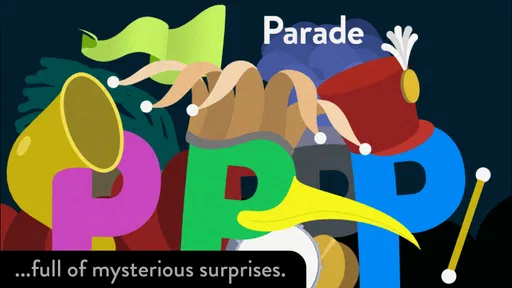
I approached Metamorphabet expecting a simple alphabet game, but its appeal is less about memorizing letters and more about discovering how each letter can change, move, and suggest an object. It is an educational game from Vectorpark, designed for children and adults who enjoy playful visual interaction. The experience feels closer to a small illustrated toy than to a conventional lesson.
The first thing to understand is that this is not a spelling course with levels, tests, or a progress chart. It offers a gentle space for exploring the alphabet through touch. That makes it especially attractive for a parent introducing letters to a young child, but it also gives older users something unusual to look at and manipulate. I found the strongest moments came when I stopped trying to rush through the alphabet and treated each letter as a visual puzzle.
It is available as a paid game for $5.99, carries an Everyone age rating, and requires iOS 12 or later. The current version is 1.4. Its store presence shows a 4.6 average from around 240 ratings, with over 10K installs, so it has found a modest but clearly interested audience rather than presenting itself as a mass-market learning platform.
What the first session feels like
There is very little emotional pressure when you begin. You are not asked to create a profile, choose a curriculum, or prove that you already know anything. Instead, the game invites you to look closely and interact. That calm opening is important for children who become frustrated by right-or-wrong exercises, and it also suits adults who want a short creative distraction.
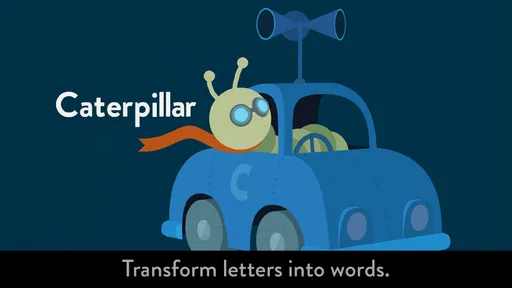
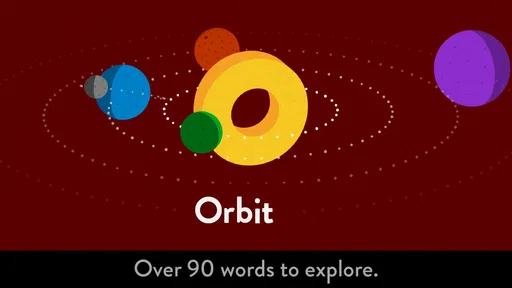
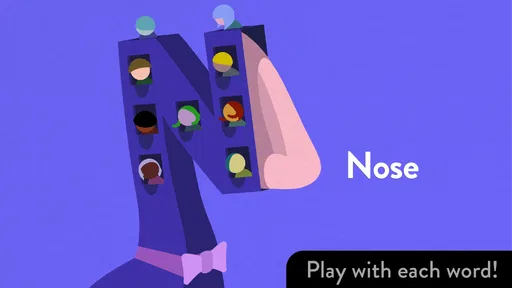
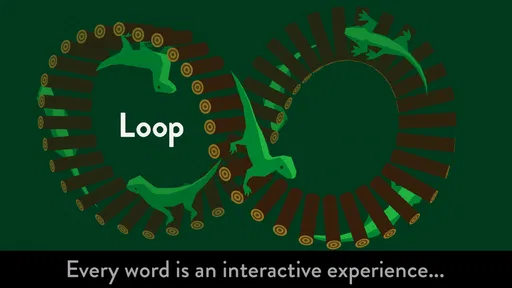
The letters are the main event, and their transformations provide the motivation to continue. A child can encounter a familiar letter, touch it, and watch the shape become more expressive. The learning value comes from connecting the abstract symbol with a memorable visual idea. In my experience, that connection is more likely to start a conversation than a worksheet is: “What does this look like?” or “Can you find another word that begins with this sound?”
That does not mean the game teaches every part of reading equally well. It is strongest at letter recognition, visual attention, and playful vocabulary prompts. It is not the right replacement for phonics practice, handwriting instruction, spelling drills, or a structured early-reading program. I would use it as a doorway into those activities, not as the entire lesson.
The lack of a conventional score is a strength for relaxed exploration, but it may disappoint families looking for measurable progress. There is no obvious reward loop pushing a child to complete a daily target. If your goal is to track mastery, a dedicated literacy app will probably be more useful. If your goal is to make the alphabet feel interesting and approachable, this game has a much clearer advantage.
More From Our News Desk

 Gmail
GmailGmail in a Busy Inbox: Who Benefits Most?
From first account to crowded workday, Gmail earns its place through dependable search and flexible sorting—but its best fit depends on how much inbox maintenance you can tolerate.

 Prime Video
Switching to Prime Video: What Changes in Your Viewing Routine
Prime Video can make a compelling second home for streaming, but switching means learning a different catalog, rental layer, and route from browsing to playback.

 Universal TV Remote Control
Universal TV Remote Control Works Best as a Reliable Backup
A phone remote earns its place through quick setup and reliable habits. Here is how to get more from Universal TV Remote Control—and where its limits show.

 Weather - By Xiaomi
Weather by Xiaomi Review: Clear at a Glance, Less Clear Up Close
Xiaomi’s weather app makes everyday forecasts quick to scan, but its calm surface can leave useful details and recovery paths harder to find than they should be.

 X
XX Under Pressure: Can It Recover When Posting Goes Wrong?
A resilience-focused review of X, examining setup, mistaken posts, interruptions, weak connections, and the gaps that matter when recovery needs to be dependable.

 Clash of Clans
Clash of Clans Is Won Between the Battles
Its raids are quick; its community is a long-term project of coordination, teaching, rivalry, and shared responsibility—with all the friction that entails.
Latest News



Who gets the most from it
I think it works best for curious children who enjoy tapping, watching, and asking questions. It is also a good shared-screen activity for an adult and child because the interaction naturally creates pauses. Instead of handing over a device and walking away, a parent can sit beside the child and turn each letter into a small discussion about sounds, shapes, animals, objects, or words.
Teachers and caregivers may find it useful as a warm-up before a more formal activity. A short session can introduce a letter theme without making the child feel that a lesson has started. For example, after exploring a letter, you can ask the child to find objects in the room that begin with the same sound. The game does not need to contain a complete teaching plan to be valuable in that role.
Adults without children can enjoy it too, particularly if they appreciate animation, tactile design, or inventive interfaces. I would not recommend buying it solely because it is labeled educational. Its charm depends on enjoying discovery. Someone who wants rapid-fire quizzes, spelling challenges, or a competitive game will likely find the pace too quiet.
Getting started without overthinking it
Installation should be straightforward for a compatible iPhone or iPad running iOS 12 or later. Since this is a paid title rather than a free download built around repeated purchases, the decision is mainly whether its focused style suits your household. I would show the game to the intended player soon after installing it instead of assuming the educational label will be enough to hold attention.
For a first session, I recommend sitting with the child for a few minutes and letting them lead. Avoid explaining every possible interpretation of a letter before they touch it. The surprise is part of the design. Ask simple questions only after the interaction has happened: “What did you notice?” “What does that shape remind you of?” “Can you make the letter again?” This approach keeps the activity conversational rather than turning it into a test.
A useful preparation is to have paper and a pencil nearby, not because the game requires them, but because they extend the experience. After exploring a few letters, invite the child to draw one from memory or sketch the object it suggested. That creates a bridge from screen-based recognition to hand movement. It also reveals whether the child is noticing the letter itself or only enjoying the animation.
I would keep the first visit short, especially for a younger child. The game is easy to revisit, and stopping while the child is still curious is better than turning a pleasant discovery into a forced alphabet marathon. On another day, return to the same letters and see whether the child remembers the visual transformation. Repetition becomes more meaningful when it feels like returning to a favorite toy rather than repeating an assignment.
The first meaningful success
The first real success is not finishing the alphabet. It is when the player begins to anticipate that a static symbol can become something else and starts interacting with intention. You may see this when a child recognizes a letter before touching it, predicts what it might suggest, or connects it with a word from everyday life.
To encourage that moment, choose one letter and build a tiny activity around it. Let the child explore it, say its name, make its sound if appropriate, and name an object that begins with it. Then ask the child to look for that letter outside the game, perhaps on a book cover or a food package. The game becomes meaningful when the symbol travels from the screen into the child’s surroundings.
One practical routine is to use it before reading a picture book. Explore a letter, find a matching word in the story, and point out the printed letter when it appears. This takes only a few minutes but gives the child three different encounters with the same idea: animated, spoken, and printed. I found this kind of connection more valuable than simply moving through letters as quickly as possible.
Another useful method is to let siblings take turns guessing. One child can interact while another describes what they see, then both can search for a related word. This makes the game less like solitary screen time and more like a shared observation exercise. It also gives a quieter child a way to participate without needing to control the device.
Where new users may feel confused
The biggest possible misunderstanding is expecting a standard game structure. There is no need to hunt for a score, unlock a complicated map, or wait for a lesson to tell you what to do next. The point is the interaction itself. If you approach it like a quiz, you may miss the visual language that makes it distinctive.
Another source of confusion is the difference between recognizing a letter and understanding its sound. A child may quickly identify a shape while still struggling with phonemic awareness. That is normal, but it means an adult should supply the missing context through conversation. Say the letter clearly, offer a familiar example, and listen to how the child responds. The game can prompt the exchange, but it does not replace it.
The playful transformations can also become the focus at the expense of the alphabet. Some children will enjoy repeatedly triggering the most amusing interactions and ignore the letter names. I would not treat that as failure. Let them enjoy the visual response once or twice, then gently bring attention back to the symbol and a related word. If the child is tired, stop rather than turning the moment into correction.
Parents should also be realistic about supervision. The game is suitable for Everyone, but age suitability does not mean every child will use it in the same way. A preschooler may need help naming what they see, while an older child may want to invent more complex word associations. The adult’s role changes with age: first demonstrating attention, then asking questions, and eventually allowing the child to explore independently.
There is a practical trade-off in the absence of a visible academic framework. You gain a relaxed, pressure-free experience, but you lose the reassurance of lesson objectives and completion indicators. If your family needs a clear sequence with exercises that become progressively harder, choose a structured literacy app alongside this one. If your child resists formal practice, this may be the more effective first step because it lowers the emotional barrier.
How it compares with ordinary alphabet alternatives
Compared with alphabet videos, this game asks the player to participate rather than simply watch. That makes it easier to pause and discuss a letter, although a video may be more convenient when a child wants background entertainment. Compared with flashcards, it offers more sensory surprise and less direct repetition. Flashcards remain better for quick recall practice, while this experience is better for building curiosity around symbols.
Compared with phonics-focused games, it is less systematic. A phonics app will usually be the stronger choice when you need sound blending, reading exercises, or clear skill progression. Compared with handwriting apps, it offers almost no reason to practice forming letters with a pencil or stylus. Its particular strength is the imaginative middle ground between looking at a letter and talking about what that letter can represent.
That distinction matters when deciding whether the price feels justified. At $5.99, I would see it as a focused creative tool rather than a complete educational package. Families wanting one app to cover reading readiness, spelling, writing, and assessment should spend their budget elsewhere or combine it with another resource. Families wanting a polished alphabet experience for shared exploration may find the one-time purchase easier to justify than a subscription-based learning service.
Making the experience last beyond the alphabet
Once the novelty settles, the next step is to use the game as a prompt for activities away from the device. Choose a letter and create a small scavenger hunt around the home. Look for objects beginning with that sound, notice the letter in printed words, or draw a picture that includes several examples. The important part is not collecting a large number of answers; it is helping the child see that letters are useful symbols everywhere.
You can also reverse the process. Start with a real object, say its name, and ask which letter begins that word. Then return to the game and explore that letter. This gives the app a clear purpose and prevents it from becoming an isolated sequence of attractive interactions. It also works well when a child has a favorite object, animal, or story character that can supply personally meaningful vocabulary.
For children who enjoy art, ask them to invent a new transformation for a letter. They can draw the letter as a creature, vehicle, or household object, then explain which parts of the original shape they kept. This exercise develops visual flexibility without pretending to be formal handwriting practice. It is one of the more interesting ways to build on the game’s central idea rather than merely replaying it.
Adults can make the sessions more useful by observing what the child does without immediately correcting them. Does the child name the letter, describe its appearance, imitate the sound, or jump straight to the animation? Each response suggests a different follow-up. A child focused on shape may benefit from pointing out the letter in books; a child focused on sound may be ready for simple word games; a child focused only on movement may need shorter, more guided turns.
Vectorpark’s design gives the game a distinctive identity, and that identity is also its boundary. It is memorable because it does not behave like a worksheet, but it cannot provide all the repetition and structure that some learners need. I would recommend it most confidently as a shared introduction, a creative break from formal practice, or a gentle way to make letters less intimidating.
My final view is that Metamorphabet is worth considering when you want the alphabet to feel alive rather than merely correct. It offers a thoughtful first encounter, works especially well when an adult talks through the discoveries, and gives children a reason to look closely at familiar symbols. Skip it if you need scores, progress reports, phonics drills, or handwriting training. Choose it if you value curiosity, visual play, and a calm path toward that first satisfying moment when a child recognizes a letter and starts seeing it in the world around them.
Metamorphabet Frequently Asked Questions
What devices can run Metamorphabet?
Metamorphabet is available for iOS devices running version 12 or later, so it is worth checking your device’s operating system before downloading. The game is designed around touch interaction, with letters that children can tap and drag as they explore. If your device meets the system requirement, the main consideration is whether its screen and controls are comfortable for the child who will use it.
How much does Metamorphabet cost, and what age rating does it have?
Metamorphabet costs $5.99, making it a paid download rather than a free-to-start game. Its content rating is Everyone, so it is presented as suitable for a broad audience. It is an educational game from Vectorpark, with a playful approach to alphabet exploration that can appeal to children and adults alike. Check the price shown in your app store before completing a purchase, as store prices can vary by region.
What is Metamorphabet?
Metamorphabet is an interactive educational word game designed primarily for young children. Each letter of the alphabet appears as a colorful, animated object that can transform, move, and react when tapped or dragged. Instead of following a traditional lesson format, the app encourages children to explore letters and vocabulary through playful visual and audio interactions, making it suitable for early learning and creative discovery.
Is Metamorphabet suitable for young children?
Yes. Metamorphabet is mainly aimed at preschool and early-school-age children, although the exact appeal depends on the child’s reading and motor skills. The interface is simple, colorful, and easy to explore without complicated menus. Children can interact with letters at their own pace, while parents can use the app as a relaxed introduction to the alphabet, basic words, pronunciation, and visual learning.
Does Metamorphabet require an internet connection?
Metamorphabet is generally designed as an offline-friendly experience after installation, which is useful for travel, waiting rooms, or situations without reliable mobile data. The core interactive content is stored on the device, so children can continue exploring the alphabet without needing an active connection. Internet access may still be required for downloading the app, updates, or platform-related services.
Pros
- Creative letter animations make alphabet learning engaging.
- Simple controls are suitable for young children.
- Works well as a calm
- screen-based learning activity.
- Encourages curiosity through playful visual transformations.
- No reading ability is required to begin exploring.
Cons
- Limited educational depth beyond letter recognition.
- Some animations may be too abstract for younger children.
- No progress tracking or personalized learning options.
- Replay value can decrease once every letter is discovered.
- Requires supervision to connect letters with their sounds.











