

Lightgliders
- 95.00
- 4.2
- Installs
- 10.00K
- Price
- Free

Screenshots


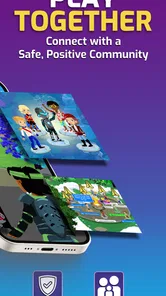


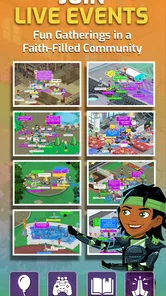


Analysis by Reviewed
I approached Lightgliders as more than a children’s game. It is an educational Christian faith experience from Made to Shine Inc, built around a virtual world where play, learning, and community are meant to sit together. That combination makes it quite different from a conventional puzzle app or a simple Bible reference tool. In my experience, its strongest appeal is to families looking for a gentle digital space connected to Christian values, especially when a child wants something more interactive than reading or watching a lesson.
The game is free to start and is rated for Everyone, which makes it easy to consider for a shared family device. It has reached over ten thousand installs and holds a 4.2 average from around 160 ratings, so it has a modest but visible user base rather than the reach of a mainstream mobile hit. The current version is 4.1.2, and it runs on Android 5.0 or later. I would still treat those details as a starting point, because the more important question is whether its style of interaction suits the child using it.
How comfortably the world can be read and explored
I find that Lightgliders is easiest to approach when I treat its virtual world as a place to explore at a child’s pace, rather than a lesson with a single obvious route. That framing helps me notice whether the child is curious about the setting or needs more structure before moving on. The next section looks at how a little guidance can make exploration feel more manageable without taking over.
A visual environment that needs patient exploration
The first thing I noticed is that Lightgliders presents itself as a world to explore rather than a straight sequence of lessons. That can make faith-based learning feel less like homework. Instead of opening a page and moving through fixed paragraphs, a child is encouraged to engage with an environment and discover what to do next. For children who learn well through context and play, this approach can make Christian themes feel more approachable.
The trade-off is that a virtual world can be less immediately clear than a traditional educational app. A child who expects one obvious “next” button may need time to understand where to go, what matters, and which activity deserves attention. I found that the game works better when an adult is available during the first sessions, not to control every action, but to help translate the environment into a simple routine: explore a little, try an activity, then talk about what the child noticed.
That small introduction is particularly useful for children who are easily overwhelmed by unfamiliar screens. Rather than presenting the game as an open-ended space with no expectations, I would give a child one manageable goal at a time. This also helps parents see whether the child enjoys the community-and-world format or would be happier with a focused devotional app.
Why reading support matters here
Lightgliders is connected to Christian faith, so some of its value depends on understanding written prompts, explanations, or conversations within the experience. A child who reads independently may be able to move through it more comfortably, while a younger child or a child with reading difficulties may need an adult to read aloud and explain unfamiliar terms.
More From Our News Desk

 Gmail
GmailGmail in a Busy Inbox: Who Benefits Most?
From first account to crowded workday, Gmail earns its place through dependable search and flexible sorting—but its best fit depends on how much inbox maintenance you can tolerate.

 Prime Video
Switching to Prime Video: What Changes in Your Viewing Routine
Prime Video can make a compelling second home for streaming, but switching means learning a different catalog, rental layer, and route from browsing to playback.

 Universal TV Remote Control
Universal TV Remote Control Works Best as a Reliable Backup
A phone remote earns its place through quick setup and reliable habits. Here is how to get more from Universal TV Remote Control—and where its limits show.

 Weather - By Xiaomi
Weather by Xiaomi Review: Clear at a Glance, Less Clear Up Close
Xiaomi’s weather app makes everyday forecasts quick to scan, but its calm surface can leave useful details and recovery paths harder to find than they should be.

 X
XX Under Pressure: Can It Recover When Posting Goes Wrong?
A resilience-focused review of X, examining setup, mistaken posts, interruptions, weak connections, and the gaps that matter when recovery needs to be dependable.

 Clash of Clans
Clash of Clans Is Won Between the Battles
Its raids are quick; its community is a long-term project of coordination, teaching, rivalry, and shared responsibility—with all the friction that entails.
Latest News



I would not assume that the game automatically solves reading challenges simply because it is playful. Play can make content less intimidating, but it does not replace readable text or personal support. On a family tablet, I found the most practical approach was to sit beside the child at the beginning, adjust the distance and screen position, and encourage the child to describe what they think an instruction means before stepping in.
This creates an unexpectedly useful shared activity. The adult is not merely troubleshooting controls; they are helping the child connect an in-game choice with a faith-related idea. That makes the experience more conversational than a solitary lesson, although families seeking completely independent use may find this extra involvement inconvenient.
Navigation for children with different learning styles
Children do not all interpret virtual spaces in the same way. Some enjoy wandering and making discoveries, while others prefer predictable steps and clear completion points. Lightgliders is more naturally suited to the first group. A child who likes to explore, customize a routine, and return to a familiar world may stay engaged longer than with a worksheet-style app.
For a child who needs structure, I recommend creating a short repeatable session. For example, let the child enter the world, choose one activity, spend a few minutes exploring, and then stop at a planned point. This avoids turning the open format into a source of uncertainty. It also gives parents a way to notice whether the child is genuinely learning or simply tapping through the environment.
A useful test is to ask the child to explain how they found something after the session. If they can describe the route or the purpose of an activity, the world is supporting understanding. If they remember only colorful movement and cannot identify what they were meant to do, the game may need more adult guidance or may simply not match their learning style.
Motor and sensory considerations
Any game built around exploring a virtual world asks the player to coordinate attention with touch or other on-screen actions. That may be comfortable for children who already use mobile devices, but it can be tiring for a child with limited fine-motor control, hand tremors, slower reaction time, or difficulty managing several visual elements at once.
I would introduce the game in short sessions rather than assuming that a child should remain engaged for a long stretch. Shorter play reduces fatigue and makes it easier to identify whether the difficulty comes from the faith content, the navigation, or the physical act of controlling the device. A stand can also help when holding a phone is uncomfortable, while a larger tablet may make visual targets easier to see, though the best setup depends on the child.
There is another important distinction: a child may understand the lesson but struggle with the interaction. In that situation, an adult can take over some tapping while the child makes choices verbally. This preserves participation without pretending that physical control is equally easy for everyone. It is a practical workaround for shared play, although it means the experience is no longer fully independent.
Sensory comfort deserves the same attention. A lively virtual setting may be enjoyable for one child and distracting for another. I would watch for signs such as rapid disengagement, covering the screen, frustration after repeated visual changes, or a preference for staying in one quiet area. If those reactions appear, lowering the general stimulation around the session, using a larger screen at a comfortable distance, and keeping the activity brief may help. If they do not, a calmer educational alternative may be a better fit.
When sound is not the best route
Shared rooms create their own access issues. A child may be using the game near siblings, during travel, or in a place where sound is not practical. I would not build the whole experience around audio unless I had already seen that the child can follow it comfortably. In a quiet home setting, an adult can fill in spoken context; in a busy setting, the child may miss important cues or become distracted.
This is one reason I see Lightgliders as better for intentional family time than for keeping a child occupied anywhere. A parent can choose a calm moment, sit nearby, and respond when the child asks what something means. That makes the game more inclusive in practice, even when the device itself cannot solve every sensory or communication need.
Situational access in everyday family life
A realistic use case would be a family with a child who wants a game after school but whose parents want the activity to reflect their Christian home. The child could spend a short period exploring Lightgliders while a parent remains close enough to help with reading, navigation, or questions about the faith themes. Afterward, the parent can ask what the child enjoyed and what felt confusing. That turns screen time into a small conversation rather than an isolated reward.
The game can also suit a child who resists formal religious study. A conventional reading plan may feel too serious or repetitive, while a virtual world offers a softer entry point. I would still avoid presenting it as a replacement for family discussion, church participation, or age-appropriate teaching. Its role is more practical: it can create interest and provide a playful setting for ideas that adults can explore further.
For travel, the situation is less straightforward. A child may appreciate having a familiar faith-oriented game available, but a moving vehicle, limited battery, glare, and surrounding noise can reduce comfort. The best experience is likely to come from a stable device and a predictable setting. If a child becomes motion-sensitive or loses focus easily, an audio story, printed activity, or offline conversation may be more suitable for that moment.
Families sharing one device should also think about turn-taking. A virtual world can invite personal exploration, and children may not enjoy being interrupted constantly by siblings. I would set expectations before opening the game: one child explores while another watches, or each child gets a short turn followed by a shared discussion. This simple arrangement prevents the community theme from becoming a source of arguments at home.
Community sounds appealing, but supervision still matters
The idea of community is part of the game’s identity, and that may be attractive to children who enjoy feeling connected to a larger world. However, parents should remain actively involved whenever a child is engaging with social or community-oriented elements. “Everyone” is a broad age classification, not a substitute for supervision or a guarantee that every interaction will suit every family.
I would explain to a child which actions are private, which are shared, and what to do if something feels confusing or uncomfortable. This conversation is useful even when the child is playing in a safe home environment, because it teaches habits that apply to other games and online spaces. Parents who want a completely isolated experience may prefer a single-player educational app with no community emphasis.
The community angle also affects children with social communication differences. Some may enjoy a structured virtual setting because it offers a less demanding way to engage, while others may find unfamiliar social expectations difficult to interpret. I would observe rather than assume. If the child prefers exploring alone, that is still valuable; there is no need to push social participation simply because the product includes a community idea.
Where the free model becomes a practical consideration
The game is free, but optional purchases range from $5.99 to $99.99 per item. That spread is important for families managing a child’s access, even if they never intend to buy anything. I recommend discussing purchase rules before handing over the device and using the platform’s purchase controls so that a child cannot make an accidental decision during play.
This is not only a budget issue. Purchase prompts can interrupt a child who is already concentrating, and a child with impulsivity or difficulty understanding money may not recognize the difference between an in-game option and a real charge. A parent-controlled setup makes the experience calmer and more predictable. If the possibility of optional spending is itself a distraction, a paid-once or entirely offline alternative may be more comfortable.
For families considering a purchase, I would first watch how the child uses the free experience. Does it encourage thoughtful conversation, or does the child focus mainly on collecting and unlocking? Does the child return because of the faith content, the exploration, or the social atmosphere? Those answers matter more than the presence of extra content, because they reveal whether additional spending would support the family’s goal.
Who will benefit most, and who should choose something else?
I think Lightgliders is strongest for children who enjoy imaginative digital spaces and for families who want Christian themes presented through play. It is also a reasonable choice for parents willing to participate, especially when a child needs help with reading, navigation, or interpreting social elements. The game’s Everyone rating makes it approachable as a family option, but the right age and level of independence still depend on the individual child.
I would be more cautious for a child who needs highly predictable instructions, low sensory stimulation, or very precise accessibility controls. A focused educational app may be better when the goal is practicing a specific academic skill. A Bible reading app may be better for an older child who wants direct access to text without a game world. A quiet story or printable activity may be preferable when screen movement, touch control, or community features create unnecessary barriers.
It is also not the ideal choice for someone looking for a competitive game, a deep action experience, or a conventional lesson with measurable progress at every step. Its appeal comes from atmosphere, exploration, and values-based engagement. That is meaningful, but it is a different kind of usefulness from drill-based learning.
My inclusive verdict
After spending time with it, I see Lightgliders as a thoughtful option for families who want a Christian educational game that can become a shared conversation. Its virtual-world format gives children more room to explore than a standard lesson, and that can help faith-related ideas feel less formal. The strongest accessibility benefit is not a particular technical feature; it is the flexibility to let an adult support the child through reading, decision-making, and discussion.
At the same time, that flexibility requires effort. The game does not remove the need to consider motor comfort, sensory load, reading ability, social understanding, or purchase boundaries. Children who need a very controlled interface may find the open world tiring, while those who prefer quiet, direct instruction may get more from a different type of app.
My recommendation is to begin with a short, supervised session on a comfortable screen, with purchases controlled and one simple goal in mind. Watch how the child navigates, communicates, and reacts to the environment rather than judging the experience only by whether they keep tapping. If the world encourages curiosity and meaningful conversation, it can earn a place in family screen time. If it creates more confusion than connection, choosing a simpler alternative is not a failure; it is the more inclusive decision.
For the right household, Lightgliders is most valuable when it is treated as a shared faith-and-play space, not as an automatic substitute for teaching or supervision. Made to Shine Inc has created a distinctive educational game, and its free entry makes trying it straightforward. Just keep the child’s individual needs at the center, especially when reading, motor control, sensory comfort, social participation, or spending limits affect how welcoming the experience feels.
Lightgliders Frequently Asked Questions
What devices can run Lightgliders?
Lightgliders is available for Android devices running Android 5.0 or later. Before downloading, check that your device meets this minimum requirement and has enough available storage for the game. Keeping the operating system up to date can also help with compatibility. The game is free to download, while optional in-app purchases may be offered.
Who makes Lightgliders, and what kind of game is it?
Lightgliders is an educational game developed by Made to Shine Inc. Its central idea is a virtual world that brings together Christian faith, games, and community. That makes it a distinctive choice for families looking for a child-oriented online experience with a faith-based theme, rather than a general-purpose action game. Its content rating is Everyone.
What is Lightgliders?
Lightgliders is a family-friendly online game and virtual world designed around exploration, creativity, social interaction, and positive values. Players can customize their glider, visit different areas, complete activities, collect rewards, and interact with other members of the community. The experience is aimed primarily at children and families, so it focuses on encouraging kindness, cooperation, imagination, and responsible online behavior rather than aggressive competition.
Is Lightgliders safe and suitable for children?
Lightgliders is built with children and families in mind, offering a moderated environment and safety-focused features intended to make online interaction more comfortable for younger players. However, parents should still review the available privacy, chat, and account settings before allowing independent play. As with any online game, supervision is recommended, especially when children communicate with other users or use optional social features.
Is Lightgliders free to download and play?
Lightgliders can typically be downloaded and started without an upfront purchase, allowing users to explore the basic experience before deciding whether they want additional content. Some features, items, memberships, or activities may require in-app purchases or a subscription, depending on the current version and platform. Parents should check the store listing and configure purchase restrictions to avoid unexpected charges.
Pros
- Creative educational gameplay blends learning with exploration and challenges.
- Safe
- moderated environment designed with younger players in mind.
- Encourages kindness
- teamwork
- and positive social interaction.
- Bright visuals and accessible controls make it easy to start playing.
- Regular activities and missions can keep children engaged over time.
Cons
- Some features may require an in-app purchase or subscription.
- Progress can feel repetitive once the main activities become familiar.
- An internet connection is needed for most of the experience.
- Social features may require parental setup and supervision.
- Performance can vary on older phones and tablets.











