Incredibox
- 8.80K
- 4.9
- Installs
- 1.00M
- Price
- $2.99

Screenshots

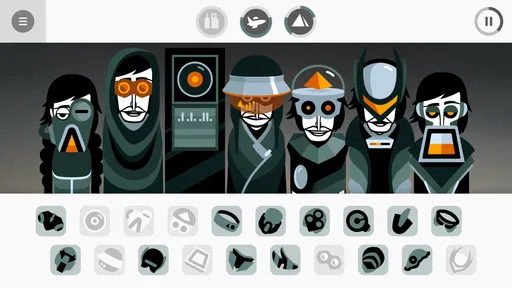
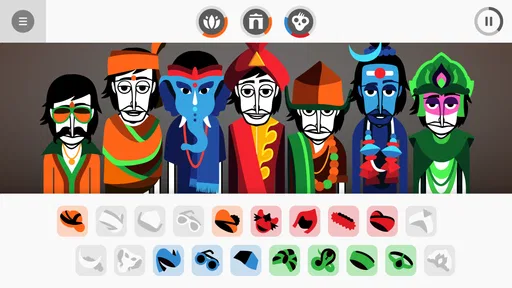
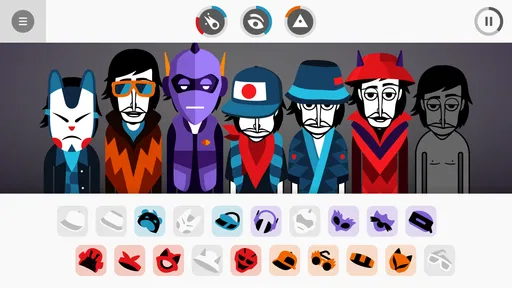
Analysis by Reviewed
I like Incredibox best as a shared, low-pressure music toy: one person starts a beat, someone else adds a sound, and the group listens to how the mix changes. It makes a good fit for a quiet stretch at home when you want to do something together without needing instruments or music lessons. The fun is in trying ideas, not in getting a polished song right on the first attempt.
A good fit for passing around at home
On a shared device, I’d treat each turn as a chance to contribute one sound and then hear the result together. That keeps younger players involved while giving older ones room to experiment with rhythm and layering. It also avoids turning the session into a competition over who can make the “best” track. If everyone wants to explore at once, taking turns or agreeing on a musical direction can make the experience more enjoyable.
A realistic way to make that work is to set a tiny shared challenge before anyone taps: build a mix that feels cheerful, spooky, or suitable for a pretend cartoon scene. Each person can add one part, then the group listens before deciding what to change. Giving everyone a clear turn is more useful than trying to manage the screen for several people at once, especially when younger players are still learning how their choices affect the whole sound.
There is a useful distinction between sharing the device and sharing an account or a finished creation. I would not assume that a household setup includes separate profiles or family controls; instead, decide in advance who is using the device and what you are comfortable sharing. For a casual session, the simplest approach is to make music together in the moment and keep expectations clear about any sharing beyond the room.
Keeping a shared device session simple
Before handing the device over, I’d agree on whether the goal is to explore freely or to build one mix together. Those are different kinds of play: free exploration suits a short turn alone, while a group composition works better when people pause to listen between changes. This small boundary also helps prevent the quickest tapper from taking over. If the device belongs to one person, the household can still share the activity without treating that as a reason to share personal account access or device settings.
The game is most rewarding when players can hear the consequences of a choice. Instead of making several changes in rapid succession, leave a moment after each addition and ask whether it makes the beat clearer, busier, or more interesting. That listening habit turns a casual session into a simple lesson in arrangement without turning it into formal instruction. It is also an easy way to include someone who would rather suggest ideas than hold the device.
What the creative process rewards
The game works especially well for people who enjoy hearing how small changes affect a whole arrangement. Try building a steady base first, then add contrasting sounds one at a time. If the mix gets busy, remove a layer rather than adding another; that makes it easier to hear which parts are carrying the rhythm and which are filling out the texture. Discovering combinations that trigger animated sequences gives experimentation a playful goal, though I wouldn’t treat every session as a hunt to unlock everything.
More From Our News Desk

Weather by Xiaomi Review: Clear at a Glance, Less Clear Up Close

X Under Pressure: Can It Recover When Posting Goes Wrong?

Clash of Clans Is Won Between the Battles

Android Auto Makes the Case for Quieter Car Software

MobiOffice: Transforming Mobile Productivity with Seamless Integration

EA SPORTS FC™ Mobile Soccer: Redefining Mobile Sports Gaming
One useful trick is to make a quick mental note of the sound that gives a mix its character before changing anything else. When a combination stops working, remove only the most recent layer and listen again. That makes cause and effect easier to judge than clearing the whole arrangement and starting from scratch. It also gives children a concrete way to explain a preference: perhaps the beat felt stronger before the extra sound, or the new layer changed the mood more than expected.
There is a trade-off between discovery and control here. Finding combinations and watching the accompanying sequences can give experimentation a satisfying destination, but it can also tempt completion-minded players to focus on uncovering combinations rather than listening to the music they have already made. I’d use the animated rewards as occasional surprises, not as a checklist. If the group has found a mix everyone likes, there is no need to abandon it just to chase another reveal.
Where it sits among music apps
Compared with a traditional music-production app, this is much easier to approach but offers less control for someone who wants to shape every note or record a detailed arrangement. Compared with a rhythm game built around fixed challenges, it gives you more room to make your own patterns. That middle ground is the appeal: creative enough to invite tinkering, but structured enough that a first-time player can start making a coherent-sounding mix without learning production terminology.
That distinction matters when choosing what to install. If your aim is to practice an instrument, learn music theory, or edit a song for a school or work project, a dedicated lesson or production app is a better fit. If you want a relaxed way to experiment with layers and hear an arrangement take shape, this is more inviting than an app that expects you to understand tracks, effects, or recording tools from the outset. It does not replace those tools; it lowers the barrier to playful musical decision-making.
It also differs from a conventional rhythm game because the pleasure is not primarily in hitting a sequence correctly. There is less of a right answer to pursue, which is freeing for curious players but less satisfying for someone who wants clear levels, scores, or a steadily escalating challenge. I would skip it if the main reason you enjoy music games is mastering precise timed inputs. For a household that prefers making choices together over competing for a result, its open-ended approach is the stronger point.
The Beatboxing Adventure Begins
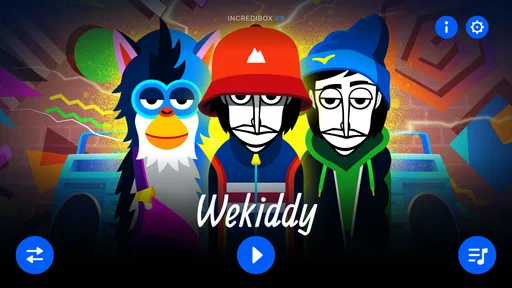
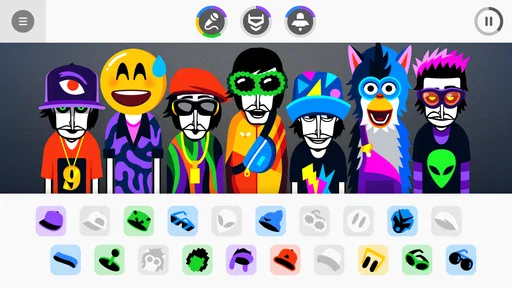
Upon launching Incredibox, you're immediately greeted with a vibrant and colorful interface that’s both intuitive and inviting. The app is essentially a beatboxing game that allows you to mix and match different sounds to create your own unique tracks. It’s like having a virtual band right in your pocket! The characters, each representing different sound effects, are as quirky as they are charming, making the whole experience visually appealing.
How It Works
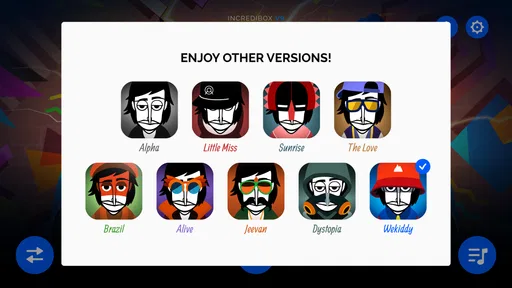
So, how does it work? You start by selecting one of the app's various musical styles, like "Alpha," "Little Miss," or "Sunrise." Each style offers a distinct musical flavor, keeping things fresh and exciting. Once you've chosen your style, you drag and drop different sound icons onto the characters to start creating music. It's as simple as that! You can experiment with various combinations and layers, and the app even rewards you by unlocking animated sequences when you find the right combos.
For a first session, I’d choose a style based on the mood you want rather than trying to compare every option immediately. Add a small number of parts, listen to how they fit, and then swap one at a time. That approach makes the different musical flavors easier to notice and keeps the mix from turning into a jumble before you have a feel for the controls. Once the group understands the basic loop, experimenting becomes more purposeful.
Why It's a Hit
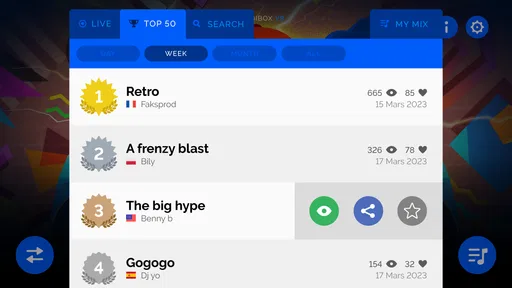
Incredibox isn’t just about making music; it’s about creativity and fun. The app’s design encourages users to explore and experiment, which is why it’s so engaging. I found myself lost in the rhythms, trying different combinations and seeing where the music would take me. Plus, the ability to share your creations with friends adds a social aspect that keeps you coming back for more.
That sharing angle is best treated as a choice, not an assumption about how a household should use the game. If you are playing around friends or relatives, passing the device around and listening together may be all you need. If someone wants to share a creation beyond the people in the room, decide together whether that suits the group. For younger players, I’d keep that conversation simple and make sure they know that making something together does not automatically mean it needs to be shared elsewhere.
Another thing that stands out is the app’s accessibility. You don’t need to be a musician to enjoy Incredibox. Whether you're a seasoned music producer or someone who just likes to dabble in tunes, this app is designed for everyone. It’s user-friendly, and the learning curve is minimal, which means you can jump right in and start creating without any hassle.
Age, price, and the household decision
So Far So Good makes this music game, which is rated Everyone. That broad age label is reassuring for mixed-age households, though I’d still listen along with younger children and decide whether the sounds and screen time suit your own routines. It is a paid download at $4.99, so I’d think of it as a small shared activity rather than a free, endlessly refreshed music service. The 4.8 average from around 49,000 ratings and more than 500,000 installs suggest that many players enjoy the format, but those figures can’t tell you whether your household will prefer open-ended mixing to a more guided game.
For parents deciding whether it suits a child, the Everyone rating is a useful starting point, not a substitute for knowing the child. I’d sit nearby for the first session, see how they respond to the visuals and sounds, and help them take turns if they are playing with siblings. The game’s flexible, creative format can work well for different ages, but younger children may enjoy the immediate interaction while older ones may want to spend longer refining a combination. Neither response is a problem; they simply call for different expectations about how long a shared session should last.
The paid format also shapes who should choose it. It makes more sense for someone who expects to revisit the music-making experience than for a player looking for a one-time distraction or a large library of guided activities. Before buying, I’d consider whether the household enjoys experimenting with sound, because that is the central appeal. The popularity figures are encouraging, but they do not guarantee that a particular child or family will prefer open-ended play to a game with a clearer objective.
For a practical test, try a short session after dinner: let one person choose a style, have each family member add a sound, then pause to listen before changing anything. That simple turn-taking makes the choices audible and helps keep the screen from becoming a solo activity. The main limitation is also part of the design: if someone wants lessons, precise editing, or a finished track for a project, a dedicated music tool is a better choice. The current version is 0.7.0 and requires Android 6.0 or later, so check that an older household device meets the requirement before buying.
On a shared device, I would also settle a simple handoff routine: one person changes a sound, then passes the device or invites the next person to choose. It avoids accidental tug-of-war and gives everyone a chance to hear the mix before it changes again. For a quick activity between other plans, agree on a stopping point such as finishing one shared arrangement rather than letting the session drift. That makes the game easier to fit into ordinary family time without expecting it to provide a full evening’s entertainment.
For Android households, checking the operating-system requirement before purchase is especially sensible if the device is an older spare or a hand-me-down. The listed minimum is Android 6.0, and the current version is 0.7.0. If you are choosing between devices or platforms, confirm the relevant compatibility details in the store you plan to use rather than assuming that requirements are identical. That simple check is more useful than buying first and discovering that the household device is not a suitable place to play.
Final Thoughts
In conclusion, Incredibox is a must-try for anyone interested in music and creativity. It's a fantastic way to explore your musical talents in a fun and relaxing way. Whether you're looking to kill some time or unleash your inner DJ, this app provides endless entertainment. So go ahead, give it a try, and let your musical journey begin!
My household verdict is more measured: I’d recommend it when the goal is to make a little music together, not when someone needs a structured course, a competitive challenge, or a production workspace. The strongest use case is a short, shared session where people take turns, listen closely, and enjoy the surprising changes that a single sound can bring. If that sounds like the kind of low-pressure activity your home would return to, the purchase is easier to justify; if your players need a firm set of goals, another kind of music game will probably suit them better.
Incredibox Frequently Asked Questions
Can I try Incredibox before buying it?
Incredibox is a paid music game, so you should expect to purchase it before you can play. Its focus is on creating music by combining sounds with a cheerful crew of beatboxers, rather than offering a separate free-to-play version. If you are deciding whether it suits you, consider whether playful, hands-on music making is the kind of experience you want from a game.
Do I need musical experience to enjoy Incredibox?
No musical training is needed to get started. Incredibox is built around experimenting with sounds, so you can explore combinations and make a mix without knowing how to read music or play an instrument. Its approachable style can appeal to beginners as well as people who already enjoy making music. The emphasis is on trying ideas and finding combinations that sound good to you.
Can I save or share the music I create in Incredibox?
Incredibox includes ways to record and share your creations, so you can keep a mix you like or let others hear it. Sharing online may require an internet connection, while the game can still function offline after installation. The Mixlist feature also lets you save favorite mixes and replay them. These options make it easier to return to ideas you have created rather than starting from scratch each time.
Is Incredibox suitable for short play sessions?
Yes. Its drag-and-drop approach makes it easy to begin experimenting without a lengthy setup, which suits a quick creative break as well as a longer session spent refining a mix. You can try different sound combinations and listen to how they work together at your own pace. Since it is a music-making game rather than a level-based challenge, you can dip in whenever you feel like creating.
Does Incredibox include different musical styles?
Yes, Incredibox offers multiple sound packs with a variety of musical styles. This gives you room to experiment beyond a single set of sounds and create mixes with different moods. Characters represent sounds such as beats, melodies, and vocal lines, which you can combine through the drag-and-drop interface. Trying different packs and combinations is a central part of the creative experience.
Pros
- Engaging music creation experience
- User-friendly interface
- Wide variety of sound options
- Regular updates with new content
- Great for all ages
Cons
- Limited free version features
- Requires internet for full experience
- Can be repetitive over time
- Higher tiers can be pricey
- No offline save option











