Hidden Spots - Objects Game
- 903.00
- 4.5
- Installs
- 5.00M
- Price
- Free

Screenshots
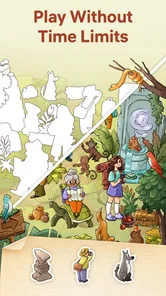
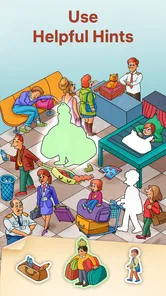


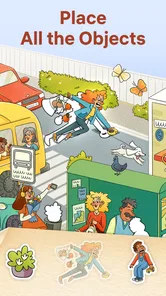
Analysis by Reviewed
I tend to reach for a hidden-object puzzle when I want to settle my attention without taking on a complicated set of rules. Hidden Spots - Objects Game fits that mood: its central pleasure is studying an illustrated scene and noticing what I missed on the first pass. It works best as a quiet, self-paced activity, not as a game that needs to keep me on the edge of my seat.
A good fit for short breaks, with a few caveats
That quick-play appeal is strongest when I want something quieter than a competitive puzzle or a game built around rapid reactions. I can open a scene, search at my own pace, and stop when I need to get back to the day. For example, it suits a short wait for a ride or a calm pause between tasks better than a session that demands a long stretch of uninterrupted attention.
It is also easy to share the basic activity with a child or a friend: looking at the same illustration and taking turns spotting objects gives the game a simple social use without requiring anyone to learn complicated controls. Still, I would not choose it for a group looking for lively multiplayer play, nor for someone who wants a story, character progression, or a deep logic challenge. Its appeal is the act of careful looking.
First Impressions
The first thing that struck me about Hidden Spots - Objects Game was its charming, colorful graphics. Upon launching the app, you’re greeted with a vibrant interface that’s easy on the eyes. The design is intuitive, so you won’t waste any time trying to figure out where everything is. Just jump right in and start playing!
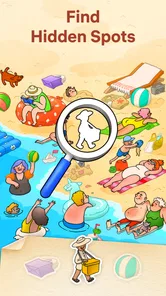
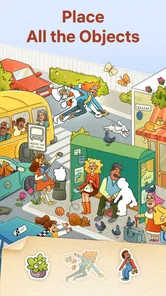
What I really appreciate is how the game manages to balance simplicity with challenge. You’re presented with beautifully illustrated scenes, each packed to the brim with hidden objects. Your task? To find them all! It sounds simple enough, but trust me, some of these objects are cleverly concealed and will have you scratching your head.
Reading the scenes instead of rushing through them
The art is more than decoration here: it gives each search a distinct visual setting and makes scanning the picture feel like exploring a small illustrated place rather than checking a flat checklist. I find it helpful to work in passes. First I look over the whole scene to get its layout, then I scan one area at a time, and finally I revisit the places where colors or overlapping details made an object hard to distinguish. That approach feels more satisfying than tapping at random.
This also explains a trade-off. Detailed scenes reward patience, but a small target can blend into nearby shapes, especially if I am playing quickly or not giving the image my full attention. When that happens, slowing down and comparing the item’s outline with the surrounding forms is more useful than repeatedly tapping the same patch. The game is best when I treat it as a visual search, not a race.
More From Our News Desk

Weather by Xiaomi Review: Clear at a Glance, Less Clear Up Close

X Under Pressure: Can It Recover When Posting Goes Wrong?

Clash of Clans Is Won Between the Battles

Android Auto Makes the Case for Quieter Car Software

MobiOffice: Transforming Mobile Productivity with Seamless Integration

EA SPORTS FC™ Mobile Soccer: Redefining Mobile Sports Gaming
Gameplay and Features
The gameplay of Hidden Spots is straightforward, which makes it accessible to players of all ages. You’re given a list of items to find, and you use your finger to tap on them as you spot them in the scene. The app doesn’t rush you with timers, so you can take your time and enjoy the process of sleuthing out those hidden items.
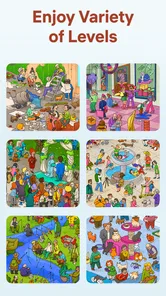
One of the features I found particularly engaging is the variety of scenes available. From bustling cityscapes to serene countryside settings, each level offers a unique experience. The developers have clearly put a lot of thought into creating detailed and immersive environments that keep you coming back for more.
Another highlight is the hint system. If you’re ever stuck, you can use a hint to reveal a hidden object. But use them sparingly! They’re limited, and part of the fun is challenging yourself to find everything on your own.
Hints, attention, and the pace of play
I save a hint for the moment when I have genuinely searched the scene rather than using one as soon as progress slows. That makes it a useful nudge instead of a shortcut that removes the point of the puzzle. If I am tired or playing in a distracting place, I am more likely to need help; in a quiet moment, the same scene can feel much more manageable. The no-timer pace makes that choice feel comfortable rather than punitive.
Compared with the usual alternatives in the puzzle category, this is a more observational experience than a match-and-clear game or a puzzle that asks me to plan several moves ahead. It is a better pick when I want to focus my eyes and settle into a picture; those other formats are better when I want stronger strategy, faster feedback, or a clear sense of solving a mathematical or spatial problem. The distinction matters if you are choosing one game for a particular mood.
What to expect before installing
Easybrain’s game is free to download, with in-app purchases priced at $9.99 per item. It is rated Everyone and requires Android 7.0 or later; the current version is 1.5.0. It was released on July 4, 2024, and has passed five million installs. Its average rating is 4.5 from around 128,000 ratings, which suggests broad interest, though those numbers cannot tell you whether its unhurried search style is right for you.
If you are wondering whether you need to be an experienced puzzle player, I would say no: the tap-to-find format is approachable, and the challenge comes from noticing details rather than learning a complex control scheme. If you are wondering whether it works as a long-term substitute for a more demanding game, I would be more cautious. Its scenes and relaxed searches are the draw, but players who need escalating mechanics or a strong narrative may find the repetition less compelling over time.
Why You Should Download It
So, why should you give Hidden Spots - Objects Game a try? For starters, it’s a great way to unwind. The game’s calming music and lack of time pressure make it perfect for a bit of stress-free gaming. Plus, it’s a fantastic exercise for your brain, honing your attention to detail and observational skills.
I also love that the game is suitable for everyone. Whether you’re playing with your kids, friends, or just solo, it’s a wonderful way to spend a few minutes of your day. And with regular updates bringing new scenes and challenges, there’s always something fresh to enjoy.
How the mood shapes the experience
The relaxed presentation works best when I let the scene set the pace instead of treating each level like a task to finish as quickly as possible. The art gives the search its character, while the gentle audio and lack of time pressure help keep the mood low-key. That combination makes this a good choice for winding down, though it may feel too subdued if I am in the mood for sharp sound cues, urgency, or a more energetic arcade-style loop.
My practical advice is to play when you can give the picture a little attention, keep hints for a genuine dead end, and stop after a scene if your eyes start skimming without taking in the details. That small adjustment makes the game more enjoyable and avoids turning a relaxing puzzle into a frustrating hunt. It is not the right fit for every kind of downtime, but it knows what it is trying to offer.
Choosing the right moment to play
A useful everyday test is whether the moment is calm enough to look closely but short enough that I do not want to commit to a bigger game. If I am waiting for an appointment, I can focus on a scene without needing to remember a complicated objective when I put my phone away. If I am walking through a noisy station or trying to answer messages at the same time, the small details are easier to miss, and the search can feel more like squinting than relaxing. I would save it for a seated pause rather than use it while moving around.
That makes the game a particularly good choice for people who enjoy illustrated puzzles but do not want a timer pushing every decision. It can also suit a parent and child sharing a device: one person can read the object list while the other scans, then they can swap roles. The simple format makes that casual turn-taking natural. I would not expect it to replace a dedicated family game, though; the fun is in jointly spotting things, not in a deep cooperative system.
Small habits that make searches easier
When a listed object seems invisible, I try not to stare at the whole screen. I divide the picture into a few broad regions and move methodically across them, checking silhouettes as well as color. That helps when an item is partly camouflaged by the scene’s palette. I also pause briefly after finding one object instead of immediately tapping the next likely shape; quick repeated taps can make me overlook an object that is close by but oriented differently.
There is a practical trade-off in that slower approach: it makes each search feel more deliberate, but it also means this is not a great choice when I only have a few seconds or want constant bursts of reward. The list gives a clear aim, yet the pleasure comes from the looking itself. If that quiet act feels soothing, the pace is a strength. If I need frequent mechanical changes to stay interested, a level-based strategy puzzle is likely a better fit.
How it differs from other hidden-object games
Within hidden-object games, the appeal here is the scene-first search: I am looking for listed items in an illustration, rather than matching symbols or arranging pieces. That makes it easier to pick up than a puzzle with several rules to learn, but it also places more weight on visual clarity and patience. People who like spotting small details in busy pictures should feel at home; people who prefer a game to explain a sequence of moves and reward planning may find the central loop too narrow.
It is also worth separating a quiet search game from a narrative mystery. The former gives me a picture and a set of things to locate; the latter usually asks me to follow clues, connect evidence, or care about what happens next. I would choose this one for a brief mental reset, not when I want a plot to pull me through a long session. That distinction helps set expectations before downloading.
Who may want a different kind of puzzle
I would steer away from it if tiny visual details are uncomfortable to focus on for long, or if you tend to get frustrated when the answer is somewhere in plain sight but hard to distinguish from the background. The same detailed art that makes the scenes inviting can make a search feel less fair when I am tired or viewing the screen in poor light. Taking a break or changing the setting is more sensible than forcing one more round.
It may also be a poor match for players who want competition, elaborate progression, or a substantial challenge that keeps changing its rules. The direct object hunt is intentionally easy to understand, and that simplicity is central to its charm. I would choose a timed puzzle for a brisk test of speed, or a logic game for a more demanding chain of decisions. Here, the reward is a calmer kind of concentration.
Cost, age, and expectations
The game is free to start, and its Everyone age rating makes it broadly approachable for families, though I would still decide for a child whether in-app purchases are appropriate. Individual purchases are listed at $9.99 per item, so it is worth understanding that there are paid options before handing over a device. I would begin with the free experience and only consider spending if I had already decided that this particular style of searching suited me.
Easybrain is the developer, and the game has 903 written reviews alongside its larger pool of ratings. I treat that as a sign that many people have tried it, not as a guarantee that every player will enjoy the same pace. The current release is version 1.5.0. For Android, the stated minimum is version 7.0; iOS players should check the requirements shown for their own device before installing.
Atmosphere verdict
In conclusion, if you’re looking for a fun, relaxing, and visually pleasing game to add to your collection, look no further than Hidden Spots. It’s a gem of a game that promises hours of entertainment, and who knows, you might just become a hidden object expert along the way!
What I would recommend is trying it when you have enough quiet to appreciate the artwork and enough patience to scan carefully. Its no-rush search, colorful settings, and gentle sound create a coherent, restful mood, while the limited hint supply gives me a reason to stay observant. It is not the puzzle I would pick for every break, but for a calm few minutes with an illustrated scene, it earns a place on my phone.
Hidden Spots - Objects Game Frequently Asked Questions
Is Hidden Spots - Objects Game free to download, and what should I know about optional spending?
Hidden Spots - Objects Game is free to download, so you can try its hidden-spot puzzles without paying upfront. Optional in-app purchases are available, with individual items priced at $9.99. If you prefer to avoid unexpected spending, review your device’s purchase settings before playing, particularly if children will use the device. The game’s basic scavenger-hunt premise is easy to sample before deciding whether any extras appeal to you.
What age rating does Hidden Spots - Objects Game have, and is it suitable for family play?
The game has an Everyone age rating and is designed to be family-friendly. Its simple mechanics make it accessible to children, while the visual search challenge can also hold the attention of adults. That makes it a reasonable choice for a casual shared gaming session or solo play. As with any game involving optional purchases, families may want to check device purchase settings before handing it to younger players.
What kind of game is Hidden Spots - Objects Game?
Hidden Spots - Objects Game is a puzzle game built around finding hidden spots in illustrated scenes. Its fresh take on scavenger hunts asks you to look closely at each picture and fill in the places that are easy to overlook. It suits players who enjoy visual challenges and careful observation, with a straightforward idea that is easy to understand before starting.
What is Hidden Spots - Objects Game about?
Hidden Spots - Objects Game is a captivating puzzle game where players must locate hidden objects in various intricate scenes. The game challenges your observation skills as you navigate through beautifully designed levels, seeking items subtly placed within the environment. It's perfect for those who enjoy brain-teasing puzzles and want to enhance their attention to detail.
Is Hidden Spots - Objects Game suitable for all ages?
Yes, Hidden Spots - Objects Game is designed to be family-friendly and suitable for players of all ages. Its simple mechanics and engaging gameplay make it accessible for children, while the increasing difficulty levels ensure that adults find it equally challenging and entertaining. It's a great game for family bonding or solo play. Its Everyone age rating also makes it a natural option to consider for a shared casual gaming session.
Pros
- Engaging and challenging gameplay.
- Variety of levels keeps interest.
- Suitable for all age groups.
- Visually appealing graphics.
- No intrusive ads.
Cons
- Requires internet connection.
- Limited free levels.
- In-app purchases needed for more content.
- Occasional bugs and glitches.
- Some levels can be repetitive.