

Giant Jumble Crosswords
- 1.50K
- 4.8
- Installs
- 100.00K
- Price
- Free
Screenshots
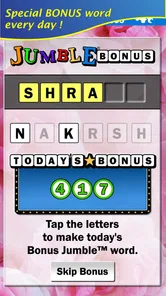
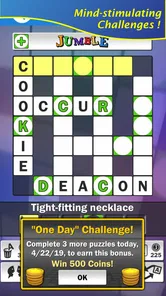
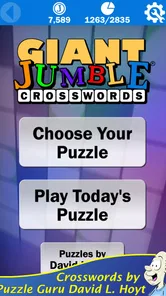
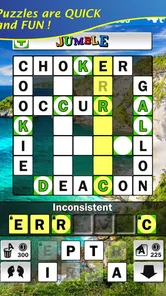
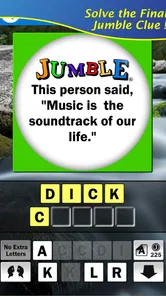
Analysis by Reviewed
I approached Giant Jumble Crosswords as the kind of word game I could open for a short break, rather than something that demands a long, uninterrupted session. That expectation matters. This is a free puzzle game from Just 2 Fun, built around the familiar Jumble idea but presented on a larger crossword-style board. The result is easy to understand quickly, yet it still gives me enough resistance to make each solved clue feel earned.
The game’s appeal is straightforward: rearrange letters, solve the words, and use those answers to work through a giant crossword puzzle. It is aimed at Everyone, so it feels suitable for casual family play as well as solo use. The store summary also identifies David L. Hoyt as the Jumble author behind the puzzles, which gives the format a clear connection to the established Jumble style without making the experience feel like a standard daily crossword.
After spending time with it, my opinion is positive but specific. I think it works best for players who enjoy wordplay and want a relaxed puzzle routine. It is less convincing for anyone looking for a fast arcade game, a highly competitive leaderboard experience, or a crossword with a completely traditional clue-and-grid structure. Its strengths are the scale of the puzzles, the approachable word mechanics, and the ability to dip in and out. Its weaker side is that a large puzzle can become mentally crowded when I lose track of which answers I have already tested.
Getting started without unnecessary frustration
The first useful thing to know is that the game itself is not difficult to understand, but the size of its puzzles can make the opening minutes feel busier than expected. A conventional small crossword usually gives me a compact target. Here, the “giant” format changes the rhythm: I may see several possible areas to work on, and a promising answer in one part of the board may not immediately help with another.
I recommend beginning with the clues that look most familiar instead of trying to solve the board in order. This is more than a basic tip. In a Jumble-based game, an easy answer can provide letters or confidence that make nearby entries less intimidating. I find that treating the puzzle as a collection of small opportunities works better than staring at the entire board and waiting for one perfect breakthrough.
Another common sticking point is assuming that every answer should be solved from the same direction or with the same level of certainty. I often get further when I mark mentally which words are definite, which are educated guesses, and which are still open questions. That simple separation prevents one uncertain answer from controlling my whole approach.
The game is free to start, which lowers the barrier for trying it during a commute, a lunch break, or a quiet evening. In-app purchases range from $0.99 to $9.99 per item. I would treat those purchases as optional convenience rather than part of the reason to download it. The core decision is whether the puzzle style suits me; spending money will not change the fact that I need to enjoy rearranging letters and working through a broad crossword layout.
More From Our News Desk

 Gmail
GmailGmail in a Busy Inbox: Who Benefits Most?
From first account to crowded workday, Gmail earns its place through dependable search and flexible sorting—but its best fit depends on how much inbox maintenance you can tolerate.

 Prime Video
Switching to Prime Video: What Changes in Your Viewing Routine
Prime Video can make a compelling second home for streaming, but switching means learning a different catalog, rental layer, and route from browsing to playback.

 Universal TV Remote Control
Universal TV Remote Control Works Best as a Reliable Backup
A phone remote earns its place through quick setup and reliable habits. Here is how to get more from Universal TV Remote Control—and where its limits show.

 Weather - By Xiaomi
Weather by Xiaomi Review: Clear at a Glance, Less Clear Up Close
Xiaomi’s weather app makes everyday forecasts quick to scan, but its calm surface can leave useful details and recovery paths harder to find than they should be.

 X
XX Under Pressure: Can It Recover When Posting Goes Wrong?
A resilience-focused review of X, examining setup, mistaken posts, interruptions, weak connections, and the gaps that matter when recovery needs to be dependable.

 Clash of Clans
Clash of Clans Is Won Between the Battles
Its raids are quick; its community is a long-term project of coordination, teaching, rivalry, and shared responsibility—with all the friction that entails.
Latest News



Installation compatibility is also fairly approachable. The current version is 3.2.1 and requires Android 6.0 or later. That makes it relevant for people using older Android hardware, although the experience will naturally depend on how responsive the particular device feels. On a smaller or slower phone, a large puzzle may be less comfortable to inspect than it is on a device with a more generous screen.
Checks I make before blaming the game
When a puzzle app appears to freeze, fail to load, or behave inconsistently, I first separate the problem into three possibilities: the device, the connection, or the game session. That order saves time. I check whether other apps are responding normally, whether the phone has enough free space for ordinary operation, and whether the game improves after being closed and opened again.
I also make sure the operating system meets the Android 6.0 requirement. A device that technically installs an app but is heavily outdated in other ways can still produce odd behavior, especially after system updates or changes to background activity. I would not immediately assume that a missed tap or delayed screen response means a puzzle has been lost.
Screen orientation and touch accuracy deserve attention too. With a wide puzzle, I may be tempted to tap quickly across several letters or clues. On a small display, that can lead to selecting the wrong area, particularly if my hands are moving faster than I am reading. Slowing down for a few seconds is surprisingly effective. I prefer to tap once, confirm what changed, and then continue rather than rapidly entering a whole sequence I may need to undo.
If the game opens but a particular puzzle does not appear to progress, I check whether I have actually completed the relevant word rather than merely filled part of it. The giant format can make it easy to overlook an unfinished section elsewhere on the board. I also revisit answers that were entered as guesses. A word that looks plausible in isolation may be wrong once the surrounding letters are considered.
These checks are especially useful because word games create a misleading kind of technical frustration. When the puzzle stops yielding answers, it can feel as though the app has failed. Often, the issue is simply that I have reached a reasoning dead end or misread a letter arrangement. Taking a short break and returning with fresh eyes is more productive than repeatedly tapping the same clue.
A recovery routine for a stalled puzzle
My preferred recovery method is to stop attacking the hardest entry. I scan the board for clues that have not received enough attention and look for the shortest or most recognizable words first. This creates a new starting point without requiring a complete restart of my thinking.
Next, I review the answers I consider certain. I do not need to erase them mentally; I use them as anchors. Then I examine the uncertain entries and ask whether the available letters can form a different word. In a Jumble-style puzzle, the temptation is to focus on the first arrangement that comes to mind. That first idea is often the obstacle, not the solution.
A useful habit is to say the letters quietly or rearrange them visually in a different order. I find that this helps when a word is familiar but temporarily inaccessible. It also reduces the chance of treating a near-word as correct simply because it resembles the answer I expected.
If I have been working for several minutes without making progress, I put the phone down rather than turning the session into a test of patience. This game benefits from a flexible attention span. A short pause can make an obvious word visible later, while forcing the same approach tends to produce more guesses and less confidence.
I would also avoid repeatedly restarting during a difficult section. Restarting may feel clean, but it removes the context I have already built. The more useful recovery is usually local: identify one reliable clue, use it to regain momentum, and expand outward. That workflow is particularly helpful on a giant board, where a full reset can feel like throwing away useful progress.
For players who share a device with family members, I suggest agreeing on a simple routine before handing it over. One person can solve a few clues, leave the device in a stable state, and let the next person continue from there. This makes the game work well as a quiet collaborative activity, but it also means everyone should be comfortable with the possibility that another player will approach the puzzle differently.
When the problem is really the device or the situation
Not every disappointing session is caused by the game. A tired player, a distracting environment, or a cramped screen can make a word puzzle seem much harder than it is. I notice this most when I try to play while doing something else. The game is casual, but solving still requires attention to spelling, letter order, and relationships across the board.
On a phone with limited screen space, I prefer shorter sessions. I can still enjoy the puzzles, but I do not expect to inspect the whole board comfortably at once. If I want a calmer solving experience, I use a larger compatible screen when available. That is not a flaw unique to this title; it is a trade-off created by the giant crossword presentation. More puzzle area can mean more visual information to manage.
Connection problems can also be misleading. If the game takes longer than expected to load or a screen does not refresh, I first test whether the rest of the phone is having trouble online. I do not repeatedly tap buttons while waiting, because that can make the eventual response feel more confusing. Closing the app normally and trying again is a safer first step than making several changes at once.
Storage and background activity are worth checking on older phones. When many apps are open, switching back to a puzzle may not feel as smooth as it did earlier. I close unnecessary apps, reopen the game, and see whether the behavior changes. If it does, the issue was probably the device’s current workload rather than the crossword itself.
I also keep expectations realistic about age rating and difficulty. The Everyone rating describes who can access the game, not how easy every puzzle will be. Some players may find the format friendly but still encounter clues that require a broader vocabulary or more patience. That is normal for a word game, and it is one reason I would not recommend it to someone who dislikes being stuck on a clue for a while.
How it compares with ordinary word-game choices
Compared with a standard crossword app, this game puts more emphasis on rearranging letters and less on moving through a tightly defined clue list. That makes it a good choice when I want the satisfaction of word discovery without committing to the conventions of a traditional newspaper-style crossword. The large layout also gives the session a sense of scale that a tiny daily grid does not provide.
Compared with a word search, it asks more from me than simply spotting hidden terms. I need to interpret the clue, form the word, and judge whether the arrangement fits. That makes the experience more thoughtful but also less immediately relaxing for players who prefer visual scanning. A word search is often better when I want a nearly effortless wind-down; this is better when I want light mental exercise.
Compared with quick anagram rounds, the giant crossword structure gives me a stronger feeling of continuity. I am not just solving one isolated scramble after another. I am building a larger picture, and a solved entry can influence how I approach the rest of the puzzle. The trade-off is that one difficult area can slow the whole session, whereas a rapid anagram game usually lets me move on quickly.
Its rating of 4.8 from around 3.6 thousand ratings suggests that many players respond well to this particular combination of Jumble mechanics and crossword scale. I would not use that figure as a substitute for personal fit, though. Someone who wants competitive timers or elaborate progression may still prefer another word game, even if they generally like crosswords.
The game has passed 100 thousand installs, which indicates a meaningful audience for its format. I see that as reassuring when deciding whether it is worth trying, but the more important question is how I like to solve. If I enjoy returning to a puzzle, testing letter combinations, and taking breaks without abandoning the activity, it makes sense. If I need constant novelty or immediate feedback, the slower structure may feel restrictive.
Who will get the most from it
I would recommend it to adults who enjoy Jumble-style wordplay, casual crossword fans who want a larger challenge, and families looking for a puzzle that can be discussed without requiring fast reflexes. It can also suit someone who wants a low-pressure way to fill short gaps in the day. I like that I can approach it seriously for a while and then stop when my attention runs out.
A realistic everyday use is a ten-minute evening session after dinner. I might solve the obvious entries first, reach one stubborn cluster, and leave it for the next day rather than forcing an answer. That pause is part of the appeal. The game supports a slower relationship with a puzzle, where remembering the unsolved letters later can be as satisfying as solving them immediately.
I would skip it if I strongly dislike anagrams, become annoyed when a clue does not yield quickly, or need a game that works primarily through rapid rewards. I would also think twice if my phone has a very small display and I find dense layouts tiring. In those cases, a compact crossword, a simple word search, or a short anagram game may be a better match.
For younger players, the Everyone rating makes the title broadly accessible, but I would still consider vocabulary level and reading confidence. The age label does not guarantee that every clue will be equally comfortable for every child. Playing together can turn difficult words into a useful learning moment, while independent play may be better suited to children already comfortable with word puzzles.
My practical verdict
Giant Jumble Crosswords succeeds because it takes a familiar letter-scrambling idea and gives it room to breathe. I enjoy the way a small solved word can reopen a larger puzzle, and I appreciate that the game does not require quick reactions. Its best sessions feel like a relaxed conversation with myself: test an idea, notice a pattern, correct a mistake, and keep going.
The main friction is not complicated setup; it is managing the size and density of the puzzle. On a smaller phone, I need to slow down and avoid tapping impulsively. When I get stuck, I have to distinguish a genuine loading problem from an incorrect answer or a tired brain. Once I adopt that mindset, troubleshooting becomes simple and the game becomes much less frustrating.
Just 2 Fun has made a free word game that is easy to sample and substantial enough to keep on a device. The current version is 3.2.1, and the Android requirement of 6.0 or later keeps it accessible to many older phones. Optional purchases are available, but I would decide based on the puzzles themselves rather than treating them as necessary.
My recommendation is clear: try it if you want a spacious, Jumble-inspired crossword experience that rewards patience more than speed. I would choose a different word game for competitive play, tiny self-contained rounds, or a more conventional crossword layout. For everyone else, especially players who like returning to an unfinished puzzle after a break, Giant Jumble Crosswords is a thoughtful and enjoyable free option. It is not frictionless on every screen or in every mood, but when I give it the right amount of attention, the large format becomes its most distinctive strength.
Giant Jumble Crosswords Frequently Asked Questions
Who created Giant Jumble Crosswords?
Giant Jumble Crosswords was created by Jumble author David L. Hoyt and developed by Just 2 Fun. Its word-puzzle format brings Jumble-style letter rearranging together with crossword clues, giving fans of word games a familiar kind of challenge in a large-puzzle format. If you already enjoy Jumble puzzles or crosswords, that combination is the main idea to expect when you download it.
What is the age rating for Giant Jumble Crosswords?
Giant Jumble Crosswords has an Everyone content rating, so it is presented as a game suitable for a broad audience. Its focus is on solving word clues and rearranging letters, rather than on mature themes. The puzzle format can appeal to different ages, though younger players may find some clues more challenging depending on their vocabulary and familiarity with crossword-style games.
What is Giant Jumble Crosswords and how does the game work?
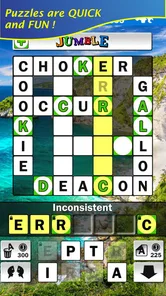
Giant Jumble Crosswords is a word puzzle game that combines the familiar challenge of crossword clues with a jumble-style letter mechanic. You solve clues, rearrange available letters, and complete large crossword-style grids. The oversized puzzles are designed for extended play sessions, making the game suitable for players who enjoy vocabulary challenges, casual brain training, and gradually working through more demanding word combinations.
Is Giant Jumble Crosswords suitable for beginners?
Yes, the game can be enjoyed by beginners, although some puzzles may require patience and a reasonably broad vocabulary. Early challenges generally help players understand the clue-and-letter format before the difficulty increases. If you are new to crossword games, it is useful to begin slowly, consider every possible letter arrangement, and use hints only when you are genuinely stuck rather than spending them immediately.
Does Giant Jumble Crosswords require an internet connection?
The basic puzzle experience may be available without a continuous internet connection, which makes Giant Jumble Crosswords convenient for travel, commuting, or playing in areas with unreliable service. However, certain features can depend on connectivity, including advertisements, updates, synchronization, or other online services. Availability may also vary by device version, so checking the app-store description is recommended before relying on offline play.
Pros
- Large puzzle collection offers plenty of content for regular players.
- Clues cover varied topics
- keeping different rounds from feeling repetitive.
- Clear grid layout makes the game comfortable to play on a phone.
- Helpful hints can reduce frustration when a clue proves especially difficult.
- Works well for short sessions or longer crossword-solving breaks.
Cons
- Some puzzles may feel too easy for experienced crossword enthusiasts.
- Hint use can reduce the challenge and may depend on limited resources.
- Small text or grid elements may be less comfortable on compact screens.
- Repeated clue styles can become predictable after extended play.
- Progress may feel slow if later puzzles require frequent hint assistance.













