Funk Studio - Make Your Mods
- 215.00
- 3.4
- Installs
- 100.00K
- Price
- Free
Screenshots
Analysis by Reviewed
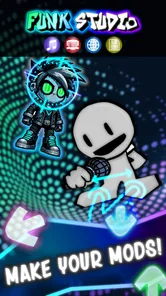
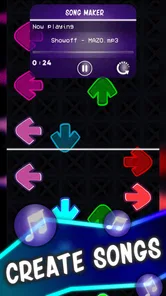
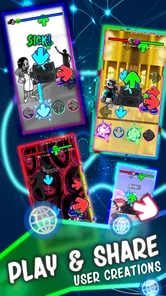
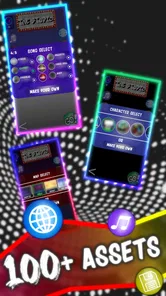
Funk Studio - Make Your Mods is a music game from HYOCT that caught my attention because it treats play more like creative tinkering than a conventional rhythm challenge. Instead of simply following notes or trying to beat a fixed song list, the idea is to make, share, and play your own funky mods through a codeless creation engine and an online platform. That gives it a very different personality from most music games on Android.
I see it as a small creative playground for people who enjoy experimenting with sound, arranging ideas, and showing their work to others. It is free to download, rated for Everyone, and has reached over 100 thousand installs, so it is not an obscure experiment with no audience at all. At the same time, its average rating of 3.4 from around 1.5 thousand ratings suggests that the experience is appealing to some players but not universally smooth or satisfying.
After spending time looking at what the game offers and how it fits into the wider music-app landscape, my view is fairly clear: this is most interesting when you want to create something playful without learning traditional programming. It is less convincing if you want a polished rhythm game, a deep music production workstation, or a large, carefully curated catalog of finished tracks.
Making music without turning the game into a coding lesson
The central attraction is the codeless approach. You can work with the idea of building a mod without needing to write conventional code, which lowers the barrier for curious players who might otherwise avoid music creation tools. That matters because many digital audio apps feel designed for people who already understand tracks, effects, sequencing, and technical terminology. Funk Studio presents itself as a game first, making experimentation feel less intimidating.
I particularly like the possibility of approaching it in short sessions. You do not need to sit down with the mindset of producing a finished song. A few minutes can be enough to try a musical idea, adjust a playful arrangement, or explore something made by another user. That makes it a better fit for a phone than a serious desktop studio, where even opening a project can feel like a commitment.
The word “mods” is important here. The appeal is not only listening to music but changing the experience and creating variations that can be played. That gives the app a community-oriented quality. A successful creation is not merely a private file; it can become something other people discover and try. For younger users, families, or beginners, that combination of making and playing can be more motivating than a lesson-based music app.
Still, I would not confuse “codeless” with “effortless.” Removing programming does not remove the need to make musical decisions. You still need patience to understand how the creation tools behave, how different elements work together, and what makes a mod enjoyable to play. The learning curve may be gentler than coding, but it is still a learning curve.
More From Our News Desk

Weather by Xiaomi Review: Clear at a Glance, Less Clear Up Close

X Under Pressure: Can It Recover When Posting Goes Wrong?

Clash of Clans Is Won Between the Battles

Android Auto Makes the Case for Quieter Car Software

MobiOffice: Transforming Mobile Productivity with Seamless Integration

EA SPORTS FC™ Mobile Soccer: Redefining Mobile Sports Gaming
How the creative loop works in practice
The most useful way to approach the game is to treat it as a cycle: explore, borrow ideas, make a small change, test it, and then share or revisit the result. That is more productive than trying to build an ambitious project immediately. Starting small also makes it easier to understand which parts of your creation are responsible for the musical feel and which changes merely add clutter.
One practical tip is to keep early experiments deliberately limited. Add one noticeable idea, play it, and compare it with the previous version before making several changes at once. In a creative tool, changing everything together makes it difficult to learn from the result. Funk Studio is more rewarding when you use it as an instrument for trial and error rather than expecting the first attempt to sound complete.
A second useful habit is to play your own mod repeatedly before sharing it. A creator can become attached to an idea simply because they remember the effort behind it. Replaying it from the perspective of someone who did not build it helps reveal whether the interaction is clear and whether the musical changes feel intentional. That distinction between “I made this” and “this is enjoyable to use” is one of the app’s more interesting creative trade-offs.
The online side also changes how you should judge your work. Sharing can provide motivation, but it can also make a simple experiment feel as though it needs to compete with everything else available. I would recommend treating the community as a source of inspiration rather than as a popularity contest. The strongest reason to use the platform is discovering approaches you would not have tried alone.
What it feels like beside ordinary music games
Compared with a traditional rhythm game, this is a much less direct experience. A rhythm game normally gives you a song, a track to follow, and a clear performance goal. The satisfaction comes from timing, accuracy, and improving a score. Funk Studio appears to put more weight on construction and variation. If your favorite part of music games is chasing perfect timing on familiar stages, this may feel too open-ended.
Compared with a beat-making or digital audio app, it is more approachable and playful. Professional music tools usually offer deeper control, but that control often comes with menus, technical settings, and a workflow designed around production rather than casual discovery. Funk Studio’s advantage is that it can make musical experimentation feel like a game. Its disadvantage is that people who want detailed recording, mixing, or studio-level control may quickly find the boundaries of the format.
It also differs from passive music platforms. Streaming apps are excellent when you want to press play and let someone else handle the composition. Here, the point is participation. You are expected to interact with the material, whether by making a mod or trying one made by another person. That makes it a poor replacement for a music player but a potentially enjoyable companion to one.
The cost is simple, but the value depends on your use
The basic download is free, which makes trying the game relatively easy. You can investigate the creative concept without paying an entry fee, and that is important for an experimental app whose appeal depends heavily on personal taste. The listed in-app purchases range from $1.99 to $2.99 per item. Those purchases mean the free starting point should not automatically be interpreted as unlimited access to every possible part of the experience.
Because the purchase options are individual items rather than a single stated price for the whole product, the value question depends on how much you use the creation and sharing features. A casual player who opens the app occasionally may be perfectly satisfied with free access. Someone who becomes deeply involved in making mods may consider selected purchases worthwhile, but should judge them by the specific content or convenience they provide rather than assuming that spending will transform the app into a professional studio.
I appreciate that the free entry point lets you test the concept before making that decision. My advice is to spend time learning the basic workflow first. If you do not enjoy the act of experimenting with mods while using the free version, paying for additional items is unlikely to solve the underlying mismatch. Purchases make more sense after you have identified a particular limitation that an item addresses.
For parents, the Everyone content rating makes the app easier to consider for a broad age range, although I would still encourage younger players to use online sharing thoughtfully. The creative format can be educational in an informal way, especially for children interested in music, but the open-ended nature of user-created material means guidance is still useful. The game is not a structured music curriculum, so it should be treated as creative play rather than formal instruction.
Where the experience can become frustrating
The biggest risk is that freedom can feel like a lack of direction. A fixed rhythm game tells you what to do next. A codeless creative platform asks you to decide what to do, and not every player enjoys that responsibility. If you prefer immediate action, clear objectives, and regular rewards, the first sessions may feel less exciting than expected.
There is also a difference between making something and making something memorable. The app’s concept encourages experimentation, but experimentation can produce rough results. That is not a flaw by itself; creative tools need room for imperfect work. However, players looking for instant musical polish may be disappointed when their first mod sounds or plays more like a sketch than a finished production.
The online platform introduces another trade-off. Sharing can extend the life of the game, but online discovery is only as satisfying as the material available and the ease of finding something worth playing. A community platform can feel lively when new ideas are easy to encounter, yet less rewarding when browsing becomes repetitive or when creations vary widely in quality. I would approach the social element with realistic expectations rather than treating it as a guaranteed stream of carefully edited content.
The rating of 3.4, based on around 1.5 thousand ratings, reinforces that balanced view. It is not a reason to dismiss the game, because creative tools often divide audiences more sharply than straightforward games. But it is a useful signal that the concept may not work equally well for everyone. I would pay attention to your own reaction during the free trial instead of assuming the store score tells the whole story.
Another consideration is device compatibility. The current version is 1.0.13 and requires Android 6.0 or later. That covers a broad range of devices, but older phones may still provide a less comfortable creative experience than newer hardware, particularly when you are navigating an online platform or working with several interactive elements. I would use a device with a responsive screen and enough free space for a smoother session, without treating that as a promise of performance on every phone.
Small workflows that make it more useful
One of the less obvious strengths is that the app can serve different creative moods. You can use it as a quick sketchpad when you have a musical idea, as a source of playable experiments when you want something new, or as a way to understand how other people structure their mods. Those are three different activities, and switching between them prevents the experience from becoming dependent on your ability to create something impressive every time you open it.
For example, imagine waiting for a friend at a café with only a short break available. A full music-production app would probably be too demanding, while a normal rhythm game might give you entertainment but no creative outlet. Funk Studio fits that middle space: you can explore a mod, make a compact variation, and leave without needing to complete a long session. Its value is strongest in these small pockets of time.
A more advanced approach is to study other creations before building your own. Rather than copying the surface details, look for the choices that make a mod readable and fun. Notice whether it introduces one idea at a time, whether the musical changes support the interaction, and whether the result remains enjoyable after the novelty wears off. This turns browsing into informal design practice.
I would also keep a personal distinction between experiments meant for learning and creations meant for sharing. A private test can be messy and exaggerated; a shared mod benefits from restraint. That simple separation reduces pressure and gives you permission to try unusual ideas without worrying that every attempt has to represent your best work.
For teachers or parents using it as a creative activity, a useful challenge is to give a child a narrow goal, such as making a short variation that feels calmer or more energetic. Open-ended instructions can be overwhelming, while a clear mood gives the experiment direction without turning it into a rigid assignment. The game’s codeless design makes this kind of guided exploration more approachable than asking a beginner to learn a full programming environment.
Who should install it, and who should look elsewhere
I would recommend trying it if you enjoy making things as much as consuming them. It is particularly suitable for curious beginners, casual music fans, and players who like communities built around user creations. People who have always wanted to experiment with interactive music but have been put off by coding or complicated studio software may find the entry point inviting.
It can also work well for families looking for a creative mobile activity rather than a purely competitive game. The Everyone rating helps in that respect, and the free starting point makes it possible to evaluate the experience together before considering any purchase. I would still explain that sharing online requires sensible boundaries and that the app is a playground, not a substitute for music lessons.
I would skip it if your priority is a conventional rhythm challenge with precise scoring and a clearly defined progression. I would also choose a dedicated music-production app if you need detailed control over recording, mixing, instruments, or final audio quality. Those tools may be harder to learn, but they are better suited to serious production goals.
Likewise, listeners who only want a reliable way to play finished music will be happier with a streaming or local music app. Funk Studio asks for active involvement, and that is its identity rather than a minor extra. If creating and modifying music sounds like work to you, its main feature may feel like a chore.
My verdict on the free download and paid extras
My final opinion is cautiously positive. Funk Studio is an appealing idea because it combines music, play, codeless creation, and sharing in a format that feels more approachable than programming and less technical than a full studio. The developer, HYOCT, has aimed at a space where the player can be both audience and creator, and that gives the game a clear identity.
The free price is the strongest reason to try it. There is little need to decide in advance whether the concept deserves your money, because you can first find out whether making and playing mods actually holds your attention. The in-app items priced from $1.99 to $2.99 can be considered later, but I would only buy one when you understand exactly how it improves your personal workflow.
My recommendation is to approach Funk Studio - Make Your Mods as a creative toy with community features, not as a replacement for a rhythm classic or a professional audio workstation. Give yourself several short sessions, explore before judging your own creations, and start with small experiments. If that loop feels rewarding, the app offers a distinctive way to play with music on a phone.
If you want instant polish, strict goals, or deep production controls, skip it and choose a more specialized alternative. For everyone else, especially beginners who like the thought of building playable musical ideas without code, the free download makes the experiment worthwhile. The real value is in discovering whether you enjoy the creative process, not in treating the app as a promise of studio-level results.
With its current version 1.0.13 and Android 6.0 minimum requirement, it remains accessible to many Android users. I would not call it a universal recommendation, and the middling average rating of 3.4 reflects that it has rough edges or a narrower audience than a mainstream hit. Even so, for the right player, Funk Studio - Make Your Mods can turn a spare few minutes into a small musical experiment—and that is a worthwhile kind of game when you want to do more than simply press play.
Funk Studio - Make Your Mods Frequently Asked Questions
What devices and operating systems can run Funk Studio - Make Your Mods?
Funk Studio - Make Your Mods is available for Android devices running Android 6.0 or later. Before downloading, check that your device meets this requirement and has enough available storage for the game and any projects you create. The game is free to download, though optional in-app purchases are available.
Who makes Funk Studio, and what kind of game is it?
Funk Studio - Make Your Mods is a music game developed by HYOCT. Its focus is on making, sharing, and playing funky mods through a codeless engine and online platform. The Everyone content rating makes it suitable for a broad audience, while the creative format may appeal especially to players who enjoy experimenting with music and custom creations.
What is Funk Studio - Make Your Mods?
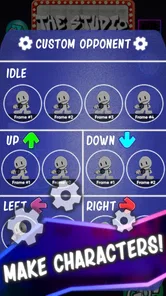
Funk Studio - Make Your Mods is a creative game designed for users who want to build and customize their own content, modifications, or playable creations. Its appeal is mainly aimed at fans who enjoy experimenting with characters, visuals, sounds, and gameplay ideas. Before downloading, remember that the exact features and supported content may depend on the app version and the device you use.
Is Funk Studio - Make Your Mods easy for beginners to use?
The game is intended to be approachable, but beginners may still need some time to understand its editing tools and available options. Users familiar with customization apps, game modding, or visual editors will probably find the workflow easier. It is worth exploring the menus gradually, saving projects frequently, and checking any in-app instructions before attempting more advanced modifications.
Can I create and share my own mods with Funk Studio?
Funk Studio focuses on helping users make personalized modifications and creative projects, and sharing may be possible depending on the features included in the current release. However, not every project can necessarily be exported or used in every game or platform. Check the game’s export, file-management, and sharing options carefully, and only use content you have permission to distribute.
Pros
- Simple tools make basic mod creation accessible to beginners.
- Supports creative experimentation with custom game content.
- Organized project workflow helps keep different mods manageable.
- Useful for testing ideas before sharing them with other players.
- Can make repetitive mod-building tasks faster for experienced users.
Cons
- Advanced projects may require technical knowledge and extra troubleshooting.
- Compatibility can vary between games
- devices
- and mod versions.
- Large mod files may consume considerable storage space.
- Updates to supported games can temporarily break existing projects.
- Sharing or exporting mods may involve additional setup outside the app.











