Euchre - Card Game Offline
- 2.87K
- 4.6
- Installs
- 1.00M
- Price
- Free

Screenshots


Analysis by Reviewed
I often reach for a phone card game when I have a few spare minutes but no one nearby to play with. Euchre - Card Game Offline is built around that simple use: a digital table for a familiar trick-taking game, with offline play at its centre. I like that it doesn’t need to turn a quick match into a big commitment, though it is best suited to people who already enjoy Euchre or are willing to learn its particular rhythm.
Deciding whether to try it
Because the game can be played offline, I see it as a handy choice for situations where opening a multiplayer game would be awkward: a quiet lunch break, a wait with no reliable signal, or a few minutes at home when nobody else is free. The key question is not whether it offers every kind of card play, but whether I want to spend that time with Euchre specifically. If I do, having a self-contained game ready on my phone is the main draw.
I would skip it if my idea of a card game depends on reading a real partner’s habits, joking around at the table, or trying several different games in one app. Those are not minor preferences; they change what makes a session enjoyable. A physical deck works better for a group, and a multiplayer-focused game is a better match when human interaction is the point rather than an optional extra.
Where the purchase fits
This is a free card game from Topy Games, with in-app purchases listed at $14.99 per item. That gives me a clear baseline: I can consider the game without an upfront price, while any optional spending deserves a look before I buy. I wouldn’t assume that a purchase is required to play or that it changes match fairness; the listed purchase price alone doesn’t tell me what an item contains or how it affects play.
The game is rated for Everyone, has a 4.8 average from around 30,000 ratings, and has passed 500,000 installs. Those figures suggest that it has found an audience, but they don’t tell me whether its particular Euchre rules or computer opponents will suit every player. The current version is 1.3.7.20250326, and it supports Android 5.1 and later, which makes it a practical option for people using older compatible devices as well as newer ones.
Jumping into the Game
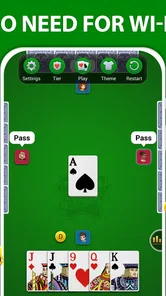
The moment you launch Euchre - Card Game Offline, you're greeted with a simple, user-friendly interface. No unnecessary frills, just straight-up Euchre fun. If you're new to the game, don't worry; the app provides a quick tutorial to get you acquainted with the rules and gameplay. It’s like having a friend patiently guiding you through the game, making it perfect for both newbies and seasoned players.
Learning the decisions, not just the rules
Euchre’s trick-taking decisions matter more than simply recognizing which card is high. A useful way to approach a first session is to treat each hand as practice: notice what gets led, how your partner’s play changes the trick, and when choosing a trump suit feels worth the risk. The tutorial can help with the basics, but I’d still take a few unhurried hands to get comfortable before expecting every choice to feel obvious.
More From Our News Desk

 Instagram
’s Power Comes From Its Place in Your Phone
A close look at how Instagram turns Meta’s reach, recommendation systems and everyday camera habits into durable platform power—and what that costs users.

 Gmail
Gmail in a Busy Inbox: Who Benefits Most?
From first account to crowded workday, Gmail earns its place through dependable search and flexible sorting—but its best fit depends on how much inbox maintenance you can tolerate.

 Prime Video
Switching to Prime Video: What Changes in Your Viewing Routine
Prime Video can make a compelling second home for streaming, but switching means learning a different catalog, rental layer, and route from browsing to playback.

 Universal TV Remote Control
 Works Best as a Reliable Backup
A phone remote earns its place through quick setup and reliable habits. Here is how to get more from Universal TV Remote Control—and where its limits show.

 Weather - By Xiaomi
Weather by Xiaomi Review: Clear at a Glance, Less Clear Up Close
Xiaomi’s weather app makes everyday forecasts quick to scan, but its calm surface can leave useful details and recovery paths harder to find than they should be.

 X
X Under Pressure: Can It Recover When Posting Goes Wrong?
A resilience-focused review of X, examining setup, mistaken posts, interruptions, weak connections, and the gaps that matter when recovery needs to be dependable.
Latest News



For a new player, I’d focus on one question at a time instead of trying to remember every possible consequence. First, learn what makes a card powerful in the current suit; then watch how the trump choice changes that calculation. After a hand, it can help to think back to the moment that felt uncertain. That small habit makes practice more useful than simply rushing through repeated deals, and it does not require a notebook or a long study session.
Returning players may find a different use for the same routine. A few hands can be a way to keep bidding instincts fresh without arranging a game night. I would not treat computer play as a perfect rehearsal for a particular group, since people vary in how they communicate and make risky calls, but it can still help me stay familiar with the shape of a hand and the consequences of a lead.
That makes the game a reasonable pick for someone who knows the rules but wants a low-pressure place to sharpen their instincts. It is less ideal if you want a broad card-game collection or a highly social table with real opponents. Its focus is specifically Euchre, so the value comes from returning to that one game rather than sampling lots of different formats.
Gameplay Experience
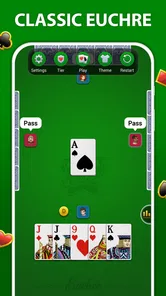
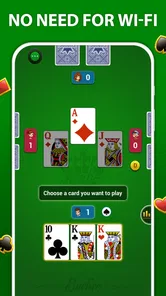
Playing Euchre on this app feels remarkably smooth. The controls are intuitive, so you won’t find yourself fumbling around trying to make a move. The AI opponents are well-balanced, offering a challenge that keeps you on your toes without feeling unfair. It’s like playing against a group of well-versed friends who know how to keep the game interesting.
One thing I particularly enjoyed is the ability to adjust the difficulty level. If you’re feeling confident, ramp it up for a more intense match. Or, if you just want to relax, dial it down and enjoy a leisurely game. This flexibility is a big plus for those of us who like to switch things up based on our mood.
One practical way to use that flexibility is to change only the difficulty when a session feels off, rather than deciding too quickly that the game itself is a poor fit. If I’m missing basic card relationships, a tougher setting may muddy the lesson; if the choices have started to feel automatic, increasing the challenge can bring back some thought. I’d use that adjustment as a learning aid, not as a promise that every deal will be equally difficult.
Progress without turning every hand into pressure
Changing difficulty is a practical way to shape a session around your energy. I’d start lower when learning, then raise it once the bidding and trick choices feel familiar; that helps separate a rules mistake from a tougher opponent’s decision. On a tired evening, lowering the challenge can keep the game pleasant, while a more demanding setting makes sense when I want to think through each play.
There is a trade-off: playing against computer opponents is convenient, but it cannot reproduce the unpredictability, table talk, or partnership habits of people you know. If your main goal is friendly competition with family or a regular group, a physical deck or a multiplayer-focused option will be a better fit. Here, the appeal is being able to play on your own schedule.
Offline Mode - A Game Changer
Let’s talk about the offline mode. It’s a lifesaver! Whether you’re on a long flight, in a remote area with spotty internet, or just trying to save data, this feature ensures you can enjoy your game uninterrupted. No Wi-Fi? No problem! It’s like having a trusty friend who’s always down for a game, no matter where you are.
That also makes it useful in small everyday gaps: I can open a hand while waiting for an appointment or play during a commute where a connection is unreliable. For a smoother start, I’d launch it once before travelling, choose a comfortable difficulty, and make sure I understand the rules I want to use. The offline focus is a real convenience, but it doesn’t turn the game into a substitute for playing with a live partner.
A realistic routine would be to play a short session while waiting for a delayed train, then stop when the journey resumes without needing to coordinate with anyone. For a longer trip, I’d try it before leaving rather than making the first launch part of the travel plan. Offline play is most useful when it removes friction from a moment that already exists; it is less compelling if I’m looking for a shared activity to fill that time.
Graphics and Sound
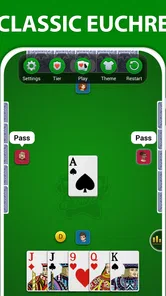
The graphics are crisp and clear, making it easy to differentiate between cards. The design is simple yet pleasing, focusing on functionality rather than flashy animations. The sound effects mimic the feel of a real card table, adding to the immersive experience without being overbearing. It’s like being in a cozy room with the gentle rustle of cards and the occasional friendly banter.
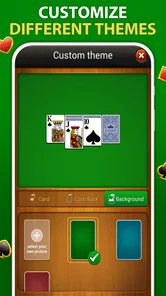
That restrained presentation suits a game where I need to notice cards and follow a trick, rather than watch elaborate effects. It also means the experience is centered on the table itself: players who enjoy decorative themes, lots of visual customization, or a lively social atmosphere may find it plain. For me, a clear display is useful during a quick session, but presentation alone is not a reason to choose it over a game with more variety.
Fairness, spending, and what to weigh
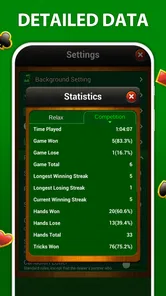
For me, fairness is mainly about whether the challenge feels consistent rather than whether the game offers a particular purchase. The adjustable difficulty gives me a direct way to change how demanding the AI feels, but it is not evidence of a competitive ranking system or a guarantee that every hand will seem even. I’d judge it by whether I enjoy the decisions across several sessions, not by one unusually easy or frustrating deal.
The free entry point makes trying the game a sensible choice if you’re curious about Euchre. Before spending, I’d check the item details in the purchase flow and decide whether the specific offer is worth it to me; the price per item does not explain its contents. If avoiding in-app spending is important, I’d simply treat the game as a free option and make no purchase unless I find a clear reason.
That is also the most sensible way to think about competitive fairness here: I can assess the feel of the computer challenge through play, but I should not infer anything about purchasable items from their price alone. If a purchase is not relevant to how I want to play, I can leave it out of the decision and judge the game on its free experience. If it is relevant, I’d read the offer carefully before confirming rather than assuming what it includes.
For families, the Everyone rating makes the age classification easy to understand, but it is still worth deciding whether a child is ready for a trick-taking game with bidding and partnership decisions. A simple card table can be a comfortable way to introduce those ideas, although the app’s own tutorial and a few patient practice hands are more useful than expecting a beginner to pick up every nuance immediately.
A focused choice for the right kind of player
Compared with casual card apps that rotate through several games, this one gives its attention to Euchre and lets me play without depending on a connection. That narrow focus is a strength if I want to practise or pass a short stretch of time, but a limitation if I’m looking for new games, live social play, or a shared table with friends. I’d recommend it to curious beginners and returning Euchre players who value convenience; I’d steer players seeking a human opponent toward a social or multiplayer alternative.
The choice between this and a physical deck is mostly about context. A deck gives a group the freedom to talk, read one another, and set its own pace, while a phone version is ready when there is no group to gather. A broader card collection is better when I want variety, and a live online table is better when I want opponents with human habits. This app’s strongest case is narrower: a familiar game, available for solo practice or a quick break.
If you are wondering whether it is suitable for an occasional player, I think it can be, provided you are willing to spend a little time getting used to Euchre’s decisions. If you already know the game, the appeal is less about learning the basics and more about having a convenient way to play when other people are unavailable. If you want a full lesson in strategy or a substitute for a regular group, I would choose a different route or pair practice here with real games.
My practical recommendation is to begin with a low-pressure session, pay attention to one uncertain decision per hand, and change the difficulty only after you know what feels too easy or too demanding. That gives a beginner a clearer sense of whether the game’s pace works for them and gives an experienced player a fairer basis for judging the computer challenge. It also avoids mistaking a single awkward hand for the whole experience.
In conclusion, Euchre - Card Game Offline is a fantastic app for anyone who loves card games. Its simplicity, coupled with the robust offline mode, makes it a must-have for both casual players and Euchre enthusiasts. So, next time you're in the mood for a card game, give this app a try. You might just find it becomes your go-to game for quick, enjoyable matches!
Euchre - Card Game Offline Frequently Asked Questions
Does Euchre - Card Game Offline need an internet connection to play?
The game is designed for offline play, so you can enjoy Euchre without needing an internet connection. That makes it a practical option for playing while travelling or whenever you want a card game without relying on a network. It is still sensible to download the game while connected, then open it on your device to get started.
How much storage space does Euchre - Card Game Offline require?
Before installing any game, it is worth checking that your device has enough free storage for the download and installation. Euchre - Card Game Offline is a mobile card game, but the space it needs can vary with your device and the way the app is packaged. Check the available storage on your phone if you are close to its limit.
What age group is Euchre - Card Game Offline suitable for?
Euchre - Card Game Offline has an Everyone content rating, so it is presented as suitable for a broad audience. Its focus is the familiar strategy of a card game rather than age-restricted themes. Parents can still review the game and its purchase settings with younger players, especially if they want to manage access to optional in-app purchases.
Is Euchre - Card Game Offline free to download, and are there in-app purchases?
Euchre - Card Game Offline is free to download, so you can try the card game without paying upfront. The app also offers in-app purchases, with items priced at $14.99 each. If you prefer to avoid extra spending, check the purchase options before confirming any transaction and use your device’s purchase controls as needed.
Which devices can run Euchre - Card Game Offline?
Euchre - Card Game Offline is available for Android devices running Android 5.1 or later. Before downloading, check your device’s operating system version in its settings to make sure it meets that requirement. The game is listed for Everyone, making its content suitable for a broad audience, including players looking for a straightforward card game.
Pros
- No internet required
- User-friendly interface
- Multiple difficulty levels
- Customizable rules
- Offline multiplayer option
Cons
- Limited AI strategies
- No online multiplayer
- Occasional ads
- Basic graphics
- Lacks tutorial for beginners