Darbuka Virtual
- 2.00
- 4.3
- Installs
- 1.00M
- Price
- Free
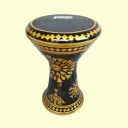
Screenshots
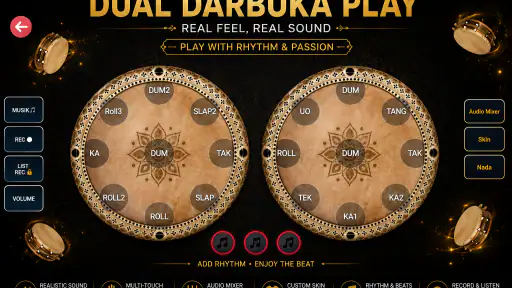
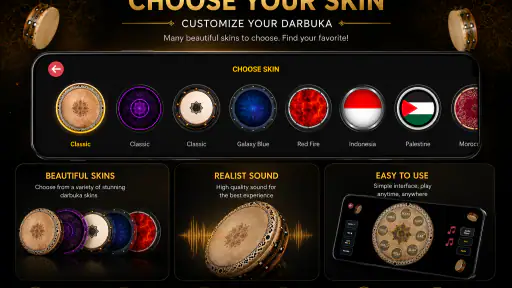
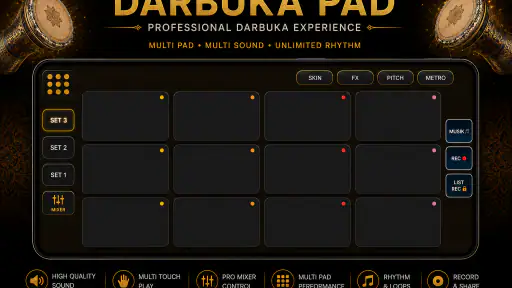
Analysis by Reviewed
I approached Darbuka Virtual as a small musical game rather than as a replacement for a real darbuka. That distinction matters. The appeal is immediate: open it, tap the virtual drum, and try to follow a rhythm or use the instrument for a casual cover. It is a focused idea from Developer Receh, aimed at people who want a quick percussion experience on a phone instead of a full music-production workstation.
My first impression is that the game is easiest to appreciate in short sessions. It does not ask you to learn a complicated interface before making a sound. That makes it approachable for a beginner, a curious music fan, or someone who wants to experiment while listening to a song. At the same time, its narrow purpose means experienced musicians may eventually want more control than a simple touch instrument can provide.
How Darbuka Virtual feels in everyday use
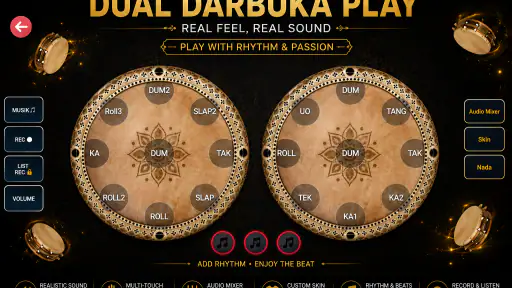
The central experience is built around playing a virtual darbuka with your fingers. In practical terms, that makes the phone screen your playing surface. You can use it to imitate percussion patterns, practice a basic sense of timing, or add your own taps while covering a song. The store summary presents it as a way to play and cover songs, and that is the right way to understand its role: it is a playful instrument for rhythm, not a complete recording studio.
I found the concept particularly suitable for spontaneous use. Imagine sitting with friends while a familiar song is playing and wanting to add a hand-drum part without carrying an instrument. You can open the game, test a few taps, and join in. It also works as a low-pressure introduction for someone who has never handled a darbuka. There is no need to commit to lessons before discovering whether the sound and playing style are enjoyable.
The free price helps that casual use. You can try it without turning the decision into a purchase, which is important for an app with such a specific purpose. Its Everyone age rating also makes the concept broadly accessible. I would still treat it as a toy-like musical tool rather than assuming it offers the depth needed for serious study.
Speed expectations before you start playing
Because the game is centered on a virtual drum, I expect it to feel more direct than a large music app filled with tracks, editors, effects, and project files. The useful performance question here is not whether it can replace professional software; it is whether the touch response feels immediate enough for simple rhythm work. For casual patterns, that directness is the main attraction.
There is a practical difference between tapping for fun and trying to follow a fast, detailed rhythm. A small delay, a missed touch, or an awkward finger position becomes much more noticeable when you are attempting a precise cover. I recommend starting with a slow, familiar song and using broad, deliberate taps. That gives you a better sense of the interaction than immediately attempting a dense percussion passage.
More From Our News Desk

Weather by Xiaomi Review: Clear at a Glance, Less Clear Up Close

X Under Pressure: Can It Recover When Posting Goes Wrong?

Clash of Clans Is Won Between the Battles

Android Auto Makes the Case for Quieter Car Software

MobiOffice: Transforming Mobile Productivity with Seamless Integration

EA SPORTS FC™ Mobile Soccer: Redefining Mobile Sports Gaming
Another useful approach is to treat the first session as a timing check. Tap a steady pulse, then alternate between stronger and lighter movements. If the response feels comfortable, the game can become a pleasant rhythm companion. If your goal is exact musical timing, test it in a quiet environment and avoid judging the experience while several other demanding apps are running.
The strongest performance advantage is simplicity, not advanced production power. A focused virtual instrument has fewer visible tasks competing for attention, so you can concentrate on the beat. That is valuable for a quick practice moment, but it also means the experience is less adaptable than a full digital audio workstation or a dedicated rhythm-training app.
What happens during heavier use
Short bursts are the natural workload for this game. A few minutes of tapping, experimenting with patterns, or accompanying a song should fit its purpose well. Heavier use arrives when you try to play continuously for a long session, repeat difficult passages, or use many fingers rapidly. At that point, comfort, screen space, and consistency matter as much as the app itself.
A phone screen does not provide the physical rebound of a real drum. Your fingers may begin to crowd one another, especially if you try to reproduce a quick sequence. I suggest keeping the device on a stable surface instead of holding it in one hand. That leaves both hands available and reduces the chance that your grip will interfere with the playing area.
For covers, I would divide the song into sections rather than attempting the entire track immediately. Work on the opening rhythm, repeat it until your hands settle, and then add transitions. This is more effective than simply tapping faster. It also reveals whether the game suits your intended style: basic accompaniment can be enjoyable, while highly detailed arrangements may expose the limitations of a single-screen virtual instrument.
Resource demand should also be considered in context. A compact musical game is generally a better fit for a quick phone session than an app that continuously mixes several audio tracks, but I would not treat that as a promise of identical behavior on every device. Older phones can respond differently from newer ones, particularly when storage is crowded or other applications are active. Closing unnecessary background apps before a focused rhythm session is a sensible habit.
One non-obvious trade-off is that a simple interface can make the game feel fast while offering fewer ways to correct mistakes. In a full music application, you might edit a recording or adjust a pattern afterward. Here, the value is in the live tapping itself. If you enjoy improvising in the moment, that is liberating; if you want to polish every take, it may feel restrictive.
Reliability, recovery, and the role of the current version
The game has reached version 1.88, which suggests that it has had room to evolve beyond its earliest release. It first appeared on September 8, 2019, and has remained available as a recognizable virtual darbuka option. I see that history as reassuring for someone who wants to try an established app rather than an entirely new experiment.
Still, reliability is not only about how long an app has existed. It is also about how gracefully it handles ordinary interruptions. If you switch away to answer a message, lock the phone, or move between apps, the safest habit is to expect that you may need to re-establish your rhythm when you return. A live tapping session is not the same as a saved music project, so I would not build an important performance around an untested interruption workflow.
For everyday use, recovery is simple in principle: reopen the game, check that the playing surface responds, and begin again with a basic beat. That makes it well suited to informal practice, where restarting is not a major problem. It is less suitable when you need a guaranteed continuous take or a carefully preserved arrangement.
Its popularity also gives the app a degree of practical confidence. It has passed one million installs and holds an average rating of 4.3 from around 994 ratings. Those figures do not prove that every phone will behave identically, but they indicate that the basic idea has found a substantial audience. I would read that as evidence of broad appeal rather than as proof of professional-level reliability.
The small number of written reviews visible alongside the rating means I would rely more on my own short test than on general praise. Before using it for a group activity, I would spend a few minutes checking touch comfort, sound behavior, and how the app feels after switching away and back. That quick trial costs little and answers the questions that matter most for a live situation.
Device constraints that can change the experience
The minimum operating-system requirement is Android 6.0. That keeps the game within reach of many older Android phones, although operating-system compatibility does not guarantee an equally pleasant playing experience on every screen. A device with a cramped display may make two-handed tapping uncomfortable, while a larger phone or tablet can give your fingers more room.
I would choose a stable surface whenever possible. A phone that slides during a rhythm pattern is frustrating, and gripping it tightly can make your hands tense. A case with a raised edge may also affect how comfortably you reach the outer parts of the virtual instrument, so removing a bulky case for a serious session could make sense if the device remains secure.
Sound is another practical constraint. The built-in phone speaker may be enough for private experimentation, but it may not be satisfying in a noisy room. Headphones or an external speaker can make the taps easier to hear, although the best choice depends on the delay and the equipment. For timing practice, I would favor whatever setup feels most immediate rather than automatically choosing the loudest option.
Battery use is worth considering during extended sessions, but I would not assume a fixed drain across devices. Screen brightness, phone age, background activity, and audio output all influence endurance. Lowering brightness and starting with a reasonably charged phone are simple ways to avoid turning a relaxed rhythm session into a search for a charger.
Storage is unlikely to be the main concern for a focused game, yet older devices with very little free space can behave unpredictably when installing or updating apps. Keeping some room available is sensible. The more important limitation is physical: the app gives you a touch surface, not the tactile feedback, acoustic projection, or expressive range of a real darbuka.
This is where the comparison with alternatives becomes useful. A real darbuka wins for hand technique, tone control, and learning how the instrument responds to pressure. A dedicated rhythm game may offer more structured challenges and progression. A music-production app is better for recording, arranging, editing, and combining multiple instruments. Darbuka Virtual sits between those options as a quick, accessible way to make darbuka-like rhythms without carrying equipment.
Who will get the most from it
I would recommend it to beginners who want to explore percussion without a financial commitment. It is also a good fit for casual covers, musical icebreakers, and short practice sessions where the goal is enjoyment rather than certification or polished production. Parents looking for a simple music-themed activity may appreciate the Everyone rating, while creative users can use the app to test a rhythm idea before trying it on a physical instrument.
It can also help with a specific creative workflow: listen to a song, identify the repeating pulse, tap along with the simplest version, and only then add variations. That sequence prevents the common mistake of copying every sound at once. The game becomes more useful when you use it to understand the backbone of a rhythm instead of treating it as a button-mashing toy.
I would skip it if you need multitrack recording, detailed sound shaping, formal lessons, or dependable live-performance tools. It is also not the right choice for someone who wants the physical technique of a darbuka. No virtual screen can fully teach the difference between hand positions, natural resonance, and the feel of striking a real head.
Another limitation is the lack of a clear reason for advanced players to stay for long periods unless they enjoy improvisation. Once you have learned the basic interaction, your interest will depend on how much fun you find in inventing patterns and covering songs. Users who need escalating challenges may be happier with a more structured musical game.
My performance verdict after weighing the trade-offs
Darbuka Virtual works because it keeps its promise narrow. It offers a convenient virtual percussion experience, is free to try, and reaches a wide range of Android devices through its Android 6.0 minimum requirement. Its version 1.88 status and long availability make it feel like a maintained, familiar option rather than a novelty that disappears after one session.
My recommendation is strongest for relaxed use: a few minutes of rhythm practice, a playful cover with friends, or an introduction to darbuka-style percussion. In those situations, the straightforward design is an advantage. You can focus on the beat instead of learning a complicated production environment.
My enthusiasm is more measured for demanding work. Touchscreens have physical and expressive limits, and this game should not be judged by the standards of a real drum, a recording suite, or a structured rhythm trainer. Test it on your own phone, use a stable playing position, and begin with simple patterns before deciding whether it can support your preferred style.
Overall, I see it as a useful pocket instrument with a playful edge. If you want quick access to darbuka-style tapping rather than a complete music workstation, this is an easy free game to try. Its value comes from immediacy and accessibility, while its boundaries become clear when you ask for deep editing, tactile realism, or performance-grade control.
Darbuka Virtual Frequently Asked Questions
What kind of music experience does Darbuka Virtual offer?
Darbuka Virtual is a music game centered on playing virtual darbuka rhythms. Its short description is simply “Darbuka Virtual,” while its summary invites you to play and cover songs. It may appeal if you want a quick, hands-on way to experiment with percussion on a mobile device, rather than a general music player or a full production studio.
What is Darbuka Virtual, and how does it work?
Darbuka Virtual is a mobile drumming app that simulates the sound and playing style of a darbuka, a traditional goblet-shaped percussion instrument. After opening the app, you tap different areas of the on-screen drum to produce bass, tone, and slap sounds. It is designed for casual practice, rhythm experiments, and entertainment rather than replacing a physical instrument or professional music equipment.
Is Darbuka Virtual suitable for beginners?
Yes, Darbuka Virtual is generally suitable for beginners because it does not require previous musical training or knowledge of percussion notation. You can start by tapping the virtual drum and gradually experiment with different combinations and rhythms. However, the app may not provide a complete structured course, so users who want to learn traditional darbuka techniques should combine it with lessons, tutorials, or guidance from an experienced player.
Can I use Darbuka Virtual to practice real darbuka rhythms?
Darbuka Virtual can be useful for practicing basic timing, hand coordination, and familiarizing yourself with common percussion patterns. It lets you repeat rhythms without carrying a physical instrument, which is convenient when traveling or during short practice sessions. Still, the touchscreen cannot fully reproduce the resistance, rebound, volume, and hand positioning of a real darbuka, so it should be considered a supplementary practice tool.
Does Darbuka Virtual work without an internet connection?
In most cases, the core drumming experience can be used without a continuous internet connection once the application is installed. This makes it convenient for practicing on a commute, while traveling, or in places with limited connectivity. Some versions may still display advertisements, request updates, or include features that depend on online services, so availability can vary according to the app version and device platform.
Pros
- Realistic darbuka sounds make practice and casual play enjoyable.
- Simple touch controls are easy for beginners to understand.
- Useful for exploring Middle Eastern rhythms anywhere.
- Lightweight app runs well on many Android and iOS devices.
- Good option for rhythm games
- improvisation
- and quick practice sessions.
Cons
- Advanced players may find the available rhythms and sounds limited.
- Touch response can feel less expressive than playing a real darbuka.
- Ads may interrupt the experience
- depending on the app version.
- Small screens can make fast multi-finger patterns difficult to perform.
- Requires headphones or low volume to avoid disturbing people nearby.
- Category
- Music
- Version
- 1.88











