Brainrotted Soundboard & AR
- 36.00
- 4.8
- Installs
- 5.00M
- Price
- Free

Screenshots



Analysis by Reviewed
I treat a soundboard as a quick joke-making tool, not something I want to study before using. Brainrotted Soundboard & AR is aimed at that instant kind of fun: pick a sound, share the moment, and, when the mood calls for it, add an augmented-reality element. That makes it a playful fit for friends who trade viral audio and like turning ordinary surroundings into a silly scene. It is less compelling if you want a serious audio editor, a broad music library, or a game built around long-term progression.
Quick laughs, with realistic speed expectations
The appeal of a soundboard is that it should be ready when a joke lands. I’d approach this one as a spontaneous social app: have it open before a call or get-together rather than expecting to search through it while everyone waits. A short pause to choose a sound can be part of the joke, but a long setup would flatten the timing. The AR angle adds another step, so I’d save it for moments when people are ready to watch rather than trying to interrupt every conversation with a camera effect.
For an everyday example, imagine friends sharing absurd clips after dinner. One person makes a comment that needs an over-the-top audio response; a soundboard can provide the punchline without anyone having to find and play a separate clip. If the group is already joking around, trying an AR scene can turn the same moment into something visual. My practical tip is to keep the idea simple: one sound and one clear visual gag are easier to enjoy than a complicated bit that takes longer to arrange.
Where it fits among soundboard alternatives
Compared with a basic soundboard, the combination of audio humor and AR gives this game a more visual, performative purpose. A plain soundboard is usually the better choice when you only need a fast effect and want the fewest distractions. A video editor is more suitable when you want precise control over timing, captions, or a polished final clip. This one sits between those uses: it is for quick, playful moments, not detailed production.
That distinction matters if you plan to post something publicly. I’d treat the app as a way to come up with a gag, then decide whether its in-the-moment result is enough or whether a separate editing tool would serve the finished post better. It also suits people who enjoy internet humor and spontaneous group jokes more than users looking for a curated collection of practical alert tones. The humor is the point, so it may feel repetitive if viral sounds are not your kind of comedy.
Choosing the right moment and keeping the joke natural
The audience matters as much as the sound. I’d use it with friends who already enjoy meme humor, rather than springing a loud effect on people who are concentrating, working, or not in the mood. In a group call, a quick reaction can be a fun change of pace, but playing effects over someone else’s sentence can make the app feel disruptive. Waiting for a pause is a small choice that makes the same sound feel more like a punchline and less like an interruption.
It can also work as a low-pressure idea starter for a short social clip. I’d decide what the clip is about first, then use a sound to emphasize one moment instead of letting the effect become the entire concept. If the joke needs several sounds to explain itself, it may be easier to tell in person than to turn into a recording. That’s a useful limit to keep in mind: this is most effective when the joke is already clear and the sound adds a little surprise.
More From Our News Desk

Weather by Xiaomi Review: Clear at a Glance, Less Clear Up Close

X Under Pressure: Can It Recover When Posting Goes Wrong?

Clash of Clans Is Won Between the Battles

Android Auto Makes the Case for Quieter Car Software

MobiOffice: Transforming Mobile Productivity with Seamless Integration

EA SPORTS FC™ Mobile Soccer: Redefining Mobile Sports Gaming
Making the app useful beyond a first try
For a casual user, the challenge is not finding a reason to tap around once; it is finding a few situations where the app genuinely adds something. I’d keep it in mind for a friendly reaction, a silly skit, or a group that is already trading sound-based jokes. I would not open it just to fill silence. If nobody is sharing the joke, the same audio that feels funny among friends can quickly become noise.
A practical way to avoid that is to treat each use as a single beat: choose the moment, play the sound, and let the conversation move on. If you are trying the visual side too, give the scene a clear subject and avoid building a complicated setup around it. That keeps the app from taking over the gathering and makes it easier to tell whether the AR element adds anything. When it does not, switching back to audio—or simply putting the phone away—is a sensible choice.
The Soundboard: Your Personal Audio Companion
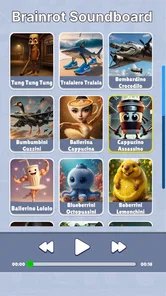
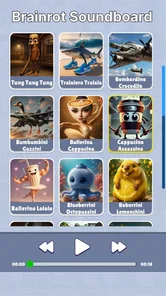
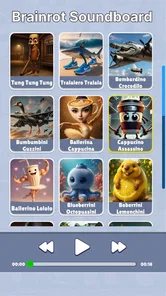
Remember those moments when you’re in a group chat and someone says something so ridiculous that it deserves a sound effect? With the Brainrotted Soundboard & AR, you have a plethora of sounds at your fingertips. From funny noises to dramatic effects, this app covers it all. I’ve been having a blast surprising friends with unexpected sound effects during video calls. It’s like having a comedian in your pocket who knows just the right sound to play at the perfect moment.
AR Features: Bringing Sounds to Life
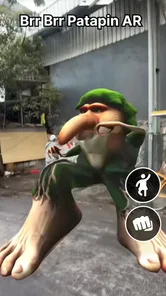
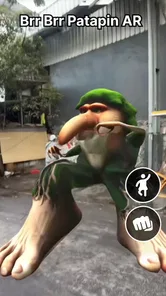
The app doesn’t stop at just audio fun. Its augmented reality feature is where the magic truly happens. Imagine pointing your camera at an object and suddenly seeing a funny animation pop up, perfectly synced with a sound effect. It’s like bringing cartoons into the real world. The AR feature is surprisingly smooth, and it adds a whole new layer of enjoyment to the app. It’s not just about hearing the sounds; it’s about seeing them come to life.
Using the AR feature, I’ve had endless fun creating small skits and sharing them with friends. It’s an excellent way to spice up your social media stories or even just to have a laugh on a lazy afternoon.
User Interface: Simple and Intuitive
Navigating through Brainrotted Soundboard & AR is as easy as pie. The user interface is clean and straightforward, making it accessible even for those who aren’t tech-savvy. The sounds are neatly categorized, and the AR function is just a tap away. It’s clear that the developers put a lot of thought into making the app user-friendly, ensuring that you spend more time having fun and less time figuring out how things work.
Using it without turning a joke into a project
For a better result, I’d decide on the punchline before opening the app. That small bit of planning avoids fumbling through choices while friends are waiting and makes the sound feel intentional rather than random. In a video call, keep the effect brief and check that the other person can hear it; in a room together, make sure the volume suits the space. The same joke can land differently in a quiet setting than it does among friends already trading clips.
The AR side is most useful when there is something in the scene that can make the visual gag obvious. I’d frame a simple object and keep the camera steady instead of trying to stage a busy scene. This is a practical trade-off: a clear, quick setup helps the visual element read, while elaborate arrangements can consume the time that made the soundboard appealing in the first place. If the scene does not come together immediately, switching back to audio keeps the moment moving.
If you are deciding whether to install it, the key question is whether you will actually use sound-based jokes with other people. It is a natural fit for friends who share memes, make short skits, or want an easy prompt for a silly social post. Someone who prefers quiet solo play, dislikes meme humor, or needs reliable tools for editing and publishing finished videos will probably be happier with a different kind of app. I’d also avoid treating it as a substitute for a full creative suite: its charm is immediacy, not fine-grained control.
Performance, stability, and device expectations
In my experience, the interface feels straightforward, and the AR feature has been smooth enough for casual play. That is a useful first impression, but AR naturally makes the camera and live visual display more central than ordinary sound playback. I would expect the experience to depend more on the phone and the scene when using AR than when simply choosing a sound. If the visual side feels less comfortable on your device, the audio use can still be the simpler way to enjoy it.
The game is free, is listed for Everyone, and comes from YoB. It is a simulation game, with a 4.8 average from around 8,800 ratings and over 5 million installs. It was released on May 13, 2025, and its current version is 0.3; Android users need version 8.0 or later. Those details make it easy to judge basic compatibility, but I would still leave room on the device and close anything that is making the phone struggle before trying a camera-based scene.
The main limitation for me is not a lack of seriousness; it is that a joke app depends on the people and moment around it. Sounds can interrupt rather than entertain if the timing is off, and AR is not automatically better than a quick audio gag. For heavier use, such as repeatedly setting up scenes or recording several ideas, I’d take short breaks and keep each attempt simple. That reduces friction and makes it easier to tell whether the app is helping the joke or getting in its way.
What to expect from repeated sessions
I’d judge reliability by the experience I need at that moment. For a quick sound effect, the app’s straightforward layout and casual purpose make it easy to return to without turning the session into a project. AR involves more of the phone’s live display, so I would be more cautious about expecting identical comfort across different devices or busy surroundings. If a scene feels awkward, I’d exit that attempt and use the audio side rather than repeatedly adjusting things while the group waits.
For a longer hangout, I’d also avoid making the app responsible for every laugh. Repeating the same kind of effect can wear thin, even when the first use lands well. Alternating between a sound, a short visual gag, and ordinary conversation gives the app a clearer role: it is a prompt for a moment, not an activity that has to carry the whole evening. That makes the experience feel more natural and helps keep the novelty from becoming noise.
Final Thoughts: A Fun Addition to Your App Collection
In a world where we’re constantly looking for ways to entertain ourselves, Brainrotted Soundboard & AR is a breath of fresh air. It combines humor, creativity, and technology in a way that feels fresh and engaging. Whether you’re looking to prank a friend, add a little something extra to your social media, or just need a good laugh, this app has got you covered.
All in all, the app is a delightful mix of sound and sight that can lighten up any mood. It’s a reminder that sometimes, the best things in life are the ones that make us laugh out loud. So, if you haven’t already, give it a try. Who knows? It might just become your new favorite app!
My performance verdict
I’d choose this for quick, shared entertainment rather than long sessions or demanding creative work. Its strongest case is a fast sound-led joke, with AR as an optional way to make that joke more visual. The sensible expectation is modest: keep the setup brief, use the simpler audio option when timing matters, and let the phone’s camera-based experience guide how much you rely on AR. For people who enjoy that kind of spontaneous humor, it earns a place as a light diversion; for anyone needing precise editing or a deeper simulation, a more focused alternative is the better call.
Brainrotted Soundboard & AR Frequently Asked Questions
Is Brainrotted Soundboard & AR suitable for children?
Brainrotted Soundboard & AR has an Everyone content rating, making it suitable for a broad audience. It is a simulation game centered on viral sounds and dancing with augmented reality, so families can consider whether that style of entertainment suits their children. As with any app, parents may want to review the experience together before younger users spend time with it.
What is Brainrotted Soundboard & AR and what does it offer?
Brainrotted Soundboard & AR is an innovative app that combines a soundboard with augmented reality capabilities to provide a unique auditory and visual experience. Users can explore a variety of sound effects and music tracks, while the AR feature allows them to interact with virtual environments and objects, enhancing their creative and entertainment experience.
Is Brainrotted Soundboard & AR free to use or does it have in-app purchases?
Brainrotted Soundboard & AR is available for free download, offering a wide range of basic features at no cost. However, to access premium sound packs and advanced AR features, users may need to make in-app purchases. This allows users to customize their experience according to their preferences and budget.
How user-friendly is the Brainrotted Soundboard & AR interface?
The Brainrotted Soundboard & AR app is designed with user-friendliness in mind. It features an intuitive interface that is easy to navigate, even for those who are not tech-savvy. The layout is straightforward, allowing users to quickly access sound effects and AR features without any hassle, making it suitable for all ages.
What devices are compatible with Brainrotted Soundboard & AR?
Brainrotted Soundboard & AR is compatible with most modern Android and iOS devices. It requires a device with AR capabilities to fully utilize its augmented reality features. Users should ensure their device's operating system is up-to-date to guarantee optimal performance and access to the latest features and updates.
Pros
- Innovative AR integration enhances user experience.
- Wide variety of sound effects available.
- User-friendly interface with intuitive controls.
- Regular updates with new features and sounds.
- Works well without high device requirements.
Cons
- Ads can be intrusive during usage.
- Limited free sounds; many require purchase.
- AR features may drain battery quickly.
- Some users report occasional app crashes.
- Sound customization options are limited.











