Beatstar - Touch Your Music
- 37.16K
- 4.6
- Installs
- 10.00M
- Price
- Free

Screenshots
Analysis by Reviewed
I reach for Beatstar - Touch Your Music when I want to listen actively rather than let a playlist run in the background. It turns familiar songs into short tests of timing and attention: notes move toward the bottom of the screen, and I tap, hold, or swipe in step with the beat. That simple idea makes it easy to try between errands, but the tighter patterns can demand real concentration. It suits people who enjoy music and want a quick, hands-on challenge, not anyone looking for a conventional instrument lesson or a passive music player.
How it fits into a quick gaming break
The best time to play is when I can give the screen my attention, even if I only have a few minutes. Waiting for a friend at a café, for example, is a better fit than walking through a busy station: a song may be brief, but the incoming notes still need my eyes and hands. If I’m interrupted midway, I’d rather stop and come back later than try to keep up while distracted. That makes the game easy to fit into a pause, but not genuinely hands-free background entertainment.
I also think it works best for someone who enjoys repeating a short challenge to improve. If you want a game that tells a story, lets you explore a world, or offers a different task every time you open it, this may feel narrow. Its pleasure comes from recognizing a musical phrase, reading the pattern, and trying to execute it more cleanly. That focused loop is a strength for rhythm-game fans and a reason other players may move on quickly.
Discover the Beat
When I first opened Beatstar - Touch Your Music, I was immediately greeted with a sleek interface that’s both inviting and easy to navigate. The design is intuitive, so even if you're new to rhythm games, you'll catch on in no time. The app offers a wide range of songs across various genres, ensuring there's something for everyone.
There is a useful distinction between enjoying a song and playing it well. A track you know by heart can still trip you up when the taps arrive quickly or a swipe lands at an awkward moment. I found it helps to watch the incoming notes rather than stare at the score, especially when learning a section. Once the pattern feels familiar, I can relax into the music and use the score as a way to judge whether my timing is improving.
Gameplay Experience
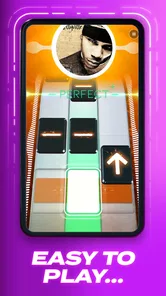
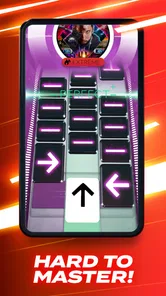
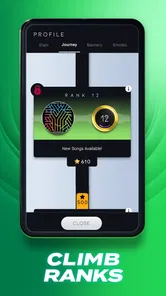
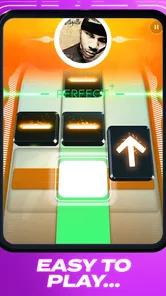
The gameplay is where Beatstar truly shines. You tap, swipe, and hold notes as they glide across the screen in time with the music. It’s like a dance party for your fingers! The app challenges your sense of rhythm and timing, and as you progress, the levels become increasingly complex and engaging. I found myself getting lost in the music, striving to beat my high score with each session.
That rising challenge is rewarding, but it also creates a trade-off: a song that feels comfortable at first can become a demanding exercise in precision. When I keep missing the same passage, I get more from taking a break and returning with fresh attention than from repeatedly tapping in frustration. For a relaxed commute or a short wait, I’d pick a track I already handle comfortably; when I have time to focus, I’d use a difficult one as a deliberate timing challenge. Because this is a screen-based rhythm game, the experience depends on being able to see and react to the notes, so it is not an ideal choice when I need to keep my eyes on something else.
More From Our News Desk

Weather by Xiaomi Review: Clear at a Glance, Less Clear Up Close

X Under Pressure: Can It Recover When Posting Goes Wrong?

Clash of Clans Is Won Between the Battles

Android Auto Makes the Case for Quieter Car Software

MobiOffice: Transforming Mobile Productivity with Seamless Integration

EA SPORTS FC™ Mobile Soccer: Redefining Mobile Sports Gaming
One of the most captivating aspects is how the app syncs with the music, making each interaction feel seamless and rewarding. The satisfaction of hitting a perfect combo is unmatched, and the game does a great job of rewarding you with points and new tracks to unlock.
For better runs, I try to keep my fingers relaxed and avoid swiping more forcefully than necessary. A tense grip makes quick transitions feel harder, while a steady hand helps me read the lane changes without rushing. I also treat a high score as feedback rather than the whole point: replaying a song to improve one tricky stretch can be satisfying, but chasing perfection every time risks turning a fun music break into a chore. These small habits make the challenge feel fairer without pretending every miss is simply a lack of rhythm.
Music Library
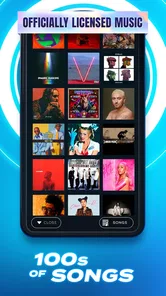
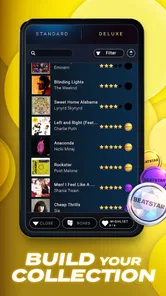
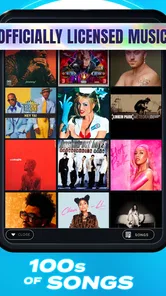
Beatstar boasts an impressive library of songs. Whether you're into pop, rock, EDM, or even classical music, there's a track for you. The app regularly updates its collection, adding new songs to keep things fresh and exciting. You can discover new music or jam to your all-time favorites; it's like having a personal DJ in your pocket.
The collection is central to the appeal, but it also shapes whether the game feels personal: players are more likely to return when the available tracks match their taste. I would check whether the current song selection appeals to me before treating this as a long-term hobby. A music fan who enjoys sampling different styles may be happy to explore, while someone who only wants to play a narrow set of artists might find the available choices less compelling. Either way, I see the songs as material for a rhythm challenge, not a replacement for a streaming service: the focus is on hitting notes, not building a queue for uninterrupted listening.
One practical way I’d use the library is to choose a familiar song for a quick confidence-building round, then try a less familiar track when I want a fresh pattern to learn. Familiarity helps me anticipate the musical phrasing, but it does not guarantee a strong score; the note sequence still needs attention. That contrast makes the game useful both as a test of timing and as a playful way to encounter music beyond my usual rotation.
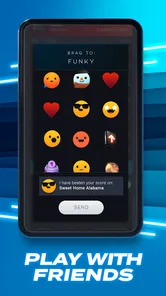
What I love most is the variety of songs available. Each track presents a unique challenge, and the thrill of mastering a difficult song keeps me coming back for more. Plus, the game’s leaderboard feature lets you compete with friends, adding a social element to the fun.
A Changing Game and What That Means
Beatstar is a music game from Space Ape, released on August 31, 2021. Its current version is 36.1.0.9403, so the version history shows that the game has continued through multiple releases since launch. That is a concrete sign of ongoing product evolution, but a version number alone does not tell me what each release changed. I would treat new songs or adjustments as something to check in the current game rather than assume a particular feature has recently arrived.
For someone who already plays, that distinction matters: an update may keep the experience current, but it does not necessarily change the core rhythm challenge that makes the game familiar. For a new player, the important question is simpler: do the current songs and tap patterns make you want another attempt? The game’s reception is substantial, with an average rating of 4.6 from around 1.1 million ratings and over 10 million installs. Those figures suggest broad interest, though they cannot tell you whether its music selection or difficulty will suit your taste.
Cost, Fit, and Everyday Use
The game is free to start, with in-app purchases ranging from $0.99 to $99.99 per item. I’d approach those optional purchases deliberately: first find out whether I enjoy the core play and the available songs, then decide whether spending fits my budget. If I prefer games with no in-app spending at all, or want unrestricted access without weighing purchases, this may not be my first pick. Its Teen content rating is also worth noting for families deciding whether it fits a younger player.
A realistic routine might be one or two songs while waiting for a ride, followed by a longer session at home when I can focus on a harder chart. The short-play appeal is real, but interruptions can break concentration, so I would not start a demanding run when I need to respond to a message or watch for a stop. On a minimum operating system of Android 6.0, it is accessible to a range of Android devices; anyone on iOS should check the current compatibility details for their device before installing.
Compared with casual music games that ask for little more than matching a beat, Beatstar puts more emphasis on precise timing and song-by-song mastery. Compared with rhythm games built around abstract electronic tracks, its appeal is the connection to recognizable songs. That makes it a strong fit for players who enjoy replaying music with a skill goal attached. If I mainly want to make music, learn an instrument, or listen without interruptions from gameplay, a music-learning tool, instrument app, or streaming service would serve that purpose better.
What I’d keep in mind before settling in
A common question is whether knowing a song makes it easy. In my experience, familiarity is useful for anticipating phrasing, but it is not a shortcut around the chart: taps, holds, and swipes still have to be read and timed. I’d start with music I recognize to get comfortable with the feel, then use unfamiliar tracks to see whether I enjoy learning patterns without relying on memory.
Another practical consideration is how much the game’s progression asks of your patience. The appeal is built around playing songs and improving, so I would not expect every session to feel like a steady stream of new discoveries. Replaying a track can be rewarding when I have a specific passage to improve; it is less fun when I’m only repeating runs because I feel obliged to chase a score. Setting a small goal—such as making a cleaner attempt rather than demanding a perfect result—keeps the session enjoyable.
For families, the Teen rating is a useful starting point, but I’d still make the decision with the young player’s habits and preferences in mind. The game centers on music and timing challenges, while its in-app purchases make it sensible to discuss spending expectations before handing over a device. For adults who want a no-cost trial of the core experience, the free entry point makes it easy to judge the fit first; purchases are optional, not a reason to assume the game is right for every budget.
The main thing I would watch as the game continues to evolve is whether its song selection stays appealing to the kinds of players who come for particular genres or artists. The version history confirms ongoing releases, but not the contents of any specific change, so I’d judge updates by what actually appears in the game rather than by a version number alone. For existing players, that means the familiar timing loop remains the clearest reason to return; for newcomers, the current library and the feel of the first few challenges matter more than promises about what might come later.
Final Thoughts
If you’re looking for a game that combines music with engaging gameplay, Beatstar is a must-try. It’s not just a game; it’s a musical journey that lets you interact with your favorite songs in an innovative way. Whether you’re killing time or seriously honing your rhythm skills, this app is sure to keep you entertained. So why not give it a shot? You might just find your new favorite way to experience music.
In conclusion, Beatstar - Touch Your Music is more than just an app; it's a full-fledged experience that brings music to life. With its wide range of songs, challenging gameplay, and the pure joy of hitting every note perfectly, it's no wonder this app has captured the hearts of music lovers everywhere.
Beatstar - Touch Your Music Frequently Asked Questions
Does Beatstar require much storage space on a phone?
Beatstar is a music game, so its songs and other game content can use storage as you play. Before downloading, make sure your device has enough free space for the app and the music you want to enjoy. If your phone is nearly full, clearing unused files first can help avoid installation or update problems.
Can I choose songs I already know, or do I have to play every track?
Beatstar is built around playing songs as interactive rhythm challenges, with tracks spanning multiple genres. You can explore its music selection and focus on tracks that appeal to you, though progression and access to songs may be connected to the game’s systems. If you enjoy discovering music as well as replaying familiar styles, that mix is part of the appeal.
Is Beatstar suitable for beginners who have never played a rhythm game?
Yes. Beatstar is easy to understand at first: notes appear on the screen, and you tap, hold, or swipe in time with the music. Getting a high score takes practice, though, because accurate timing matters and missed notes can interrupt your combo. Beginners can start by focusing on the rhythm rather than trying to hit every note perfectly straight away.
What is Beatstar - Touch Your Music?
Beatstar - Touch Your Music is an innovative rhythm-based mobile game that allows players to experience their favorite songs in a new, interactive way. Players tap and swipe to the beat of popular tracks, creating a unique music experience that combines gaming and music. The app features songs from various genres, offering something for every music lover. It is a music game developed by Space Ape.
How do I play Beatstar - Touch Your Music?
Playing Beatstar is simple yet challenging. Players must tap, hold, and swipe notes as they appear on the screen in time with the music. The game requires rhythm and precision, as missing notes can break your combo and affect your score. With practice, players can improve their timing and master each track. Its controls are straightforward, but keeping up with a song’s changing patterns is what makes replaying tracks engaging.
Pros
- Engaging rhythm-based gameplay.
- Wide variety of popular tracks.
- High-quality graphics and sound.
- Regular updates with new songs.
- Intuitive touch controls.
Cons
- Requires internet connection.
- Limited offline features.
- In-app purchases can be pricey.
- Can be challenging for beginners.
- Occasional lag on older devices.











