Beat Piano - Music EDM Tiles
- 126.00
- 4.6
- Installs
- 10.00M
- Price
- Free

Screenshots
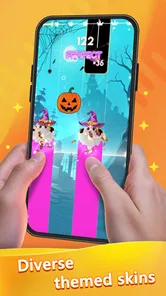
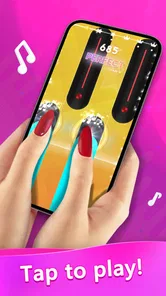
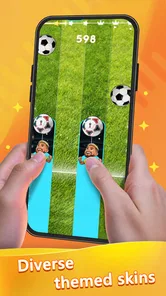
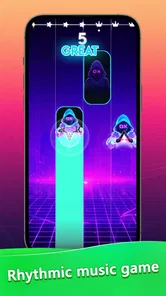

Analysis by Reviewed
When I want a music game that gets to the rhythm challenge quickly, Beat Piano - Music EDM is an easy one to understand: listen, watch the tiles, and tap along. Its appeal is the quick feedback and the way a familiar beat can turn a few spare minutes into a focused little challenge. It is not a substitute for piano lessons or a music-making tool, and that distinction matters when deciding whether it belongs on your phone.
What the free download means
The game is free to download, so you can try its rhythm play without paying an upfront price. That makes it easy to sample a few sessions before deciding whether it fits your taste. There are in-app purchases, priced from $0.99 to $5.99 per item, so I’d treat those as optional spending rather than assume they are needed to enjoy the basic idea. If you prefer games with no purchase prompts or spending choices at all, that may be a reason to skip it.
Beat Piano - Music EDM is a music game from Avatar GG, and its age rating is Everyone. It has a 4.7 average from around 14,000 ratings, with over 1 million installs. Those numbers suggest that plenty of players have tried it, but they don’t tell me whether its song selection or pace will suit you personally. It was released on October 19, 2023, and version 1.48.0 is the current version. The minimum operating system is 7.0, which is useful to check before installing on an older device.
Getting Started with Beat Piano - Music EDM
The first time I launched Beat Piano - Music EDM, I was immediately impressed by its sleek and vibrant interface. It’s like stepping into a neon-lit nightclub. The app is super user-friendly, and even if you’re not a tech wizard, you’ll find your way around in no time. It’s designed to make you feel like a DJ, but without the complicated setup.
Gameplay and Features
Alright, let's dive into the gameplay. The main goal is to tap the tiles in sync with the music. Sounds simple, right? But as the beats get faster and the songs get more intricate, you’ll find yourself tapping faster than you ever thought possible. It’s an exhilarating challenge that keeps you coming back for more.
That straightforward tap-and-follow loop is the game’s main appeal, but it also sets expectations: this is a timing challenge, not a lesson in playing piano or making your own music. I’d reach for it when I want a quick test of concentration, not when I’m looking for a detailed rhythm-training tool. A practical tip is to start a session when you can give the audio your attention; trying to play while chatting or switching between tasks makes it harder to follow the beat and can turn a relaxing break into a frustrating one.
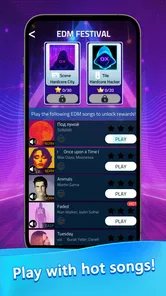
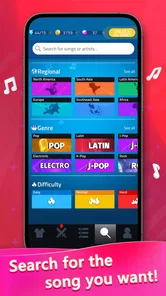
The app offers a wide range of EDM tracks, from heart-pumping beats to more mellow rhythms. You can choose your favorite songs and even unlock new ones as you level up. The sheer variety of tracks is a huge plus, ensuring there’s something for everyone, whether you’re into mainstream hits or indie gems.
More From Our News Desk

Weather by Xiaomi Review: Clear at a Glance, Less Clear Up Close

X Under Pressure: Can It Recover When Posting Goes Wrong?

Clash of Clans Is Won Between the Battles

Android Auto Makes the Case for Quieter Car Software

MobiOffice: Transforming Mobile Productivity with Seamless Integration

EA SPORTS FC™ Mobile Soccer: Redefining Mobile Sports Gaming
Unlocking songs gives a session a small sense of progress, which can be satisfying if you enjoy working toward the next track. The trade-off is that someone who wants to jump straight to a particular song may prefer a music game with a different library or a more direct song-selection approach. I’d try a few available choices before spending anything, then decide whether the tracks you can access make you want to keep playing. The free entry makes that a sensible way to judge its value.
One feature I absolutely love is the multiplayer mode. You can challenge your friends or other players around the world. It adds a competitive edge that really spices things up. Plus, it’s a great way to see who’s got the best rhythm skills!
For a casual everyday use, I can picture opening it during a short wait or a break, playing a round, and then putting the phone away. If a friend is also interested, the competitive angle gives that same quick session a shared goal. If you’d rather play entirely at your own pace, the tile-tapping core still gives you a solo reason to open the game; multiplayer is a bonus, not the only reason to consider it.
Making a short session work
A useful way to try the game is to treat the first session as a fit check rather than a high-score attempt. Pick a track that feels comfortable, keep your attention on the beat, and notice whether the visual cues help you stay in time or distract you. If a song feels too demanding, switching to a more relaxed choice is a better test of the core loop than repeatedly pushing through a track you already dislike.
It can also help to separate “I like this song” from “I like playing this song.” A track you enjoy listening to may still feel awkward as a tile-tapping challenge, while a less familiar selection can turn out to suit the timing better. I’d judge the game by whether I want another round after trying a couple of different moods, not by one unusually easy or difficult attempt.
For a shared session, I’d keep the competition light. A friend can make the game more engaging, but comparing scores is only fun if both people enjoy the same kind of reflex challenge. If one player wants relaxed music and the other wants to chase a tougher run, solo play is likely the better option for that moment; the game’s appeal does not depend on turning every session into a contest.
Visuals and Sound
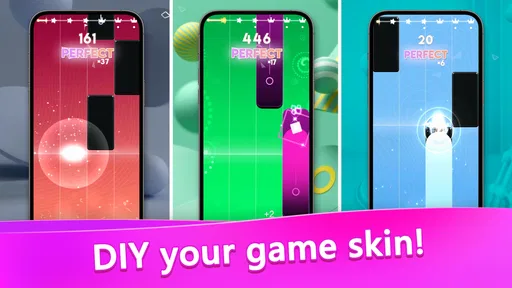
The graphics are something to behold. With each successful tap, the screen lights up with dazzling effects, making every moment feel like a mini celebration. It’s visually stimulating and pairs perfectly with the audio experience. Speaking of which, the sound quality is top-notch. The tracks are clear and crisp, which is crucial for a game that relies heavily on audio cues.
The bright effects help make accurate taps feel rewarding, though players who are sensitive to busy visuals may find the presentation less calming than a plain practice-style game. I’d also choose a moment when listening is comfortable rather than trying to rely on the visuals alone: timing is tied closely to the music. That makes it a better fit for a focused break than for playing in a noisy setting where the beat is difficult to hear.
This also affects where I’d play. A quiet pause at home or a spot where I can listen comfortably is a more natural fit than a loud commute or a conversation-filled room. If I only have a noisy environment available, I would save a serious attempt for later instead of blaming myself for missing cues that are hard to hear. That small choice makes the game feel more like a short musical break and less like an arbitrary test of reflexes.
How it compares with other music games
Music games can ask for very different things: some focus on tapping in time, some simulate instruments, and others encourage players to create or arrange music. This one sits firmly in the first camp. Its strength is low-friction play: there is no instrument technique to learn before the basic challenge makes sense. The cost of that simplicity is limited creative depth; if you want to compose, practice piano fingering, or follow a progressive music curriculum, a dedicated learning or production app is the more useful choice.
Compared with a conventional rhythm game built around a more involved control scheme, tile tapping is approachable for a quick try, but may not satisfy someone who wants more varied input or a deeper sense of mastery. I’d choose it for a short burst of timing and track-based play, not as the one music app expected to serve every purpose. That makes the decision fairly practical: choose the style of interaction you actually want, rather than assuming every music game will scratch the same itch.
Who is likely to enjoy it?
I’d recommend trying it if you enjoy EDM, quick reflex challenges, and games that are easy to understand without a long setup. It may also suit someone who wants a light competitive option to share with friends. On the other hand, I’d skip it if you want a real piano-learning app, deep music creation tools, or a calm experience without flashing effects and increasing pace. Players who mainly care about a specific artist or track should also make sure the available selection matches their tastes before investing time or money.
It is also a reasonable pick for someone who does not usually play games but likes music and wants an activity with a clear, immediate objective. The uncomplicated control idea lowers the barrier to trying it, although the rising pace may still make it a poor fit for anyone who dislikes reaction challenges. I would not recommend it as a way to unwind if you find bright effects or demanding timing stressful; a music player or calmer game would be a kinder option.
For parents considering a game for a family device, its Everyone age rating is a useful starting point, but I’d still think about whether the individual player enjoys fast tapping and lively screen effects. The rating does not make the game a piano course, and it does not make the optional purchases relevant to every player. I’d let a child try the free experience with an adult’s usual approach to in-app spending rather than treating the age label as a promise about every family’s preferences.
Compared with the usual music-game alternatives, this one leans on tapping tiles to the beat rather than teaching instrument technique or asking you to build arrangements. That keeps the first session approachable, but means it offers less for someone who wants a structured skill course or creative control. My advice is to treat it as an arcade-style rhythm game: enjoy the immediate challenge, and choose a different kind of app if your goal is learning songs on an instrument.
Final Thoughts
In a nutshell, Beat Piano - Music EDM is an addictive, fun, and challenging app that’s perfect for music lovers and gamers alike. Whether you’re looking to kill some time or seriously hone your rhythm skills, this app’s got you covered. The combination of beautiful visuals, a wide selection of tracks, and engaging gameplay makes it a standout choice in the music game genre.
So, if you’re ready to unleash your inner DJ and tap along to some awesome beats, give it a try. Trust me, you’ll be hooked in no time!
My buy-or-skip verdict is simple: start with the free access and see whether the tapping, song choices, and visual style work for you. I wouldn’t pay just because an item is available; I’d only consider an in-app purchase if I already knew I wanted what it offers. With that approach, it’s an easy game to sample, while the best alternative for a learner or a player seeking a quieter, more customizable music experience is a different kind of music app.
Beat Piano - Music EDM Tiles Frequently Asked Questions
Does Beat Piano - Music EDM need an internet connection to install?
Beat Piano - Music EDM is a game for Android devices, and you’ll need an internet connection to download it from the app store. Once it is installed, the game can be played offline, which is useful when you are away from Wi-Fi or mobile data. Some activities, such as getting new songs or opening certain content, may still require a connection.
How much storage space should I have before downloading Beat Piano - Music EDM?
It is sensible to leave some free space on your device before installing Beat Piano - Music EDM, as with any game. The amount needed can vary depending on your device and the app’s current files, so check the installation prompt on your phone before proceeding. Keeping additional space available can also help your device run smoothly while you play.
Who developed Beat Piano - Music EDM?
Beat Piano - Music EDM is developed by Avatar GG. It is a music game built around tapping in time with songs, offering a simple way to try rhythm-based play on an Android device. If you are considering a download, you can look for Avatar GG as the developer name in the app store to make sure you have found the game you intend to install.
Is Beat Piano - Music EDM suitable for children?
Beat Piano - Music EDM is a music game rated Everyone, so its content is intended for a broad audience. Its rhythm-based play may appeal to children and adults alike, especially anyone who enjoys tapping along to music. As with any game, parents can decide whether its gameplay and any optional purchases are appropriate for their child.
What is Beat Piano - Music EDM?
Beat Piano - Music EDM is a dynamic music game that allows players to engage with their favorite EDM tracks by tapping along to the rhythm. The app is designed to provide an immersive musical experience, combining the thrill of interactive gameplay with the excitement of electronic dance music. It is developed by Avatar GG and belongs to the Music category.
Pros
- Smooth and intuitive user interface
- Wide variety of music tracks
- Customizable themes and sounds
- Engaging gameplay with rhythm challenges
- Frequent updates with new content
Cons
- Contains in-app purchases
- Requires internet connection
- May drain battery quickly
- Ads can be intrusive
- Limited offline features











