Yard Sale Treasure Map
- 3.62K
- 4.4
- Installs
- 1.00M
- Price
- Free

Screenshots
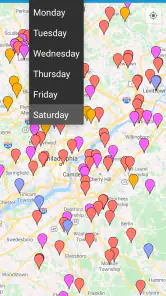

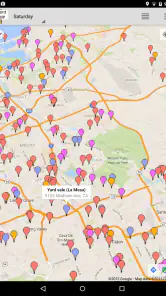
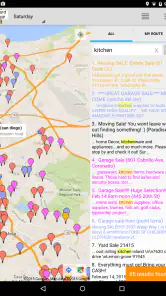
Analysis by Reviewed
When I plan a yard-sale morning, the hard part is often not finding a place to browse; it’s deciding which stops are worth the drive and how to string them together. Yard Sale Treasure Map is built around that particular problem. It brings local sale listings onto a map, with tools for searching, choosing stops, and organizing a route. I find that approach more useful than treating the app as a promise of rare finds: it helps me plan the hunt, while the quality of the listings and the items still depends on the sellers.
What the Free Access Means
The app is free to download, which makes it easy to try before deciding whether it suits your weekend routine. There are also in-app purchases, with listed items ranging from $0.99 to $4.99 each. I’d treat those as optional spending rather than assume they’re necessary: first see whether the free experience gives you enough help finding and organizing nearby sales. The app is rated for Everyone, and Kolodgie Enterprises LLC is its developer.
For a shopper weighing up the cost, the useful distinction is simple: you can start without paying, but some purchases may be offered inside the app. I wouldn’t buy anything just because it appears; first check what it unlocks and whether that would solve a problem you actually have. That makes the free starting point a sensible way to judge its value without turning a casual hobby into a commitment.
Planning a More Focused Yard-Sale Morning
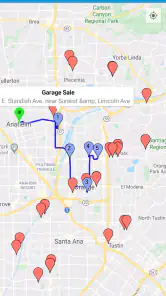
The app’s value is less about guaranteeing a bargain than reducing the small hassles that can make a sale-hunting trip feel scattered. Instead of switching between individual listings and trying to remember where each address is, I can use a map as the starting point for deciding which areas and stops deserve my time. That is a practical advantage for a morning with several possible destinations, but it matters less if I’m only popping into one sale around the corner.
From Listings to a Workable Route
Imagine having a personal assistant who’s scoured the neighborhood, pinpointing all the best sales for you. That’s pretty much what the app does. With its easy-to-use interface, the app integrates seamlessly with Craigslist to provide you with a detailed map of all the yard sales happening around you. No more random driving or missing out on that perfect sale!
Map Your Route
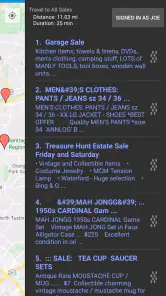
One of the stand-out features is the route planning capability. The app allows you to plan your journey by selecting which sales you want to hit and then mapping out the most efficient route. This is a huge time-saver and lets you focus more on the treasure hunting rather than the logistics. I’ve found this particularly helpful when multiple sales are happening in different parts of town.
My practical tip is to make a short priority list before setting off rather than trying to visit every pin. A route can organize your chosen stops, but it can’t tell you which seller will still have the item you want when you arrive. I’d leave room for a nearby change of plan, too: yard-sale mornings are easier when the route is a guide, not a strict schedule. If a listing is vague, checking its details before adding a detour can help you avoid spending time on a stop that doesn’t match your needs.
More From Our News Desk

Clash of Clans Is Won Between the Battles

Android Auto Makes the Case for Quieter Car Software

MobiOffice: Transforming Mobile Productivity with Seamless Integration

EA SPORTS FC™ Mobile Soccer: Redefining Mobile Sports Gaming

How Microsoft OneDrive Became a Mobile Productivity Giant

How Google Translate Breaks Language Barriers Effortlessly
There’s also a useful trade-off in how tightly you plan. A long route may look efficient on the map but still leave little time to browse each sale, especially if you find something worth inspecting. I’d plan fewer stops than I think I can manage, then treat extra nearby listings as optional. That leaves room to talk with sellers, compare an item with what I actually need, and change direction without feeling that the whole schedule has gone off track.
If I’m heading out with another person, I’d agree in advance on a shared priority: a particular kind of item, a neighborhood, or simply a relaxed morning. The map can help us choose stops, but it won’t settle different opinions about whether a detour is worthwhile. Keeping one or two flexible stops is a better compromise than building a packed itinerary that turns a leisurely browse into a race.
Searching with a Purpose
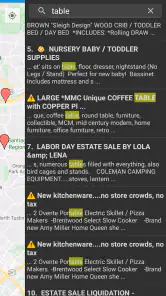
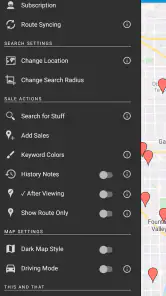
Another cool feature is the ability to filter sales based on specific items you’re hunting for. Whether it's vintage furniture, rare books, or quirky collectibles, you can tailor your search to find exactly what you need. The search functionality is robust, ensuring you don’t miss out on a sale that has what you’re looking for.
This is most useful when I’m shopping with a purpose, such as looking for a particular kind of household item, rather than browsing every sale indiscriminately. I’d still read each listing carefully: a search result helps surface relevant wording, but it isn’t a guarantee that an item is available, in good condition, or priced within your budget. For a broad bargain hunt, a general map may be enough; for a targeted search, filtering can make the morning feel much less random.
For a specific purchase, I’d use search as a way to shortlist, not as a reason to make a long trip on its own. If a listing mentions the kind of item I want but gives few details, I’d weigh how far out of the way it is and whether I have other stops nearby. That small check prevents a keyword match from becoming an expensive detour in time and fuel. It also helps set realistic expectations: a search can identify promising descriptions, but it can’t inspect an object for me.
Searching broadly can be useful too. If I don’t have one exact item in mind, I can look for sales in an area and let the listings shape the route, rather than filtering so narrowly that I overlook a stop worth browsing. I see that as a choice between efficiency and discovery: focused searches are better for a shopping list, while a looser plan suits people who enjoy surprises and have time to wander.
Checking Plans Before You Leave
We all know that plans can change, especially with something as unpredictable as yard sales. The app updates in real-time, providing you with the latest information on sales, cancellations, or new postings. This ensures you’re never caught off guard and can adjust your plans on the fly.
Even with updates, I’d check the most important stops again before leaving. A seller’s plans can shift, and a map cannot remove the uncertainty that comes with community listings. Compared with manually scanning Craigslist and keeping addresses in a separate notes app, having the sales gathered on a map is the clear convenience; if you only visit one nearby sale, though, a quick search in the usual classifieds may be all you need. The app is at version 11.9.0 and requires iOS 10 or later, details worth checking if you’re installing it on an older device.
For a realistic Saturday, I might look over listings during breakfast, choose a couple of likely stops, and check the key details again before driving. If the first sale has nothing useful, I can move on to another selected stop rather than search from scratch in the car. I’d still avoid making a listing the sole reason for crossing town when the description is thin or the item is especially specific. That way the outing remains worthwhile even if one hoped-for find is gone.
One question I’d ask before relying on it is whether it suits the area where I actually shop. The app’s usefulness depends on having relevant sales to plan around; a dense set of listings makes the map and route more valuable, while a sparse set leaves less to organize. I’d try it on an ordinary weekend first and see whether the local results match my habits before building a whole morning around it.
Where It Fits Among Shopping Options
For local secondhand shopping, the usual alternative is to browse classified listings one by one, or use a general map and keep addresses elsewhere. That can work perfectly well for a single destination, and it may be preferable if I already know exactly where I’m going. The advantage here is having yard-sale browsing organized around locations and a chosen route, which saves me from juggling a separate list when I want to visit several stops.
It is not a substitute for every kind of secondhand search. If I’m looking for one particular item and want to compare listings over a wider area, a general classifieds search may give me a better starting point than planning a morning around yard sales. If I want a spontaneous browse close to home, I may not need route planning at all. I’d choose this app when the trip itself involves multiple sales; for a one-off purchase, I’d use whichever source gives me the clearest details with the least effort.
There is a human judgment step that no map can do for me. A listing may sound promising but still be a poor fit once I consider condition, dimensions, price, or how I’ll get the item home. For bulky furniture in particular, I’d check those practical questions before driving across town. The app can help me find and arrange candidate stops, but it does not replace asking the seller or inspecting an item in person.
Who Gets the Most Value
I’d recommend it to regular weekend treasure hunters, people who like planning several stops, and anyone searching for a particular type of secondhand find across a wider area. A realistic Saturday use is to search for a few needed items over breakfast, select the most promising sales, then follow a route while keeping one or two alternatives in mind. That workflow makes the app useful as an organizer, not a promise of a bargain.
It’s less compelling if you dislike driving between locations, prefer browsing only walkable sales, or rarely visit yard sales. It also won’t replace your own judgment about condition, price, or whether a seller’s description is trustworthy. With an average rating of 4.4 from around 9,500 ratings, and more than a million installs, it has clearly found an audience; those figures are context, not a guarantee that every local listing will be useful to you.
The app’s history also makes it feel like a focused tool rather than a general shopping destination: it was released on May 15, 2010. I’d expect its appeal to be strongest for someone who already enjoys the routine of checking local sales, not for a shopper who wants delivery, a guaranteed inventory, or a polished catalogue of items. The free download lowers the barrier to trying that routine, while optional purchases are a reason to pause and judge each offer on its own merits.
Compatibility is worth checking before making it part of a regular routine. The minimum operating system is 10, so I’d confirm that an older device meets that requirement before planning to rely on it. It is listed for iOS 10 or later; if I’m choosing a device or platform, I’d verify the app’s availability for that setup rather than assume the same requirements apply everywhere.
For a casual user, the best test is not whether the map looks busy on one day, but whether it regularly saves enough effort to justify opening it before a trip. I’d compare a couple of weekends: did it help me find relevant stops, avoid needless backtracking, or make a targeted search easier? If not, ordinary browsing may be just as convenient. If I often head out with several possible sales in mind, the planning layer is much more likely to earn its place.
Some shoppers may also prefer not to organize a route at all. If wandering without a plan is the point, a structured list of stops could make the morning feel less spontaneous. I’d use the route as a loose outline and skip it when I simply want to explore one neighborhood. That flexibility is important: the app works best when its tools support the way I want to shop instead of dictating the whole outing.
In conclusion, the app is a must-have for any yard sale enthusiast. It takes the guesswork out of the equation, allowing you to focus on what you love most: finding those unique treasures. Whether you’re a seasoned pro or a weekend warrior, this app is sure to enhance your yard sale experience. Happy treasure hunting!
My Buy-or-Skip Verdict
I’d try Yard Sale Treasure Map if I regularly plan a morning around several sales or want a map-based way to narrow down item searches. Its free access makes that trial straightforward, while the in-app purchases mean I’d check the value of any optional item before spending. If you only need an occasional nearby listing, ordinary classifieds may be simpler; if route planning and focused browsing sound useful, this app is a practical companion rather than a guarantee of treasure.
Yard Sale Treasure Map Frequently Asked Questions
Which devices can I use Yard Sale Treasure Map on?
Yard Sale Treasure Map is available for Android and iOS, so you can use it on a compatible phone or tablet. Check that your device meets the minimum operating-system requirement before downloading. The app is intended for finding and organizing local sales, making a mobile device useful when browsing listings, viewing their locations on a map, and following a route while out shopping.
Who makes Yard Sale Treasure Map, and is it suitable for all ages?
Yard Sale Treasure Map is developed by Kolodgie Enterprises LLC and is a shopping app for people looking for yard, garage, and estate sales. It has an Everyone content rating, so its content is considered suitable for a general audience. Its practical appeal is straightforward: it helps users discover sale listings and plan a trip around them, whether they are casual browsers or regular bargain hunters.
What is Yard Sale Treasure Map and how does it work?
Yard Sale Treasure Map is a mobile app designed to help users find local garage sales, yard sales, and estate sales. It integrates with Craigslist to provide listings based on your location. Users can view sales on a map, plan routes, and even get directions to the sales. The app aims to make treasure hunting easier by providing all the necessary information in one place.
Is Yard Sale Treasure Map free to use?
The Yard Sale Treasure Map app can be downloaded for free on both Android and iOS devices. However, while the basic features are accessible at no cost, there may be additional in-app purchases or premium features that require payment. These often include advanced search options or ad-free experiences, giving users the option to enhance their garage sale hunting experience. In-app purchases are available, so review any purchase details shown in the app before confirming one.
What makes Yard Sale Treasure Map different from other garage sale apps?
Yard Sale Treasure Map distinguishes itself with its integration with Craigslist, offering a comprehensive and up-to-date listing of sales directly from the platform. This integration ensures users have access to the most current sales data. Additionally, its user-friendly interface and route planning feature provide an exceptional user experience, making it easier for users to efficiently plan their treasure hunting excursions.
Pros
- User-friendly interface for easy navigation.
- Real-time updates on yard sales nearby.
- Customizable search filters by distance.
- Comprehensive sale details and photos.
- Option to save favorite sales for later.
Cons
- Limited to areas with active users.
- Requires internet for real-time updates.
- Ads can be intrusive during usage.
- Occasional map loading delays.
- No in-app communication with sellers.

- Category
- Shopping
- Version
- 11.9.0











