YACReader Remote
- 33.00
- 4.2
- Installs
- 5.00K
- Price
- $4.49

Screenshots






Analysis by Reviewed
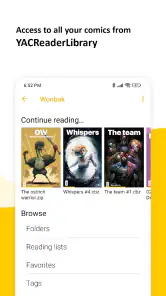
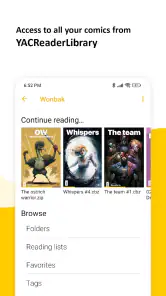
Hey there, comic book enthusiasts! If you're like me, always on the lookout for the best way to enjoy your digital comics, then you might want to check out the YACReader Remote app. This little gem makes comic reading a breeze, especially if you're already using YACReader on your desktop. Let me take you on a tour of what makes this app a must-have for comic aficionados.
Seamless Integration with YACReader
One of the standout features of YACReader Remote is its seamless integration with the desktop version of YACReader. If you're already using YACReader to manage your comic library, this app is like the cherry on top. It allows you to easily sync your comics from your computer to your mobile device, so you can read them wherever you go. No more being tethered to your desk!
User-Friendly Interface
The app boasts a user-friendly interface that’s intuitive and easy to navigate. Whether you're a tech-savvy user or someone who's just getting started with digital comics, you'll find the layout appealing. Everything from accessing your library to selecting a comic to read is straightforward, making the reading experience smooth and enjoyable.
Customizable Reading Experience
What I love about YACReader Remote is the degree of customization it offers. You can tweak the app settings to suit your reading preferences, whether it's adjusting the page transition style or setting your preferred zoom level. It's these little options that make a big difference, allowing you to tailor the app to fit your personal reading style.
Performance and Reliability
Nobody likes an app that crashes in the middle of an intense reading session, right? Well, the good news is, YACReader Remote is pretty reliable. During my time browsing through my collection, I didn’t experience any significant crashes or bugs. The app runs smoothly, ensuring that your comics load quickly and efficiently.
In conclusion, if you're serious about your comic reading and looking for a way to take your collection on the go, YACReader Remote is definitely worth a download. Its seamless integration with YACReader, user-friendly interface, and customizable features make it a top choice for any comic book lover. Whether you're at home or on the move, this app ensures that your favorite comics are always at your fingertips. Happy reading!
Pros
- Easy synchronization with desktop version
- Supports multiple comic formats
- User-friendly interface
- Fast loading times
- Customizable reading settings
Cons
- Requires YACReader for full functionality
- Limited reading features
- Occasional sync issues
- No offline mode
- Ads in free version

- Category
- Comics
- Version
- 1.8.5