

XO Sports
- 8.00
- 3.9
- Installs
- 10.00K
- Price
- Free

Screenshots
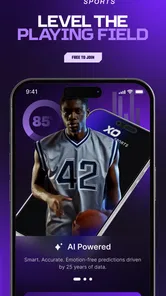
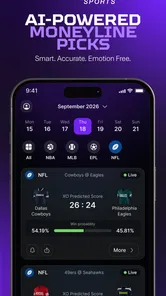
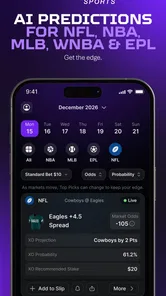

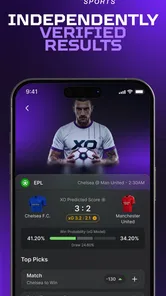
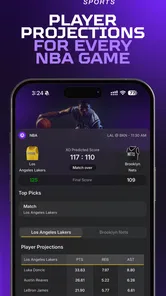
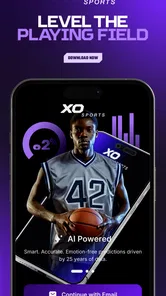
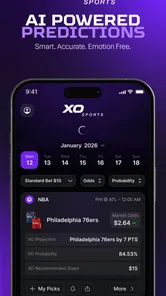
Analysis by Reviewed
I approached XO Sports as a sports app for a shared household rather than as something only one person would use. That distinction matters. A sports tool can look simple on a personal phone, yet become less convenient when a parent, partner, sibling, or roommate wants to check the same information on the same device. My overall impression is that XO Sports is worth exploring for people who want a free starting point for sports-related decision-making, but it needs to be treated as a focused utility rather than a complete replacement for every sports service.
The app comes from XO Sports and sits in the Sports category. Its store message, “Pick Smarter. Win Bigger.”, points toward informed choices, although I found that the useful part of the experience depends on how carefully the user interprets what is shown. It is not the kind of app I would open casually without a plan. I get more from it when I already know which sport, event, or decision I want to examine and use the app as one part of that process.
How XO Sports fits into a shared household
A realistic use case is a household where one person follows sports closely while another only checks in occasionally. The regular user may want to inspect the app before a match, while someone else may simply want a quick second opinion or to understand why a particular selection is being discussed. On a shared phone or tablet, XO Sports can support that conversation, but the device itself becomes part of the workflow. I would not hand it over with the expectation that every person will automatically see a personalized experience.
That is the first practical lesson: shared access is not the same as shared identity. If several people use one device, I would make it clear who is currently using the app and avoid treating a screen left open by one person as a recommendation for everyone else. This is especially important when the app is being used around sports decisions involving money. A household can share a device, but it should not casually share responsibility for a decision.
For a couple, siblings, or friends watching the same event, the app can be useful as a conversation aid. One person can review a selection, explain the reasoning, and let the other person decide independently. I prefer that approach to passing the phone around while everyone assumes the last screen reflects a universal answer. XO Sports works better when it encourages discussion than when it becomes the household’s unquestioned authority.
I also found that the free entry point makes experimentation easier. You can try the app without making the first step a purchase, which is helpful when different people in the home have different levels of interest. The trade-off is that the presence of optional purchases means I would set a clear household rule before anyone uses it: browsing and evaluating are one activity, while spending is a separate decision that requires the account holder’s approval.
Starting without creating confusion
My preferred setup for a shared device is simple. I would open XO Sports with one person present, identify what that person wants to accomplish, and avoid leaving the app in a half-finished state for the next user. If another household member opens it later, they should know whether they are looking at an old selection, a current discussion, or merely the last screen someone viewed. That small habit prevents a surprising amount of misunderstanding.
More From Our News Desk

 Gmail
GmailGmail in a Busy Inbox: Who Benefits Most?
From first account to crowded workday, Gmail earns its place through dependable search and flexible sorting—but its best fit depends on how much inbox maintenance you can tolerate.

 Prime Video
Switching to Prime Video: What Changes in Your Viewing Routine
Prime Video can make a compelling second home for streaming, but switching means learning a different catalog, rental layer, and route from browsing to playback.

 Universal TV Remote Control
Universal TV Remote Control Works Best as a Reliable Backup
A phone remote earns its place through quick setup and reliable habits. Here is how to get more from Universal TV Remote Control—and where its limits show.

 Weather - By Xiaomi
Weather by Xiaomi Review: Clear at a Glance, Less Clear Up Close
Xiaomi’s weather app makes everyday forecasts quick to scan, but its calm surface can leave useful details and recovery paths harder to find than they should be.

 X
XX Under Pressure: Can It Recover When Posting Goes Wrong?
A resilience-focused review of X, examining setup, mistaken posts, interruptions, weak connections, and the gaps that matter when recovery needs to be dependable.

 Clash of Clans
Clash of Clans Is Won Between the Battles
Its raids are quick; its community is a long-term project of coordination, teaching, rivalry, and shared responsibility—with all the friction that entails.
Latest News



I would also keep the first session deliberately short. Instead of exploring every available area at once, I would choose one sports question and see whether the app helps answer it clearly. This gives a better sense of its usefulness than tapping through the interface without a purpose. If the app feels helpful for that narrow task, it becomes easier to decide whether it deserves a regular place on the device.
Because XO Sports is free to download, the main early question is not whether installation is affordable. It is whether the app’s approach suits the household. Optional in-app items range from around eight dollars to nearly one hundred eighty dollars each, so the financial boundary deserves attention before anyone starts tapping purchase controls. I would not let a child or a guest explore unsupervised on an account connected to payment details, even if the app itself is accessible to a general audience.
That is not a criticism unique to this product; it is a practical consequence of using any sports app with paid options on a shared device. Still, XO Sports makes the distinction particularly important because its central appeal is tied to making better selections. A user who feels confident after reading an app’s guidance may be more tempted to spend than someone who is simply checking a score.
Keeping household roles separate
One of the most useful boundaries is to separate the person researching from the person making the final decision. In my experience, this avoids the common problem where a younger family member, casual fan, or visiting friend feels responsible for an outcome because they happened to touch the screen. XO Sports can be discussed together, but I would keep account ownership, payment authority, and final responsibility with one clearly identified adult.
I would also avoid presenting the app as a prediction machine. The store summary encourages smarter choices, but “smarter” should mean more considered, not guaranteed. Sports remain uncertain. If someone in the household expects certainty, the app is probably being used in the wrong way. Its role is better understood as a source of structured consideration, not a promise that an outcome will go a particular way.
For families, this creates a useful teaching opportunity. An adult can show a teenager how to question a recommendation, compare it with personal knowledge, and recognize the difference between entertainment and financial risk. I would keep that conversation age-appropriate and direct. The app’s Everyone rating describes broad content accessibility, but it does not remove the need for adult judgment around spending or sports-related decisions.
Coordination, trust, and everyday use
XO Sports is easiest to coordinate when everyone agrees on what the app is for. In one household it might be a private research tool used before watching a game. In another, it might be opened during a group discussion. Those are different habits, and mixing them without explanation can create friction. I would decide whether the app is mainly for individual use or shared conversation, then keep that expectation consistent.
A practical evening routine could look like this: one person checks the app before the household watches an event, writes down the question they are considering, and explains the result to the others without presenting it as a command. The rest of the group can then decide whether the information adds anything to their own view. This workflow keeps the app useful while preventing the most confident user from dominating the discussion.
Another non-obvious advantage of this approach is that it exposes weak reasoning quickly. If the person using the app cannot explain why a selection seems attractive, the household can pause instead of acting immediately. I would treat that pause as a feature of the workflow, even though it is not a button inside the app. XO Sports is more valuable when it slows down impulsive choices than when it simply makes them faster.
There is also a trade-off with shared devices: convenience can reduce privacy. A person may not want other household members to see what they are researching or which choices interest them. Since I would not assume that every app session is designed for multiple separate users, I would use a personal device for sensitive activity and reserve the shared screen for open discussion. That is a sensible boundary for partners and roommates as well as families.
For users who normally rely on sports news sites, team apps, or live-score tools, XO Sports occupies a different place. A score service is usually better when the goal is speed and factual updates. A team app may be preferable for official club information. A general sports news source is stronger when I want context, interviews, or broad coverage. I would choose XO Sports when the specific task is evaluating a sports-related choice, not when I simply want to know what happened.
That comparison also explains why I would not recommend replacing every sports app with it. A household that wants one polished destination for scores, schedules, news, and discussion may find the experience incomplete. Someone who already has a trusted research routine may see XO Sports as an additional viewpoint rather than a necessary daily tool. Its value depends on whether its focus matches the question in front of you.
What the rating and adoption suggest
The app currently has a 3.9 average from around forty ratings, with a smaller group of written reviews. I read that as a reason to approach it with curiosity rather than certainty. The response is neither a clear warning nor overwhelming proof that every user will enjoy it. For a household deciding whether to keep it installed, a short trial based on one concrete use case makes more sense than relying on the rating alone.
XO Sports has passed ten thousand installs, which gives it a modest user base without making it feel like an unavoidable mainstream platform. That can be positive for someone who wants to try a focused tool without committing to a huge ecosystem. It also means I would be realistic about support expectations and avoid assuming that every edge case has been refined through massive public use.
The current version is 1.1.88, and the app runs on Android seven or later. That minimum requirement is friendly to older compatible phones, which is useful in a household where the shared device is not the newest model. Even so, I would test it on the actual device intended for group use rather than assuming that an older phone will feel equally comfortable. Screen size, battery condition, and general responsiveness can matter more in a shared setting than they do on a personal handset.
Age, trust, and responsible boundaries
The Everyone content rating makes XO Sports broadly accessible from a content-classification perspective. I would still distinguish that from being appropriate for unsupervised financial decisions. A child may be able to understand the sports topic while not being ready to evaluate paid options or the emotional pressure that can follow a disappointing result.
My household rule would be that minors can discuss the sports information with an adult, but an adult handles purchases and decides whether any action is taken. I would explain that an app can help organize a thought without knowing the future. This prevents the common misunderstanding that a confident-looking suggestion is a guarantee.
Trust matters just as much between adults. If one person pays for an item, everyone should know whether it is for personal use or part of a shared activity. I would never assume that a partner or roommate agrees simply because they used the same device. A clear spoken boundary is more reliable than an open screen, especially when the available purchases can become expensive.
The app is a poor fit for anyone who tends to chase losses, treats sports selections as a way to solve money problems, or feels pressured to act quickly. I would also skip it for a household that cannot agree on who controls spending. In those situations, a basic score or news app is the safer choice because it provides sports information without making the decision-making process the center of attention.
Who should install it, and who should pass?
I can recommend XO Sports to an adult sports fan who wants a dedicated place to examine choices before acting and who is comfortable applying personal judgment. It may also suit friends or family members who enjoy comparing opinions around an event, provided the group keeps responsibilities clear. The free download lowers the barrier to testing that workflow.
I would be more cautious with someone looking for guaranteed results, a complete sports-news replacement, or a fully separated multi-user household experience. The app should not be installed on a shared payment-enabled device without first deciding who can buy what. If the main goal is simply live scores, a score-focused alternative will likely be faster and less distracting. If the goal is team news, an official team source may offer a better match.
For me, the strongest use case is a short, deliberate session before an event: identify the question, inspect the app, compare its guidance with independent reasoning, and stop before excitement turns into pressure. That workflow gives XO Sports a meaningful role without allowing it to take over the household’s judgment.
My household verdict
After looking at XO Sports through the lens of shared use, I see a focused sports app with a sensible free entry point and a clear need for adult boundaries. I like it most when it is used as a discussion starter and a way to slow down a decision. I like it least when someone treats the app’s guidance as certainty or leaves a shared device connected to spending without supervision.
My recommendation is to try it as a controlled, personal research tool before making it part of a family routine. Give each user a clear role, keep payment authority with one responsible adult, and use the app alongside—not instead of—common sense and independent sports knowledge. Those steps make the experience more useful and reduce the confusion that can arise when several people share one screen.
XO Sports is free to begin with, aimed at Everyone, and compatible with older Android devices, so it is easy to test in an ordinary household. The optional purchases mean the real decision is not whether installation costs anything, but whether the people using it can maintain sensible limits. If they can, the app may add structure to pre-event conversations. If they cannot, I would choose a simpler sports information app and leave the paid decision-making tools alone.
XO Sports Frequently Asked Questions
What devices and operating-system versions can run XO Sports?
XO Sports is an app in the Sports category, and its Android version requires Android 7.0 or later. Check the requirements shown in the store on your device before downloading, especially if you use an older phone or tablet. Compatibility can affect whether the app installs and runs as expected, so make sure your device meets the stated minimum.
Who develops XO Sports, and how popular is it?
XO Sports is developed by XO Sports. It has been installed more than 10,000 times, with an average rating of 3.9 from 41 ratings and 8 written reviews. Those figures can offer a quick sense of its reception, but they do not guarantee that it will suit your needs. Reading recent user feedback can help you decide whether to try it.
What is XO Sports, and what can I use it for?
XO Sports is a sports-focused application designed to help users follow sporting content, discover updates, and stay connected with relevant teams, competitions, or events. Depending on the version and your location, available features may include schedules, scores, news, statistics, video content, or personalized information. Before downloading, check the current store description because the exact coverage can vary by region and platform.
Is XO Sports free to download and use?
XO Sports is free to download, but free access does not always mean that every feature is included. The app offers in-app purchases ranging from $7.99 to $179.99 per item, so review what a purchase covers before confirming payment. Some content or tools could also require an account or access through a participating service. Check the store’s pricing details and any purchase terms before proceeding.
Does XO Sports require an account or personal information?
The basic installation process may not be enough to access every part of XO Sports. Certain features, such as personalized alerts, saved teams, premium content, or synchronized preferences, may require you to create an account. During registration, the app could request information such as an email address or profile details. Review its privacy policy and permissions so you understand how your data is handled.
Pros
- Simple interface makes sports content easy to browse.
- Covers multiple sports in one convenient app.
- Useful for checking updates while on the go.
- Lightweight design generally feels quick to navigate.
- Suitable for casual fans seeking quick sports information.
Cons
- Some content may depend heavily on an active internet connection.
- Coverage and update speed can vary between different sports.
- The app may feel limited for users wanting advanced statistics.
- Notifications could become distracting if too many are enabled.
- Availability of certain features may differ by region or device.





