

WNBA - Live Games & Scores
- 1.87K
- 4.7
- Installs
- 1.00M
- Price
- Free

Screenshots

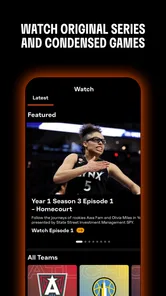
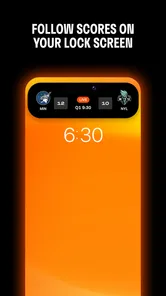

Analysis by Reviewed
I’d use the WNBA - Live Games & Scores app when I want to follow the league without keeping a game on in the background. It’s a sports app from WNBA Enterprises, and its focus is clear: scores, game coverage, news and highlights in one place. That makes it most useful when I care about what is happening across the WNBA, but don’t always have time to watch every matchup.
Getting from a busy day to the game
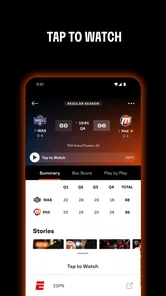
My usual routine would be to open the app before a game or during a spare moment, check the live score, then use play-by-play when I can’t watch. That handoff matters: a score tells me whether the game is close, while the sequence of plays gives me some sense of how it got there. If I’m at work or commuting, I can follow the changing story without needing to treat the app like a live video stream.
For example, if I have a short break and know a game is underway, I can check the score first, scan the play-by-play for the latest swings, and return later for highlights. That’s a practical way to stay involved without trying to watch on a small screen in a setting where I can’t give it my full attention. I’d save full viewing for when I have the time and prefer a more continuous experience.
Making a quick check useful
A quick score glance is most useful when I already know which game I care about. If I’m less familiar with the teams, I’d take a moment to read the surrounding news or check the sequence of plays rather than treating the score as the whole story. A lead can change quickly, and a number alone doesn’t tell me whether the game has been tight throughout or swung sharply in one stretch.
This makes the app a good companion for small gaps in the day, not a reason to keep checking my phone every few minutes. I’d choose one deliberate check during a break, then return when I can give the game more attention. That habit keeps score-following informative instead of turning it into a stream of interruptions.
Choosing how much of the game to follow
The useful question is not simply whether I can follow a game, but how much detail I want at that moment. Live scores answer “what is the situation?” Play-by-play helps answer “how did it change?” Highlights are better when I want to see selected moments after the fact. Keeping those purposes separate makes it easier to pick the right stop instead of expecting one screen to do everything.
If I’m introducing a friend to a matchup, I’d start with the score and a short explanation of the teams or stakes from league news, then share a highlight later if a particular play caught my attention. That’s more inviting than asking someone to absorb a full game before they know what interests them. For a committed fan, the same path works in reverse: use updates to keep track during the day, then watch when time allows.
More From Our News Desk

 Gmail
GmailGmail in a Busy Inbox: Who Benefits Most?
From first account to crowded workday, Gmail earns its place through dependable search and flexible sorting—but its best fit depends on how much inbox maintenance you can tolerate.

 Prime Video
Switching to Prime Video: What Changes in Your Viewing Routine
Prime Video can make a compelling second home for streaming, but switching means learning a different catalog, rental layer, and route from browsing to playback.

 Universal TV Remote Control
Universal TV Remote Control Works Best as a Reliable Backup
A phone remote earns its place through quick setup and reliable habits. Here is how to get more from Universal TV Remote Control—and where its limits show.

 Weather - By Xiaomi
Weather by Xiaomi Review: Clear at a Glance, Less Clear Up Close
Xiaomi’s weather app makes everyday forecasts quick to scan, but its calm surface can leave useful details and recovery paths harder to find than they should be.

 X
XX Under Pressure: Can It Recover When Posting Goes Wrong?
A resilience-focused review of X, examining setup, mistaken posts, interruptions, weak connections, and the gaps that matter when recovery needs to be dependable.

 Clash of Clans
Clash of Clans Is Won Between the Battles
Its raids are quick; its community is a long-term project of coordination, teaching, rivalry, and shared responsibility—with all the friction that entails.
Latest News



Keeping game updates from taking over
One trade-off with any live sports companion is that the more often I check, the more the phone can pull me away from whatever I’m doing. I’d use the app intentionally: open it when I have a reason, read what I need, and leave the rest for later. If I’m somewhere I cannot safely or politely look at a screen, the sensible choice is to wait rather than trying to follow every possession.
It also helps to decide whether I want the result before opening a clip. If I missed a game and want to preserve the suspense, I’d start with the coverage that gives me the least away, then choose whether to move on to highlights. A highlight can reveal the outcome through the moment it shows, so it is not always the right first tap for someone avoiding spoilers.
When league coverage is the priority
For someone who follows only a few WNBA stories, the app’s focused scope is a strength: I can spend my attention on this league rather than sorting through a broad sports feed. That focus is less valuable if I mainly want one place for many leagues, sports, or teams outside the WNBA. In that case, a general sports app may fit the daily routine better, even if its league-specific coverage feels less central.
I’d also separate following a game from watching one. Scores, play-by-play, news and highlights help me keep up, but they don’t recreate a continuous broadcast, the atmosphere of the crowd, or every possession in context. If the live viewing experience is what I want, I’d choose a viewing option instead. The app makes more sense as a companion for the gaps around watching, or as a lighter way to stay informed when watching is not practical.
What happens after the final buzzer
The app’s news and highlights help carry the experience beyond the live game. I can catch up on notable plays, then look through league news such as player moves or injury updates. This is especially useful if I follow several teams: instead of relying on scattered social posts, I have a WNBA-centered place to check what has changed. I’d still use broader sports coverage if I wanted a wider view across leagues, but for staying close to women’s basketball, a dedicated home is a real advantage.
The handoff from live coverage to news is also a useful way to avoid spoilers. If I missed a game, I’d start with the score or a recap-style check rather than opening highlights in a crowded place where a clip might reveal the result. Then I could watch the plays when I’m ready. That small bit of self-management makes the app more useful for people who follow games on their own schedule.
Following a team without following every game
Fans who support more than one team can use the app as a check-in point rather than trying to watch every matchup. I’d look at the scores when I have time, use play-by-play for a game that seems especially close, and leave other results for a later scan. That approach is useful during a busy stretch of the season: it gives me a sense of the league’s activity without making every game an appointment.
For a newer fan, league news can also provide a way into the larger conversation. A score might prompt a question about a player or a team, and a related update can add useful context before I decide whether to watch a highlight or a full game elsewhere. I wouldn’t treat a few headlines as a complete guide to the league, but they can help me work out which stories I want to follow next.
Everything You Need in One Place
When I first downloaded the WNBA - Live Games & Scores app, I was blown away by how comprehensive it is. The app offers live game coverage, which means you can follow your favorite teams and players in real-time. No more missing out on those crucial moments! The live scores update is super fast, so you're always in the loop. Plus, if you're busy and can't watch the game, the play-by-play feature is a lifesaver, giving you all the details as if you're right there in the stands.
Stay Updated with News and Highlights
One of the things I love most about this app is the news section. It's filled with the latest updates on everything happening in the WNBA world, from player trades to injury reports. And let's not forget about the highlights! These are perfect for catching up on the best plays of the game, all neatly compiled so you don't have to scour the internet for them. The app does a fantastic job of keeping you connected to the league and its players.
A useful trade-off is choosing the right level of detail for the time I have. When I only need the outcome, a quick score check is enough; when I want context, play-by-play is the better stop; and when I want to relive a moment, highlights make more sense. I wouldn’t expect those formats to replace watching the whole contest, but they make it easier to keep up between full broadcasts. For a new fan, this layered approach can also make following a game less overwhelming than trying to learn every team and storyline at once.
User-Friendly Interface
Now, I'm not the most tech-savvy person out there, so I really appreciate how intuitive the app is. The interface is clean and straightforward, which makes navigation a breeze. Whether you're checking out the scores, reading the latest news, or watching highlights, everything is just a tap away. It's designed to make your experience as seamless as possible, and I must say, it does a great job at it!
For a practical routine, I’d decide what I’m looking for before opening it: a score, an explanation of a run of play, a news update, or a clip. That simple choice keeps me from bouncing between sections without learning much. If I’m checking in during a work break, a quick score and a short look at the play sequence may be enough; if I have more time later, I can return for highlights. The app is most useful when I treat those formats as different tools rather than interchangeable versions of the same update.
Free to start, with a purchase check
The WNBA app is free to download, though in-app purchases range from $1.99 to $34.99 per item, so I’d check any purchase prompt carefully if I’m only looking for basic coverage. It’s rated for Everyone, has a 4.7 average from around 8.9 thousand ratings, and has passed one million installs. Version 18.4.5 supports devices running iOS 9 or later. The app has been available since June 3, 2011, which gives it a long-running role as a league-focused companion rather than a general sports scoreboard.
That purchase range is a reason to pause and read what a prompt is for, not a reason to assume that every useful part requires payment. I’d begin with the free experience and decide whether it covers my needs before considering any optional purchase. If my goal is simply to follow results and league news, I’d be especially careful not to buy something just because it appears while I’m trying to get to a game update.
Where it fits beside other sports apps
Compared with a broad scoreboard app, this one is appealing when WNBA coverage is the point rather than one item in a long list of sports. A general service can be a better daily hub for someone who follows several leagues, while a broadcast service is the clearer choice for someone who wants to watch a complete game. I see this app in the middle: more league-focused than a general scores feed, but not a replacement for full video viewing.
That distinction matters for households or groups with different interests. I could use this app to keep up with the WNBA while someone else follows other sports in a broader app, then share a score or a highlight when a result is worth discussing. If everyone wants the same comprehensive sports dashboard, maintaining separate apps may feel unnecessary. If the WNBA is a regular part of the conversation, the dedicated focus earns its place more easily.
Who will get the most out of it
I’d recommend it most to WNBA regulars, fans tracking more than one team, and newcomers who want a straightforward route from scores to context. A general sports app may be more convenient if basketball is only one of many sports you follow, while a live broadcast is the better choice when watching every possession matters. The dedicated app’s strength is keeping league coverage together; its limitation is that it is not a substitute for the full atmosphere and uninterrupted view of a game.
I’d also suggest it to someone who wants a low-effort way to stay connected between games, rather than a deep research tool or an all-sports command center. A casual fan can check a result and follow a headline without committing an evening to a matchup. On the other hand, someone who rarely follows the WNBA and only wants occasional scores may be better served by the sports app they already use, especially if adding another app would complicate their routine.
If you’re wondering whether it can replace watching, my answer is no—and that is not a flaw so much as a difference in purpose. It can tell me what happened and help me catch selected moments, while a full broadcast gives the flow and atmosphere that a score feed cannot. If you’re asking whether it is useful when you have only a few minutes, that is exactly where I find its score and play-by-play workflow most practical. For deeper viewing, I’d switch to a broadcast; for quick league updates, I’d stay here.
If I’m following a close matchup while doing something else, the best workflow is simple: check the score, use play-by-play for the turning points, and come back for highlights when I can focus. If I’m looking for a broad sports dashboard or a full live viewing session, I’d choose another option for that specific need. But when my question is “What’s happening in the WNBA, and what did I miss?”, this is a handy place to start.
In conclusion, if you're a WNBA fan, this app is a must-have. It's packed with features that bring the excitement of women's basketball right to your fingertips. The WNBA - Live Games & Scores app has definitely earned a spot on my home screen, and I'm sure it will on yours too. So, go ahead and download it now to enhance your basketball experience like never before!
WNBA - Live Games & Scores Frequently Asked Questions
Who publishes WNBA - Live Games & Scores?
WNBA - Live Games & Scores is the official app from WNBA Enterprises, created for fans who want a central place to follow women's basketball. It is listed in the Sports category and is free to download. Its focus is WNBA coverage, so it may be a good fit if you want game information and league-related updates together in one app.
What features does WNBA - Live Games & Scores offer?
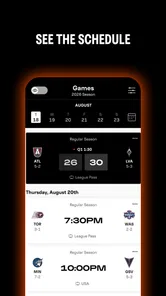
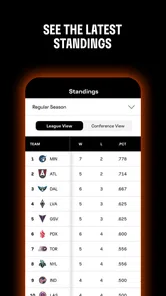
WNBA - Live Games & Scores provides real-time updates on WNBA games, including live scores, play-by-play commentary, and team statistics. Users can access game schedules, standings, and player stats. The app also offers video highlights and news updates, ensuring fans are well-informed about their favorite teams and players throughout the season.
Is the WNBA - Live Games & Scores app free to use?
Yes, the WNBA - Live Games & Scores app is free to download and use. However, some features may require in-app purchases or subscriptions for premium content, such as exclusive video highlights or ad-free browsing. Users should check the app's details for any potential costs before downloading. In-app purchases are listed from $1.99 to $34.99 per item, so review purchase details in the app before confirming anything.
Can I watch live WNBA games on the app?
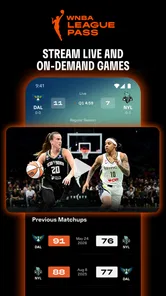
While the WNBA - Live Games & Scores app provides live scores and updates, it does not stream live games directly. However, it may offer links or information on where to watch games live. Users looking to stream live games should check if the app has partnerships with broadcasters or streaming services.
Is the app available on both Android and iOS devices?
Yes, the WNBA - Live Games & Scores app is available for download on both Android and iOS devices. Users can find it on the Google Play Store for Android devices and the Apple App Store for iOS devices. Ensure your device meets the app's compatibility requirements for a seamless experience. The Android version requires Android 9 or later, so check your operating system before downloading.
Pros
- Real-time game updates
- Comprehensive player stats
- User-friendly interface
- Customizable alerts
- In-depth team analysis
Cons
- Frequent ads
- Limited offline access
- Occasional app crashes
- High data usage
- Subscription for premium features





