

Walleye Now
- 41.00
- 3.7
- Installs
- 10.00K
- Price
- Free

Screenshots
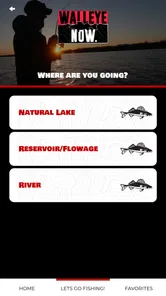
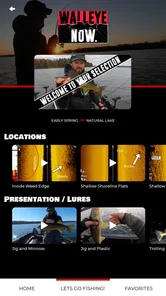
Analysis by Reviewed
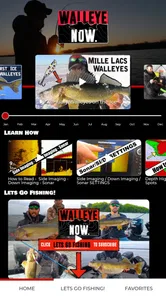
I approached Walleye Now as a practical fishing companion rather than a general sports app, and that distinction matters. Its purpose is narrow: help anglers think more deliberately about catching walleye throughout the year, whether they are fishing a familiar lake or trying to understand a new body of water. I found the app most useful when I treated it as a planning and decision-making aid, not as a promise of instant success.
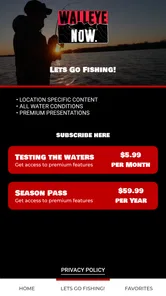
The app is free to install, with optional in-app purchases ranging from $5.99 to $59.99 per item. It is published by Walleye Now and sits in the Sports category. The audience rating is Everyone, so it is suitable for a broad range of users, although the actual value depends much more on your fishing experience and expectations than on age.
At a glance, the store presence is modest: the app has more than ten thousand installs, an average rating of 3.7 from dozens of ratings, and dozens of written reviews. I would read that as a sign of a specialized tool with a real audience, but not one that has become a universal replacement for local knowledge, weather awareness, or time on the water.
Getting from installation to a useful fishing plan
I’d use this section to turn the initial download into a repeatable routine: choose one familiar body of water, set a clear question for the outing, and decide what observation would make me change course. That keeps planning practical rather than turning into a long browse through fishing advice. From there, the next section looks at what a first-time user should expect before relying on the app.
What I expected before using it
I did not expect Walleye Now to behave like a social fishing network, a full navigation system, or a conventional weather application. The concept is more focused. It is designed around the practical question every walleye angler eventually asks: where should I concentrate my effort, and how should I adjust that approach as conditions and seasons change?
That focus is its main strength. Many fishing apps try to cover every species, every kind of water, and every possible outdoor activity. A walleye-specific app can instead speak to the habits and decisions that matter for this particular fish. If you regularly target walleye, the narrower scope feels intentional rather than limiting.
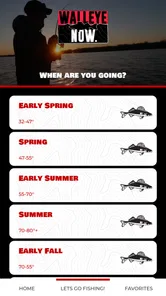
It is also important to set a realistic expectation about what “any time of year” means in practice. The app can help organize your thinking across changing seasons, but it cannot remove the variables that make fishing difficult. Water clarity, wind, temperature, forage, boat control, local regulations, and simple luck still matter. I would use its guidance to create a starting plan, then adapt that plan once I am actually on the water.
More From Our News Desk

 Gmail
GmailGmail in a Busy Inbox: Who Benefits Most?
From first account to crowded workday, Gmail earns its place through dependable search and flexible sorting—but its best fit depends on how much inbox maintenance you can tolerate.

 Prime Video
Switching to Prime Video: What Changes in Your Viewing Routine
Prime Video can make a compelling second home for streaming, but switching means learning a different catalog, rental layer, and route from browsing to playback.

 Universal TV Remote Control
Universal TV Remote Control Works Best as a Reliable Backup
A phone remote earns its place through quick setup and reliable habits. Here is how to get more from Universal TV Remote Control—and where its limits show.

 Weather - By Xiaomi
Weather by Xiaomi Review: Clear at a Glance, Less Clear Up Close
Xiaomi’s weather app makes everyday forecasts quick to scan, but its calm surface can leave useful details and recovery paths harder to find than they should be.

 X
XX Under Pressure: Can It Recover When Posting Goes Wrong?
A resilience-focused review of X, examining setup, mistaken posts, interruptions, weak connections, and the gaps that matter when recovery needs to be dependable.

 Clash of Clans
Clash of Clans Is Won Between the Battles
Its raids are quick; its community is a long-term project of coordination, teaching, rivalry, and shared responsibility—with all the friction that entails.
Latest News



For a first-time user, the best mindset is to ask the app questions instead of waiting for a single answer. Which water should I examine first? What kind of seasonal pattern might be relevant? What information should I compare before moving? That approach makes the experience more useful and reduces the frustration that comes from expecting an automatic “fish here now” instruction.
Setting it up without overcomplicating the process
After installing the app, I would begin by exploring its main areas before trying to absorb everything at once. A specialized fishing tool can feel confusing when every section appears important, but the first session should have a simple goal: understand how the app organizes information and identify the path that leads to a practical fishing decision.
Start with the body of water you already know best. Familiar water gives you a reference point. You can compare what the app suggests with places, seasons, and patterns you have personally experienced. That makes it easier to judge whether the material is helping you form a better plan rather than simply giving you more information to read.
If you are new to walleye fishing, choose one upcoming outing and use that as your setup project. Note the season, the type of water you intend to fish, and the amount of time you realistically have available. This prevents the common mistake of browsing broadly without turning the information into an actionable plan.
I also recommend keeping a small note outside the app during your first few trips. Record the water you fished, the conditions you noticed, the areas you tried, and what produced a bite. This is not a criticism of Walleye Now; it is the best way to make a specialized reference tool more personal. Over time, your own observations become the filter that tells you which guidance deserves the most attention.
The current version is 4.2.5, and the app supports Android 6.0 or later. That makes it accessible on many older Android devices, which is useful for anglers who keep a dedicated phone in their tackle bag instead of taking their newest everyday phone onto the boat. Still, I would check that your device is comfortable to use outdoors before relying on it for a full trip.
Your first meaningful action
The first useful action is not simply opening a page or reading a tip. It is building a short plan for one specific outing. I would choose a lake or river, identify the time of year, and narrow my attention to a few likely approaches rather than trying to memorize every possible tactic.
For example, imagine I have a free morning during a seasonal transition. Instead of launching with a vague idea that the fish could be anywhere, I would use the app to frame the search: begin with the areas and patterns that make sense for that period, prepare a limited selection of tackle, and decide in advance how long I will give the first location before changing direction.
That last step is easy to overlook. Fishing information is only valuable when it changes behavior. A plan that says “try everything” is not a plan. A better workflow is to choose a first presentation, a second adjustment, and a clear reason to move. Walleye Now is most helpful when it supports that progression rather than becoming another source of endless browsing.
For a newcomer, success on the first trip should not be defined only by catching a fish. A meaningful first result could be discovering that a seasonal suggestion helped you eliminate unproductive water faster, or learning which conditions made one approach more sensible than another. That kind of progress is realistic and gives you a better basis for the next outing.
One non-obvious advantage of a focused app is that it can reduce tackle indecision. Walleye anglers often carry too many options and then spend valuable time switching without a clear reason. I would use the app to prepare a smaller starting kit, leaving room to adapt but avoiding the habit of changing everything at once. When a change produces a result, you are more likely to understand why.
Where first-time users may get confused
The biggest source of confusion is likely to be the difference between guidance and certainty. A recommendation about seasonal behavior is a starting hypothesis, not a guarantee that every fish in a lake will follow the same pattern. If a suggestion does not work immediately, that does not automatically mean the app is wrong. It may mean the local conditions have shifted, the fish are using a nearby variation, or the presentation needs adjustment.
Another common mistake is treating broad seasonal advice as a precise location instruction. Even when an app helps you understand what to look for, you still need to interpret the water in front of you. The strongest users will combine the app’s walleye-specific perspective with observation: wind direction, water movement, visible bait activity, depth changes, and the behavior of other anglers.
There is also a practical trade-off between free access and optional purchases. You can start without paying, which is helpful for deciding whether the app fits your style. However, users who want the fullest experience may encounter paid items inside the app. I would not purchase anything during the first few minutes. First, test whether the free material improves a real fishing plan. Then consider whether an optional purchase solves a problem you actually have.
The broad price range of those items means different anglers may make different decisions. Someone who fishes walleye several times each month may see more value in deeper or more extensive material, while an occasional angler may prefer to stay with the free experience and local advice. The sensible approach is to judge an upgrade by repeated usefulness, not by the promise of catching more fish on one trip.
One further point is that a fishing app can be awkward to use at the exact moment you need it most. Bright sunlight, wet hands, glare, and limited attention all work against detailed reading. I would review the relevant material before leaving home and use the water time for short checks rather than trying to study an entire section while moving between spots.
A realistic day on the water
Consider a first-time user who has a half-day available on a familiar lake. The night before, I would use Walleye Now to create a compact outline: the seasonal situation, the type of areas worth checking first, the initial approach, and the adjustment I will make if the first attempt produces no feedback.
At the launch, I would avoid changing the plan simply because another boat is parked nearby or because one location looks attractive. I would give the first area a fair test, pay attention to conditions, and compare what I am seeing with the pattern I prepared. If the evidence does not line up, I would change one variable at a time: location, presentation, speed, or timing.
That workflow turns the app into a learning tool. If I move after changing three things simultaneously, I will not know what helped. If I make controlled adjustments, the outing teaches me something even when the catch is slow. This is one of the strongest ways to get value from a specialized reference app without expecting it to do the fishing for me.
On the way home, I would record what happened while the details were fresh. Did the water look different from what I expected? Did the seasonal idea help narrow the search? Was the first plan too broad? These notes make the next session more efficient and help reveal where the app’s general guidance needs local interpretation.
How it compares with ordinary alternatives
The usual alternatives are a general fishing app, online videos, local tackle-shop advice, printed guides, or simply asking experienced friends. Each has a place, but Walleye Now offers a different balance. A general app may cover more species and tools, yet its walleye advice can feel diluted. Videos can show technique clearly, but they are often harder to search when you need one specific decision. Local advice is valuable, although it may be tied to one body of water or one person’s current preference.
A printed guide can be easier to consult without distractions, but it does not adapt as conveniently to the particular question you have during planning. Walleye Now sits between a reference guide and a focused digital companion. Its advantage is concentration; its limitation is that it will not replace the wider tools an angler may need for navigation, weather, safety, or regulations.
For someone who fishes several species and wants one all-purpose outdoor app, another option may be better. For someone who mainly targets walleye and wants information organized around that goal, the specialization is a genuine reason to try it. I would especially recommend it to anglers who already have basic equipment and want to make their trips more intentional.
Who should use it, and who should skip it?
I think Walleye Now is a good fit for a beginner who feels overwhelmed by walleye-specific choices, an intermediate angler who wants a more systematic seasonal approach, or an experienced fisher who enjoys comparing established habits with another perspective. It can also suit someone who fishes different bodies of water and needs help creating a starting framework before learning each location firsthand.
I would be more cautious about recommending it to a person who expects guaranteed spots, automatic navigation, or a substitute for checking local rules and conditions. It is not the right choice if your main interest is saltwater fishing, a different target species, or a broad outdoor toolkit. The narrow subject is valuable only when walleye is genuinely your priority.
I would also skip paid extras until I had used the free portion during an actual planning cycle. The app costs nothing to begin with, so there is little reason to rush. Give it enough time to influence a real outing, then decide whether its additional material is worth the expense for your frequency of use.
My recommendation after using the app
My overall view is positive but measured. Walleye Now makes sense because it commits to a specific fishing problem instead of trying to be everything for everyone. Its best contribution is helping you move from a vague intention to a more disciplined plan: choose a likely starting point, prepare a limited approach, observe what happens, and adjust with a reason.
The app will not eliminate uncertainty, and that is where some users may feel disappointed. Fishing remains dependent on local conditions and personal execution. The rating of 3.7 reflects a mixed but respectable reception, and I would interpret that as a reminder to try the experience yourself rather than assuming it will suit every angler.
For my first trip, I would keep the process simple: explore the app at home, plan one outing, use the guidance to narrow the search, and write down what the water teaches me. After several trips, I would be in a much better position to judge whether it has become part of my normal routine.
The most useful way to approach Walleye Now is as a thinking partner, not a magic fishing button. If you want walleye-focused structure and are willing to combine it with observation, patience, and local judgment, the free starting point is easy to justify. If you want a complete navigation or all-species solution, I would choose a broader tool instead and treat this app, at most, as a specialized supplement.
Walleye Now Frequently Asked Questions
Is Walleye Now available for my phone or tablet?
Walleye Now is an Android app that requires Android 6.0 or later, so check your device’s operating system before downloading. It is listed as a free app, with optional in-app purchases ranging from $5.99 to $59.99 per item. Those purchases may affect the overall cost if you choose to buy additional content, so review the purchase details before confirming any transaction.
What is Walleye Now, and who is it designed for?
Walleye Now is a fishing-focused app created for anglers interested in walleye fishing. It is intended for both beginners who want to learn the basics and experienced fishermen looking for practical information while planning a trip. The app can be useful for understanding techniques, seasonal behavior, equipment choices, and fishing strategies, although the exact usefulness may depend on your location and the content available in your region.
What type of fishing information can I find in Walleye Now?
The app generally focuses on information that helps anglers target walleye more effectively, including fishing techniques, lure and tackle suggestions, seasonal guidance, and tips for identifying productive conditions. Before downloading, users should check the current app description and screenshots because available sections and features may change with updates. It should be viewed as a helpful reference rather than a guarantee of catches or a replacement for local fishing knowledge.
Does Walleye Now work without an internet connection?
Offline availability may depend on the specific feature you are using. Some educational material or previously loaded content may remain accessible without a connection, while online videos, updates, maps, account functions, or other interactive tools may require mobile data or Wi-Fi. If you plan to use the app on a remote lake, it is best to open the important content beforehand and confirm whether the version installed on your device supports offline access.
Is Walleye Now free to download, or does it include paid features?
Walleye Now is free to download and includes in-app purchases priced from $5.99 to $59.99 per item. Users should review the purchase details before confirming a transaction and consider whether any paid content fits their needs. Pay attention to what a purchase unlocks and whether it is a one-time purchase or another type of payment, since the available options can change with app updates.
Pros
- Quick access to local walleye fishing reports and updates.
- Useful information for planning trips around current conditions.
- Helps anglers discover productive areas and seasonal patterns.
- Simple format makes reports easy to scan before heading out.
- Can complement local knowledge with recent community observations.
Cons
- Report coverage may be limited outside popular walleye fishing regions.
- Some updates may depend on user submissions and vary in detail.
- Conditions can change faster than reports are updated.
- May offer limited value to anglers targeting species other than walleye.
- Requires location access or internet connectivity for the best experience.





