W.W. Grainger, Inc.
- 846.00
- 4.6
- Installs
- 500.00K
- Price
- Free

Screenshots

Analysis by Reviewed
I would treat the Grainger app as a practical shopping tool for a household only when someone actually needs industrial or maintenance supplies. It is not a general store for everyday groceries or home décor; its value is in searching a large specialist catalog and comparing products before buying. For a shared phone, the useful question is less “Can everyone browse?” and more “Who is choosing and ordering items for the home or a work task?”
One device, different kinds of shopping
A realistic use would be a homeowner trying to replace a particular fitting while another person checks a product needed for a garage or workshop. Having a specialist catalog in one place can make comparison easier than opening several general shopping apps, especially when the item is unfamiliar. I would search by the clearest product term available, then compare the specifications carefully rather than choosing from a thumbnail or a familiar-looking name alone.
That specialist focus is also a limit. If the task is ordinary household shopping, a broad retailer may be quicker and easier. If you already know the exact part or supply you need, Grainger’s search-and-compare approach is more relevant; if you are just browsing for general home goods, it is probably not the app I would open first.
Keep purchasing decisions clear on a shared phone
On a household device, I would agree in advance who is responsible for placing orders and checking the details. A shared screen can make browsing convenient, but it can also blur whose account, delivery choices, or purchase history is being used. I would have the person making the purchase review the selected item and order details before submitting anything, rather than treating a search result as a final decision.
This is especially useful when one person identifies a part and another handles the budget. Share the product name and relevant specifications, not just a screenshot: two items can look similar while serving different needs. The app’s comparison purpose is most helpful when the people coordinating agree on what matters—such as compatibility or a particular requirement—before settling on a choice.
Age, trust, and who should use it
The app is free and carries an Everyone content rating, so its subject matter is not presented as age-restricted. Still, I would not confuse that with a reason to let a child make purchases. For a family, I would keep ordering decisions with an adult and use product searches as a supervised way to identify supplies for a project. Grainger Apps develops the shopping app, and its focus is clearly more useful to people handling maintenance, facilities, or workshop needs than to casual shoppers.
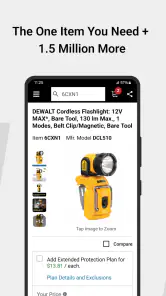
The catalog is described as covering over a million products, which makes the app appealing when a job calls for a less familiar supply. That breadth can also mean more effort: a broad search may return options that need careful checking, and a household user may not know which specification is decisive. My practical tip is to establish the required size, type, or intended use before searching, then compare only products that meet that need.
More From Our News Desk

Clash of Clans Is Won Between the Battles

Android Auto Makes the Case for Quieter Car Software

MobiOffice: Transforming Mobile Productivity with Seamless Integration

EA SPORTS FC™ Mobile Soccer: Redefining Mobile Sports Gaming

How Microsoft OneDrive Became a Mobile Productivity Giant

How Google Translate Breaks Language Barriers Effortlessly
Getting Started with Ease
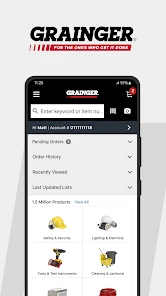
First off, downloading and setting up the W.W. Grainger, Inc. app is a breeze. It’s available on both Android and iOS, so no worries about compatibility here. Once you’ve got it installed, you’re greeted with a clean and straightforward interface. I appreciate how the app doesn’t bombard you with unnecessary information. Everything is neatly categorized, making it easy to find exactly what you need without any hassle.
A Treasure Trove of Supplies
One of the most impressive features is the app’s vast inventory. Whether you’re looking for electrical components, plumbing supplies, or safety equipment, the app has it all. And I mean, seriously, it’s like walking into a massive warehouse, but without the physical exertion. The search function is robust, allowing you to filter results by brand, price, and specifications, which is a huge time-saver when you’re on the clock.
Seamless Ordering Process
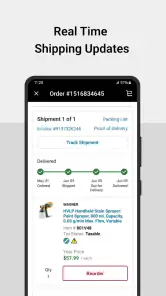
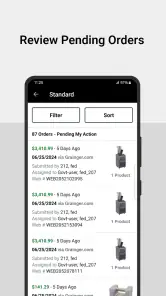
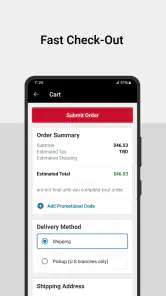
Ordering supplies through the app is as straightforward as it gets. The checkout process is smooth, and you have multiple payment options at your disposal. I found the order tracking feature particularly useful, giving you real-time updates on your shipment. It’s these small touches that make the app a game changer, especially when deadlines are looming.
Customer Support at Your Fingertips
I can’t stress enough how important customer support is in this line of work, and the app doesn’t disappoint. There’s a dedicated support section where you can chat with a representative or browse through FAQs. Personally, I had a minor issue with an order, and the support team resolved it quickly. It’s reassuring to know that help is just a tap away.
Final Thoughts
In the fast-paced world of industrial supply, having a reliable tool like the W.W. Grainger, Inc. app can make a significant difference. It’s efficient, user-friendly, and packed with features designed to make your life easier. Whether you're a seasoned professional or just starting out, this app is a valuable addition to your toolkit. So, why not give it a whirl and see how it can streamline your procurement process?
Where it fits in a household routine
I would use it when a repair has moved beyond a quick trip for generic supplies: for instance, when a household member needs to identify a specific maintenance item and wants to compare available options before placing an order. The strongest workflow is to note the requirements first, search, compare the relevant details, and let one person make the final purchase. That keeps the app useful without turning a shared device into a confusing mix of searches and decisions.
Compared with general marketplaces, a specialist shopping app can be a better starting point for industrial and maintenance products, while a general retailer is usually more convenient for everyday household basics. The trade-off is that breadth does not remove the need for product knowledge. I would not assume that the first result is automatically the right one; check the details against the task, and ask someone experienced if a mismatch could disrupt a repair or create a safety issue.
Compatibility and expectations
The app is free, has a 4.6 average from around 5,900 ratings, and has been installed over 500,000 times. It is rated for Everyone and its current version is 11.0.254, with iOS 12 as the minimum operating system. Those details make it straightforward to judge basic device fit, but the more important decision is whether Grainger’s specialist catalog matches what you plan to buy.
My verdict for shared household use is conditional: it makes sense if someone regularly handles repairs, workshop tasks, or other supply needs that suit Grainger’s catalog. It is less compelling as a general family shopping app, and I would keep account and purchase responsibilities clear on any shared device. Used for a defined job, it can help people compare specialist items; used without a specific need, its industrial focus may feel like more catalog than a household wants.
Make a repair search easier to act on
One useful habit is to separate identifying an item from deciding to buy it. Before opening the catalog, I would write down what the existing part connects to, where it is used, and any measurements or markings that can be checked safely. That short preparation makes a broad search less likely to become a scroll through products that only look approximately right. If the part is still installed, a clear note of its label can be more useful than relying on memory later.
For a shared household task, I would also agree on a stopping point: once the likely options have been narrowed to a few candidates, pause and confirm the choice with the person who understands the repair. This avoids treating search filters as a substitute for technical judgment. It is a small workflow adjustment, but it makes a specialist catalog more approachable for the family member who is helping without having the expertise to select the final component.
Useful for planned jobs, less so for emergencies
I see the app working best when there is time to compare details and coordinate the purchase. For a non-urgent maintenance job, one person can research during the day, send the relevant item information to whoever approves the spending, and let that person complete the order. The app’s shopping focus suits that deliberate process better than a rushed situation where the household needs an immediate fix and has not yet identified the correct supply.
If a repair is urgent, I would not assume that finding a matching listing means the item will arrive in time or solve the problem. In that situation, a nearby supplier or a qualified repair professional may be the more practical route. The app can still help clarify what to ask for, but the household should make timing and compatibility decisions separately from the convenience of browsing on a phone.
Choosing between Grainger and a general marketplace
The choice is not simply between a specialist catalog and a general retailer being “better.” They answer different shopping questions. I would start with Grainger when the task involves maintenance or industrial-style supplies and I need to compare product details in that context. For common household items, a general marketplace may have a more familiar browsing experience and a wider mix of unrelated goods, making it easier to bundle ordinary errands in one place.
A practical trade-off is that a focused catalog can reduce distraction but still ask more of the shopper. The products may be specific enough that a buyer needs to know what dimensions or requirements matter. If I cannot confidently interpret the options, I would use the app to gather candidate names and specifications, then confirm them with someone knowledgeable rather than choosing on convenience alone. That is a better use of the catalog than expecting it to make the technical decision for me.
Accounts, budget, and handoffs
On a family tablet or a phone passed between household members, I would treat the account as belonging to the person who is ultimately responsible for the order. Before another person browses, it helps to say whether they are only researching or are also expected to check out. That simple boundary reduces the chance that a helpful search turns into an unintended purchase or leaves the household uncertain about who will handle follow-up.
When the person researching is not the person paying, I would send a compact handoff: the product name, the specification that matters, and why it appears to fit the job. A screenshot alone can omit the detail that separates two similar items. Keeping that explanation with the recommendation also makes it easier for the purchaser to challenge an assumption before ordering, which is particularly valuable when the item is unfamiliar or the repair has safety implications.
What to expect from the app’s focus
Grainger Apps has built this as a shopping app for its own specialist range, not as a household inventory manager or a shared family planner. I would use it to find and compare supplies, then keep any broader repair notes, project schedule, or household budget in whatever system the family already trusts. Expecting one shopping app to coordinate every part of a home project can create needless friction; keeping its role narrow is more effective.
The same distinction helps set expectations around age. Everyone is an appropriate content rating for the app, but the catalog’s purpose and purchase decisions still call for adult oversight in a family setting. A younger household member could help identify a label or search for an item as part of a supervised project, while an adult checks suitability and handles the buying. The rating describes the content context, not the child’s readiness to select technical products or spend money.
Who will get the most from it
I would recommend trying the app if you maintain a workshop, manage recurring repairs, or often need supplies that are more specialized than everyday hardware-store basics. It can also be helpful for someone who knows the requirements but wants a mobile way to compare candidates before deciding. The current version is 11.0.254, and the app dates back to Jun 21, 2012; what matters more to me than its history is whether it fits the device and the kind of purchasing the household actually does.
Someone who only shops for ordinary home essentials may get little value from installing another retailer’s app. The same goes for a household where nobody is comfortable judging whether a technical product matches the job: in that case, advice from a tradesperson or an experienced supplier should come before a purchase. I would not choose the app just because its catalog is large; I would choose it when its specialization solves a real shopping problem.
A measured household recommendation
With an average rating of 4.6 from around 5,900 ratings and over 500,000 installs, the app has found an audience among shoppers who want Grainger’s specialist catalog on a mobile device. Those figures are reassuring context, but they do not tell me whether a particular fitting is right for my repair or whether the app matches every family’s routine. I would judge it by a trial search for a real, clearly defined need rather than by popularity alone.
My household recommendation is to keep it available for planned maintenance purchases, assign one adult to own the account and checkout, and involve other family members in research only as needed. For a well-defined job, that arrangement gives the catalog room to be useful without making it the family’s default shopping destination. For groceries, décor, casual browsing, or a repair that needs immediate expert help, I would reach for a more suitable option instead.
W.W. Grainger, Inc. Frequently Asked Questions
Who is the W.W. Grainger, Inc. app for?
The W.W. Grainger, Inc. app is a shopping app for people who need to find and compare industrial supplies and equipment from Grainger. It may suit business buyers and professionals who want to browse the company’s product selection from a mobile device, as well as anyone looking for Grainger.com offers. Its focus is practical purchasing rather than general-purpose retail shopping.
What is W.W. Grainger, Inc. app used for?
The W.W. Grainger, Inc. app is designed to provide businesses and professionals with easy access to Grainger’s extensive inventory of industrial supplies and equipment. Users can browse products, check availability, and place orders directly through the app, making it an essential tool for those in need of quick and efficient procurement solutions. Its store summary highlights searching and comparing a broad range of products.
Is the W.W. Grainger, Inc. app free to download and use?
Yes, the W.W. Grainger, Inc. app is free to download from both the Apple App Store and Google Play Store. Users can access a vast selection of products and make purchases without any additional subscription fees. However, they will need to set up an account to place orders and access certain features. The app itself is listed as free, while product purchases are separate.
What device requirements should I check before downloading the app?
Check that your phone or tablet meets the app’s operating-system requirement before installing it. The current version is 11.0.254, and the minimum supported operating-system version is 12. The app is rated for Everyone, so its age rating is not a barrier for general audiences. It is available on Android and iOS, so choose the version that matches your device.
How do I search for products in the W.W. Grainger, Inc. app?
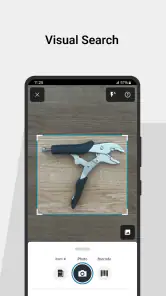
Searching for products in the W.W. Grainger, Inc. app is straightforward. Users can utilize the search bar at the top of the app’s interface to enter keywords, part numbers, or product categories. The app also supports voice search, making it easier for users to find exactly what they’re looking for without typing long queries. Its store summary also emphasizes searching and comparing products.
Pros
- Comprehensive product catalog.
- User-friendly interface.
- Efficient search functionality.
- Reliable customer support.
- Fast order processing.
Cons
- Limited international shipping.
- Occasional stock availability issues.
- High shipping costs.
- Complex return process.
- No live chat support.
- Category
- Shopping
- Version
- 11.0.254











