VIN Check Report for Used Cars
- 4.41K
- 4.5
- Installs
- 1.00M
- Price
- Free

Screenshots
Analysis by Reviewed
When I’m weighing a used car, I want a way to check its identity and history without relying only on a seller’s account. VIN Check Report for Used Cars is built for that moment: it helps me look up a vehicle using its VIN, and its wider lookup tools make it relevant to buyers who want to check details before committing. I see it as a useful first screen, not a substitute for inspecting the car in person.
Getting to Know the App
Imagine having the power to unveil a car’s past just by tapping a few buttons. That’s exactly what the VIN Check Report for Used Cars app offers. It’s like having a detective in your pocket that’s ready to reveal all those secrets the dealership might not want you to know. With an easy-to-use interface, even those of us who aren’t tech-savvy can navigate through the app effortlessly.
Readability and navigation
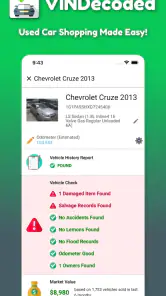
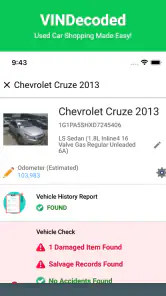
So, here’s the deal. You grab your phone, open the app, and enter the Vehicle Identification Number (VIN) of the car you’re eyeing. In seconds, the app pulls up a comprehensive report that covers everything from previous accidents to any outstanding recalls. It’s like pulling back the curtain on the car’s entire history.
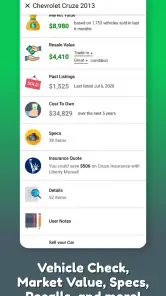
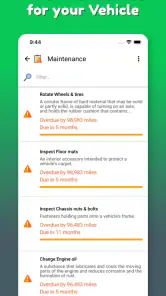
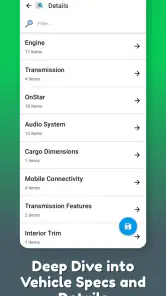
One of the features I love is the detailed breakdown of the car’s specifications. It’s not just about past mishaps; you also get to know the car’s original features and any changes it might have undergone. It’s like getting a full biography of your potential new ride.
Motor, sensory, and practical considerations
Because the main task is entering or checking vehicle information, I’d use it when I can focus on the screen rather than while walking around a noisy lot or trying to talk over an engine. If small text, glare, or a busy interface is difficult for you, bring a companion or review the report somewhere comfortable. I wouldn’t treat a quick glance outdoors as a careful read of important vehicle details.
Latest News
A little preparation helps with both accuracy and comfort. I’d ask for the VIN ahead of time and keep it in a note so I’m not trying to copy a long sequence while standing beside a car. VIN characters can be easy to mix up, especially when copied from a photo or read in poor light. If the report seems to describe a different model or configuration, I’d first check the characters rather than assume the app has uncovered a problem.
Situational access and useful workflows
A practical way to use a VIN lookup is to ask the seller for the number before arranging a visit, then compare the report’s specifications with the car and its paperwork when you meet. If the VIN is hard to read on a phone, check it against the vehicle documents rather than guessing a character. That small step can prevent a lookup for the wrong vehicle and keep a promising lead from being judged on mismatched information.
The app is free to install, with optional in-app purchases, and it comes from VINDecoded.com. It sits in the auto and vehicles category, has an Everyone age rating, and has been available since May 21, 2015. Its average rating is 4.5 from around 11,000 ratings, with more than 1 million installs. Those figures suggest broad interest, but I’d still judge any individual report by whether its details match the car in front of me.
Why It’s a Game-Changer
Now, let’s talk about why this app is a must-have for anyone in the market for a used car. First off, peace of mind. Knowing the full story behind a car can save you from future headaches and unexpected expenses. It’s like having a crystal ball that shows what you’re really getting into.
Plus, the app’s ability to alert you to potential red flags is invaluable. If there’s a recall that hasn’t been addressed, or if the car has been in a major accident, you’ll know right away. No more nasty surprises after you’ve made the purchase.
Where a report helps—and where it can’t replace judgment
I’d use this as a filter when comparing several listings, not as a final verdict on which one to buy. For example, if two similar cars are on my shortlist, their specifications and reported histories can help me decide which deserves a viewing first. If a report raises a concern, I’d ask the seller a direct question and follow up with an independent mechanic; a clean-looking report alone cannot tell me how the engine sounds, whether the brakes feel right, or how the car was maintained.
There’s also a useful distinction between a vehicle-history lookup and a hands-on inspection. Dealer paperwork, a mechanic’s assessment, and a test drive answer different questions, while this app helps organize identifying details and history-related clues. I wouldn’t expect it to settle a disagreement about condition or replace checking recall status through an appropriate official source when a safety decision depends on the latest information.
For a realistic shopping day, I’d use it before spending time and money traveling to see a car. Suppose a seller has posted a vehicle that looks promising but is across town. I’d request its VIN, review the result at home, and write down specific questions about anything that doesn’t line up with the listing. If the details are consistent, I can arrange the visit with a clearer idea of what to inspect. If they conflict, I can ask for an explanation before making the trip. The report doesn’t make the decision for me; it makes the conversation more focused.
Choosing it over simpler lookup options
Compared with a basic VIN decoder, the app’s appeal is that a lookup can bring together specifications and history-related clues rather than only identifying a vehicle. That is useful when I’m screening listings and want context before deciding whether to arrange a viewing. A simple decoder may be the better choice if all I need is to identify the model or check a single specification. For a safety-critical recall question, I’d also verify through an appropriate official source instead of treating an app report as the final word.
It also isn’t a replacement for every paid vehicle-history service or a mechanic’s inspection. Different sources may draw on different records, and a report is only as useful as the information available for that particular car. I’d treat a concerning entry as a prompt to investigate, not as automatic proof of damage; equally, a reassuring result is not a guarantee of a trouble-free vehicle. The best choice depends on what I’m trying to learn, how much detail I need, and whether I’m prepared to follow up on what I find.
Remaining barriers and trade-offs
The app is most useful when I have a readable VIN and time to review what comes back. A seller who won’t share the number, a damaged label, or confusing paperwork can slow the process before the report even begins. Also, a report may surface information that needs interpretation: a record is a reason to investigate, not automatically proof that a car is unsafe, and a lack of an obvious warning is not proof that nothing has happened.
Cost is another practical consideration. Installation is free, but some in-app purchases range from $0.99 to $24.99 per item, so I’d check what a particular lookup requires before relying on it for several cars. If you only need a basic VIN decoding or a routine recall check, a simpler alternative may be enough; if you want multiple vehicle details gathered in one place while shopping, this app’s broader lookup approach is more convenient.
That makes it worth deciding how many cars I’m likely to check before I begin. If I’m comparing a handful of candidates, I’d look at the cost of each intended lookup first rather than assume every report is covered by installing the app. I’d also avoid paying for more detail until I’ve confirmed that the VIN belongs to the exact car I’m considering. This is a small but useful way to avoid spending on the wrong vehicle or on a listing I’m already unlikely to pursue.
On the accessibility side, I would not assume the app suits every reader just because its navigation feels approachable. People who rely on screen readers, need larger text, or have difficulty entering long strings of characters should test the actual screens with a sample VIN before using it under pressure. Asking a seller to send a clear photo of the VIN or getting help from someone you trust can make the process more manageable, though it is still worth checking every character yourself.
For someone with limited vision or hand mobility, the practical question is not only whether a report can be opened, but whether its details can be read and entered comfortably. I’d try the task in a quiet place before relying on it at a viewing, and use any phone-level display or input tools that already work for me. A trusted person can help read a VIN or review a result, but I’d still compare the vehicle identity carefully so assistance doesn’t turn into a mistaken lookup.
Who benefits most, and who may prefer another route
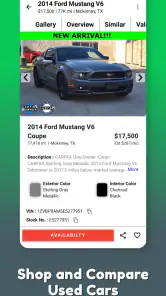
I think the app is best suited to a used-car shopper who wants an early screening step and is comfortable checking the result against the vehicle itself. It can be handy for a first-time buyer who isn’t sure which details to ask about, as well as for someone comparing cars across several listings. The specifications can help catch a mismatch between an advertisement and the vehicle being offered, while a history flag can give a buyer a clear reason to ask for more information.
I’d skip it as my main tool if I only need a quick model identification, if I’m not prepared to verify a worrying result, or if I need an accessibility experience that I haven’t tested on my own device. It’s also not the right answer when I need a mechanical diagnosis. A mechanic can assess wear and current condition; the lookup is more useful for identity and records. For a buyer who wants a full inspection but has no interest in reviewing vehicle history, going straight to a qualified professional may be a better use of time.
Another sensible use is to keep the report in its proper place in the buying process. I’d use it to decide what deserves attention, then take the car for a test drive and arrange an independent inspection if I remain interested. When a seller’s explanation differs from a report, I’d ask for supporting paperwork and compare dates and vehicle details rather than accusing anyone based on a single entry. That keeps the tool useful without giving it more authority than it deserves.
Inclusive verdict
In a nutshell, the VIN Check Report for Used Cars app is a lifesaver for anyone looking to buy a used car. It’s straightforward, reliable, and it provides all the information you need to make an informed decision. Whether you’re a first-time buyer or a seasoned car enthusiast, this app is worth having in your arsenal.
So, next time you’re in the market for a used car, don’t just rely on the dealer’s word. Pull out your phone, fire up the app, and see for yourself. Trust me, you’ll be glad you did. Happy car hunting!
VIN Check Report for Used Cars Frequently Asked Questions
Is VIN Check Report for Used Cars available for free, and are there optional purchases?
The app is free to download, so you can get started without paying for the download itself. It also offers in-app purchases priced from $0.99 to $24.99 per item, which may apply when accessing paid features or reports. Check the purchase details shown in the app before confirming a transaction, especially if you only need a basic VIN lookup.
What is the VIN Check Report for Used Cars app?
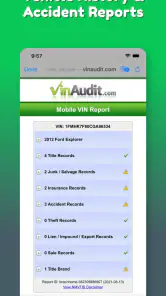
The VIN Check Report for Used Cars app is a tool designed to help potential car buyers access detailed reports on used vehicles using their Vehicle Identification Number (VIN). This app provides insights into the car's history, including accident reports, ownership changes, and more, enabling users to make informed purchasing decisions. Its Auto & Vehicles focus is reflected in a lookup service that brings vehicle information together for buyers comparing used cars.
How does the VIN Check Report app work?
To use the VIN Check Report app, simply enter the Vehicle Identification Number (VIN) of the car you're interested in. The app will then generate a comprehensive report detailing the car's history, such as past accidents, service records, and any reported thefts. This information is crucial for assessing the vehicle's condition and value. The app’s lookup offering also covers specifications, value, recalls, stolen status, and engine details, alongside VIN decoding.
Is the information provided by the VIN Check Report app reliable?
Yes, the VIN Check Report app sources its data from reputable databases that compile vehicle history information. While no report can guarantee complete accuracy, the app strives to provide detailed and up-to-date information to help users make well-informed decisions when purchasing a used car. Treat a report as one useful part of your research, and consider checking important details with the seller and through an independent vehicle inspection before making a purchase.
Can I use the VIN Check Report app for multiple vehicles?
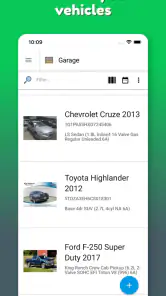
Yes, the VIN Check Report app allows users to check multiple vehicles. Whether you're a car enthusiast or a dealership, you can generate reports for as many vehicles as needed. However, be aware that some versions of the app may require a subscription or payment for each report. If you plan to compare several cars, review the available in-app purchase options first so you can understand any costs before ordering reports.
Pros
- Comprehensive vehicle history reports.
- User-friendly interface for easy navigation.
- Quick access to accident history.
- Provides details on previous owners.
- Includes recall and safety information.
Cons
- May not cover all vehicle models.
- Limited free report access.
- Requires internet connection.
- Some data might be outdated.
- Occasional report loading issues.

- Category
- Auto & Vehicles
- Version
- Varies with device











