UNIQLO US - Clothes Shopping
- 1.55K
- 4.7
- Installs
- 1.00M
- Price
- Free

Screenshots


Analysis by Reviewed
I usually shop for clothes with a specific need in mind, but I don’t always have time to browse a store. The UNIQLO US - Clothes Shopping app is useful in that gap: it gives me a phone-based way to look through UNIQLO’s US range, consider options, and decide whether I want to buy or see an item in person. It’s less of an all-purpose fashion marketplace than a focused shop for people who already have some interest in the brand.
How the connection shapes browsing
Shopping apps depend on a working connection for the moments that matter: loading product images, moving between collections, and progressing through an order. In my experience, it’s worth opening the app when you have a reasonably steady connection, especially if you’re comparing several garments. Clear product photos are useful, but image-heavy browsing can feel less immediate when reception is weak. I’d avoid leaving a purchase until the last minute if you’re somewhere with patchy service.
A pocket-sized store, with mobile trade-offs
The layout makes it straightforward to move among men’s, women’s, and kids’ clothing, which is handy when you’re shopping for more than one person. Rather than wandering through a broad marketplace with many unrelated brands, you’re focused on UNIQLO’s range. That focus is a real advantage if you already like the brand’s everyday basics; it is less helpful if your goal is to compare prices and styles across retailers.
One practical way I’d use it is to check a garment’s pictures and details before going to a physical store, then make a short list of the pieces I want to inspect in person. That can make a quick visit more purposeful, particularly when I’m shopping for a specific layer or replacing a well-worn staple. The app is also useful for browsing when stores are busy, but I wouldn’t treat a screen as a substitute for trying on something where fit or fabric feel is uncertain.
Make a phone-sized shopping trip count
On a small screen, it’s easy to keep scrolling and lose track of why I opened the app. I get more from it when I start with a need—such as a plain top for work or a warmer layer—then narrow my browsing instead of treating the catalog as endless entertainment. Product photos help me inspect a design, but they can’t tell me exactly how a fabric feels or how a cut will sit on my own body. For a fit-sensitive purchase, checking the garment in person or using a retailer with a comparison-focused shopping experience may be the better choice.
If you’re browsing on mobile data, I’d be selective about opening lots of image-heavy pages in quick succession. Waiting for the product images to load before moving on can also make comparisons less confusing. These are simple habits, but they help when you’re shopping during a commute or in a place where the connection comes and goes.
When a connection drops
A dropped connection can interrupt browsing or make checkout feel uncertain. If a page stalls, I’d first give it a moment, then retry the action once service is back rather than tapping repeatedly. Before starting checkout, it helps to review the items and sizes in your basket so you can tell whether your last change took effect. If you’re unsure whether an order went through, check the app’s order information before attempting payment again; that small pause is better than accidentally repeating a step.
More From Our News Desk

Clash of Clans Is Won Between the Battles

Android Auto Makes the Case for Quieter Car Software

MobiOffice: Transforming Mobile Productivity with Seamless Integration

EA SPORTS FC™ Mobile Soccer: Redefining Mobile Sports Gaming

How Microsoft OneDrive Became a Mobile Productivity Giant

How Google Translate Breaks Language Barriers Effortlessly
For a realistic example, imagine noticing on the way home that a basic layer needs replacing. I’d use the ride to browse a few options, save the likely choice for closer inspection, then revisit it on a stable connection before ordering. That separates casual discovery from the part where accuracy matters. It also gives me a chance to reconsider whether I need the item instead of buying just because I happened to be scrolling.
Who it suits, and when I’d choose another option
This is a natural fit for people who already shop at UNIQLO and want a convenient way to browse its US offerings. It can also suit busy households that need to look through adult and children’s clothing in one place. If you mainly want the lowest price across many brands, a general shopping marketplace is a stronger starting point. If you need to judge fabric texture or fit before committing, a store visit has the advantage the app cannot provide.
UNIQLO CO., LTD. makes this free shopping app, which is rated for Everyone and has a 4.7 average from around 9,500 ratings. It has been installed over a million times, and version 25.10.1 requires Android 9 or later. Those details make it easy to assess basic compatibility, but the more important question is whether you want a focused UNIQLO shopping experience rather than a multi-brand store.
A familiar store layout on a smaller screen
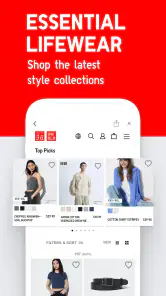
Upon launching the app, I was greeted with a sleek and modern interface. It’s like walking into one of their brick-and-mortar stores but without the noise and the crowd. The layout is intuitive, making it easy even for a tech newbie to navigate. The categories are well-organized, and it’s super simple to find what you’re looking for, whether it’s the latest in men’s, women’s, or kids’ fashion.
Browsing and shopping experience
The browsing experience in the UNIQLO US - Clothes Shopping app is smooth as silk. You can swipe through their extensive catalog with ease, and the images are crisp and detailed. I loved the way they’ve included multiple images for each item, showing different angles and details, which is crucial when you're deciding on clothing online.
One feature that stood out to me was the “Style Hint” section. It’s like having a personal stylist at your fingertips. You can see how other users are styling their UNIQLO pieces, which is fantastic for those days when you’re in a fashion rut and need some inspiration.
Checking out and paying
Once you’ve found your fashion favorites, checking out is a breeze. The app supports various payment methods, including credit cards, PayPal, and even Apple Pay, which I found incredibly convenient. Plus, there’s an option to save your payment details for future purchases, making the whole process even faster the next time around.
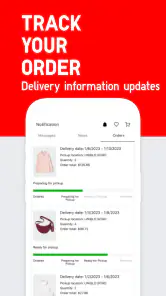
And let’s not forget about the delivery options. The app provides clear information on shipping times and costs, so there are no unpleasant surprises at the end of your shopping spree. I appreciated the transparency and the fact that they offer tracking for your orders.
What I’d weigh before ordering
My main caution is that a convenient checkout can make a decision feel more settled than it really is. With clothing, the photo and product details are only part of the decision: the way a piece hangs, the weight of the fabric, and the comfort of a neckline are easier to judge in person. I’d use the app to narrow choices, not to convince myself that every uncertain purchase is a safe one.
A useful workflow is to separate discovery from commitment. I might browse while I have a few minutes, note the styles that suit the gap in my wardrobe, then return later when I can compare the item details without rushing. That pause is especially helpful if I’m shopping for a gift or for someone whose usual size and preferred fit I don’t know well. In those cases, asking them or going together to a store is more reliable than guessing from a screen.
For a household shopping trip, the adult and kids’ categories make it easier to keep several needs in view without switching to another retailer. I’d still make a quick list before browsing: who needs what, and which items require an in-person fit check? That keeps the app useful as a planning tool rather than turning a practical errand into an open-ended scroll.
Connectivity, data, and a calmer routine
When I’m on a commute, I treat the app as a place to explore rather than a place to rush an order. A train can move between strong and weak reception, and that can make product pages or checkout steps feel less predictable. I wait for a page to finish loading before comparing details, and I leave payment for a more reliable connection. If I need to conserve mobile data, I’m selective about how many image-heavy product pages I open.
That approach also helps avoid a common mobile-shopping mistake: confusing an unfinished screen with a completed action. If a basket change or order step seems uncertain, I pause and check the current state before trying again. It’s a small habit, but it matters more when you’re distracted, moving between places, or switching between Wi-Fi and mobile service.
People often want to know whether they can comfortably use a shopping app in short gaps, whether it replaces a store visit, and whether it helps compare other brands. I’d say it works well for quick discovery when the connection is usable, but it doesn’t replace trying on clothes when fit is the deciding factor. It is a UNIQLO storefront, not a cross-brand comparison tool, so I’d use a broad marketplace for retailer-to-retailer price checks and this app when I’m interested in UNIQLO specifically.
UNIQLO US is available free of charge, and its 1M+ installs and 1.5K reviews reflect a well-established shopping app. It was released on Sep 26, 2017, and the current version is 25.10.1. I’d check that an Android device meets the minimum OS requirement of 9 before installing; on iOS, I’d confirm compatibility in the relevant store. Those practical checks matter more than the headline rating when deciding whether it will run on a particular phone.
My overall take
Overall, the UNIQLO US - Clothes Shopping app is a must-have for anyone looking to simplify their shopping experience without compromising on style. It’s user-friendly, comprehensive, and offers a seamless shopping experience from start to finish. Whether you’re a UNIQLO regular or a first-time shopper, this app is bound to make your fashion hunt easier and more enjoyable.
So, if you’re in the market for some new threads or just want to browse the latest trends, give this app a try. Trust me, your wardrobe will thank you!
UNIQLO US - Clothes Shopping Frequently Asked Questions
Is the UNIQLO US app free, and what devices can I use it on?
The UNIQLO US app is free to download and is designed for shopping on mobile devices. It is listed for iOS devices running version 9 or later, so checking your device’s operating system before downloading can help avoid compatibility issues. The app is intended for everyone and focuses on browsing and buying UNIQLO clothing, collections, and accessories.
Can I browse UNIQLO clothing and accessories without creating an account?
You can use the app to explore UNIQLO’s clothing, style collections, and accessories, making it useful for browsing before deciding what to buy. An account is relevant for features such as managing personal details, viewing order history, and using membership benefits. If you plan to purchase, keeping your account information current can make it easier to access those shopping tools.
What features does the UNIQLO US app offer?
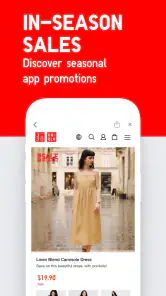
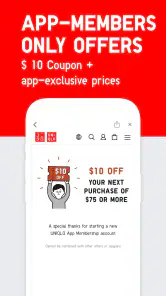
The UNIQLO US app provides a seamless shopping experience with features like browsing the latest collections, receiving exclusive app-only offers, and accessing membership benefits. Users can also enjoy a streamlined checkout process, order tracking, and the ability to find nearby store locations. Additionally, the app offers product reviews and detailed sizing guides to help make informed purchasing decisions.
Is it possible to make returns or exchanges through the UNIQLO US app?
Yes, the UNIQLO US app allows users to initiate returns or exchanges directly from the app. You can view your purchase history, select the items you wish to return or exchange, and follow the step-by-step process. The app provides clear guidelines and customer service support to ensure a hassle-free return or exchange experience.
Does the UNIQLO US app offer personalized recommendations?
The UNIQLO US app uses AI technology to provide personalized product recommendations based on your shopping history and preferences. By analyzing your past purchases and browsing behavior, the app suggests items that align with your style and needs, ensuring a tailored shopping experience that helps you discover new products effortlessly.
Pros
- User-friendly interface.
- Wide variety of clothing.
- Regular updates with new styles.
- Easy return policy.
- Exclusive online discounts.
Cons
- Limited international shipping.
- App occasionally crashes.
- Size availability issues.
- Some items out of stock quickly.
- Limited payment options.

- Category
- Shopping
- Version
- 25.10.1











