Toyota
- 17.67K
- 4.5
- Installs
- 1.00M
- Price
- Free

Screenshots
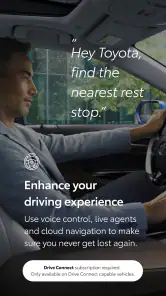
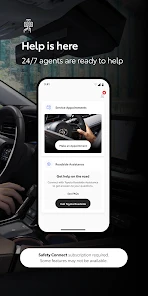
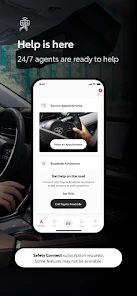
Analysis by Reviewed
I find the Toyota app most useful when it takes small ownership tasks off my mind: checking a vehicle, keeping track of maintenance, or preparing for a trip. It is a free Auto & Vehicles app from Toyota Motor North America, Inc., and its 4.5 average across around 111,000 ratings suggests many owners find a reason to keep it installed. It is designed for eligible Toyota vehicles, so the first question is not whether the interface looks convenient, but whether your vehicle and region are supported.
That distinction is worth checking before you invest time setting up an account or changing your routine. The app supports Toyota vehicles from 2010 onward, except in Hawaii, where the cutoff is 2018 or newer. A used-car shopper can use that as an early filter: confirm the model year and location first, then find out which functions are available for the specific vehicle. Eligibility is a starting point, not a promise that every connected feature works on every Toyota.
For an owner who shares a car with family, the app may be most helpful as a convenient place to check vehicle information and keep ownership tasks visible. It is less compelling for someone who drives a Toyota but prefers not to manage accounts or use a phone for car-related actions. I would decide based on the tasks I actually want to make easier, rather than installing it just because it is the manufacturer’s app.
Using the app in everyday ownership
Readability and navigation
So, I recently got my hands on the Toyota app, and let me tell you, it's quite the companion for anyone who owns a Toyota vehicle. If you're like me, always on the lookout for ways to make life a tad bit easier, then this app might just be your new best friend.
First things first, setting up the app was a breeze. I simply downloaded it from the app store, signed in with my Toyota account, and voila! I was in. The interface is super user-friendly, and even if you aren't tech-savvy, you'll find it a walk in the park to navigate through. In practice, the value of a clear layout is that you can deal with an ownership task briefly, then get back to your day instead of searching through several separate tools.
Latest News
For a less stressful first session, I would set it up at home rather than while standing beside the car in a crowded lot. That gives you time to sign in, identify the vehicle, and become familiar with where the useful controls and information sit. If you are helping a relative who is less confident with apps, walking through one task at a time—such as locating maintenance information—can be more useful than trying to explain every screen at once.
The app has had multiple versions, and the current release is 3.0.44. That makes it sensible to keep expectations practical: menus and available options can change as the software evolves, so rely on what appears for your own vehicle rather than instructions that may describe another model or an older interface. The key question is whether the app makes your particular ownership task quicker, not whether you use every section.
Useful checks, with vehicle-specific limits
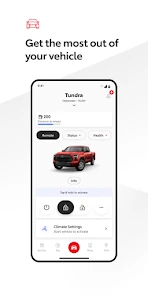
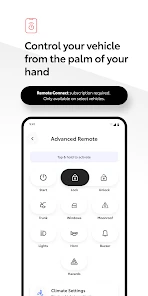
The app is chock-full of features that make managing your vehicle a whole lot easier. One of my favorites is the remote start function. On those frosty mornings, I can start my car right from the comfort of my bed. How cool is that? And let’s not forget the ability to lock and unlock your car remotely. It’s like having a magic wand for your car! These controls are especially handy when you are away from the vehicle and want to check or change its state without walking back to it.
Another neat feature is the vehicle health report. It gives you a detailed overview of your car’s condition, so you’re always in the know. Plus, the app keeps track of your maintenance schedule, reminding you when it’s time for a tune-up. No more sticky notes on the fridge! I would treat those reminders as a prompt to follow up, not as a substitute for reading the vehicle’s guidance or discussing a concern with a service professional.
Eligibility matters before you build a routine around these tools: the app supports vehicles from 2010 onward, with a newer-vehicle cutoff of 2018 in Hawaii. If you are considering it for a used Toyota, check the model year and your location before relying on remote controls or vehicle information. The app is free, but the practical benefit still depends on having a supported vehicle and the relevant functions available for it.
A small but useful habit is to distinguish between information that helps you plan and information that calls for action. A maintenance reminder can help you remember to arrange a visit, but it is not a diagnosis. If a report makes you concerned, I would use it as a reason to check the vehicle’s own guidance or ask a service professional, rather than trying to infer a repair from a brief app summary. That keeps a convenient ownership tool in its proper role.
There is also a trade-off in putting routine details in one phone app: you gain an easy place to check them, but you rely on being able to access your account and phone when needed. I would keep any essential vehicle paperwork and service records in their usual places rather than treating the app as the only record. That is especially sensible for a household where more than one person may need to handle the car.
Motor and sensory considerations
Remote actions can reduce the need to walk back to a parked vehicle, which may be useful for someone with limited mobility or a packed schedule. Maintenance reminders can also help people who prefer a prompt over keeping dates in memory. At the same time, phone-based controls require you to operate a screen, sign in, and make selections; that may be less comfortable for someone who has difficulty with small touch targets, screen glare, or sustained phone use. I would set up essential account access when there is time and good lighting, rather than trying to learn it in a rushed parking-lot moment.
For someone with limited dexterity, the biggest practical benefit may be reducing trips to and from the vehicle, while the biggest drawback may be the phone interaction itself. I would test the controls that matter during a calm moment and see whether the sequence feels manageable. If a task takes several careful taps, or if visibility is poor outdoors, using a familiar physical key or asking another household member may be the more comfortable option. Convenience only counts when the action is genuinely easier for you.
For low-vision users, phone settings such as larger text or screen magnification may help with general navigation, though the experience can vary by device and screen. I would not assume that every control becomes easy to use just because the phone has accessibility settings. It is worth checking whether the important labels remain clear and whether you can confidently tell which vehicle or action is selected before using a remote function.
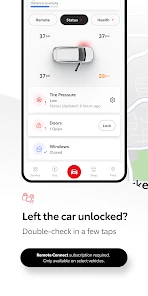
For a realistic everyday example, imagine leaving a store and being unsure whether you locked the car. If your vehicle supports the relevant remote control, checking through the app may save a return trip. On a cold morning, remote start can be convenient before departure, while a maintenance reminder can help you plan a service visit before a busy week. These are modest benefits, but they matter most when they fit naturally into a routine rather than requiring constant checking.
In a shared-car situation, one person might use the app to check a vehicle before a trip while another prefers the key and dashboard. I would agree on who is responsible for noticing maintenance prompts and booking service, rather than assuming everyone will see the same information. The app can support a household routine, but it cannot settle who is doing what; a simple conversation or shared calendar may still be needed.
Situational access and alternatives
The integration with your car’s navigation system is seamless. You can send destinations from your phone directly to your car. This saves a ton of time fiddling with the in-car GPS. Plus, the app’s connectivity with Toyota’s infotainment system means you can control music, calls, and even apps like Spotify with ease. A useful workflow is to choose a destination before setting off, so you spend less time entering it once seated. For drivers who already prefer their phone’s navigation, though, that familiar option may be simpler than switching between the app and the vehicle display.
And for those who love a good road trip, the app’s trip history and fuel efficiency trackers are a godsend. You can keep tabs on how much fuel you’re burning and adjust your driving habits accordingly. It’s like having a co-pilot who’s looking out for your wallet. I see these tools as useful for noticing patterns over time, not as a reason to inspect a screen while driving. A passenger can review information during a stop, or you can look at it after the journey and decide whether a different route or driving habit is worth trying.
That timing matters for access as well as safety. I would prepare a destination before driving and leave trip-history or fuel-efficiency checks until the car is parked. Someone who finds screen use distracting, tiring, or uncomfortable should not feel obliged to use these parts of the app at all. The vehicle’s normal controls and a passenger’s help may be a better fit in the moment.
Compared with relying only on the vehicle’s controls, paper reminders, and a separate map app, the Toyota app brings several ownership tasks together in one place. That convenience is its strongest case. A general navigation app may still be the better choice if you mainly want directions, while a calendar can be enough if maintenance dates are your only concern. If you do not own a supported Toyota, or would rather avoid account-based phone controls, this app is unlikely to add much to your routine.
The comparison is not simply “one app versus another.” The Toyota app is most distinctive when you want vehicle-related information and supported connected functions in the same place; a navigation app is often more direct when directions are the only need, and a paper log or calendar can be easier if you want a dependable maintenance date without another account. I would use the Toyota app alongside those familiar tools when it adds something specific, not force it to replace every part of my driving routine.
For a driver who rarely uses remote functions, the strongest reason to keep it may be occasional maintenance planning rather than daily use. For someone who often forgets whether the car is locked or wants to prepare a supported vehicle before leaving, the convenience may be more noticeable. If you are deciding whether to install it, start with one real task you want to simplify, then judge the app by whether it handles that task reliably for your vehicle.
Remaining barriers and inclusive verdict
My main reservation is that an app cannot make every vehicle function available to every owner: support depends on vehicle eligibility, and usefulness depends on the tools you actually need. The experience also assumes that you are comfortable managing an account and using a smartphone. If those steps are a barrier, the car’s own controls or a simple reminder system may be more dependable. The app is rated for Everyone, has passed one million installs, and is currently at version 3.0.44; those details offer context, but they do not replace checking whether it suits your vehicle and habits.
The audience rating is Everyone, but that label is about suitability and is not the same as a guarantee that every screen or action will work equally well for every ability. A person who needs a highly hands-free way to handle vehicle tasks may find the phone-first approach limiting. Likewise, anyone without a supported Toyota should look elsewhere for the job they have in mind, since the app’s appeal is tied closely to having a compatible vehicle.
There is a practical question about what to do when the phone is unavailable: I would keep the vehicle’s regular key and controls as the fallback, rather than making a remote action the only way I expect to manage the car. That is a sensible approach for any connected vehicle tool, and especially useful for someone whose routine depends on a particular control. Treating the app as an extra option, rather than a replacement for ordinary access, makes its benefits easier to enjoy without relying on it in every circumstance.
With more than a million installs, Toyota’s app clearly has a sizeable audience, but the right fit is still personal. The figure matters less than whether your vehicle qualifies, whether the features you want appear for it, and whether the phone-based workflow is comfortable. Toyota Motor North America, Inc. develops the app, which is free to install; I see that as a low-cost way to explore it, provided you keep those eligibility and usability questions in view.
All in all, the app is a game-changer for Toyota owners who want their vehicle information and supported connected functions close at hand. It’s packed with features that genuinely make life easier and driving more enjoyable. Whether it’s starting your car remotely, navigating with ease, or keeping up with maintenance, this app has got you covered, provided your vehicle supports the functions you want.
If you’re a Toyota owner with an eligible vehicle and like handling small tasks from your phone, I think it is worth trying. If you mainly need directions, do not use connected features, or find phone-based controls awkward, your existing car controls and a basic navigation or calendar app may be a better fit. For me, its strongest point is bringing several practical parts of ownership together without making every driver use them in the same way.
Toyota Frequently Asked Questions
Is the Toyota app free to download, and could using it involve other costs?
Downloading the Toyota app is free, so you can install it without paying for the app itself. Some features within the app may require a subscription or additional payment, depending on the service and vehicle. Before relying on a particular connected feature, review the terms that apply to it and your Toyota. This can help you understand whether an ongoing or optional cost is involved.
Who makes the Toyota app, and how can I identify the official app?
The Toyota app is developed by Toyota Motor North America, Inc. When searching for it, check the developer name so you can distinguish the official Toyota app from unrelated apps with a similar title. It is in the Auto & Vehicles category and has an Everyone content rating, making it suitable for a general audience. Those details can help you choose the right app before installing.
What devices can I use the Toyota app on?
The Toyota app is available for Android and iOS devices, making it accessible to users across the two major mobile platforms. Before downloading, check that your device runs a supported operating system; the current Android minimum is version 10. The app is free to download and is intended for Toyota owners who want to use connected vehicle services from a phone.
Which Toyota vehicles are supported by the app?
The Toyota app currently supports 2010 or newer vehicles, with 2018 or newer required for vehicles in Hawaii. Support for particular functions can depend on the vehicle, so an older eligible model may not offer every option shown in the app. Check that your Toyota meets the applicable model-year requirement before downloading if you want to use connected features.
What features does the Toyota app offer?
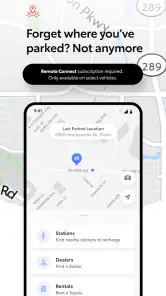
The Toyota app offers a range of features designed to enhance your driving experience. Users can remotely lock and unlock their vehicles, start the engine, and locate their car with the integrated GPS. Additionally, the app provides maintenance notifications, service scheduling, and even access to your vehicle's health report. For hybrid vehicle owners, there's also an option to monitor battery levels and efficiency.
Pros
- User-friendly interface for easy navigation
- Comprehensive vehicle information available
- Seamless integration with Toyota services
- Real-time updates on vehicle status
- Supports multiple languages for global users
Cons
- Limited features for non-Toyota vehicles
- Requires stable internet connection
- Occasional app crashes reported
- Some features may be region-specific
- Registration process can be lengthy

- Category
- Auto & Vehicles
- Version
- 3.0.44











