Thrive Market: Shop Healthy
- 7.98K
- 4.8
- Installs
- 1.00M
- Price
- Free

Screenshots

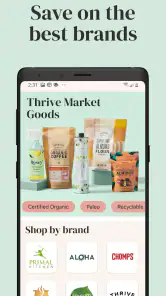
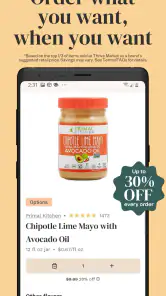
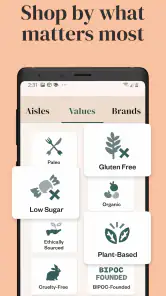

Analysis by Reviewed
I approached Thrive Market: Shop Healthy as I would any shopping app that asks me to make decisions about food, household products, and personal information: I wanted to know whether it was genuinely useful, whether its controls felt understandable, and whether the shopping experience justified adding another account to my phone. My overall impression is positive, but it is not a universal replacement for a supermarket or a regular grocery-delivery app. It works best when I already know the kinds of organic, sustainable, or specialty products I want and can plan a larger order instead of browsing casually.
The app comes from Thrive Market, and its purpose is straightforward: help people shop for groceries through a mobile storefront focused on healthier and more environmentally conscious choices. It is free to install, available for Everyone, and supports devices running Android 7.0 or later. That broad compatibility makes it accessible on older phones, although the quality of the experience will still depend on the device, connection, and how comfortably I can compare products on a smaller screen.
What makes the app interesting is not simply the ability to buy groceries from a phone. Plenty of shopping services do that. The more useful question is whether the organization of this particular catalog helps me make better decisions, especially when I am looking for dietary filters, pantry staples, or products that are difficult to find locally. In my experience, that is where the app has its strongest case—and also where I noticed the need to slow down and check details rather than treating every label as a complete buying decision.
How the shopping experience builds or weakens trust
A focused catalog is helpful when I shop with a plan
The first thing I noticed is that this is not designed like a general marketplace where almost anything can appear. Its identity is tied to organic and sustainable groceries, so the browsing experience feels more intentional than opening a broad retailer and typing a vague search. I found the app more useful when I began with a clear goal, such as restocking pantry basics, looking for a particular dietary category, or building a repeatable list of household items.
That focus can reduce the noise found in larger shopping apps. I do not have to sort through unrelated electronics, clothing, or countless third-party listings before reaching food. At the same time, a narrower catalog can become a limitation. If I want one ordinary item immediately, I may have a better experience with a nearby supermarket app, especially when local availability and same-day pickup matter more than specialty selection.
The practical advantage is strongest for planned shopping. I can compare several similar products, think about ingredients, and decide whether a less familiar brand fits my needs. The weaker use case is emergency shopping. This is not the app I would open when dinner is missing one ingredient and I need it within the hour.
What I check before trusting a product page
I treat product information as a starting point, not a substitute for reading the package. When I shop for food, I look at the full ingredient list, allergen wording, serving information, and any storage or preparation details shown in the listing. For household goods, I pay attention to size and quantity because an attractive product image can make two differently sized options look more similar than they really are.
More From Our News Desk

Clash of Clans Is Won Between the Battles

Android Auto Makes the Case for Quieter Car Software

MobiOffice: Transforming Mobile Productivity with Seamless Integration

EA SPORTS FC™ Mobile Soccer: Redefining Mobile Sports Gaming

How Microsoft OneDrive Became a Mobile Productivity Giant

How Google Translate Breaks Language Barriers Effortlessly
This habit matters particularly in a catalog built around health and sustainability. Those ideas can mean different things to different shoppers. I do not assume that a product is right for my diet merely because it appears in a health-oriented collection, and I do not treat a sustainability-related description as a complete explanation of environmental impact. The app can help me discover products, but the final judgment still belongs to me.
A useful workflow is to make a short list first, then revisit each item before checkout. I compare the actual package size, ingredients, and intended use rather than adding products quickly from a recommendation row. This takes a little longer, but it avoids one of the most common mobile-shopping mistakes: paying attention to the product name while overlooking the quantity.
Account decisions deserve the same attention as product decisions
Because this is a shopping service rather than a simple recipe or price-comparison tool, I expect an account-based experience to be central to using it. That means I think about what I am comfortable saving in any shopping account: contact details, delivery information, order history, and preferences. I do not enter information casually just to browse a few products.
My advice is to separate browsing from commitment. I can explore the catalog and decide whether the selection suits me before building a full routine around the service. If the app presents account choices, notifications, or marketing preferences, I review them instead of tapping through automatically. Trust is stronger when I can see what I am choosing, not when a convenient button hides several decisions behind it.
I also prefer using a unique password for a shopping account and keeping my device protected with its normal screen lock. Those are simple steps, but they matter more than a polished interface. A grocery app handles information connected to purchases and delivery, so basic account hygiene is part of using it responsibly.
Visible controls are more important than reassuring language
When I evaluate an app’s data practices, I pay attention to the controls I can actually see: whether I can review account details, manage communication choices, and understand when information is being requested. I do not infer privacy protections from the app’s branding or from the fact that its products are health-oriented. Those are separate questions.
My experience also makes me cautious about permissions. I grant only what is clearly needed for the action I am trying to complete, and I revisit device-level permission settings when an app changes behavior or receives an update. If a shopping task does not require a particular permission, I prefer not to enable it simply because the prompt appears during setup.
This is especially relevant when shopping from a phone used for many other parts of daily life. Delivery details, purchase history, and saved preferences can reveal routines. I therefore use the account and device settings as active tools rather than assuming that the default configuration is automatically the best one for me.
A realistic weekly grocery scenario
Imagine that I am planning a weekend pantry restock. I open the app with a short note containing the items I actually need: breakfast ingredients, snacks for work, and a few household supplies. Instead of scrolling through the entire catalog, I search one category at a time and inspect the package details before adding anything. I then review the basket from top to bottom, checking quantities and removing products that were interesting but not necessary.
This approach exposes the app’s real value. It can make a deliberate, specialty-focused shopping trip feel organized, particularly when I want to compare several options without driving to multiple stores. It also exposes the trade-off: if I shop impulsively, I can spend time exploring products that do not belong in my budget or routine. The app rewards preparation more than spontaneity.
Before placing the order, I would confirm the delivery information, review the final total shown in the checkout flow, and make sure the account choices still match my preferences. I would not rely on a remembered product size or assume that a previous order means the current basket is identical. A repeat purchase is convenient only when I still want the same item in the same quantity.
Where it compares well with ordinary alternatives
Compared with a conventional supermarket app, this service feels more specialized. A supermarket usually wins for local availability, quick pickup, fresh items selected nearby, and the ability to add one forgotten product to an existing trip. Thrive Market: Shop Healthy is more appealing when I want a curated online environment for pantry goods, specialty items, and products connected to organic or sustainable shopping goals.
Compared with a broad online marketplace, the focused catalog can make discovery less chaotic. I am less likely to lose the original purpose of my shopping trip among unrelated products. However, a general marketplace may offer more brands, more delivery patterns, and more ways to compare sellers. If my priority is the widest possible selection or the fastest fulfillment, I would look beyond this app.
Compared with a price-comparison tool, this is closer to a complete shopping destination. I can browse and build an order rather than merely checking which retailer lists an item. The trade-off is that I should not assume the first displayed option is automatically the cheapest choice available elsewhere. I compare the total value, including package size, convenience, and whether I would have bought the item anyway.
Who will get the most from it
I think the app is a good fit for people who already shop online for groceries and want a more focused place to explore organic, sustainable, or specialty products. It may also suit households that plan pantry purchases in advance and prefer reviewing a basket calmly instead of making several small trips.
It is less suitable for someone who mainly buys fresh food locally, needs immediate delivery, or wants an app centered on weekly supermarket promotions. It may also feel unnecessary for a shopper who has already found a nearby store with the exact products they need at a convenient price. Installing another retailer app only makes sense when its selection and workflow solve a real problem.
Families with specific dietary routines may appreciate the ability to search and compare, but I would still verify every label for allergies or medical restrictions. I would never use a category name as medical advice. For those needs, the app can support shopping preparation, but it should not replace guidance from a qualified professional or the information printed on the product packaging.
Small habits that make the app more useful
- Start with a written shopping goal. A short list keeps a discovery-focused catalog from turning into an expensive browsing session.
- Compare package size, not only the product title. This is one of the easiest ways to avoid a disappointing order.
- Use the product page as a verification step. Read ingredients and relevant details before adding an item, especially for dietary needs.
- Review the basket before checkout. Remove duplicates, reconsider impulse additions, and confirm delivery information.
- Check account and device controls periodically. Keep only the permissions, notifications, and saved details that match how you use the service.
These habits are not glamorous, but they make a noticeable difference. The app is most convincing when it helps me make a thoughtful purchase, not when it simply encourages me to add more products. I would rather spend an extra minute checking a quantity than discover after delivery that I misunderstood what I ordered.
What the public response suggests—and what it does not prove
The app has a 4.8 average from around 51 thousand ratings, with roughly 8 thousand written reviews, and it has passed over a million installs. Those figures tell me that it has attracted a substantial audience and that many users have rated the experience positively. They do not tell me whether every product category, delivery situation, device, or household need will work equally well.
I use those signals as a reason to investigate further, not as a guarantee. Written reviews can be useful for spotting recurring friction, but I still judge the app against my own priorities: catalog fit, checkout clarity, account control, and whether the service makes sense for the way I buy groceries. A high average is encouraging, yet it should not override a mismatch with my location, budget, or shopping habits.
Updates, compatibility, and everyday reliability
The current version is 2.143.0, and the app has been available since March 31, 2016. That history suggests an established product rather than a brand-new experiment. I still keep the app updated through the normal store process because shopping apps depend on secure account handling, payment flows, and compatibility with current operating systems.
Its minimum requirement of Android 7.0 is relatively accommodating for older devices. On a phone that barely meets that requirement, I would expect the practical experience to depend on memory, storage, and connection quality. Large product catalogs can feel less comfortable on an older screen, so I would avoid judging the service solely from a quick first launch.
The app itself costs nothing to install, which makes trying the catalog low-risk from a download perspective. That does not mean every shopping decision is cost-free. I still consider basket size, delivery terms shown during checkout, and whether the products genuinely replace purchases I would make elsewhere. Free installation is a convenience, not proof of savings.
My cautious verdict on control and confidence
After using it as a planned grocery-shopping tool, I see a clear benefit in its focused catalog and mobile browsing experience. It can save me the effort of searching several unrelated storefronts when I want organic, sustainable, or specialty groceries. The strongest experience comes from a deliberate workflow: search with a list, inspect details, review the basket, and make account choices consciously.
My reservations are equally practical. This is not the best answer for urgent local shopping, instant delivery, or shoppers who want the broadest possible marketplace. The health-oriented presentation also requires personal judgment; I still read labels and avoid assuming that a general category answers a specific dietary question. Finally, I treat account settings, permissions, and notifications as decisions worth reviewing rather than background details.
I recommend trying Thrive Market: Shop Healthy when its specialized selection matches the way you already shop. I would skip it if my main goal is speed, local freshness, or the simplest possible one-off purchase. For a careful planner, the app offers a useful balance of discovery and organization. For everyone else, a supermarket app may remain the more practical everyday choice.
Thrive Market: Shop Healthy Frequently Asked Questions
Can I use Thrive Market: Shop Healthy on an iPhone or iPad?
Thrive Market: Shop Healthy is a shopping app for mobile devices, built for browsing and ordering groceries and other everyday products. You can find it through the app store for your device and explore its shopping experience before deciding whether it suits your needs. The app is free to download, although using it to place orders may involve membership terms and other purchase conditions.
Is Thrive Market: Shop Healthy free to download, and are purchases free too?
The app is free to download, so you can install it and look around without paying for the download itself. Shopping is a separate matter: Thrive Market generally operates through a paid membership model, and products you order also have their own prices. Review the membership and checkout terms in the app before committing, including any renewal, shipping, or other charges shown for your order.
Can I use Thrive Market: Shop Healthy on my phone?
Thrive Market: Shop Healthy is a shopping app for mobile devices, and its current version requires Android 7.0 or later. It is free to download, so you can install it and explore the shopping experience before deciding whether it suits your needs. The app is intended for browsing and ordering groceries and other everyday products.
What is Thrive Market: Shop Healthy?
Thrive Market: Shop Healthy is a shopping app designed for ordering better-for-you groceries, pantry staples, snacks, supplements, beauty products, and household items. It lets you browse products by dietary preference, lifestyle, and category, then place orders for delivery. The app is especially useful for people looking for organic, non-GMO, gluten-free, keto, vegan, or other specialized options in one marketplace.
Do I need a membership to shop through the Thrive Market app?
Yes, Thrive Market generally operates through a paid membership model, so users should review the current membership terms before completing registration. Membership may provide access to member pricing and other benefits, while non-members may have different purchasing options or limitations. Because prices, trial offers, renewal policies, and cancellation conditions can change, check the details shown in the app before subscribing.
Pros
- Wide range of organic
- non-GMO
- and specialty food products
- Convenient doorstep delivery for groceries and household essentials
- Personalized filters make dietary shopping easier
- Member prices can reduce costs on frequently purchased items
- Supports several dietary preferences
- including vegan and gluten-free
Cons
- Membership fee may not be worthwhile for occasional shoppers
- Fresh product availability can vary by location
- Some items may cost more than comparable supermarket brands
- Delivery times and fees depend on the order and region
- Limited access if you prefer shopping without recurring memberships

- Category
- Shopping
- Version
- 2.143.0











