ThinkDiag+
- 661.00
- 4.0
- Installs
- 500.00K
- Price
- Free

Screenshots
Analysis by Reviewed
I would be cautious about treating a phone-based scan as a diagnosis, but ThinkDiag+ can make the first step much less mysterious. I see it as a way to gather clues about a vehicle before deciding what to do next, rather than a replacement for a qualified mechanic. That distinction matters in a household where several people share a car: the person who spots a warning light can collect useful information for whoever handles the repair.
A useful handoff when a car is shared
Imagine a check-engine light appears on the way home, and the usual driver is not the person who takes the car to a garage. A scan can help the driver record what the app reports and pass that information along, instead of relying on a vague description of a dashboard symbol. If you use reports for that handoff, include the vehicle and the circumstances in your own notes; a scan result without context can be easy to misread later.
This is where a dedicated diagnostic tool differs from a basic dashboard guide or a quick search online. Those alternatives can explain what a warning might mean, but they do not read the car’s diagnostic information. A workshop has professional equipment and experience interpreting results; ThinkDiag+ is more useful as an accessible first look for an owner who wants to ask better questions, not as proof that a repair is safe to attempt.
A small habit makes the handoff more useful: note whether the light was steady or flashing, what the car was doing when it appeared, and whether the driver noticed another symptom. Those details are observations, not diagnoses, but they give a mechanic a clearer starting point than a code alone. I would keep the note with the scan rather than relying on memory after a stressful drive.
Getting Started with ThinkDiag+
First off, setting up ThinkDiag+ was a breeze. After downloading the app and connecting it to the OBD-II scanner, I was ready to roll. The app pairs seamlessly with the scanner, allowing you to access a plethora of diagnostic functions right from your smartphone. It's compatible with both Android and iOS, so no worries about compatibility issues here.
Latest News
The app is free, is made by THINKCAR TECH CO., LTD, and sits in the auto and vehicles category. It has a 4.0 average from around 9,100 ratings, while more than 500,000 installs suggest it has found an audience beyond professional workshops. I would still separate downloading the app from budgeting for a complete setup: you need the compatible scanner, and the original review’s mention of a subscription is a reason to check the current in-app terms before relying on a particular function.
That distinction is worth sorting out before a warning light appears. Installing the software does not, on its own, give a phone access to the vehicle; the compatible scanner is the physical bridge. I would check the scanner’s fit for the car and the functions I want before planning a household routine around it. If someone only wants a one-off explanation of a dashboard symbol, that extra step may be more effort than using a manual or asking a repair shop.
User-Friendly Interface
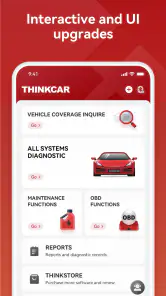
One thing I absolutely love about this app is its user-friendly interface. Everything is laid out in a clean, intuitive manner, making it easy even for those who aren’t particularly tech-savvy. With just a few taps, you can run diagnostics, access real-time data, and even check your car's battery status. It's like having a full-blown diagnostic machine without the hefty price tag.
For shared use, I would agree on a simple routine before anyone starts a scan: use the phone and account the household has chosen, note which vehicle is connected, and let the primary driver know before changing settings or clearing anything. That is practical coordination, not a family-management feature. It also reduces the risk of one person mistaking another person’s saved information or scan for their own.
Think of that chosen phone and account as an organizing decision, not a way to create separate household permissions. If two people use different phones, agree who keeps the report and where the household will find it later. A shared folder or a written maintenance note can work alongside the app without assuming it handles family records for you. This is especially helpful when one person does the scanning but another speaks with the garage.
Comprehensive Diagnostic Features
The range of features available is nothing short of impressive. From checking engine codes to viewing live data, ThinkDiag+ covers all bases. I was especially impressed with the ability to run full system scans that cover ABS, SRS, engine, transmission, and more. It even provides maintenance recommendations, which is a nice touch for those of us who can be a bit forgetful about regular car care.
Those wider system results are most valuable when treated as a map for follow-up, not a verdict. A code can point toward a system or condition without identifying the failed part by itself. I would photograph or write down the exact result before discussing repairs, and avoid clearing codes just to make a warning disappear: doing so can remove information that a technician may need. If a warning comes with unsafe handling, unusual braking, or another urgent symptom, I would stop relying on an app and get professional help.
There is also a practical trade-off in seeing more systems: a longer scan may produce more information than a casual owner knows how to interpret. I would start with the system connected to the warning or symptom, then record other findings without assuming every result needs immediate work. If the scan raises several questions, a mechanic can help prioritize them against the car’s behavior and service history. More data is useful only when it leads to a sensible next step.
ThinkDiag+ is a better fit for a curious owner who is comfortable learning basic vehicle terms than for someone who wants a single plain-language answer and no decisions to make. It can also be less suitable if you do not want to buy or connect a separate scanner, or if you expect every vehicle system to be available in the same way. Before making it part of a repair plan, check that the scanner and functions you need match your vehicle and intended use.
Real-Time Data and Reports
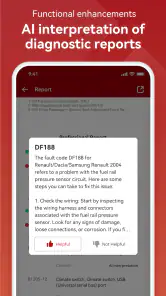
For those who like to keep a close eye on their car’s performance, the real-time data feature is a game-changer. You can monitor various parameters like speed, RPM, and fuel efficiency as you drive. Plus, the app lets you generate detailed reports that you can save or share. This is particularly useful if you're diagnosing issues or keeping track of your vehicle's health over time.
For a more careful check, I would use live readings while parked or have a passenger watch them; handling a phone while driving is not worth the distraction. A report can also make a garage visit more focused: share the recorded findings and describe when the symptom happened, but let the mechanic confirm what they mean. For a family car, that combination of scan plus a short note from the driver is often more useful than an isolated screenshot.
Reports can be especially handy when a symptom comes and goes. If the car behaves normally by the time it reaches the workshop, a saved reading and a brief note about the conditions may help explain why the driver became concerned. I would avoid treating one snapshot as a full history, though. For meaningful comparisons, record the date and circumstances consistently, and leave interpretation of changing values to someone who understands the vehicle.
Value for Money
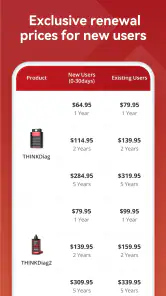
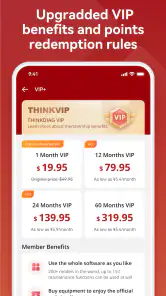
Let's talk about the cost, shall we? While the app itself is free, accessing the full range of features requires a subscription. Some might find this a bit off-putting, but considering the vast array of functions and the potential savings on mechanic bills, it's a small price to pay. Trust me, having this level of diagnostic capability at your fingertips is worth every penny.
I would not assume the app replaces routine servicing or saves money in every case. If you only need an occasional warning-light explanation, a basic code reader or a mechanic’s inspection may be simpler; if you maintain several vehicles or want to compare scan results over time, the app’s broader view can be more worthwhile. The current version is 3.2.4, it runs on Android 5.0 or later, and its content rating is Everyone. Those details make it accessible to many households, though an adult should still supervise younger users around a vehicle and any repair decisions.
The choice between this app and a basic code reader depends on what you actually want to do. A simpler reader may be enough if your only goal is to retrieve a basic engine code once in a while. ThinkDiag+ makes more sense when you value its broader diagnostic functions, live readings, and report workflow, provided the scanner and any paid access suit your needs. A workshop remains the better alternative when you need a confirmed diagnosis, repair, or safety judgment rather than information to take into the conversation.
For a household that shares one car, I would make the decision based on who will use the results, not simply on how many features sound appealing. One person who is willing to learn the basics can scan and keep notes for the group. If nobody wants that responsibility, or if different drivers are likely to interpret results differently, paying for access may not make the routine more useful. A direct inspection can be the clearer choice.
Who I’d Recommend It To
I’d choose ThinkDiag+ for a household with a regular driver who wants to understand scan results and a second person who can help keep track of them. It may also suit a hands-on owner preparing for a service appointment or checking whether a new symptom deserves prompt attention. I’d skip it if you want a guaranteed diagnosis, are unwilling to use a compatible scanner, or would rather leave all interpretation to a workshop. The app is a starting point; the right next step depends on the warning, the symptoms, and your comfort with vehicle maintenance.
For age and trust, the Everyone content rating tells me the app is broadly suitable as software, not that every vehicle-related task is suitable for a child. I would let a younger family member help read a report or learn what a warning symbol means only with an adult guiding the discussion. Connecting equipment, handling keys, and deciding whether a car is safe to drive belong with a responsible adult. The app does not replace those boundaries.
Nor would I assume a shared device automatically means a shared record. Before the first scan, decide who is responsible for saving findings and who can make decisions about next steps. That avoids a common household muddle: someone sees an old result, thinks it belongs to the current problem, and acts on it without checking which car or occasion it came from. A short note identifying the vehicle and event is a modest but useful safeguard.
If you are shopping for a diagnostic app, the most important question is not whether it can display a lot of information, but whether you will use that information responsibly. ThinkDiag+ suits someone willing to connect a scanner, keep track of context, and follow up with a professional when necessary. It is less compelling for a driver who wants a definitive answer on screen or has no interest in interpreting vehicle data. In those cases, a trusted garage is not a lesser option; it is the more appropriate one.
In conclusion, the ThinkDiag+ app is a must-have for anyone serious about understanding their vehicle's health. It's easy to use, packed with features, and can potentially save you a ton of money in repairs. Whether you're a car aficionado or just someone who wants to keep their car in tip-top shape, give ThinkDiag+ a try. You might just find it indispensable.
My household verdict is more measured: I would recommend it when someone is ready to be the careful record-keeper and use scans to make conversations with a repair professional more informed. Its value is in giving an owner a better first look, especially when several people share driving and need to coordinate what happened. I would not buy into it expecting a diagnosis in place of expertise, or treat a clean-looking screen as permission to ignore a worrying symptom. Used with that boundary, it can be a genuinely helpful part of a car-care routine.
ThinkDiag+ Frequently Asked Questions
Is ThinkDiag+ free to download, and what do I need to use it?
ThinkDiag+ is a free Auto & Vehicles app from THINKCAR TECH CO., LTD, but using it for vehicle diagnostics also requires compatible ThinkDiag hardware that connects to the car and communicates with the app. The app is intended for Android devices running version 5.0 or later. Before downloading, consider whether you have or plan to obtain the hardware needed to connect it to your vehicle.
What is ThinkDiag+ and how does it work?
ThinkDiag+ is a professional-grade OBD2 diagnostic tool designed for automotive enthusiasts and mechanics. It connects to your vehicle via Bluetooth and interfaces with a mobile app on your smartphone. This app allows you to perform various diagnostics, read and clear error codes, and access real-time data, making car maintenance and troubleshooting more accessible and efficient.
Is ThinkDiag+ compatible with my vehicle?
ThinkDiag+ is compatible with most vehicles manufactured after 1996 that support the OBD2 protocol. It supports a wide range of car brands and models. However, it's always recommended to check the compatibility list on the app or the manufacturer's website to ensure your specific vehicle is supported before purchasing.
What features does ThinkDiag+ offer?
ThinkDiag+ offers a comprehensive suite of diagnostic features including engine diagnostics, ABS and SRS systems checks, battery monitoring, and live data streaming. The app also provides maintenance functions such as oil reset and EPB reset. It's designed to provide professional-grade diagnostics right from your smartphone, making it a versatile tool for car owners.
Do I need a subscription to use ThinkDiag+?
Yes, while the ThinkDiag+ hardware is a one-time purchase, the app requires a subscription to access all its features. Typically, the initial purchase includes a trial period for full access. After the trial, users must subscribe to a monthly or annual plan to continue using advanced features and receive updates.
Pros
- Comprehensive vehicle diagnostics.
- User-friendly interface.
- Wide range of supported vehicles.
- Affordable compared to competitors.
- Regular software updates.
Cons
- Requires stable internet connection.
- Limited free features.
- In-app purchases can add up.
- Occasional connectivity issues.
- Device compatibility limitations.

- Category
- Auto & Vehicles
- Version
- 3.2.4











