

Tenpin Toolkit: Bowling Tools
- 136.00
- 4.9
- Installs
- 50.00K
- Price
- Free

Screenshots
Analysis by Reviewed
I spend enough time around bowling lanes to know that the hardest part is not always throwing the ball. It is remembering what happened, comparing one adjustment with another, and turning a vague feeling into something useful for the next frame. Tenpin Toolkit is built for that practical side of tenpin bowling. It is a free sports app from Tenpin Toolkit that gathers several tools for bowlers and coaches in one place, rather than trying to become a full bowling game or a social network.
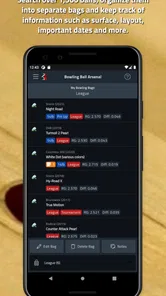
My first impression is that it makes the most sense as a companion for practice sessions, coaching conversations, and equipment decisions. It does not replace time on the lane, and it will not magically fix an inconsistent release. What it can do is give structure to the information that bowlers often keep in their heads, on scraps of paper, or in separate phone notes. That focus makes it more useful for serious learners than for someone who only wants a quick score tracker.
The app sits in the sports category and is suitable for everyone. It has been available since June 9, 2018, and the current version is 2.7.4. Its average rating is 4.9 from around 1.1 thousand ratings, with more than 50 thousand installs. Those figures suggest that it has found a clear audience among bowlers, although popularity alone does not tell me whether it fits your particular routine. The important question is whether you want a toolbox for analysis and coaching, rather than a simple entertainment app.
How Tenpin Toolkit feels during real bowling work
I approach Tenpin Toolkit as a practical companion for the decisions around a bowling session, not as something that should pull my attention away from the lane. This section looks at how that balance affects real use: when a specialist tool can help me stay organized, and when a quick note or a coach’s observation is the better choice. It also sets up a closer look at the controls and choices that shape a careful user’s trust.
Quick enough for the moments when the lane is waiting
In everyday use, I expect a tool like this to earn its place by getting out of the way. Bowling sessions have a natural rhythm: throw, watch the result, discuss the adjustment, and get ready before the next opportunity disappears. An app that makes me dig through complicated menus or wait through unnecessary screens would be frustrating, even if its calculations were useful.
Tenpin Toolkit is best approached as a focused utility. Its value comes from having bowling-specific tools close at hand, not from elaborate presentation. That usually makes this kind of app feel more direct than a general spreadsheet or a collection of unrelated calculator apps. I can open it with a particular question in mind, use the relevant tool, and return my attention to the lane.
That does not mean every task will feel instant for a first-time user. Bowling terminology can be precise, and a tool is only helpful when I understand what its inputs mean. A new bowler may need a little time to learn the difference between an observation worth recording and a detail that does not affect the decision. The app rewards preparation: if I already know what I want to examine, it is much easier to use efficiently.
More From Our News Desk

 Gmail
GmailGmail in a Busy Inbox: Who Benefits Most?
From first account to crowded workday, Gmail earns its place through dependable search and flexible sorting—but its best fit depends on how much inbox maintenance you can tolerate.

 Prime Video
Switching to Prime Video: What Changes in Your Viewing Routine
Prime Video can make a compelling second home for streaming, but switching means learning a different catalog, rental layer, and route from browsing to playback.

 Universal TV Remote Control
Universal TV Remote Control Works Best as a Reliable Backup
A phone remote earns its place through quick setup and reliable habits. Here is how to get more from Universal TV Remote Control—and where its limits show.

 Weather - By Xiaomi
Weather by Xiaomi Review: Clear at a Glance, Less Clear Up Close
Xiaomi’s weather app makes everyday forecasts quick to scan, but its calm surface can leave useful details and recovery paths harder to find than they should be.

 X
XX Under Pressure: Can It Recover When Posting Goes Wrong?
A resilience-focused review of X, examining setup, mistaken posts, interruptions, weak connections, and the gaps that matter when recovery needs to be dependable.

 Clash of Clans
Clash of Clans Is Won Between the Battles
Its raids are quick; its community is a long-term project of coordination, teaching, rivalry, and shared responsibility—with all the friction that entails.
Latest News



My practical advice is to explore it before league night or a coaching session. Spend a few quiet minutes opening the available tools and working through a familiar bowling situation. That way, I am not learning the interface while teammates are waiting. This is one of the less obvious advantages of a specialist app: the more familiar I become with its vocabulary, the faster it feels when the pressure is on.
A realistic practice-session workflow
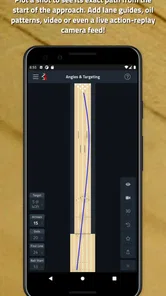
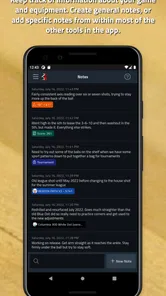
Imagine that I am practicing and my first few shots leave me unsure whether the problem is my release, my target, or the ball reaction. Instead of changing several things at once, I can use the app as a place to organize the observation. I note what I intended to do, compare it with what the ball actually did, and use the relevant bowling tool to think through the next adjustment.
The key is not to treat the app as an automatic coach. It cannot see my feet, timing, hand position, or the exact condition of the lane. Its role is to help me ask a better question. Rather than saying, “That ball felt wrong,” I can separate the decision into pieces: where I stood, where I looked, how the ball moved, and what changed after the previous shot. That makes the next attempt more deliberate.
I also find that a short workflow is better than trying to document every delivery. If I stop after every ball to enter a long explanation, the app becomes a distraction. A better approach is to use it at natural pauses: after a short group of shots, when changing equipment, or when a repeatable pattern becomes visible. This is a genuine trade-off. More notes may seem thorough, but too much recording can take attention away from the physical practice that matters most.
Where it helps coaches more than casual bowlers
Coaches often need to explain choices in a way that a student can understand and repeat. A specialist toolkit can support that conversation because it gives both people a shared reference point. Instead of relying entirely on personal shorthand, a coach can guide a bowler through the reasoning behind an adjustment and then leave the bowler with a method to revisit later.
For a casual bowler, the same depth may feel unnecessary. If I bowl only occasionally and mainly want to remember a score or enjoy a social game, a simpler notes app may be quicker. Tenpin Toolkit becomes more compelling when I am actively trying to improve, comparing equipment, or learning how lane changes affect decisions. The app is not weak because it is specialized; it is simply aimed at a narrower need than a general bowling companion.
One useful coaching habit is to use it after the session rather than during every shot. I can review the decisions that mattered, identify which adjustment helped, and prepare a short plan for the next practice. That reduces screen time at the lanes and turns the app into a reflection tool instead of a constant interruption.
Heavy use: what happens when the session gets complicated
The app becomes most valuable when several variables arrive at once. A tournament-style practice block, a coaching lesson, or a long equipment comparison can create more information than I can comfortably remember. This is where a collection of related tools is more practical than a single-purpose calculator. I can move from one question to another without rebuilding my whole method in a separate app.
Still, heavy use exposes a limitation that is common to any toolkit: the quality of the result depends on the quality of the information I enter or interpret. If my observations are inconsistent, the app cannot turn them into reliable conclusions. I need to keep my process steady, use the same terms each time, and avoid changing stance, target, speed, and ball all at once.
I would also avoid using the app as a reason to overanalyze a poor game. Bowling has random pin action and changing lane conditions, so one result is not always a pattern. Tenpin Toolkit is more useful when I compare repeated observations across a session or several practices. That is an advanced but important distinction: the app can organize evidence, but I still have to decide whether the evidence is meaningful.
During a busy session, I would keep a small number of questions in focus. For example, I might examine whether my target change improves ball motion, or whether a particular adjustment gives me a more repeatable reaction. I would not try to use every available tool at once. The strongest workflow is selective, because a toolkit is most powerful when it supports a decision instead of creating more decisions.
Reliability and the importance of a repeatable method
Tenpin Toolkit has the advantage of being a mature app rather than a brand-new experiment. It has been around since 2018, and its current release is 2.7.4. That history, together with the strong user rating, gives me reasonable confidence that the project has remained useful to its audience. I would still judge reliability in two ways: whether the app behaves consistently, and whether I can trust my own use of the tools.
The second point matters more than many people expect. A bowling calculation or planning aid can appear precise while the real-world situation is messy. If I enter an estimate based on a rushed observation, the output may look authoritative even though the starting point was weak. I therefore treat the app as decision support, not as a guarantee. The most reliable results come from consistent inputs and repeated testing on the lane.
For coaching, I would keep the app’s conclusions connected to visible bowling evidence. If a recommendation suggests an adjustment, I would test it with a small, controlled change and watch whether the ball reaction improves. This prevents a common mistake: accepting a result simply because it is presented neatly. A clean tool is helpful, but the lane remains the final judge.
Another practical habit is to check the app before an important session rather than discovering a problem at the start. Make sure the phone has enough charge, open the tools you expect to use, and refresh your memory of the workflow. That is not glamorous advice, but it prevents the most avoidable kind of failure: being technically prepared only after the useful moment has passed.
Device limits and the cost question
The minimum operating-system requirement is Android 5.1, which makes the app accessible to many older Android devices. That is helpful for bowlers who keep an older phone in their bowling bag or do not want to replace a perfectly serviceable device just to run a lane tool. At the same time, an older operating system can come with its own practical disadvantages, such as slower general phone performance or a less comfortable display.
I would pay attention to screen size and readability, especially if I plan to use the app while standing near the lanes. Bowling centers can be bright, busy, and visually distracting. A compact phone may be convenient to carry but less comfortable for entering details. A larger screen can make a tool easier to inspect, though it may be less convenient to handle between shots. This is a device-choice trade-off rather than a flaw unique to the app.
Resource demands are likely to matter less here than they would with a graphic-heavy game, because the app is a sports utility rather than an entertainment title built around complex visuals. I would expect it to be more comfortable on modest hardware than a modern 3D bowling game, although the overall experience will still depend on the condition of the phone. Keeping other demanding apps closed can help any older device feel more responsive during a session.
The app is free to download, but in-app purchases range from $9.99 to $28.99 per item. That changes how I would recommend trying it. A casual bowler should explore the free experience first and decide whether the tools match their habits before paying for anything. A coach, competitive bowler, or serious learner may find a paid tool worthwhile if it replaces several separate resources, but the purchase should be based on a specific recurring need rather than curiosity alone.
The everyone age rating also makes it approachable for families and junior bowlers. Younger users may still benefit from adult or coach guidance when interpreting bowling concepts. The app can support learning, but it does not remove the need for safe lane behavior, patient instruction, or an understanding of the physical side of the sport.
How it compares with ordinary alternatives
The most obvious alternative is a paper notebook. Paper is fast, flexible, and never runs out of battery. It is also excellent for sketches of lane play, arrows, breakpoints, and personal reminders. If I think visually or want a completely open-ended record, a notebook may remain better than any app. Tenpin Toolkit earns its place when I want bowling-specific tools rather than blank space.
A general notes app is another strong competitor. It can store practice observations, photos, and coaching reminders in one place, and I probably already know how to use it. Its weakness is that I must create the structure myself. Tenpin Toolkit is more useful when I want the app to reflect bowling decisions instead of forcing me to invent a template every time.
Spreadsheets offer even more control, especially for bowlers who enjoy building their own analysis system. They are powerful for long-term records, but they can be tedious on a phone and easy to overcomplicate. I would choose a spreadsheet when I need custom columns, extensive historical comparisons, or data that goes beyond the toolkit’s intended workflow. I would choose this app when I want a ready-made bowling focus without maintaining my own model.
Bowling games are not really direct competitors. They provide entertainment and may help a newcomer understand basic scoring ideas, but they do not replace hands-on practice or coaching analysis. Tenpin Toolkit is for the person who wants to improve decisions around real bowling, not for someone looking for a virtual lane.
Who should install it, and who should skip it
I would recommend it to bowlers who regularly practice with a purpose, coaches who want a portable set of teaching aids, and players who enjoy understanding why a lane adjustment works. It is particularly suitable for someone moving beyond instinctive changes and trying to build a repeatable process. The free entry point makes it easy to test without committing immediately to a purchase.
I would skip it if my main goal were simple scorekeeping, social sharing, or casual entertainment. I would also hesitate if I dislike recording observations or if I want an app to automatically diagnose my physical technique. This toolkit cannot replace a coach watching the approach, and it cannot make an uncertain bowler confident merely by presenting more information.
For a beginner, I would use it in small doses. Start with one question from each practice session, such as whether a target change affects the ball’s path. Once that habit feels natural, add another tool. For an experienced bowler, the better approach is to connect it to a pre-session plan and a short post-session review. Those two user types can both benefit, but they should not use the app in the same way.
My performance verdict
My overall view is that Tenpin Toolkit succeeds because it respects the practical side of bowling. It is not trying to replace the lane, the coach, or the bowler’s judgment. Instead, it gives focused users a way to organize decisions that are otherwise easy to forget. In my experience, that makes it more valuable over time than during a single curious launch.
Its speed expectations are sensible for a specialist utility, its older Android support broadens device access, and its resource profile should be less demanding than a graphics-heavy bowling game. The main friction is mental rather than technical: I need to understand the bowling problem before the right tool becomes useful. The paid items also mean that I should test the free experience carefully and spend only when a particular feature fits my regular routine.
The most important tip I can offer is to use it as a controlled experiment log, not as an oracle. Change one meaningful variable, observe the result, and resist the temptation to blame every poor shot on the lane or the equipment. That approach turns the app from a collection of utilities into a practical learning system.
For me, the final decision is straightforward. If you are a bowler or coach who wants bowling-specific support for practice and analysis, Tenpin Toolkit is worth trying before you build a more complicated system yourself. If you only need a basic record or a fun bowling experience, a notebook, notes app, or bowling game may be the better fit. Its strongest performance comes from focused use, where it helps me think more clearly without taking over the session.
Tenpin Toolkit: Bowling Tools Frequently Asked Questions
Is Tenpin Toolkit: Bowling Tools free to download, and are there in-app purchases?
Tenpin Toolkit: Bowling Tools is free to download, so you can try it without paying upfront. It also offers optional in-app purchases, ranging from about $10 to $29 per item. Consider whether the free features meet your needs before buying anything, and check the purchase details shown in the app so you understand what each option unlocks.
What devices and age groups is Tenpin Toolkit: Bowling Tools intended for?
The app is intended for ten-pin bowlers and coaches, and its content rating is Everyone. It supports Android devices running version 5.1 or later. If you use iOS, check the app’s compatibility details in the relevant app store before downloading, since requirements can differ by platform. The app is from developer Tenpin Toolkit.
What is Tenpin Toolkit: Bowling Tools used for?
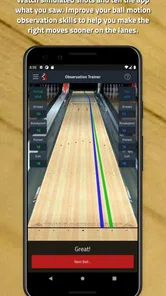
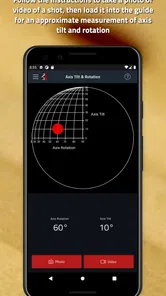
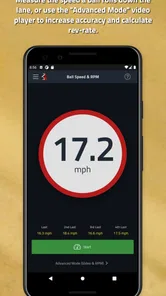
Tenpin Toolkit: Bowling Tools is designed to help bowlers analyze and improve their game using practical bowling calculators and reference tools. It can assist with lane-play decisions, ball motion, scoring, and other technical aspects of ten-pin bowling. The app is more useful for players who want measurable guidance during practice or competition than for complete beginners looking only for a basic scorekeeper.
Is Tenpin Toolkit suitable for beginners, or is it mainly for experienced bowlers?
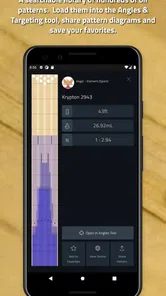
The app can be useful at different skill levels, but its value depends on how familiar you are with bowling terminology and strategy. Beginners may need time to understand concepts such as angles, entry points, oil patterns, and ball reaction. Intermediate and advanced bowlers are likely to benefit most because they can apply the calculations and tools directly to equipment choices, lane adjustments, and practice planning.
Does Tenpin Toolkit: Bowling Tools work without an internet connection?
Many bowling tools generally perform their calculations locally, so an active internet connection may not be required for the core features. However, availability can depend on the specific version of the app and whether it includes online content, updates, advertisements, or external links. Before relying on it at a tournament or bowling center, it is sensible to test the tools in airplane mode and keep the app updated.
Pros
- Includes practical tools for tracking scores and bowling performance.
- Useful for both casual bowlers and players working on consistency.
- Offers quick calculations without needing separate bowling equipment.
- Compact app that is easy to keep available during league sessions.
- Can help organize useful bowling information in one place.
Cons
- Some features may be more useful to experienced bowlers than beginners.
- Manual data entry can become tedious after several games.
- Accuracy depends on entering scores and measurements correctly.
- The interface may feel utilitarian compared with more polished apps.
- Certain tools may have limited value if you bowl only occasionally.





