توعية مرورية العراق
- 374.00
- 4.7
- Installs
- 500.00K
- Price
- Free

Screenshots
Analysis by Reviewed
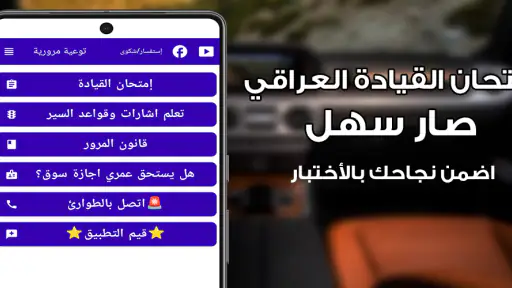
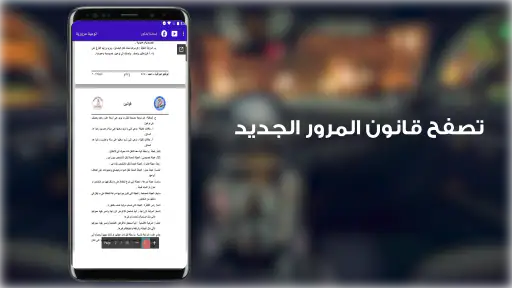
Learning traffic rules is much easier when the lesson feels connected to the roads you actually use. توعية مرورية العراق is a free Auto & Vehicles app from SAFE PC that I found most useful as a focused practice companion for people preparing for a driving test or trying to become more alert around Iraqi traffic signals. It is not presented as a full driving simulator, and I would not treat it as a replacement for supervised road practice. Its value is in turning traffic awareness into something you can revisit in short sessions.
The app has attracted a 4.7 average from around 7.5 thousand ratings, with more than 500 thousand installs. That level of use makes it easier to see why it appeals to learners: the idea is simple, the price is free, and the Everyone age rating makes it approachable for families and new drivers. I also like that the store language points directly toward Iraqi traffic awareness rather than trying to be a worldwide driving course.
What to expect before you begin
My first impression is that this is best understood as a study and awareness tool, not an app for entertainment. The central habit it encourages is noticing traffic signals and thinking about what they require before moving. That sounds basic, but it is exactly the kind of knowledge people can rush through when preparing for a test. A quick session can help turn recognition into a more deliberate response.
The developer is SAFE PC, and the app belongs naturally in the Auto & Vehicles category. It was released on June 6, 2021, and the current version is 1.7.3. It runs on Android 7.0 or later, so owners of older supported phones may still be able to use it without needing a recent device. I would still check that the app opens comfortably on your phone before building a serious study routine around it.
The most important expectation to set is that passing a quiz or recognizing a sign does not automatically make someone a safe driver. Road awareness involves timing, observation, judgment, and consideration for other people. This app can support the knowledge part, especially around signals, but it cannot reproduce the pressure of a busy intersection or teach vehicle control. I found it more valuable when used alongside actual instruction rather than in isolation.
Latest News
For a first-time user, the sensible goal is not to race through every available question or screen. Instead, aim for one meaningful improvement: understand a signal you previously confused, remember the correct response, and then look for that signal during your next trip as a passenger or driver. That small connection between the screen and the road is where the app becomes more than a collection of test prompts.
Who will get the most from it
This app makes the most sense for a learner who wants a lightweight way to review traffic signals between lessons. It can also help someone who has held a license for years but notices that signs and signal meanings are no longer automatic. Parents may find it useful for discussing road awareness with a teenager, provided the conversation goes beyond simply asking whether an answer was right or wrong.
I would be more cautious about recommending it as the only study resource for a formal driving exam. If your test includes topics beyond traffic signals, you should use the official learning material or a broader training resource as well. A general driving handbook may be better for road markings, vehicle checks, right-of-way situations, and local examination details. This app is strongest when its narrower focus matches the gap you need to close.
From installation to your first useful result
Start with a calm first session
After installing توعية مرورية العراق, I recommend opening it when you have a few uninterrupted minutes rather than while standing at a roadside or sitting in a moving car. The purpose of the first session is to understand how the app presents its learning material and how you are expected to respond. Rushing makes it easy to remember a tap rather than the meaning of a signal.
Because the app is free, there is no purchase decision slowing down the first step. That makes it practical for a quick trial: install it, explore the opening screens, and decide whether the language and presentation feel clear enough for you. If you are helping another learner, let that person operate the app instead of taking over. The act of reading, choosing, and correcting an answer is part of the learning.
I suggest keeping a small mental note of the signals that cause hesitation. Do not only count correct answers. A response chosen after several seconds of uncertainty is different from one you recognize immediately. That distinction gives you a better picture of what to review. It is also a useful way to avoid the common trap of repeating easy material simply because it feels comfortable.
How to reach the first successful action
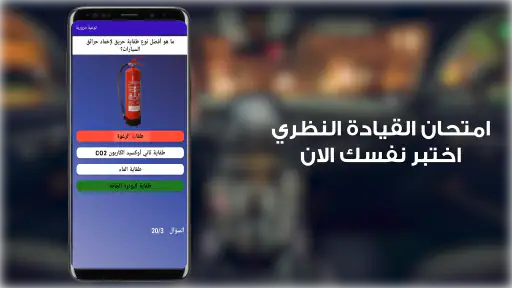
Your first success should be specific: identify a traffic signal, explain what it means in your own words, and connect it to the action a driver should take. If the app presents a question or learning prompt, pause before selecting an answer. Ask yourself what you would do at an intersection, then compare your choice with the result shown by the app.
When you get an answer wrong, resist the temptation to tap forward immediately. Read the signal again and describe the mistake plainly. Did you confuse its shape, its color, its direction, or the action it requires? This is a more effective workflow than memorizing the position of an answer button. On a later review, try to solve the same type of problem without relying on the order in which choices appeared.
A realistic everyday example would be a learner preparing for a driving lesson the next morning. I would spend a short evening session reviewing signals that caused uncertainty, then ask the instructor to point them out during the lesson. The app prepares the recognition; the instructor supplies the real-world timing and context. That two-step process is more useful than studying on the phone and never looking up from the screen during actual travel.
Another practical use is passenger observation. If you are not yet driving, sit beside a qualified driver and quietly identify signals before the driver reacts. Do not distract the driver or turn the exercise into a running conversation in heavy traffic. Later, compare your interpretation with what happened. This helps expose a weakness that quizzes may hide: knowing a definition but failing to notice the signal soon enough.
Build a review routine without overstudying
Short, repeated reviews worked better for me than one long sitting. A brief session keeps the task manageable and makes it easier to return to difficult signals. The important part is changing the question you ask yourself. One time, focus on recognition. Another time, focus on the safe action. Later, think about how the signal might appear while you are scanning the road.
One useful technique is to separate “I know this” from “I saw this recently.” Familiarity can create false confidence, especially when the same prompts appear in a predictable sequence. Try to explain the meaning aloud before checking the app’s expected response. If you cannot explain it clearly, mark it as a review item even if you selected the correct answer.
I also recommend studying before a lesson rather than immediately after a stressful drive. Before practice, the app can refresh the vocabulary in your head. After practice, it can help you revisit a specific moment while it is still memorable. The trade-off is that phone-based review is convenient but abstract; actual driving supplies context but leaves less time to think. Using both at different moments gives each method a clear job.
Common confusion and how to handle it
The biggest source of confusion is treating traffic signals as isolated pictures. Safe driving depends on noticing the signal together with the lane, intersection, road users, and movement around you. If you learn only a picture-to-answer association, you may perform well inside the app while remaining slow to interpret the same information outside it.
Another mistake is assuming that a correct response means the situation is always simple. Real roads contain distractions, poor visibility, impatient drivers, and people who do not behave predictably. The app can reinforce the intended meaning of a signal, but it cannot decide how you should manage every unusual situation. When something on the road feels unclear, slowing down safely and following qualified instruction matters more than trying to apply a memorized response mechanically.
Language can also affect confidence. The short description identifies the app as Iraqi traffic awareness, so its local focus is an advantage for the intended audience. However, every learner should make sure they understand the wording rather than selecting answers by recognizing familiar shapes. If a term is unclear, pause and ask an instructor or experienced driver to explain it in everyday language.
Some users may expect a full digital driving course because the app appears in the vehicle category. That expectation can lead to disappointment. I would not install it expecting a live map, a realistic steering exercise, or a complete replacement for an official manual. Its practical role is narrower: helping you pay attention to traffic signals and test your understanding in a convenient format.
There is also a study-design issue worth mentioning. A high score can be misleading if you repeat the same material until the answers become familiar. To test genuine understanding, close the app and describe the signal later without looking at it. Then check your memory during a real journey, as long as you are a passenger or safely stopped. This simple separation between practice and recall is one of the most effective ways to use a small learning app well.
How it compares with usual alternatives
The usual alternatives are an official driving handbook, an instructor, and direct observation on the road. Each has a strength this app does not fully replace. A handbook is broader and can be consulted in detail. An instructor can correct your interpretation and adapt an explanation to your mistakes. Road observation shows how signals work amid movement, distance, and distractions.
Where this app is more convenient is repetition. A handbook can feel slow to revisit, and an instructor cannot be available every time you forget a signal. A phone-based tool gives you a low-pressure way to refresh the basics while waiting at home or preparing for a lesson. That convenience is especially useful when you know exactly what you need to practice.
Compared with a broad international driving app, the Iraqi focus may be more relevant to someone learning in Iraq. A global app might cover more vehicle controls or driving scenarios, but its examples and terminology may not feel as close to the learner’s local experience. I would choose this app for targeted traffic-signal awareness and a broader or official resource for everything outside that focus.
The trade-off is depth. A specialized tool can be easier to approach because it does not bury the main subject under unrelated lessons, but it may leave you needing another source for comprehensive preparation. That is not a flaw if you use it deliberately. It becomes a problem only when you assume a focused review tool is a complete licensing curriculum.
Small habits that make the app more effective
First, keep an error list in your head or on paper using meanings, not answer positions. Write something like “signal meaning and required action” rather than “the second choice.” This prevents memorization of the interface and makes your review useful even if the question appears differently later.
Second, pair each difficult signal with a road-observation task. During a safe passenger trip, look for that type of signal and identify it before the vehicle reaches the intersection. If you are driving, do not look at your phone or let the exercise distract you. The goal is to improve scanning, not to create a new hazard.
Third, explain one signal to another person without showing the screen. Teaching forces you to separate what the signal looks like from what it asks a driver to do. If your explanation becomes vague, that is a clear sign that you need another review or a conversation with an instructor.
Fourth, use the app as a checkpoint before trusting your confidence. A learner who answers familiar prompts quickly may still need broader practice. After a good session, deliberately move to a real-world observation exercise or official study material. The best result comes from combining quick digital review with careful road experience.
Who should choose something else
I would steer complete beginners toward this app only if they also have access to proper instruction. Someone who needs to learn how to operate a vehicle, position it safely, judge distance, or respond to emergencies needs supervised practice. A signal-focused app cannot provide that foundation.
I would also suggest another primary resource for a learner whose exam preparation includes a wide range of regulations and vehicle knowledge. The app can still be a useful supplement, but it should not be the only place you study. Similarly, experienced drivers looking for navigation, maintenance reminders, fuel tracking, or route planning will probably find a different Auto & Vehicles app more relevant to their daily needs.
Users on unsupported older Android releases should not plan around it, since the listed minimum is Android 7.0. For supported devices, the current version is 1.7.3, but the more important question is whether the presentation helps you understand the material. If the wording feels unclear or the learning flow does not match your needs, an instructor and official reference should take priority rather than forcing yourself through repeated sessions.
My recommendation after using it
For a first-time user, I would install توعية مرورية العراق with one clear purpose: improve recognition and understanding of Iraqi traffic signals before applying that knowledge on the road. Begin with a calm exploration, complete a small amount of practice, review every uncertain answer, and then test yourself away from the screen. That path gives you a meaningful first result instead of just a completed download.
The app’s free access and Everyone rating make it easy to try, while its strong 4.7 average and broad install base suggest that many people find the approach useful. Still, popularity should not change how you judge it. Its real strength is focused repetition; its real limitation is that it cannot reproduce driving conditions or replace a qualified teacher.
My honest view is that it earns a place in a learner’s study routine when used as one layer of preparation. I would recommend it to someone who wants a convenient Iraqi traffic-awareness refresher, especially before lessons or while revisiting weak areas. I would not recommend relying on it alone for licensing or practical driving competence. Used with that boundary in mind, it can turn a vague intention to “learn the signs” into a repeatable habit that supports safer decisions.
توعية مرورية العراق Frequently Asked Questions
Is توعية مرورية العراق free to download, and who can use it?
توعية مرورية العراق is free to download and is listed for everyone, so it may suit a broad range of users interested in road safety and traffic awareness. It is an app in the Auto & Vehicles category, developed by SAFE PC. Before installing, check that your device runs Android 7.0 or later, since that is the minimum supported operating-system version.
What is توعية مرورية العراق and what is it used for?
توعية مرورية العراق is an Iraqi traffic-awareness application designed to help users learn safer road behavior and understand important traffic regulations. It can be useful for drivers, learners preparing for a driving test, and anyone who wants to improve their knowledge of signs, road etiquette, violations, and accident prevention. The app focuses on educational information rather than navigation or real-time traffic updates.
Is توعية مرورية العراق suitable for people preparing for a driving test?
Yes, the application can be a helpful study companion for people preparing to obtain a driving license in Iraq. Its traffic-awareness material may help users review road signs, driving responsibilities, and basic safety principles in a convenient format. However, users should not rely on the app alone, because official training, current government requirements, and guidance from a qualified instructor may include information that is not covered in every version.
Does the app provide current Iraqi traffic laws and official regulations?
The app is intended to present traffic-awareness content relevant to Iraq, but users should verify whether the information reflects the latest legal updates. Traffic laws, fines, licensing procedures, and road regulations can change over time, while application content may not always be updated immediately. For official decisions, users should consult Iraqi traffic authorities or other recognized government sources instead of treating the app as a legal reference.
Can توعية مرورية العراق be used without an internet connection?
Some educational sections may remain available after installation, but offline access depends on how the application stores its content and whether particular pages require an internet connection. Users should open the app before traveling and check which lessons, images, or resources load successfully offline. An internet connection may also be needed for updates, newly published awareness material, support features, or other online functions included in the current release.
Pros
- Provides traffic-safety guidance tailored to Iraqi road conditions.
- Useful for drivers
- pedestrians
- and young learners alike.
- Can reinforce awareness of signs
- rules
- and responsible driving.
- Educational content is easy to consult in short sessions.
- May support safer daily travel through practical reminders.
Cons
- Some information may require updates when Iraqi traffic rules change.
- Content may be less useful for users outside Iraq.
- Limited interactive features could reduce long-term engagement.
- Arabic-focused material may not suit users seeking English guidance.
- It should complement
- not replace
- official driving instruction.
- Category
- Auto & Vehicles
- Version
- 1.7.3











