T.J.Maxx
- 2.77K
- 4.0
- Installs
- 1.00M
- Price
- Free

Screenshots

Analysis by Reviewed
I decide whether to keep a shopping app by asking a practical question: does it make choosing between browsing online and visiting a store easier? T.J.Maxx is designed for people who enjoy looking through changing finds as much as they enjoy getting a specific item. I’d treat it as a companion to the T.J.Maxx shopping experience, rather than a universal shopping app where every product is easy to plan around in advance.
What to decide before installing
My first test is whether I expect to use the app for more than one task. A store locator can be handy on an unfamiliar route, while account, rewards, and gift card tools may matter if I already use them. If I would open the app only to search for one exact product, I’d compare that effort with checking a retailer whose catalogue is built around dependable, specific-item shopping.
It’s free, so trying it does not require a purchase. The more important cost is attention: account setup, keeping track of another shopping app, and deciding whether notifications are useful to me. For a regular customer those small steps can pay off; for someone who shops at T.J.Maxx once in a while, they may not.
Who gets the most from it
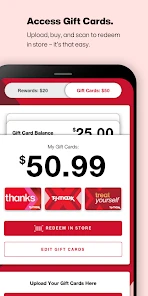
If you already shop at T.J.Maxx, the app is useful for keeping store-related tasks together: browsing, checking your account, looking at rewards, and finding a nearby location. The TJX Rewards and gift card tools also make it more relevant to shoppers who use those options. It’s free, and The TJX Companies, Inc. develops it; the app is rated for Everyone.
It is less compelling if you only want a tightly curated catalogue with predictable stock and a quick repeat purchase. Discount-store shopping often rewards flexibility: you may open the app with a general need, then decide based on what catches your eye. If your priority is to buy one exact item without browsing, a specialist retailer or a broad marketplace may be a more direct route.
A visit that benefits from a little flexibility
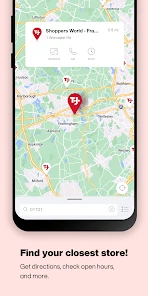
Imagine I’m leaving work and need a household gift, but I have not settled on what it should be. I can use the store locator to choose a convenient location, browse for inspiration, and then treat the visit as a chance to compare possibilities rather than a mission to collect one guaranteed product. That distinction matters: it prevents a useful planning tool from turning into an assumption about what a particular store has on hand.
In the aisle, barcode scanning can help answer a quick price question. I’d use it to compare similar finds or check whether an item still fits my budget, then look at the actual product before deciding. A scan can make price-checking less awkward, but it does not replace checking size, condition, or whether the item meets the need I came in with.
More From Our News Desk

Clash of Clans Is Won Between the Battles

Android Auto Makes the Case for Quieter Car Software

MobiOffice: Transforming Mobile Productivity with Seamless Integration

EA SPORTS FC™ Mobile Soccer: Redefining Mobile Sports Gaming

How Microsoft OneDrive Became a Mobile Productivity Giant

How Google Translate Breaks Language Barriers Effortlessly
What the audience and software details tell me
The app has a 4.0 average from around 6,600 ratings, with roughly 2,800 written reviews, and more than a million installs. It launched in 2017 and is now at version 16.6.0, with iOS 8.0 as its stated minimum operating-system requirement. Those figures suggest an established audience, but they don’t guarantee that every feature will suit your habits or that every store visit will turn up the same kind of find.
It is a shopping app, not simply a digital store directory: its appeal comes from bringing browsing and store-related tools into one place. I would judge it by whether those pieces fit my routine, rather than by expecting the app alone to make every purchase simpler. People who share shopping responsibilities may also want to decide whose account will hold the rewards and gift card details before making the app part of a household routine.
Unpacking the T.J.Maxx Experience
The first thing you'll notice when you open the T.J.Maxx app is its clean and user-friendly interface. It mirrors the in-store experience with categories that make it easy to navigate through a variety of products ranging from clothing to home goods. I found myself browsing effortlessly through sections thanks to their intuitive layout. The search functionality is robust, allowing you to filter results by size, brand, and price, which really helps if you’re on a mission to find something specific.
Browsing works best with a loose plan
I get the most from this kind of shopping when I start with a need rather than a fixed product: a present, a home refresh, or a clothing item in a particular size. That gives the browsing a useful boundary without taking away the chance to find an alternative. If I’m shopping for a gift, for example, I can decide on a budget and a general type of item first, then compare what I see instead of buying something simply because it looks like a bargain.
That approach also helps when the app’s search is useful but the final choice depends on details that are easier to judge in person. Filters can narrow the field, yet a search result is not the same as checking how a garment fits or whether a home item works with the space I have. I’d use the app to make the first pass, then let the actual product settle the decision.
Features That Stand Out
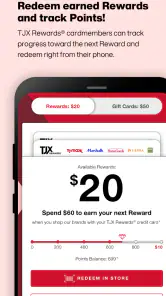
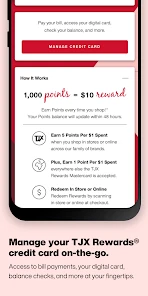
One of the standout features of this app is its "My Account" section, where you can manage your orders, track your shipping, and even locate the nearest T.J.Maxx store. What really caught my attention, though, is the rewards program. By signing up, you can earn points on purchases, which can then be redeemed for discounts. It’s like being rewarded for shopping, and who doesn’t love that?
Another nifty feature is the "Scan & Shop" option. I gave it a whirl in-store and it’s a game-changer. You simply scan an item’s barcode to check its price and availability. This feature alone makes in-store shopping a breeze, allowing me to make informed decisions without having to hunt down a store associate.
Small habits that make the tools more useful
I’d check the account area before a planned visit if I need to keep an order or rewards details in view, rather than waiting until I’m already at the checkout. For gift cards, having the relevant information accessible in the app can make them easier to manage alongside other shopping tasks. These tools are most helpful when they solve a real, recurring bit of friction; there is little reason to build a routine around features I rarely use.
For barcode scanning, I’d treat it as a quick comparison step, not a guarantee that the item is the best choice or that another location has it. Scan the actual item in hand, especially when similar products are grouped together, and confirm the price before committing. It is a small workflow change, but it can help me avoid relying on a vague memory of a tag or confusing one item with another.
Shopping Made Personal
What I love about the app is how it learns your preferences over time. The more you shop, the better it gets at recommending items you might love. It feels like having a personal shopper with you at all times, which is pretty neat. Plus, the app keeps you in the loop with notifications about the latest arrivals and exclusive sales, so you’ll never miss out on a deal.
I’d be selective about how much I rely on recommendations. Suggestions can be a pleasant way to find something I would not have searched for, but they are best treated as prompts, not a substitute for my own list or judgment. A shopper who wants a quiet, focused experience may prefer to open the app only when needed and limit alerts, while someone who enjoys browsing may appreciate a reason to check in.
For shoppers comparing it with other options, I see a different purpose here than in a grocery app built around a fixed list or a retailer focused on one product category. T.J.Maxx makes more sense when you’re open to discovering clothing, home goods, or gifts while also handling store visits and rewards. If you need dependable availability for a particular size or model, I’d check a retailer that specializes in that item before making a trip; the pleasure of browsing is also the trade-off.
When another shopping route is the smarter one
If I know the exact model, size, or replacement part I need, I’d start with a specialist store or a broad marketplace where searching for that precise item is the main job. Those alternatives are a better fit when certainty and repeatability matter more than browsing. For a planned grocery run, a list-first grocery app is also more practical: T.J.Maxx is not the tool I’d choose to organize a predictable basket of routine essentials.
By contrast, a trip to T.J.Maxx can make sense when the goal is less rigid: finding a gift in a broad category, looking for something for the home, or checking clothing options while already nearby. I would not make a special journey based only on an online impression if the item is time-sensitive. The app can help me plan where to go and what to explore, but I still need a backup plan when the purchase cannot wait.
Next-Level Convenience
For days when you’re not in the mood to brave the crowds, the app offers a seamless online shopping experience. The checkout process is straightforward, with multiple payment options including credit cards and PayPal. I particularly appreciated the option to save my payment details for future purchases, making the whole experience smooth and hassle-free.
For an occasional online order, I’d still take a moment to review the product details and the order summary before paying, just as I would on any retailer’s app. Saving payment information is convenient if I return often, but convenience is not automatically worth keeping payment details in another account. I’d choose based on how frequently I expect to use it and my own comfort with saved information.
Planning without expecting certainty
Before relying on it for a time-sensitive errand, I’d separate what the app can help with from what still takes judgment. Store location and account tools can make planning less fiddly, while the catalogue and recommendations are better treated as browsing aids than promises that a particular find will be available nearby. I’d also consider whether I want notifications: they can help surface new arrivals, but shoppers who prefer fewer prompts may want to manage them rather than let every alert interrupt the day.
A practical way to avoid a wasted trip is to decide how flexible the errand is before leaving. If any suitable gift will do, browsing at a convenient store may be worthwhile. If I need a specific item by a deadline, I’d first look for a retailer that can give me more confidence about the exact product, then use T.J.Maxx as a secondary option rather than the whole plan.
Where I’d draw the line
The app is most worthwhile if you shop with T.J.Maxx often enough to use its account, rewards, gift card, or store-finding features, or if you enjoy browsing for an unexpected find. For an occasional shopper, downloading it may add little unless a store visit or online order is already on the agenda. I’d skip it if you dislike browsing, want every purchase to be planned around a guaranteed item, or would rather keep shopping accounts and notifications to a minimum.
I’d also think about the trade-off between using one retailer’s app and keeping my shopping activity spread across several accounts. If T.J.Maxx is already part of my routine, consolidating store-related tasks is a sensible reason to keep it. If I rarely visit, a saved store location or a rewards feature I seldom use may not justify another app on my phone. The right choice depends less on how many tools an app offers than on whether I will actually reach for them.
My recommendation
Ultimately, the T.J.Maxx app brings the joy of discovery and the promise of savings right to your fingertips. Whether you’re a regular Maxxinista or a newbie to the world of discount shopping, this app is definitely worth a download. So, why not give it a try and see what hidden gems you can uncover?
My recommendation is more specific: I’d try it if I already shop at T.J.Maxx, want its store and account tools close at hand, or enjoy browsing without needing a guaranteed result. I would not make it my first choice for a precise, urgent purchase or a tightly planned shopping list. Used with that distinction in mind, it can make a familiar store visit easier to organize while leaving the final choice where it belongs—with me, looking at the item and deciding whether it is genuinely worth bringing home.
T.J.Maxx Frequently Asked Questions
Is the T.J.Maxx app free, and what devices can run it?
The T.J.Maxx app is free to download and is listed for Android and iOS devices. Its minimum operating system requirement is version 8.0, so check your device’s software before installing. The app is a shopping tool from The TJX Companies, Inc., and its age rating is Everyone. Once installed, you can use it to explore the app’s shopping and account features.
What is the T.J.Maxx app and what can I do with it?
The T.J.Maxx app is a mobile shopping platform that allows users to browse and purchase a wide range of products from clothing to home goods. Users can explore new arrivals, check out exclusive deals, and even manage their T.J.Maxx Rewards account. The app also offers features like store locators and personalized shopping recommendations to enhance your shopping experience.
Is the T.J.Maxx app available for both Android and iOS devices?
Yes, the T.J.Maxx app is available for download on both Android and iOS platforms. Users can easily find the app on the Google Play Store for Android devices and the Apple App Store for iOS devices. This ensures that a wide range of users can access the app's features and enjoy a seamless shopping experience regardless of their device preference.
Does the T.J.Maxx app offer any exclusive discounts or rewards for app users?
Absolutely! The T.J.Maxx app provides exclusive discounts and offers to its users. By using the app, you can unlock special promotions and deals that are not available in-store or on the website. Additionally, users can manage their T.J.Maxx Rewards account through the app, making it easier to track and redeem points for further savings.
How secure is the T.J.Maxx app when it comes to making purchases?
The T.J.Maxx app prioritizes user security and ensures that all transactions are encrypted and secure. Users can confidently make purchases knowing that their personal and financial information is protected. The app employs industry-standard security measures and regularly updates its systems to safeguard against any potential breaches, providing peace of mind to its users.
Pros
- User-friendly interface with easy navigation
- Wide range of products at discounted prices
- Frequent updates with new deals and items
- Secure payment options for safe transactions
- Loyalty program with exclusive rewards
Cons
- Occasional app crashes and bugs
- Limited customer support availability
- Some items not available for online purchase
- Shipping delays during peak seasons
- Limited international shipping options

- Category
- Shopping
- Version
- 16.6.0












