

Swimmetry
- 70.00
- 2.3
- Installs
- 10.00K
- Price
- Free

Screenshots
Analysis by Reviewed
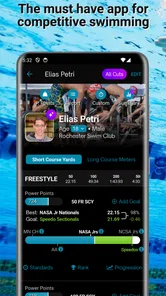
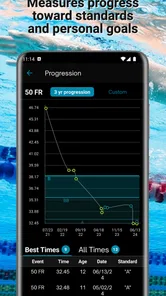
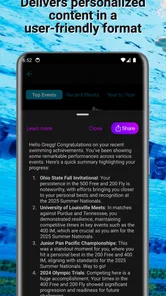
Swimmetry is the kind of sports app that makes most sense when swimming is already part of your routine. I approached it as a training companion rather than a replacement for a coach, a smartwatch, or a club’s official timing system. Its focus is progress: seeing how your swims develop, setting goals, comparing results, following rankings, and keeping up with swimming news. That combination gives it a more analytical feel than a simple lap counter, but it also means the app is most useful when you are willing to record sessions consistently and think about what the numbers mean.
What caught my attention is the balance between personal tracking and the wider swimming community. You are not limited to a private training diary; the experience also points toward comparisons and rankings. That can be motivating for a competitive swimmer, while a casual user may find those elements less important than the basic progress view. My overall impression is therefore quite specific: Swimmetry works best as a structured companion for swimmers who enjoy measurable improvement, not as an all-purpose fitness app for every kind of exercise.
How Swimmetry fits into a swimmer’s routine
The app comes from 10KLakes, LLC and is listed in the Sports category. It is free to install, with optional in-app purchases ranging from $1.99 to $12.99 per item. That makes it easy to try without committing money immediately, although anyone planning to use every part of the experience should pay attention to which functions or extras require payment. The content rating is Everyone, so its presentation is intended to be suitable for a broad audience rather than a narrowly adult fitness market.
In practical use, I would place it between a training log and a social results platform. A basic notes app can record that you swam, but it does not naturally organize a swimmer’s progress into goals, comparisons, and rankings. A general fitness tracker may count activity or distance, yet often treats swimming as just one workout type among many. Swimmetry’s identity is narrower and that is a strength: the app is built around swimming as the main subject instead of asking swimming to fit into a generic exercise template.
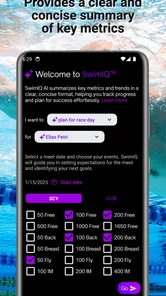
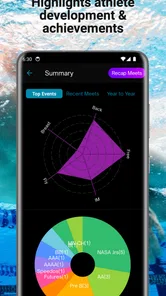
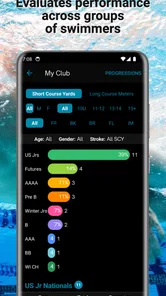
The store summary highlights swimmer progressions, goal tracking, comparisons, rankings, and news. Those elements suggest a workflow that starts with your own development, then expands outward. I would begin by using the progress and goal features privately, establish a few repeatable habits, and only then pay attention to comparisons or rankings. Looking at rankings before you have a consistent record can create noise rather than useful motivation, especially if your swimming schedule changes from week to week.
What the first sessions are really for
The first few sessions should be treated as setup and calibration for your own habits, not as a test of your ability. The most useful question is not whether you immediately appear near the top of a comparison, but whether the app helps you recognize a pattern in your training. For example, you might use it after a regular evening pool session to check whether your recent work is moving toward a goal, then make a short note of what felt different in the water. That turns the app into part of a weekly review rather than something opened only when a result is especially good.
A practical tip is to choose one primary goal at a time. If you watch progress, rankings, comparisons, and news all at once, the experience can feel busier than your actual training. A single goal gives the rest of the information a purpose. You can use comparisons to understand context, rankings for occasional motivation, and news when you want broader swimming content, without allowing every screen to influence your next workout.
More From Our News Desk

 Gmail
GmailGmail in a Busy Inbox: Who Benefits Most?
From first account to crowded workday, Gmail earns its place through dependable search and flexible sorting—but its best fit depends on how much inbox maintenance you can tolerate.

 Prime Video
Switching to Prime Video: What Changes in Your Viewing Routine
Prime Video can make a compelling second home for streaming, but switching means learning a different catalog, rental layer, and route from browsing to playback.

 Universal TV Remote Control
Universal TV Remote Control Works Best as a Reliable Backup
A phone remote earns its place through quick setup and reliable habits. Here is how to get more from Universal TV Remote Control—and where its limits show.

 Weather - By Xiaomi
Weather by Xiaomi Review: Clear at a Glance, Less Clear Up Close
Xiaomi’s weather app makes everyday forecasts quick to scan, but its calm surface can leave useful details and recovery paths harder to find than they should be.

 X
XX Under Pressure: Can It Recover When Posting Goes Wrong?
A resilience-focused review of X, examining setup, mistaken posts, interruptions, weak connections, and the gaps that matter when recovery needs to be dependable.

 Clash of Clans
Clash of Clans Is Won Between the Battles
Its raids are quick; its community is a long-term project of coordination, teaching, rivalry, and shared responsibility—with all the friction that entails.
Latest News



This is also where I noticed an important trade-off. The more seriously you treat the tracking side, the more valuable consistency becomes. Missing sessions does not necessarily mean failure, but it makes a progression view harder to interpret. Someone who swims irregularly for relaxation may prefer a simpler log where recording an occasional workout takes almost no thought. Someone preparing for repeated events or following a deliberate plan is more likely to appreciate the structure here.
Goals, comparisons, and rankings without losing perspective
Goal tracking can be useful because it gives a session a reason beyond simply finishing it. A goal can help you decide what to review after practice and whether a change in routine is worth keeping. I would avoid changing several things at once, though. If you alter your schedule, technique focus, and target simultaneously, a later comparison will not tell you which change mattered. Use the app as a record of decisions, not as an automatic coach that explains every result.
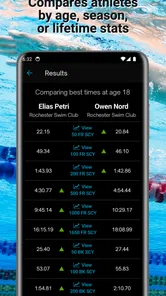
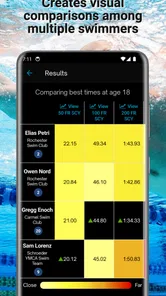
Comparisons are potentially more helpful than rankings when used carefully. A ranking reduces performance to position, while a comparison can encourage you to examine how your own results relate to earlier efforts or to a defined swimming context. The distinction matters for younger swimmers and for anyone returning after a break. A lower position may reflect limited activity, a different event, or a temporary interruption rather than a meaningful decline in ability.
My advice is to check rankings occasionally, preferably after reviewing your personal progress first. That order protects the most useful signal: whether your own swimming is becoming more consistent or moving toward the goal you chose. Rankings can add energy to training, but they are a poor substitute for a personal baseline. If you find yourself changing workouts only to move up a list, the competitive layer is beginning to control the app instead of serving you.
Where the news feature belongs
The news element gives Swimmetry a broader role than a private training record. It can make the app feel connected to swimming beyond your own pool sessions, which is appealing when you want to stay engaged between workouts. I see it as a useful secondary feature rather than the reason to install the app. If you mainly want swimming news, a dedicated news source may offer a deeper editorial experience. If you mainly want progress tracking, the news should remain something you browse when it adds interest, not another stream demanding attention.
That separation is a small but valuable workflow choice. Open the app with a specific intention: review progress, update a goal, inspect a comparison, or browse news. Doing so makes it easier to judge whether each part is helping. It also prevents an interesting article or ranking screen from distracting you from the training information you actually needed.
Trust, controls, and careful use of personal information
When I evaluate a sports app, trust is not just about whether the screens look polished. I also want to know what choices are visible, how much control the user has, and whether the app makes sensitive moments feel understandable. With Swimmetry, I would approach account and data decisions deliberately rather than assuming that every available feature should be enabled. The app’s value comes from organized swimming information, so it is worth deciding what you want recorded and what you would rather keep outside the service.
Before entering personal details, I would read the account prompts and any privacy or data explanations presented during setup. I would also check whether profile visibility, comparisons, and rankings have clear controls. This is especially important if the swimmer is a child or teenager. The Everyone content rating describes suitability of the content, not a promise that every social or account decision is automatically right for every family. A parent should remain involved in deciding what profile information is appropriate and whether public-facing participation is wanted.
There is a useful distinction between a training record and a public identity. Your progress may be meaningful to you without needing to be visible in a ranking or comparison. If the app presents a choice about sharing, participation, or profile details, I would select the narrowest option that still supports the feature I want. That approach preserves the benefit of tracking while limiting unnecessary exposure. It is also easier to expand sharing later than to undo a choice you made without reading it.
Sensitive moments during everyday use
The most data-sensitive moments are likely to occur around account creation, profile setup, comparison features, and rankings. A swimmer may be comfortable recording results privately but less comfortable attaching a recognizable name or identity to them. I would pause at each of those points and ask whether the feature genuinely improves my training. If the answer is no, there is little reason to provide more information or participate more publicly than necessary.
A realistic example would be a family using the app after a child’s weekly swim practice. The parent might want to follow goals and progress, while the child may be excited by rankings. I would first establish a private routine, review what the app displays, and discuss whether comparisons feel encouraging or stressful. If the competitive view starts affecting confidence, the sensible response is to reduce attention to rankings rather than treating the ranking as an obligation.
Another example is an adult swimmer returning after a long break. They may want a record of gradual improvement but not want old results, personal details, or public comparisons to define the experience. In that situation, I would use the progress and goal elements as a personal checkpoint, keep the profile minimal, and avoid interpreting an early comparison as a judgment. The app can support a return to training, but it cannot replace the personal context behind each session.
What user agency looks like here
Good user agency means being able to decide how deeply to participate. Swimmetry’s free entry point helps with the first decision: you can try the app before considering optional purchases. The next decisions are about how much tracking to maintain, whether to engage with comparisons and rankings, and how prominently to use the news side. I would treat those as separate choices rather than accepting the full experience as one package.
It is also sensible to review purchase prompts with the same care as account prompts. The individual purchase range is clear enough to show that optional spending exists, but the practical question is whether a paid item supports your actual routine. I would use the free experience until I knew which part of the app I returned to most often. Paying for an extra that does not change how I train is unlikely to improve the experience.
The current version is 1.2.79, and the app requires Android 7.0 or later. That makes compatibility a straightforward check before installation, especially on an older phone. The app has been available since June 26, 2017, so it is not a brand-new experiment. Still, age alone does not guarantee that every swimmer will find the interface modern or that the app will match the workflow of newer wearable-focused tools. I would judge it by whether its current tracking and control options fit my needs, not simply by its history.
Who should choose it, and who should skip it?
I would recommend trying Swimmetry if you swim regularly, like reviewing progress, and want swimming-specific features instead of a broad activity dashboard. It may suit a developing swimmer who needs goals, a competitive user who enjoys comparisons, or a coach-guided athlete who wants another place to reflect on progress. It can also work for a motivated beginner, provided the beginner treats rankings as optional and focuses on building a sustainable record.
I would be more cautious recommending it to someone who wants automatic tracking with almost no manual attention. A smartwatch or a pool-focused wearable may be a better choice when effortless session capture is the priority. A coach’s spreadsheet or club system may be preferable when official times, team communication, and direct human feedback matter more than app-based rankings. A general fitness app may also be better for someone who divides time equally among running, cycling, strength work, and swimming.
The app is not the right choice if competition tends to undermine your enjoyment. Comparisons and rankings can motivate one swimmer and discourage another. In that case, use only the personal progress and goal elements if the controls allow that comfortably, or choose a quieter training log. The best swimming tool is the one that helps you return to the pool with a clear plan, not the one that produces the most information.
My cautious verdict
Swimmetry has a clear identity and a useful idea at its center: swimming progress becomes more meaningful when goals, comparisons, rankings, and news are gathered around it. I like that it can serve both the personal side of training and the wider interest in swimming. The free installation lowers the barrier to testing it, while the optional purchases mean I would explore first and spend later.
My reservation is that the competitive features require judgment. Rankings are not automatically a measure of improvement, and comparisons can become distracting when your schedule, experience, or circumstances differ from other swimmers. I would also make account, profile, sharing, and purchase decisions carefully, especially for younger users. The app should support your training choices, not quietly make those choices for you.
With that approach, I think Swimmetry is worth trying for swimmers who want more structure than a basic workout note and less dependence on a general fitness platform. Its average rating is 2.3 from around 91 ratings, so I would not recommend installing it on reputation alone; I would test it against your own routine. If you enjoy measurable progress and can use comparisons with perspective, it has a worthwhile role. If you want effortless tracking, official coaching tools, or a completely private and minimal log, another option may be a better fit.
Swimmetry Frequently Asked Questions
What does Swimmetry offer for tracking swimming progress?
Swimmetry is a sports app centered on swimmer progressions, goal tracking, comparisons, rankings, and news. It may suit swimmers who want to follow their development and stay engaged with their goals. Its focus on progress and comparisons can also help users put their swimming activity in context, while the news feature provides another way to keep up with swimming-related content.
What is Swimmetry and who is it designed for?
Swimmetry is a swimming-focused app designed to help users organize training, review performance, and stay engaged with their swimming goals. It may be useful for recreational swimmers, fitness-focused users, and athletes who want a more structured approach to practice. Before downloading, check whether its available features match your pool type, training level, and preferred swimming discipline.
What information can Swimmetry track or analyze?
The information available in Swimmetry can depend on the device, connected sensors, and the way you record workouts. Typical swimming metrics may include distance, time, pace, intervals, stroke-related data, and workout history, although not every metric is available on every phone or wearable. Review the app’s current compatibility details before relying on it for advanced performance analysis.
Does Swimmetry require a smartwatch or additional swimming equipment?
Swimmetry may offer useful functionality with manual workout entry or basic phone-based tracking, but more detailed swimming data often requires a compatible smartwatch, fitness tracker, or other supported equipment. Phones can also be impractical in the water unless specifically designed for aquatic use. Confirm supported devices, operating-system requirements, and pool or open-water limitations before starting a subscription or training plan.
Is Swimmetry suitable for beginners, or is it mainly for competitive swimmers?
Swimmetry can be valuable for beginners who want to build consistency, understand workout structure, and monitor improvement, as well as for experienced swimmers seeking more detailed training feedback. However, the app should be treated as a planning and tracking tool rather than a replacement for qualified coaching. Beginners should start gradually and avoid increasing distance or intensity solely because the app recommends it.
Pros
- Clear swim metrics help track pace
- distance
- and workout progress.
- Useful training data can support more structured swim sessions.
- Clean interface makes reviewing completed workouts straightforward.
- Suitable for swimmers who want to monitor performance over time.
- Can make pool training feel more organized and goal-focused.
Cons
- Some advanced features may require a paid subscription.
- Accuracy can vary if device tracking is affected by water or movement.
- Requires compatible hardware or sensors for the best experience.
- Detailed statistics may feel overwhelming for casual swimmers.
- Battery use may increase during longer tracking sessions.





