Sunoco: Pay fast & save
- 1.47K
- 4.6
- Installs
- 500.00K
- Price
- Free

Screenshots



Analysis by Reviewed
I judge a fuel app by whether it makes a stop I already need to make simpler, not by how persuasive its rewards sound. Sunoco: Pay fast & save has a clear appeal for drivers who regularly use Sunoco: it brings phone-based payment and Sunoco Go Rewards into the same brand-specific experience. That focus is also its main limit. I’d consider it a handy companion for a familiar Sunoco routine, not a replacement for a general payment method or a fuel-comparison tool.
Before relying on it, I’d treat the first visit as a test run. Set up what you need while parked, then check the app at the station and follow the instructions for that location. That practical approach can help avoid learning a new payment flow when I’m already in a hurry, and it keeps me from assuming every stop will work exactly the same way. If my nearest Sunoco fits my normal route, the app has a fair chance of earning a place on my phone; if it requires a special trip, I’d want the savings to justify the detour.
Making a Sunoco Stop Work Better
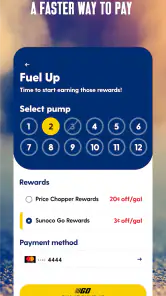
First off, let me just say, the convenience factor with Sunoco: Pay fast & save is off the charts. Once you’ve got the app downloaded and your payment method set up, the whole process feels like a breeze. You just drive to your nearest Sunoco station, open the app, and you can pay right from your phone. No more fumbling for credit cards or cash; it’s all in the palm of your hand. And the best part? You can do it all without leaving your car, which is a blessing on those rainy or frigid days.
In everyday use, I’d set things up before I’m running low rather than trying to learn the app beside a pump. That small bit of preparation matters: a driver can check that the payment setup is ready while parked at home, then treat the phone payment as a quicker option on the next eligible stop. I also wouldn’t assume every station or pump will feel identical; the practical habit is to check the app at the location and follow what it shows there, rather than plan a tight schedule around an untested workflow.
Rewards Are Best When They Fit Your Route
Now, let’s talk savings. Who doesn’t like getting a little extra bang for their buck? With this app, you can take advantage of various discounts and deals that are updated regularly. It’s like having a personal coupon book in your pocket, specifically for gas. Just imagine, over time, those pennies saved per gallon really add up. Plus, with their rewards program, every purchase brings you closer to a free fill-up. It’s like they’re paying you to buy gas—how cool is that?
Latest News
The useful way to judge rewards is against the trip I would have made anyway. I’d check the current offer before setting off, then compare the overall stop with nearby choices instead of focusing only on a per-gallon saving. A discount is less compelling if it adds a detour or if I’m buying fuel at a time that doesn’t suit me. For people who already choose Sunoco, rewards can be a pleasant extra; for occasional visitors, they may take longer to feel meaningful.
For a commuter, the most sensible routine is to check offers before leaving home, then use the same convenient station when it suits the day’s route. That makes it easier to tell whether the reward is genuinely useful rather than letting an offer dictate an unnecessary trip. On a long drive, I’d use a different decision rule: pick a stop that works for the journey first, and treat any Sunoco reward as a bonus if one happens to fit. A rewards program is valuable when it complements a plan, not when it becomes the plan.
There’s also a small but important distinction between a discount and a saving in real life. The price at the pump, the extra distance, and the time spent changing course all matter to me. I’d compare the total cost and convenience of the stop, rather than assuming a promotion automatically makes it the best choice. That’s especially useful when I’m driving somewhere unfamiliar, where a station that looks close on a map may not be the easiest stop to reach from my actual route.
Brand Convenience Versus Broader Choice
But, I know what you’re thinking: “What about the stations that aren’t Sunoco?” While this app is a game-changer for Sunoco regulars, it might not be for everyone if you don’t have a station nearby. But if you do, it’s an absolute must-have on your phone. Trust me, your wallet will thank you.
That makes the comparison with ordinary alternatives fairly simple. A bank card or cash works at more places and requires no loyalty to a particular brand, while a general map or fuel-finding tool is often a better starting point when I care most about choosing among stations. Sunoco’s advantage is narrower: it brings payment and Sunoco Go Rewards together for someone already stopping at its locations. I’d keep a general payment option available too, especially on road trips where the nearest convenient station matters more than brand-specific rewards.
In practice, I wouldn’t make this the only fuel tool on my phone. If I’m planning an unfamiliar route, a broader map can help me see options across brands, while this app is more relevant once I’m considering a Sunoco stop. Keeping both approaches in mind avoids treating a brand-specific service as a universal station directory. It also gives me a straightforward backup if I reach a location and the app-based process isn’t the most convenient choice at that moment.
A realistic example is a weekday commute with a familiar Sunoco along the way. I can check the app before setting off, stop when I need fuel, and use phone payment if the station’s flow supports it. The routine is most appealing when it saves a little friction without changing where I go. By contrast, if I’m low on fuel in an unfamiliar area, I’d first choose a convenient and suitable station rather than drive farther in pursuit of a reward. That’s where a general navigation or payment option may serve me better.
What to Expect From the App in Daily Use
Beyond the savings, the app itself is super user-friendly. The interface is clean, straightforward, and doesn’t bombard you with unnecessary ads or pop-ups. It’s intuitive enough that even the most tech-averse individuals can navigate it with ease. Plus, the customer support is responsive and ready to help if you hit a snag, though I doubt you will.
As an Auto & Vehicles app from Sunoco, it has a focused job rather than trying to manage every part of car ownership. It’s free, open to everyone by its age rating, and has a 4.6 average from around 5,600 ratings, with more than 500,000 installs. The current version is 3.5.10, and the app has been available since May 14, 2018. Those figures suggest a well-established audience, though they don’t tell me whether a particular station near me supports the experience I want; checking locally remains the sensible step.
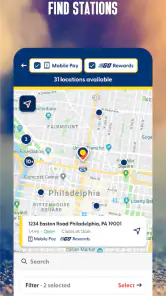
One feature I particularly love is the station finder. The app uses your location to show you the nearest Sunoco stations, complete with their current prices. It’s especially handy when you’re in an unfamiliar area and need to refuel quickly.
I’d use that finder as a planning aid, not as a promise that the first result is the right stop. Before leaving, I can compare the listed Sunoco options with the route I expect to take and decide whether a stop is convenient enough. If I’m already close to empty, I’d put a dependable, reachable station ahead of a small possible price advantage. That modest change in how I use the feature makes it more helpful and reduces the temptation to chase a result that doesn’t suit the drive.
It’s also worth thinking about when to check the app. Looking while parked gives me room to compare a location and current offer without dividing my attention on the road. Once I’m at the station, I can focus on the steps shown there instead of trying to sort out rewards or payment while in a rush. That workflow is a practical strength of combining the station finder with the rewards experience: I can make the decision before the pump, then keep the actual stop simple.
The best fit is someone who passes Sunoco stations regularly, prefers handling a purchase from the car, and is willing to use a brand rewards program without making fuel decisions solely around it. A commuter with a reliable nearby location may get repeated value from the routine. Someone who travels widely, rarely visits Sunoco, or prioritizes comparing every local brand should probably stick with a broader station finder and ordinary payment methods as their main tools.
Who Should Keep It—and Who Can Skip It
I’d recommend giving it a try if a Sunoco station is already part of your weekly driving pattern and you’re comfortable managing fuel purchases on your phone. It may be particularly convenient when weather makes getting out of the car unpleasant, or when you simply want a consistent way to handle a familiar stop. The app’s appeal doesn’t depend on changing your habits; it’s strongest when it fits habits you already have.
I’d skip it as a primary fuel app if Sunoco locations are inconvenient for you, if you want one tool that compares every nearby brand, or if you prefer to pay in person and don’t want a phone-based routine. It may still be worth keeping as an occasional option, but the rewards are unlikely to compensate for a pattern of out-of-the-way stops. Drivers who value flexibility above brand-specific benefits will probably be happier relying on a general map and their usual payment method.
Sunoco is the developer behind the app, and its scope reflects that: this is a branded service centered on Sunoco visits rather than a neutral guide to every part of driving. The age rating is Everyone, and the app is free to download. Those details make it easy to consider, but they don’t answer the most practical question for any driver: whether the locations they use make the app worthwhile. I’d start by checking a familiar station and trying the process during a low-pressure stop.
If I were helping a friend decide, I’d ask where they normally buy fuel before recommending it. Someone who already chooses Sunoco can test payment and rewards without reorganizing a trip. Someone who picks the cheapest or closest station across brands should begin with a broader option instead. In either case, keeping a physical or standard digital payment method available is a sensible fallback, particularly on a trip where reaching the next convenient stop matters more than using a particular app.
A Practical Verdict for Sunoco Drivers
In conclusion, Sunoco: Pay fast & save is not just another app cluttering up your phone. It’s a genuinely useful tool that makes the mundane task of filling up your gas tank a little more exciting and a lot more efficient. So if you’re a Sunoco customer or willing to become one, definitely give this app a shot. You’ll wonder how you ever got by without it. Happy fueling!
My recommendation is a little more specific: try it if Sunoco already suits your route, prepare the payment setup before you need fuel, and judge the rewards against the trip you would have taken anyway. If those pieces line up, paying by phone and checking Sunoco Go Rewards can make a routine stop feel more convenient. If they don’t, a general station finder and ordinary payment options are the more flexible choice. That balance is what makes this a useful niche app rather than an essential download for every driver.
Sunoco: Pay fast & save Frequently Asked Questions
Is Sunoco: Pay fast & save free, and what devices can run it?
Sunoco: Pay fast & save is a free Auto & Vehicles app from Sunoco. It is rated for Everyone and requires Android 9 or later. The app is intended for people who want to use Sunoco’s mobile fueling and rewards features, so checking that your device meets the operating-system requirement before downloading is a sensible first step.
What is Sunoco: Pay fast & save and how does it work?
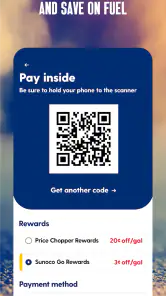
Sunoco: Pay fast & save is a mobile app designed to streamline your fueling experience by allowing you to pay quickly and securely at Sunoco gas stations. Users can link a payment method to the app, which enables them to pay at the pump without needing to swipe a card. Additionally, the app offers savings opportunities, such as discounts and rewards, making it a convenient and cost-effective way to manage fuel purchases.
How do I set up my payment method in the Sunoco app?
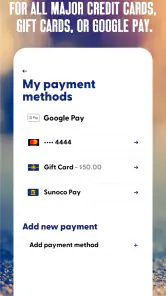
Setting up your payment method in the Sunoco app is straightforward. After downloading the app, create an account or log in. Navigate to the payment section, where you can add your preferred payment method by entering your card details or linking a digital wallet. Ensure all information is entered correctly to facilitate seamless transactions at the pump. Once set up, you'll be able to pay quickly without needing to carry physical cards.
Are there any rewards or loyalty programs associated with the Sunoco app?
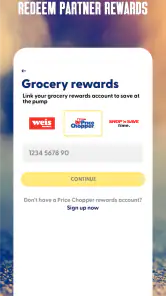
Yes, the Sunoco app offers a rewards program called Sunoco Go Rewards. By using the app, users can access the program’s fuel savings opportunities and promotions. The app is designed to make it easier to combine mobile fueling with rewards, so it may appeal to drivers who regularly visit Sunoco stations and want to keep their fuel-related benefits together in one place.
Does the Sunoco app work without an internet connection?
The app’s key features involve signing in, managing payment details, and using mobile payment and rewards services. For those activities, you should plan to have an internet connection available, particularly when setting up the app or paying at a station. Keeping the app updated and checking your connection before you begin fueling can help avoid interruptions during a visit.
Pros
- Fast and easy payment process
- User-friendly interface
- Secure transactions
- Wide network of Sunoco stations
- Offers and discounts available
Cons
- Limited to Sunoco stations
- Occasional app glitches
- Requires stable internet connection
- No support for international users
- Limited customer service options

- Category
- Auto & Vehicles
- Version
- 3.5.10











