Stop & Shop
- 4.95K
- 4.3
- Installs
- 1.00M
- Price
- Free

Screenshots
Analysis by Reviewed
I find a grocery app most useful when it helps me make decisions before I reach the store, not just when I’m already standing in an aisle. Stop & Shop is built around that practical routine: browse, plan, and then shop through the supermarket’s own service. Its focus is narrower than a general shopping app, which is a plus if you already buy groceries at Stop & Shop, but a reason to look elsewhere if you mainly compare several retailers.
Planning around a reliable connection
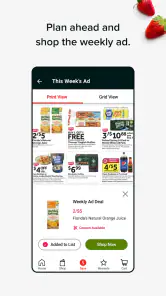
Browsing products, checking digital coupons, and placing an order are the moments when I’d want a reliable internet connection. That shapes how I’d use the app: I’d review offers and build my plan at home or somewhere with dependable service, rather than assume every screen will load quickly in a store with weak reception. A useful habit is to check the order details before leaving home, so a slow connection at the entrance doesn’t become part of the shopping trip.
The app is free and is made by The Stop & Shop Supermarket Company LLC. It has a 4.3 average from around 15,000 ratings and over a million installs, which gives a new user a sense of its reach without telling me whether it will suit every household. It is rated for Everyone, and version 8.13.1 requires Android 8.1 or later. I’d still check that my phone’s software is compatible before relying on it for a time-sensitive order.
Making the phone useful in different settings
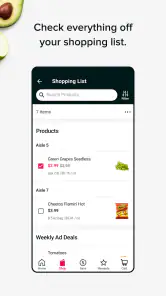
There are two sensible ways to fit this into a routine. If you’re heading into a physical Stop & Shop, the Scan It! feature can make the phone part of the trip: scan as you go and use the running total to keep spending in view. I’d treat that total as a planning aid, then review the checkout screen before paying. For a quieter shop, I’d use the app beforehand to check coupons and make a list of what I actually need.
For example, after work I might check a coupon for a pantry item, add it to the week’s plan, and decide whether to shop in person or arrange delivery. That sequence is more useful than opening the app at the last minute: it gives me time to compare the planned basket with what’s already at home and avoid buying duplicates. If my connection drops while I’m browsing, I’d wait until it returns before placing an order or assuming a change has been saved.
Choosing the right kind of shop
Delivery and pickup are handy alternatives to walking the aisles, but they don’t make the app a universal grocery solution. They make the most sense when Stop & Shop is already where you shop and the available ordering choices fit your schedule. If you prefer choosing produce yourself, need groceries immediately, or want to compare prices across multiple chains, an in-person trip or a broader shopping option may suit you better.
Compared with a paper list, the app can bring coupons and shopping tasks together; compared with a general delivery marketplace, its appeal is its direct connection to Stop & Shop. The trade-off is that its usefulness depends on your relationship with this retailer and on being able to get online for key tasks. I’d also avoid treating a displayed coupon as a guaranteed saving until I’ve checked that it applies to the item and is reflected in my order or checkout.
More From Our News Desk

Clash of Clans Is Won Between the Battles

Android Auto Makes the Case for Quieter Car Software

MobiOffice: Transforming Mobile Productivity with Seamless Integration

EA SPORTS FC™ Mobile Soccer: Redefining Mobile Sports Gaming

How Microsoft OneDrive Became a Mobile Productivity Giant

How Google Translate Breaks Language Barriers Effortlessly
A More Organized Grocery Routine
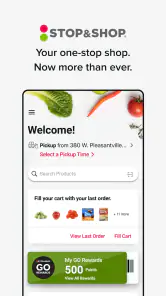
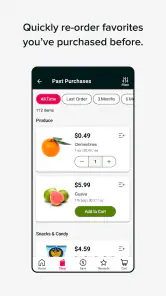
From the moment I downloaded the Stop & Shop app, I could tell it was designed with the user in mind. The interface is intuitive, allowing me to navigate through different categories with ease. Whether I’m looking for fresh produce, canned goods, or a bottle of wine for dinner, everything is just a few taps away. It’s like having the entire grocery store in the palm of your hand!
Coupons that need a little attention
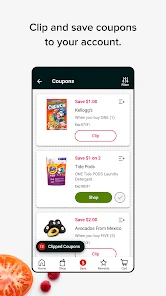
One feature I absolutely love is the digital coupons. Every week, I’m greeted with new deals tailored to my shopping habits. It’s like the app knows me better than I know myself! Plus, who doesn’t love saving a couple of bucks?
My practical tip is to treat coupon browsing as part of planning, not as a reason to add something automatically. I’d check that the offer matches the product I intend to buy, then keep the planned item on my list so I remember why it is in the basket. This is especially helpful when several similar products sit on the same shelf: a coupon can make one option more appealing, but only if it applies to the exact item I choose.
It also helps to separate a discount from the total value of a purchase. If I’m buying an item only because it has an offer, I’d ask whether I would use it before it expires or whether it simply adds clutter to the pantry. For a household that already buys the same staples, coupons can make the app more useful; for someone who shops unpredictably, the effort of checking offers may not be worth it every time.
Keeping a running view of the basket
Another standout feature is the "Scan It!" functionality. Next time you’re in a physical Stop & Shop store, whip out your phone and start scanning items as you shop. This not only speeds up the checkout process but also helps keep track of your spending. It’s a game-changer for those who like to stick to a budget.
I’d use the running total as a guardrail rather than a final bill. It can help me notice that a basket is growing beyond the amount I had in mind, or pause before adding a nonessential item. But I’d still look over the checkout details and make sure the items and any discounts appear as expected. That extra check is a sensible habit whenever a phone is involved in managing a shop.
There is a small trade-off: scanning asks me to keep my phone available as I move through the store. If I want a hands-free trip, or if I’m shopping with a child and need to focus on the aisle, a simple list and ordinary checkout may feel easier. Scan It! is most compelling when I value awareness of the basket more than minimizing phone use.
Delivery and pickup as separate conveniences
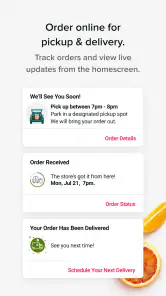
What’s more, Stop & Shop offers flexible delivery and pickup options. On days when stepping out seems like a chore, I simply schedule a delivery. And believe me, having groceries delivered right to your doorstep feels like a luxury, especially after a long day at work.
For those who prefer picking up their groceries, curbside pickup is a breeze. Just place your order through the app, choose a convenient pickup time, and your groceries will be ready and waiting. No more wandering through aisles or waiting in long queues!
I’d choose between the two based on the shape of the day rather than assuming one is always superior. Pickup can fit neatly into a drive that I’m already making, while delivery can be a better match when getting out is the hard part. If I care about selecting produce personally, an in-person visit gives me more direct control over those choices. Either way, I’d review the basket and timing before setting off, especially if I’m relying on the order to cover a particular meal.
For a family meal, for instance, I might plan the ingredients at home, check the basket against the recipe, and then select the option that fits the evening. That little pause catches forgotten basics before the order is underway. It also makes clear when the app is not the right tool: if dinner is needed immediately, walking into a nearby store may be quicker than arranging an order.
When another shopping approach makes more sense
The app is at its best for people who regularly shop at Stop & Shop and want coupons, in-store scanning, and ordering choices tied to that retailer. It is less suited to someone whose main task is comparing products and prices across several supermarkets. A general marketplace can make cross-store browsing more convenient, while a paper list may be the simplest option for a short, familiar shop.
That distinction matters because convenience is personal. Someone who knows the store and buys familiar staples may appreciate having planning and shopping tools gathered in one place. A first-time or occasional shopper may not get enough benefit from building a digital routine, particularly if they only need a few items. I’d start with the parts I genuinely need rather than trying to use every option on every trip.
Keeping the routine manageable
For a household with a regular Stop & Shop list, the strongest approach is to separate planning from execution. I’d browse and collect coupon ideas before shopping, then use Scan It! in-store when keeping an eye on the basket matters. That avoids trying to research every deal while moving through the aisles. If another person in the household is shopping, agreeing on the list first also helps prevent duplicate purchases and keeps the app from becoming an extra step rather than a time-saver.
On a busy evening, I’d decide early whether delivery or pickup is the better fit, then confirm the basket and chosen time while the connection is stable. Pickup suits someone already driving near the store; delivery is more helpful when leaving home is the main obstacle. Neither option is automatically best: the right choice depends on the day’s schedule and whether you want to select items yourself.
A useful way to test the fit is to use the app for one ordinary shop rather than reorganizing the whole household around it. I’d make a short list, check one or two relevant coupons, and decide whether scanning or ordering actually saves effort. If it adds more screen time than it removes, I’d keep the simpler parts of the routine and leave the rest aside.
What to do when a screen stalls
If a page hangs or the connection cuts out, I wouldn’t repeatedly tap buttons that could submit the same action twice. I’d wait for service, reopen the relevant screen, and check the basket or order status before trying again. That small pause is especially worthwhile around checkout, where confirming what the app has retained is safer than assuming a coupon, item, or order change went through.
Connectivity affects more than convenience when I’m using the app away from home. In a store, a slow-loading product page can interrupt the pace of shopping; at home, the same delay is usually easier to work around. I’d do the parts that need browsing or confirmation where the signal is dependable, and keep a simple written backup of essential items if I’m heading somewhere I expect reception to be unreliable. That is not a substitute for the app’s order status, but it prevents a shopping list from becoming inaccessible at an awkward moment.
I’d also avoid making last-minute changes while walking toward pickup or delivery arrangements unless I can verify that they have gone through. When an action matters, checking the resulting basket or status is more useful than relying on a tap alone. This is a general caution for a connected shopping experience, not a reason to avoid using the app.
My verdict on a connected grocery trip
People who shop only occasionally at Stop & Shop may find a regular list or a quick in-store visit simpler than learning another digital routine. And if your priority is comparing stores rather than shopping with one supermarket, this app is not the best starting point. For shoppers who already use Stop & Shop, though, its coupons, scanning, and order options can make one retailer’s trip easier to organize, provided the phone has a usable connection when it counts.
All in all, the Stop & Shop app has revolutionized the way I do my grocery shopping. It’s convenient, efficient, and packed with features that cater to modern-day shopping needs. So, if you’re looking to simplify your grocery runs, give this app a try. You might just find yourself wondering how you ever shopped without it!
With the ability to save time and money while offering an easy-to-use platform, Stop & Shop is not just an app, but a lifestyle choice for the savvy shopper. Happy shopping!
Stop & Shop Frequently Asked Questions
Is the Stop & Shop app suitable for everyday grocery shopping?
Stop & Shop is a shopping app built around grocery needs, making it a practical option to consider for everyday shopping. Its store summary highlights saving time and money, along with finding meal inspiration. You can use it to explore grocery shopping options and think through what you need before heading to the store or placing an order.
Can I browse the Stop & Shop app before deciding to shop?
Yes. You can explore the app to get a feel for its shopping experience and meal inspiration before deciding what to do next. Browsing can help you organize your grocery needs and consider what you might want to buy. It is a shopping app from The Stop & Shop Supermarket Company LLC, so it is aimed at Stop & Shop customers.
Can I use the Stop & Shop app to plan meals and find grocery inspiration?
Yes. The app is designed to help with meal inspiration as well as grocery shopping, so it can be useful when you are deciding what to cook and what to add to your shopping list. You can explore the app before placing an order and use it to make shopping feel more organized, whether you are preparing for a planned meal or browsing for ideas.
Is the Stop & Shop app free to download, and what devices can run it?
The app is free to download, and its content rating is Everyone. It is available for Android and iOS devices, with Android support beginning at version 8.1. The current app version is 8.13.1. Before installing, check that your device’s operating system meets the requirement and that you are downloading the official app from your platform’s app store.
What is Stop & Shop and how does it work?
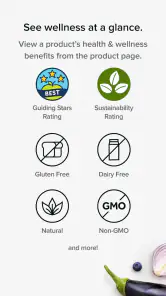
Stop & Shop is a comprehensive grocery shopping application that allows users to browse and purchase a wide variety of products ranging from fresh produce to household essentials. The app provides detailed product information, real-time inventory updates, and personalized recommendations based on user preferences. Additionally, users can choose between home delivery or in-store pickup options, making grocery shopping more convenient and tailored to individual needs.
Pros
- User-friendly interface
- Wide selection of groceries
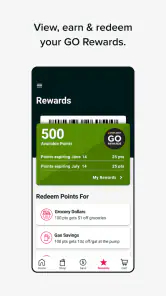
- Loyalty program benefits
- Regular promotions and discounts
- Easy online shopping experience
Cons
- Limited delivery areas
- Occasional app glitches
- Longer delivery times during peak hours
- Limited payment options
- Inconsistent product availability

- Category
- Shopping
- Version
- 8.13.1











