

Sprocket Sports
- 43.00
- 3.4
- Installs
- 50.00K
- Price
- Free

Screenshots
Analysis by Reviewed
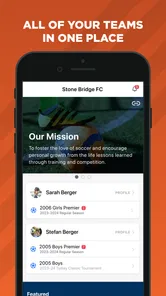
When a household has children playing on different teams, sports administration can become a surprising source of daily friction. One person is checking enrollment, another is trying to remember a practice detail, and a young athlete may need access to a team update from a shared phone. Sprocket Sports is built for that kind of organized sports environment rather than for tracking workouts or watching live games. I found it most useful as a central place for enrollment and team-related coordination, especially when several people need to stay aligned.
The app comes from Sprocket Sports and belongs in the sports category, but it feels closer to an administrative tool than a fitness companion. It is free, rated for Everyone, and supports devices running Android 8.0 or later. Its current version is 6.0.22, while its Android release dates back to August 27, 2021. That combination matters: the app is established enough to have a substantial user base, yet compatibility with older Android devices makes it practical for families using hand-me-down phones.
How Sprocket Sports fits into a shared household
I would not install this app simply because someone enjoys sports. Its value appears when a club, league, or team uses Sprocket Sports as part of its enrollment and management process. In that setting, it can reduce the number of places a household must check. Instead of relying entirely on scattered messages, paper forms, or a general-purpose calendar, the app gives sports-related administration a dedicated home.
A realistic example is a parent managing two children who play in different groups. The parent may use one device to handle enrollment while each child needs to know which team information applies to them. A shared phone can work for occasional checking, but it requires care: the person using the device must understand which account or profile is active before changing anything. I would treat the app as a household coordination tool, not as a casual app that everyone opens without thinking.
That distinction is important because sports administration often involves actions with consequences. Registering for the wrong program, overlooking a required step, or confusing one child’s team with another can create avoidable work. My practical advice is to decide before installation who will manage enrollment and who will only view team information. Even without assuming any special family-control system, that simple household rule creates a useful boundary.
The app is also more suitable for families already connected to an organization using it. If a team communicates exclusively through another service, Sprocket Sports will not automatically replace that system. Its usefulness depends on whether the relevant club or program has adopted it and how consistently that organization uses its tools. I would confirm that point before asking every family member to build a routine around it.
Starting with the right account boundary
Setup should begin with ownership. I recommend that the adult responsible for registration use their own account details and keep enrollment decisions separate from a child’s casual access. On a shared device, switching between people without checking the active session is the kind of small mistake that can lead to confusing entries or duplicated effort.
More From Our News Desk

 Gmail
GmailGmail in a Busy Inbox: Who Benefits Most?
From first account to crowded workday, Gmail earns its place through dependable search and flexible sorting—but its best fit depends on how much inbox maintenance you can tolerate.

 Prime Video
Switching to Prime Video: What Changes in Your Viewing Routine
Prime Video can make a compelling second home for streaming, but switching means learning a different catalog, rental layer, and route from browsing to playback.

 Universal TV Remote Control
Universal TV Remote Control Works Best as a Reliable Backup
A phone remote earns its place through quick setup and reliable habits. Here is how to get more from Universal TV Remote Control—and where its limits show.

 Weather - By Xiaomi
Weather by Xiaomi Review: Clear at a Glance, Less Clear Up Close
Xiaomi’s weather app makes everyday forecasts quick to scan, but its calm surface can leave useful details and recovery paths harder to find than they should be.

 X
XX Under Pressure: Can It Recover When Posting Goes Wrong?
A resilience-focused review of X, examining setup, mistaken posts, interruptions, weak connections, and the gaps that matter when recovery needs to be dependable.

 Clash of Clans
Clash of Clans Is Won Between the Battles
Its raids are quick; its community is a long-term project of coordination, teaching, rivalry, and shared responsibility—with all the friction that entails.
Latest News



For a household with more than one athlete, I would make a short written note of each child’s team, age group, and season before beginning enrollment. This is not a feature of the app; it is a workflow improvement that makes the app easier to use. Sports platforms often present several similar choices, and taking a moment to identify the correct one is safer than selecting the first familiar name.
The same approach helps when a child borrows a parent’s phone. A child may only need to read a team update, while the adult may be the person who should handle registration or other administrative steps. Keeping those purposes separate reduces the chance that a curious tap becomes an unintended change. I would also avoid leaving the app open on a shared device when another family member is likely to use it immediately afterward.
One of the less obvious trade-offs is that a single device can be convenient but can also blur responsibility. A dedicated phone for each person is not necessary for occasional use, yet separate devices or carefully separated sessions become more attractive when several athletes are active at once. The app can support a coordinated household routine, but it does not remove the need for the household to agree on who does what.
Turning team administration into a repeatable routine
The strongest use case is not opening the app randomly; it is checking it at predictable moments. I would look at it before the start of a new sports period, after an organization asks families to complete enrollment, and before a child leaves for an activity. This rhythm makes the app part of a process instead of another notification source competing for attention.
For parents, the most useful habit is to review information for each athlete separately. When two children participate in different groups, it is easy to assume that a message or enrollment choice applies to both. I would read the team context first, then act. That extra pause is especially worthwhile on a small screen, where similar names and compact menus can be easy to misread.
For older children, the app may be helpful as a reference point for their own team involvement, but I would still explain the difference between viewing information and managing an enrollment. A young athlete can be responsible for checking what concerns them without necessarily becoming the person who makes household-level decisions. That arrangement respects growing independence while keeping important administrative actions with the adult who understands the family schedule and commitments.
Another useful workflow is to pair the app with a household calendar rather than expecting it to be the only planning tool. Sprocket Sports is focused on sports enrollment and team management; a calendar remains better for combining practices with school, work, appointments, and transport. I see the app as the source for sports-related coordination and the calendar as the place where the whole household decides whether those commitments fit.
This separation is a genuine advantage. A general messaging app can become noisy, and a calendar can lose the context behind a sports request. Keeping enrollment and team administration in the sports platform while using a broader planning tool for the family schedule creates clearer roles. The downside is that it means maintaining two routines instead of expecting one app to do everything.
Shared devices, privacy, and trust
Because the app may be used around children and household logistics, trust is more important than flashy presentation. I would not hand a shared phone to a child without explaining whose session is open and what kind of actions are appropriate. That is ordinary digital hygiene, but it matters more when the app is connected to real team participation rather than just entertainment.
The Everyone age rating makes the app broadly accessible from an age-classification perspective, but that does not mean every task should be delegated to every age group. Age suitability and administrative responsibility are different questions. A child may be perfectly capable of reading team information while still needing an adult to handle enrollment choices, household contact details, or decisions involving schedules.
I also think families should agree on a simple rule for notifications and shared phones. If several people use one device, a message preview may be seen by the wrong person or misunderstood without context. I would keep conversations calm and direct: identify which athlete the information concerns, decide who needs to act, and avoid treating every alert as an emergency. The app works better when it supports a clear family process rather than becoming the family process.
For a teenager with their own phone, the balance changes. Independent access can make it easier for them to stay aware of team matters, but I would still encourage a parent to remain involved in enrollment and major changes. The best arrangement depends on maturity and the organization’s expectations, not simply on the child’s age. Sprocket Sports can be part of that gradual handoff, but the handoff should be intentional.
One limitation I noticed in this kind of setup is that the app cannot solve disagreements about responsibility. If one person assumes another completed enrollment, the presence of a shared platform may actually create false confidence. I would always finish an important task by telling the other household members what was done. That small confirmation is more dependable than assuming everyone saw the same screen.
What the app does well for organized sports
Sprocket Sports has a clear advantage over improvised systems: it gives sports administration its own context. A group chat is useful for quick conversation, but it is not an ideal place to manage enrollment. Email can preserve information, but important details may be buried among unrelated messages. A paper form may work for one season, yet it is harder to coordinate when several people need visibility.
Compared with a generic team-messaging app, this platform makes more sense when the organization wants enrollment and team management connected to the same sports experience. Compared with a general calendar, it is more focused on the organization’s side of participation. That focus is the reason I would recommend it to families whose club actively uses it.
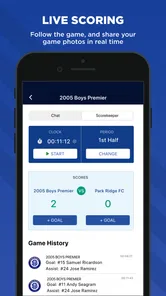
The trade-off is equally clear: a focused platform can feel limited if you want exercise tracking, live scores, broad social features, or a complete family planner. I would not choose Sprocket Sports as a replacement for a running tracker, a shared calendar, or a general communication app. It is better understood as a specialized layer in a larger routine.
Its free price lowers the barrier to trying it, which is helpful for families deciding whether it fits their organization’s workflow. Still, free does not mean frictionless. The real question is whether the team’s use of the platform is consistent enough to justify another app on the phone. If coaches or administrators use several channels at once, the app may organize one part of the experience without eliminating confusion elsewhere.
The public response is mixed rather than overwhelmingly enthusiastic, with an average rating of 3.5 from around a hundred ratings and over forty written reviews. I read that as a reason to set expectations sensibly. The app may be valuable because of the organization it serves, but individual satisfaction will depend heavily on how clearly that organization communicates and how well the household adopts the workflow.
Who should use it, and who should skip it
I would recommend Sprocket Sports to parents handling youth sports enrollment, households with multiple athletes, and teams that already rely on Sprocket Sports for administration. It is particularly useful when a family wants a dedicated place for sports-related tasks instead of mixing registration details into personal email threads or chat conversations.
I would also consider it for a teenager who wants a clearer connection to their team information, provided the household agrees on boundaries. Letting a young athlete check relevant updates can encourage responsibility, while keeping enrollment decisions with an adult avoids unnecessary confusion. The app is most effective when access matches responsibility.
I would skip it if your club does not use Sprocket Sports or if you are looking for a personal training tool. It is not the right choice for someone who mainly wants workout plans, performance statistics, route tracking, or recreational sports news. I would also hesitate if your household already has a reliable enrollment process and the organization provides no reason to add another platform.
Families with very young children may find that an adult remains the primary user. That is not a weakness by itself, but it changes the value proposition. The app may simplify the parent’s administration without giving the child meaningful independence yet. For older children, the benefit shifts toward shared awareness and gradual responsibility.
Device compatibility and everyday practicality
Support for Android 8.0 and later makes the app approachable for households that do not replace phones frequently. That is useful in real families, where a child may receive an older device or where one phone is shared temporarily. I would still keep the operating system updated where practical, because sports coordination is more dependable when the device itself is maintained.
The installed base is over fifty thousand, which suggests that Sprocket Sports is not an obscure experiment, but it is also not a universal sports platform used by everyone. That reinforces my main advice: adoption by your specific club matters more than broad popularity. A platform can be well suited to one organization and irrelevant to another.
On a shared device, I would make the app easy to find but avoid placing it beside unrelated games or entertainment apps if a child is likely to use the phone independently. A clear home-screen arrangement can reduce accidental taps and help everyone remember what the app is for. This is a small practical detail, yet it makes shared access less stressful.
I would also check the app before leaving for an important activity instead of relying on a last-minute glance in a parking lot. Small screens, weak connections, and rushed decisions are a poor combination. Reviewing sports information earlier gives the household time to ask the organization a question if something appears unclear.
My household verdict
After looking at Sprocket Sports as a family coordination tool, I see a focused app with a practical purpose rather than an all-in-one sports solution. Its best quality is that it gives enrollment and team administration a dedicated place, which can make a busy household more organized when the relevant club uses it consistently.
The key is to treat it as a responsibility-sharing tool, not a replacement for family communication. Adults should manage important enrollment decisions, children can gradually take ownership of checking information, and everyone should know which athlete or team a task concerns. That approach makes shared-device use safer and prevents the app from creating a false sense that simply installing it solves coordination.
My overall impression is positive for the right audience. The free access, Everyone rating, support for older Android devices, and sports-specific focus make it easy to consider. At the same time, its mixed 3.5 average and dependence on organizational adoption are reminders that the experience will vary. If your club has chosen Sprocket Sports and your household needs a clearer way to manage participation, I think it is worth trying. If you need fitness tracking, broad family planning, or a universal team chat, I would choose a more specialized alternative instead.
For a household with one or more active athletes, I would begin with one adult account, establish who handles enrollment, and decide how children will use the app before inviting everyone into the routine. That simple preparation gets more value from the platform than treating it as another app to install and forget. In my view, Sprocket Sports works best when the technology stays in the background and the family’s responsibilities become easier to understand.
Sprocket Sports Frequently Asked Questions
What devices and operating systems can run Sprocket Sports?
Sprocket Sports is a sports app for managing enrollment and team information, and it requires Android 8.0 or later. Before downloading, check that your device meets this requirement and that you are using the app for an organization that works with Sprocket Sports. The app is free to download, so you can install it without paying an app purchase price.
Is Sprocket Sports suitable for younger users?
Sprocket Sports is rated for Everyone, making it suitable for a broad audience, including families involved in youth sports. Its practical usefulness depends on whether a club or league uses the platform and has connected the relevant athlete or family account. Parents and guardians should follow their organization’s instructions when setting up access and reviewing any team information shared through the app.
What is Sprocket Sports, and who is it designed for?
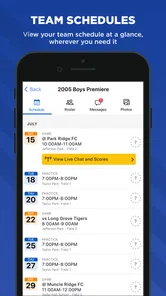
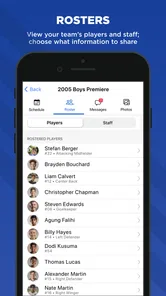
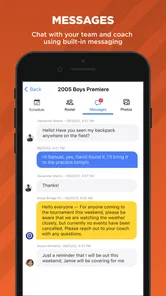
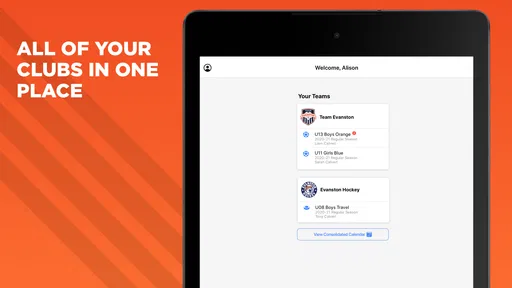
Sprocket Sports is a youth sports management platform designed to help clubs, leagues, coaches, administrators, parents, and athletes organize sporting activities in one place. Depending on how an organization uses the service, it may provide access to schedules, team information, announcements, registration details, rosters, payments, and communication tools. The exact features available can vary because each sports organization configures its own account.
Can parents and athletes use Sprocket Sports to view schedules and team information?
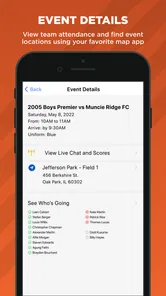
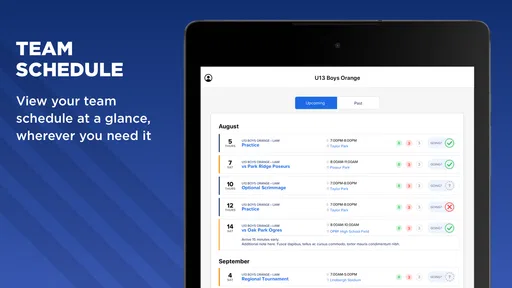
Yes, Sprocket Sports is generally used by families and athletes to access information shared by their club or league. After signing in, users may be able to view practices, games, events, rosters, locations, and updates. Some organizations also use it for attendance responses, forms, registration, or direct communication. You will usually need an invitation or an account connected to your organization before all features become available.
Does Sprocket Sports support registration and online payments?
Many organizations use Sprocket Sports to manage player registration and related administrative tasks, and payment options may be available when enabled by the club or league. However, the available payment methods, fees, deadlines, refund policies, and required forms are controlled by the organization rather than being identical for every user. Before completing a purchase or registration, carefully review the displayed charges and terms.
Pros
- Simple team management tools for schedules
- rosters
- and communication.
- Keeps sports information organized in one convenient mobile app.
- Useful updates help families stay informed about team activities.
- Supports better coordination between coaches
- players
- and parents.
- Clean layout makes common team tasks relatively easy to find.
Cons
- Some features may depend on your organization’s Sprocket setup.
- Notifications can become frequent during busy seasons.
- The app is less useful without an active team or league invitation.
- Certain tools may feel limited compared with dedicated sports platforms.
- Performance and available features can vary between organizations.





