

Spartan Forge: Hunt
- 201.00
- 3.6
- Installs
- 50.00K
- Price
- Free

Screenshots

Analysis by Reviewed
I approached Spartan Forge: Hunt as a practical hunting companion rather than another app I would open once, browse for a minute, and forget. Developed by Spartan Forge LLC, it sits in the sports category and is built around planning and carrying out a hunt with help from AI-driven tools. That sounds ambitious, but the useful question is simpler: does it make the decisions before and during a hunt easier?
My answer is cautiously positive. The app can become a valuable part of a hunter’s routine when it is used as a planning workspace, not as an automatic substitute for judgment. It is free to install, rated for Everyone, and available on devices running Android 7.0 or later. Optional purchases range from $7.99 to $79.99 per item, so I would spend time learning the free experience before deciding whether the extra tools fit the way I hunt.
How I would build a dependable hunt workflow
The best way to use this app is to give it a job at each stage of the outing. Before leaving home, I would use it to organize the hunt and think through the conditions. Once I arrive, I would use the information as a reference while checking the actual terrain, access, wind, visibility, and other details that no phone can completely replace. Afterward, I would review what happened and use those observations to improve the next plan.
That three-part habit matters because an AI-assisted recommendation is only as useful as the context behind it. If I enter a plan casually and then ignore changing conditions, the app cannot rescue the hunt. If I treat it as one input among several, it has a much better chance of saving time and helping me notice patterns.
A realistic example would be a weekend hunt on unfamiliar ground. The night before, I would open the app, study the area, and mark the locations or routes that deserve attention. I would then compare those ideas with the forecast and my intended arrival time. On the morning itself, I would avoid making a last-minute decision from a single screen. Instead, I would use the app to confirm my plan, then adjust it if the wind or access conditions make the original approach unrealistic.
For a regular hunting area, the value is less about discovering one magical location and more about creating consistency. I can begin each outing with the same sequence: check the area, review the conditions, choose a route, and record what I actually observed. Repeating that process makes the app more useful over time because my decisions become easier to compare.
The important mindset is to use Spartan Forge as a decision aid, not a promise of success. That distinction protects against one of the common problems with prediction-focused outdoor apps: the temptation to follow a confident-looking suggestion without asking whether it makes sense on the ground.
More From Our News Desk

 Gmail
GmailGmail in a Busy Inbox: Who Benefits Most?
From first account to crowded workday, Gmail earns its place through dependable search and flexible sorting—but its best fit depends on how much inbox maintenance you can tolerate.

 Prime Video
Switching to Prime Video: What Changes in Your Viewing Routine
Prime Video can make a compelling second home for streaming, but switching means learning a different catalog, rental layer, and route from browsing to playback.

 Universal TV Remote Control
Universal TV Remote Control Works Best as a Reliable Backup
A phone remote earns its place through quick setup and reliable habits. Here is how to get more from Universal TV Remote Control—and where its limits show.

 Weather - By Xiaomi
Weather by Xiaomi Review: Clear at a Glance, Less Clear Up Close
Xiaomi’s weather app makes everyday forecasts quick to scan, but its calm surface can leave useful details and recovery paths harder to find than they should be.

 X
XX Under Pressure: Can It Recover When Posting Goes Wrong?
A resilience-focused review of X, examining setup, mistaken posts, interruptions, weak connections, and the gaps that matter when recovery needs to be dependable.

 Clash of Clans
Clash of Clans Is Won Between the Battles
Its raids are quick; its community is a long-term project of coordination, teaching, rivalry, and shared responsibility—with all the friction that entails.
Latest News



What I would do before opening the map
I would first define the purpose of the outing. Am I scouting, hunting a familiar area, checking a new access point, or trying to make the most of a short morning? Those goals lead to different choices. A plan for a quick after-work hunt should be simpler than a full-day trip, and the app becomes easier to use when I do not ask it to solve every possible question at once.
Next, I would prepare the phone rather than waiting until I am standing in the field. That means checking the battery, making sure the device is comfortable to handle, and reviewing the intended area while I still have time to think. Even a well-designed hunting app becomes frustrating when the user is cold, rushed, or trying to make a complicated plan in poor light.
I would also keep a separate mental checklist for information the app cannot interpret perfectly. Local rules, permission, safe access, private boundaries, weather changes, and personal safety remain my responsibility. The app can support preparation, but it does not replace legal research, landowner communication, or common sense.
Settings and choices worth checking early
Experienced users will get more from the app by checking its setup before relying on it. I would pay particular attention to the selected area, map presentation, and any planning preferences that affect how information is displayed. A small setup mistake can make a useful recommendation look irrelevant, especially when I am working near multiple parcels, roads, or possible access points.
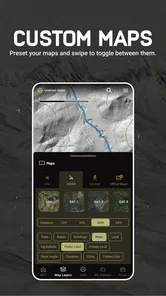
I would also decide how much information I actually want visible at once. More layers and indicators may sound helpful, but a crowded map can slow down a decision. My preference would be to begin with the details needed for the current task, then add information only when it answers a specific question. For example, while choosing an approach, I need clarity more than a screen full of unrelated markers.
Another worthwhile habit is checking the app before the trip rather than assuming every screen will behave exactly as expected in the field. I would open the area, move around the map, inspect the planned route, and confirm that I understand what the visual cues mean. This is not glamorous preparation, but it prevents a common failure: spending the first part of a hunt learning the interface instead of paying attention to the surroundings.
Because the app is free with optional in-app purchases, I would be especially careful not to buy an upgrade simply because a feature looks impressive. I would first identify a repeated problem in my own workflow. If I regularly need a particular planning capability and the paid option addresses that need, the purchase may be sensible. If I only hunt occasionally, the free version may be enough, and the extra cost may not improve the experience proportionally.
Shortcuts that make repeated planning easier
The most useful shortcut is not a button; it is a repeatable order of operations. I would keep the same sequence for every outing: choose the area, review the conditions, identify possible approaches, select a primary plan, and prepare a backup. This reduces decision fatigue and makes it easier to notice when the current plan differs from the conditions that supported it.
I would also avoid changing too many variables at once. If I move to a different area, change my arrival time, and adopt a new route on the same day, I may learn very little from the result. A better approach is to alter one meaningful part of the plan and record what happened. That makes the app’s planning suggestions more useful because I am building a personal reference rather than collecting isolated guesses.
For a familiar property, I would create a simple pre-hunt routine around the places I already understand. I might begin with the area that matches the current wind, then check whether access is practical, and finally compare it with one alternative. This is faster than wandering through every possible option, while still leaving room to react if the first choice does not feel right.
Another practical pattern is separating planning from navigation. I would make the main decisions at home or while parked safely, then use the phone briefly during movement. Constantly staring at a screen is distracting and can make a hunt less enjoyable. The app is most effective when it helps me decide where to go, after which I can focus on moving carefully and reading the actual environment.
When I return, I would note the difference between the plan and reality. Did the route take longer than expected? Was the wind different in the timber than in the open area? Did access create more noise or delay than anticipated? Those observations are more valuable than simply labeling the outing good or bad. They give me a way to judge whether the app helped and what I should change next time.
Where the AI approach helps, and where it stops
The AI-driven angle is most helpful when I have too many pieces of information to organize quickly. It can give structure to a planning session and encourage me to consider factors I might otherwise overlook. That is particularly useful when I am exploring unfamiliar ground or trying to make a sensible plan with limited time.
However, I would not treat an AI recommendation as a field-tested guarantee. Terrain can create local conditions that a broad forecast does not capture. Human activity, access problems, recent disturbances, and changes that happened after the planning information was generated can all alter the situation. A recommendation may be reasonable and still be wrong for that morning.
This is also why I would resist chasing the most attractive-looking suggestion. A location that appears promising on a screen may be difficult to reach quietly or may not suit the conditions when I arrive. The strongest workflow combines the app’s planning support with observation, patience, and a willingness to abandon a weak plan.
Users who want a simple offline map, a basic compass, or a straightforward way to save a few locations may find this app more involved than necessary. In those cases, a simpler mapping tool may be faster and less distracting. Spartan Forge: Hunt makes more sense for someone who wants an integrated planning process and is willing to learn how its information fits into personal judgment.
Practical limitations I noticed in the overall experience
The first limitation is complexity. An all-in-one hunting platform naturally asks more from the user than a single-purpose utility. There is a learning curve, and the benefit grows gradually rather than appearing immediately. I would not recommend judging it after a rushed first session, but I also would not pretend that every hunter needs this level of planning.
The second limitation is dependence on interpretation. The app can present useful guidance, yet the user still has to decide what matters. Someone who expects a clear instruction for every situation may become disappointed. The better fit is a hunter who enjoys preparing, comparing options, and adapting rather than someone looking for a push-button answer.
There is also a practical cost question. The application itself is free, but optional purchases are available from $7.99 to $79.99 per item. That broad range means I would approach the paid features deliberately. I would use the free experience long enough to understand my actual needs, then choose only an upgrade that solves a problem I encounter repeatedly.
The public response is mixed rather than universally enthusiastic: the app has a 3.6 average from around 287 ratings, with roughly 201 written reviews. I read that as a reason to set realistic expectations. The concept clearly appeals to many hunters, but the experience may depend heavily on location, preferred hunting style, device comfort, and willingness to learn the workflow.
Who should use it and who should skip it
I would recommend it to hunters who enjoy preparation and want more structure than a basic map provides. It is especially appealing if you regularly compare areas, revisit the same ground, or want to make your pre-hunt decisions more repeatable. The AI-assisted approach can help turn a vague idea into a sequence of questions and choices.
I would also consider it for someone moving into unfamiliar areas who wants a planning companion before committing to a route. The app can help organize the research stage, while the hunter remains responsible for verifying access, conditions, and safety.
I would skip it if my main need were an extremely simple tool with almost no setup. I would also hesitate if I rarely hunt, dislike learning new interfaces, or prefer to make every decision from printed maps and direct observation. Those approaches can be perfectly valid, and adding a sophisticated app would not automatically make them better.
It is not the right choice for anyone who wants technology to replace fieldcraft. The strongest results come from combining the app with knowledge of the area, careful movement, legal awareness, and honest notes about what happened. Without that combination, the extra information may create confidence without creating better decisions.
My final view after settling into the routine
Spartan Forge: Hunt is a serious planning app for hunters who want to build a repeatable process around their outings. I like its ambition, and I find the AI-driven approach most convincing when it helps me organize possibilities rather than pretending to know the future. The app has enough depth to reward regular use, but that depth also creates the main barrier for casual users.
It has been available since September 16, 2021, and the current version is 1.18.17. Those details matter less to me than the practical experience: I would install it, test the planning workflow on a familiar outing, and only then decide whether it deserves a permanent place in my routine. The Everyone content rating also makes it broadly accessible from a store perspective, though responsible hunting decisions still require adult judgment and local knowledge.
My recommendation is to start with one clear use case. Plan a single hunt, compare the app’s suggestions with what you observe, and write down the differences. Then repeat the process before spending money on optional tools. If the app helps you prepare faster, choose better alternatives, or learn from each outing, it is doing something worthwhile.
For me, the mastery point is not finding a perfect setting or following every recommendation. It is learning which information deserves attention, which details need field verification, and when a simpler approach is better. Used that way, Spartan Forge: Hunt becomes more than a collection of hunting screens: it becomes a structured habit for thinking clearly before, during, and after an outing.
Spartan Forge: Hunt Frequently Asked Questions
Is Spartan Forge: Hunt available for both Android and iOS?
Spartan Forge: Hunt is an app for hunters who want planning and scouting tools on a mobile device. Before downloading, check that your phone’s operating system meets the app’s requirements and that you are using the correct store for your device. The Android version requires Android 7.0 or later. Keeping your device’s software current can also help ensure a smoother experience.
What is Spartan Forge: Hunt, and what does the app offer?
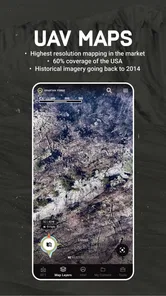
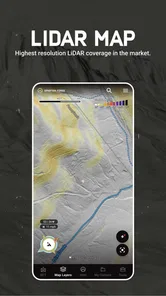
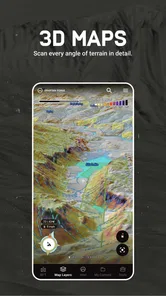
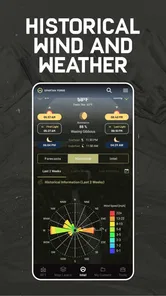
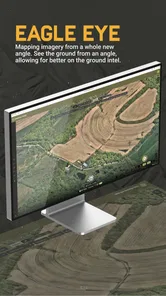
Spartan Forge: Hunt is a hunting-focused mobile app designed to help hunters plan, scout, and make more informed decisions in the field. It combines mapping tools, property information, weather data, terrain details, and hunting-related insights in one place. Before downloading, users should understand that the available features and data can vary by location, subscription level, and the type of hunt they are preparing for.
Does Spartan Forge: Hunt work without an internet connection?
The app may support offline use for certain maps or previously downloaded information, which can be especially useful in remote hunting areas with weak or unavailable cellular service. However, not every feature necessarily works offline. Live weather updates, cloud-based data, account synchronization, and some mapping layers may require an internet connection. It is best to download maps and review your planned area before leaving home.
Is Spartan Forge: Hunt free to download and use?
Spartan Forge: Hunt is free to download, but some advanced tools, premium map layers, forecasts, analytics, or hunting resources may require an in-app purchase. The app offers purchases ranging from $7.99 to $79.99 per item, so check the purchase details and included features carefully before paying. The free download does not necessarily include every feature hunters may want to use.
Can Spartan Forge: Hunt help with hunting regulations and property boundaries?
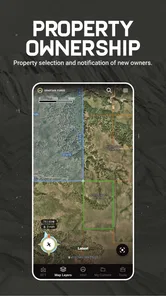
The app can provide useful mapping and land-related information to support scouting and hunt preparation, including details that may help users identify public or private areas. Nevertheless, digital boundaries and regulatory information should not be treated as a replacement for official sources. Hunters should independently verify access permissions, season dates, bag limits, licensing requirements, and local regulations before entering or hunting any property.
Pros
- Detailed maps help plan routes
- terrain
- and hunting areas.
- Weather and wind data support more informed hunting decisions.
- Hunt-specific tools are useful for serious outdoor preparation.
- Location tracking makes it easier to review scouting trips.
- Regular data updates can improve planning across changing conditions.
Cons
- Many advanced features require a paid subscription.
- The amount of map and hunting data may overwhelm new users.
- Reliable GPS and weather information depend on phone connectivity.
- Continuous location use can drain the device battery quickly.
- Some tools may be less useful outside supported hunting regions.





