

Soccer Rankings
- 34.00
- 4.7
- Installs
- 10.00K
- Price
- Free

Screenshots

Analysis by Reviewed
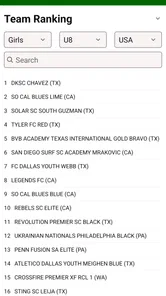
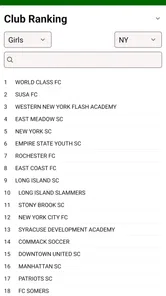
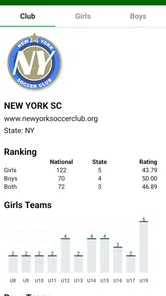
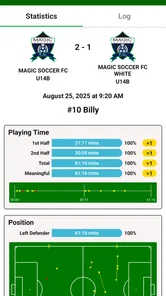
When a youth soccer family needs to check where a team stands, the usual routine is surprisingly scattered: one person searches on a browser, another asks a coach, and someone else tries to remember which ranking page was current. Soccer Rankings, a free sports app from USA Sport Statistics, is built around making that particular task easier. I found its focus refreshingly narrow: it is for rankings of USA youth soccer teams, not a general match tracker or a full team-management platform.
That narrow purpose matters in a shared household. A parent can keep it on a phone used before practices, a player can check a team position without needing a complicated sports account, and a coach can use it as a quick reference when several families are asking similar questions. The app has an average rating of 4.7 from around 80 ratings, with more than 30 written reviews, and over 10 thousand installs. Those figures suggest a small but engaged audience rather than a mass-market sports app.
How it fits into a shared soccer household
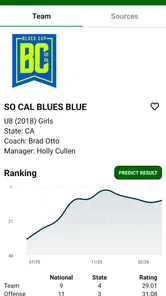
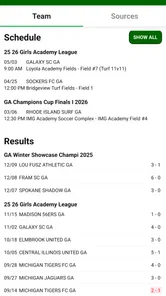
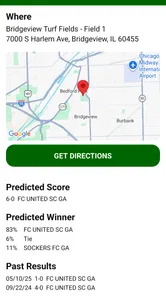
My most practical use for an app like this would be around tournament weekends. Imagine a family sitting in the car between matches. One adult wants to see how the team compares with other youth teams, a player is curious about an opponent, and a younger sibling is borrowing the same phone to look something up. Soccer Rankings works best in that moment because the question is specific: find a team and inspect its ranking information, rather than open a large app filled with scores, news, video, messaging, and advertisements.
That simplicity also makes it suitable for occasional use. Not everybody in a household needs a separate installation or a permanent role. The person holding the phone can open the app, perform the lookup, and hand it over. I would not treat it as a shared team workspace, though. Its stated purpose is rankings, so families should not expect it to replace a club communication channel, a training calendar, a registration system, or a coach’s private evaluation notes.
The distinction is important because rankings can become emotionally loaded. A child may see a position and treat it as a judgment of personal ability, while a parent may read movement up or down as a verdict on the whole season. I would use the app as a conversation starter, not as the only measure of progress. Match context, age group, injuries, travel, development goals, and the quality of opposition all matter more than a single position on a screen.
For a household with several teams, the app can still be useful, but the workflow needs a little discipline. I would write down the exact team name, age group, and any other identifying detail before searching. That avoids the common mistake of selecting a similarly named team, especially when a parent is checking quickly while distracted by a match schedule or a busy sideline.
What the first setup tells you
Soccer Rankings is available at no purchase cost, which lowers the barrier for a family that only needs occasional ranking checks. It is rated for Everyone, and the minimum operating-system requirement is Android 7.0. That makes it a reasonable candidate for an older household phone that is still used for maps, calls, and team messages, although compatibility should always be considered before relying on any app during a tournament.
More From Our News Desk

 Gmail
GmailGmail in a Busy Inbox: Who Benefits Most?
From first account to crowded workday, Gmail earns its place through dependable search and flexible sorting—but its best fit depends on how much inbox maintenance you can tolerate.

 Prime Video
Switching to Prime Video: What Changes in Your Viewing Routine
Prime Video can make a compelling second home for streaming, but switching means learning a different catalog, rental layer, and route from browsing to playback.

 Universal TV Remote Control
Universal TV Remote Control Works Best as a Reliable Backup
A phone remote earns its place through quick setup and reliable habits. Here is how to get more from Universal TV Remote Control—and where its limits show.

 Weather - By Xiaomi
Weather by Xiaomi Review: Clear at a Glance, Less Clear Up Close
Xiaomi’s weather app makes everyday forecasts quick to scan, but its calm surface can leave useful details and recovery paths harder to find than they should be.

 X
XX Under Pressure: Can It Recover When Posting Goes Wrong?
A resilience-focused review of X, examining setup, mistaken posts, interruptions, weak connections, and the gaps that matter when recovery needs to be dependable.

 Clash of Clans
Clash of Clans Is Won Between the Battles
Its raids are quick; its community is a long-term project of coordination, teaching, rivalry, and shared responsibility—with all the friction that entails.
Latest News



The current version is 5.1.1. I would still approach setup with the same care I use for any shared device: install it through the normal app store, check that the phone belongs to the right family member, and avoid assuming that every person using the handset has the same preferences. A child using a parent’s phone is not the same as a child having their own account, and a ranking lookup does not require turning the device into a permanent team-management tool.
There is an important boundary around the app’s optional spending. In-app purchases are listed at $9.99 per item. Because the main app is free, I would make sure the device owner understands that “free to install” and “no possible charge” are not identical ideas. On a shared phone, the adult who controls purchases should review the store’s authentication settings and explain the rule before handing the device to a child. That is a household habit rather than a claim about a special family-control feature inside the app.
I also recommend agreeing on what information is being searched before opening the app. A player may want to look up their own team, while a parent may be checking an opponent. Those are different conversations, and making the purpose clear prevents the phone from becoming a source of unnecessary arguments. The app can show ranking information; it cannot settle disagreements about what that information means.
Coordinating parents, players, and coaches
The strongest shared-use benefit is coordination without requiring everyone to maintain the same sports routine. A parent can check a ranking before a car journey, send the relevant information through the household’s usual messaging method, and close the app. Another family member does not need to learn a complicated dashboard just to answer one question.
For coaches, I would use the app carefully during planning discussions. A ranking can help identify possible opponents or provide context for a tournament conversation, but it should not become a shortcut for deciding who deserves playing time. If a coach shares a ranking with families, it is worth adding the date and the team identity in the message so that nobody mistakes a quick lookup for a permanent assessment.
One useful habit is to separate “checking” from “comparing.” Checking means finding the team and seeing its current position. Comparing means drawing conclusions about performance, strength, or future results. The first is what this app is naturally suited to support. The second needs more information than a rankings-focused tool is designed to provide.
Another practical tip is to take notes outside the app when the information is needed for a meeting. I would record the team name, age group, and the date of the discussion rather than relying on memory. That creates a clearer trail for a parent group or coach meeting, while avoiding the assumption that a ranking remains unchanged. I would not present an old screenshot as if it were a live answer.
This is also where Soccer Rankings differs from broader soccer alternatives. A club-management app is better for attendance, availability, schedules, and messages. A live-score service is better when the main question is what is happening in a match right now. A general sports news app is better for professional competitions and headlines. Soccer Rankings has a more focused job: helping users look at USA youth soccer team rankings. That focus is its advantage when the question matches it, and its limitation when the question does not.
Age, trust, and the meaning of a ranking
The Everyone content rating makes the app approachable for a broad household audience, but an age rating does not remove the need for adult guidance. The sensitive part is not necessarily the interface; it is the way young players may interpret competitive information. I would show a child how to find the correct team and then explain that rankings are context, not identity.
Trust works better when each person knows what the app is being used for. If a parent checks a team before a game, saying so openly is healthier than turning the lookup into a secret evaluation. If a player borrows a parent’s phone, the adult should remain responsible for purchases and account-level decisions. The app does not need to become a family surveillance tool, and I would avoid framing it that way.
Shared devices introduce another small but real issue: search history and assumptions. If several teams are being checked, the next person may see the previous lookup and think it represents their own team. I would clear up that confusion verbally and avoid leaving the phone open on a ranking page when passing it to a different family member. This is simple, but it prevents a surprising amount of friction during busy weekends.
Parents should also decide whether a young player is ready to browse rankings independently. The Everyone label supports general access, but emotional readiness varies widely. One child may treat the result as harmless information; another may obsess over every change. In the second case, I would keep the app as an adult reference and discuss results selectively, just as I would with any competitive statistic.
There is a further trust issue when families compare teams from different settings. A ranking can look authoritative even when the underlying circumstances are not identical. Different schedules, travel patterns, tournament choices, and development priorities can affect how teams appear. I would never use the app alone to label one child or club as better than another.
Where the focused design helps, and where it stops
The app’s biggest strength is that it does not ask a ranking-focused user to navigate an entire soccer ecosystem. If I only need USA youth team rankings, a dedicated tool is easier to understand than a large platform built around messages, fixtures, videos, and club administration. That is especially helpful for grandparents, occasional caregivers, or relatives who only need to answer one question while a child is at a tournament.
The trade-off is that focus can feel limiting. A family looking for practice reminders, roster information, direct coach communication, player statistics beyond rankings, or live match coverage should choose a different category of app. Installing Soccer Rankings will not eliminate the need for those tools. It is best viewed as one small reference point in a wider soccer routine.
The listed optional purchases also deserve a cautious approach. Since the app is free to obtain but includes items priced at $9.99 each, I would not let a child explore purchase screens casually on a shared device. Before paying, I would first decide what the item adds to the household’s actual workflow and whether the free experience already answers the question. That pause is particularly useful when the app is only opened a few times each month.
I would also avoid judging the app by how well it handles jobs it was never meant to perform. It should not be criticized for lacking the communication depth of a team-management service if its purpose is rankings. At the same time, users should not expect a ranking reference to become a complete coaching assistant. The right comparison is not “Does it do everything?” but “Does it make this one recurring task easier than my current method?”
For me, the answer is yes when the household regularly follows USA youth soccer teams and wants a direct way to check rankings. The answer is no when the family’s real need is scheduling, messaging, game-day alerts, or detailed player development. In those cases, a broader soccer platform will save more time even if it feels heavier to use.
My household verdict
Soccer Rankings is a sensible free sports app for families who repeatedly need ranking information about USA youth soccer teams. Developed by USA Sport Statistics, it has a clear purpose, a broad Everyone rating, and a low-friction price for trying it. Its audience is not every soccer fan; it is the parent, player, coach, or relative who wants a focused reference without adopting a full club-management system.
I would recommend it for shared-device use with a few ground rules: confirm the team and age group before drawing conclusions, keep purchase responsibility with the adult who owns the device, and treat rankings as context rather than a child’s personal score. Those habits make the app more useful and reduce the chance that a quick lookup turns into an unnecessary family dispute.
I would skip it if you need live scores, team chat, attendance, schedules, or a complete record of a player’s development. I would also skip it if ranking comparisons tend to create pressure in your household. A different tool, or simply a conversation with the coach, may be more valuable in that situation.
For the right user, though, the focused approach is the point. I like that it can sit quietly on a family phone and answer a specific question when needed, without pretending to replace every other part of youth soccer. Used with sensible boundaries, it is a practical companion for tournament weekends, opponent research, and those quick car-ride conversations about where a team stands.
Soccer Rankings Frequently Asked Questions
Who is Soccer Rankings designed for?
Soccer Rankings is a Sports app from USA Sport Statistics, intended for people who want to follow soccer team rankings, particularly in the United States. Its focus is youth soccer teams, so it may be more relevant to families, players, coaches, and fans looking for standings in that area than to someone seeking a general-purpose professional match tracker. The app is free to download and is rated for Everyone.
What is Soccer Rankings, and what does the app offer?
Soccer Rankings is designed for football fans who want quick access to team standings, rankings, and competition information in one place. After exploring the app, its main value is the organized presentation of league positions and related statistics, making it easier to follow domestic leagues and international competitions without checking several different websites or sports applications.
Which leagues, tournaments, and teams are covered in Soccer Rankings?
Coverage can vary depending on the version of the app, region, and available data providers. Soccer Rankings generally focuses on popular football leagues, international competitions, and recognized clubs or national teams. Before downloading, users should check the current store description and in-app competition list, especially if they want information about a less popular league or a specific local tournament.
Does Soccer Rankings provide live scores and real-time updates?
The app is primarily focused on rankings, standings, and football statistics, so users should not automatically assume that every match includes minute-by-minute live coverage. Some competitions may receive frequent updates, while others can be refreshed less often. If live scores, lineups, or match commentary are essential to you, verify those features in the current app listing before installing.
Is Soccer Rankings free to download and use?
Soccer Rankings is free to download, but in-app purchases are available at $9.99 per item. Some free sports apps include advertising or reserve certain features for purchase, while basic rankings may remain accessible without payment. It is worth reviewing the purchase options in the app before buying anything, so you can decide whether its free features meet your needs.
Pros
- Covers rankings from multiple leagues and international competitions.
- Simple layout makes team positions easy to check at a glance.
- Useful for comparing points
- wins
- draws
- and losses.
- Fast access to current standings after matches are completed.
- Helpful for following promotion
- relegation
- and qualification places.
Cons
- Some lower-tier leagues may have limited or delayed coverage.
- Live updates may not appear immediately during ongoing matches.
- Statistics can vary in detail between competitions.
- Advertising may interrupt browsing in the free version.
- Requires an internet connection for the latest rankings.





